
1. Introduction
This manual provides detailed instructions for the installation, operation, and maintenance of your Hodozzy 9-inch Android Car Radio. This device is designed to enhance your driving experience with advanced features such as wireless CarPlay, Android Auto, GPS navigation, Bluetooth connectivity, and a high-resolution touch screen.
Compatible Vehicles:
- Audi A3 8P1 (2003-2012)
- Audi S3 II 8P (2006-2012)
- Audi A3 8V1, 8VK (2012-2019)
- Audi RS 3 Sportback (2011-2012)
- Audi A3 Cabriolet 8P7, 8V7 (2010-2019)
- Audi A3 Sedan 8VS, 8VM (2013-2019)
- Audi A3 Sportback 8PA (2004-2013)
2. Package Contents
Please verify that all items listed below are included in your package before proceeding with installation.
- Car Radio Player (9-inch screen)
- Dashboard Kit
- Power Cable
- GPS Antenna
- Rear Camera Input Cable
- RCA Cable
- USB Cables (x2)
- Mounting Brackets (x2)
- Screws (x4)
- Instruction Manual
- Microphone
- Rear View Camera
- Radio Antenna
- Canbus Decoder
- Installation Tool

Image: Overview of the package contents and the physical dimensions of the Hodozzy 9-inch Android Car Radio unit.
3. Setup and Installation
Proper installation is crucial for optimal performance. It is recommended to have the unit installed by a qualified professional. Ensure the vehicle's power is disconnected before beginning installation.
Installation Steps:
- Preparation: Carefully remove the original car radio and dashboard trim. Refer to your vehicle's service manual for specific instructions.
- Wiring: Connect the provided power cable, RCA cable, GPS antenna, radio antenna, and rear camera input cable to the corresponding ports on the new Android car radio. Ensure all connections are secure. If your vehicle has a CANbus system, connect the provided Canbus decoder.
- Mounting: Secure the Android car radio into the dashboard using the provided mounting brackets and screws. Ensure it fits snugly and is aligned correctly.
- Testing: Reconnect the vehicle's power and perform initial tests to ensure all functions (power, audio, display, touch screen) are working correctly before fully reassembling the dashboard.
- Final Assembly: Reinstall the dashboard trim and any other components removed during the process.
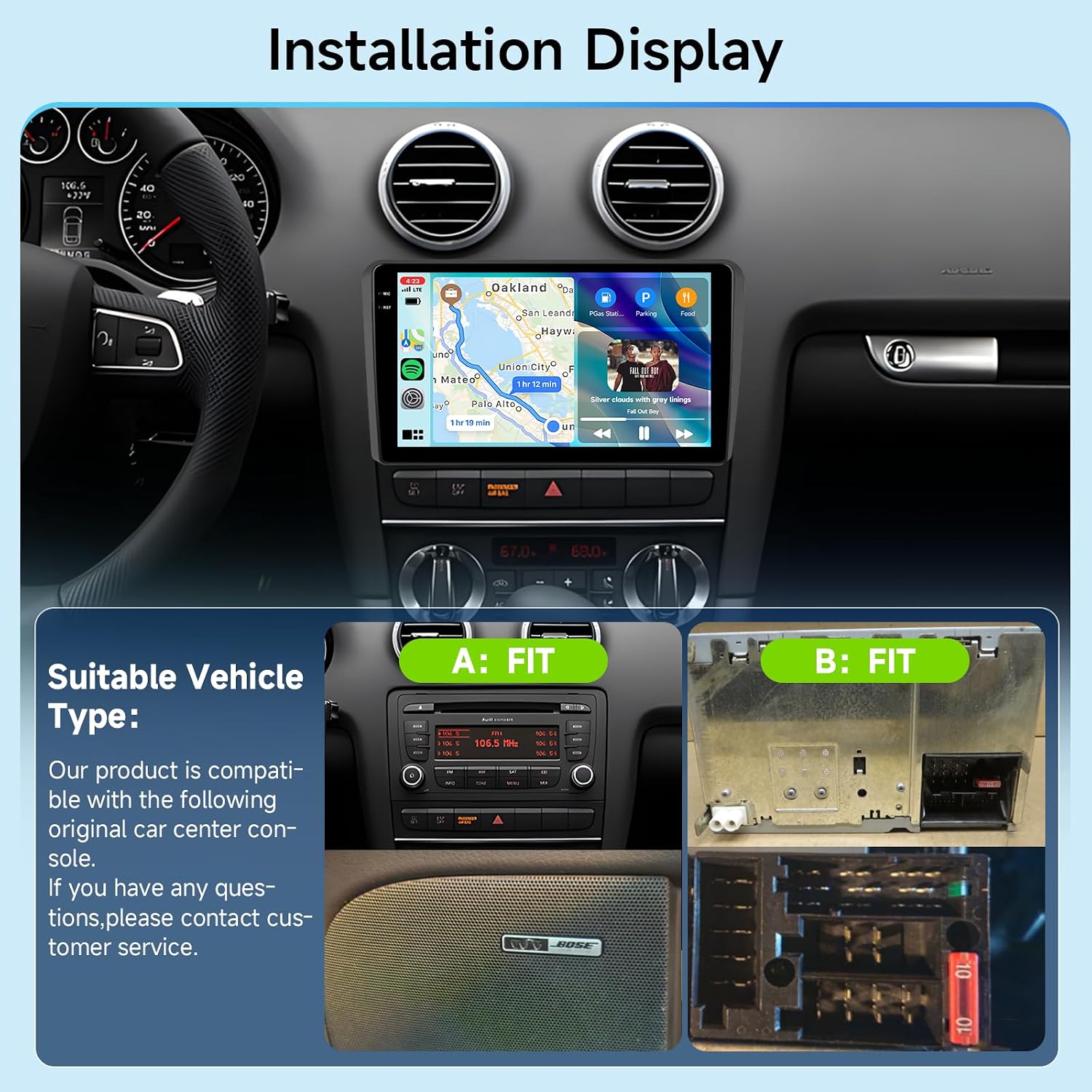
Image: Visual representation of the Hodozzy Android Car Radio installed in an Audi A3 dashboard, showing compatible console types.
4. Operating Instructions
This section details the primary functions and how to operate your Hodozzy Android Car Radio.
4.1. Wireless CarPlay & Android Auto & Mirror Link
Connect your smartphone wirelessly to access navigation, messaging, calls, and music directly on the car radio display. This unit supports both Apple CarPlay and Android Auto for seamless integration.
- CarPlay/Android Auto: Synchronize your phone via Bluetooth for access to apps, voice assistants (SIRI/Google), and hands-free operations.
- Mirror Link: Wirelessly mirror your phone's screen content onto the car radio display.
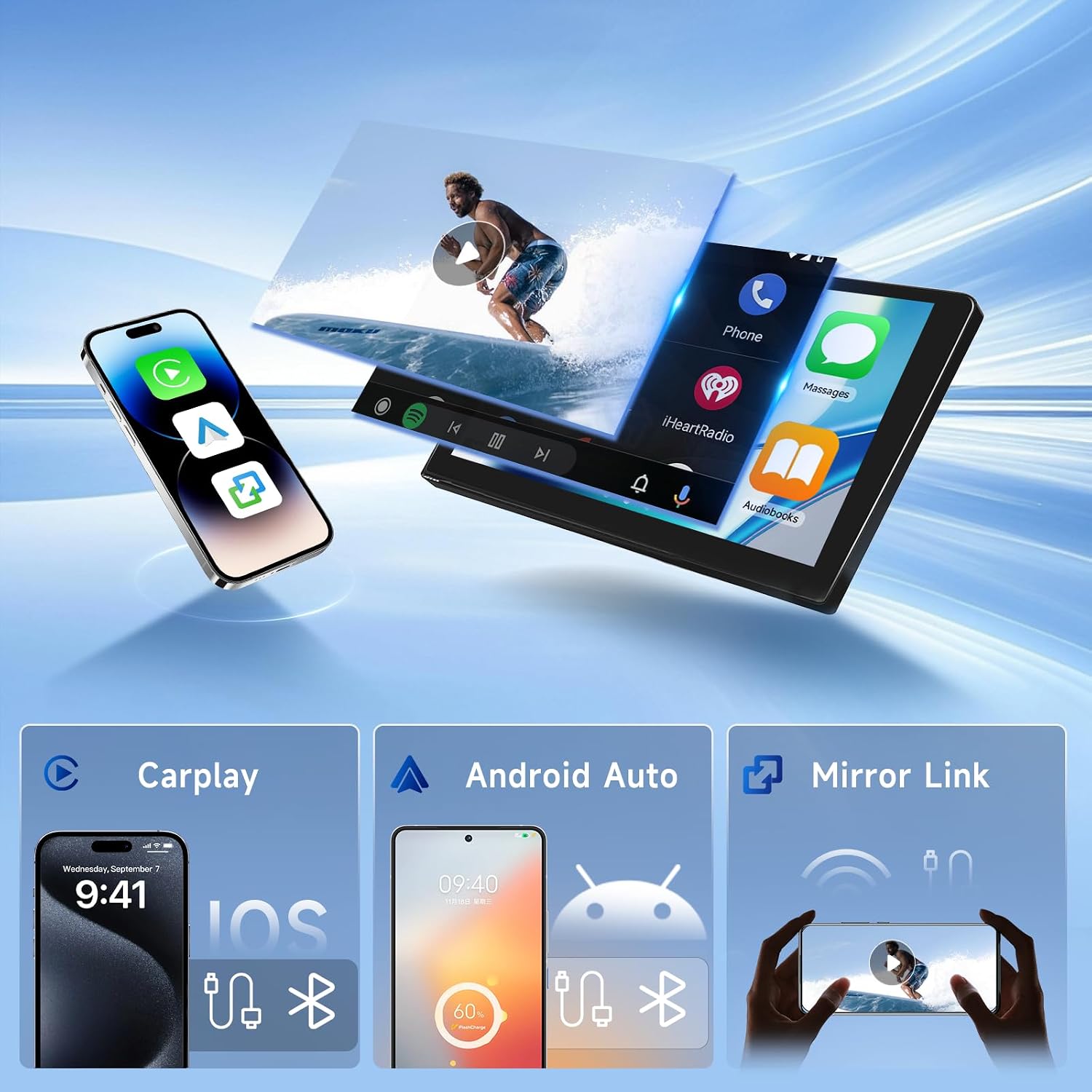
Image: Illustrates the wireless connectivity options including CarPlay, Android Auto, and Mirror Link for smartphone integration.
4.2. GPS Navigation & WiFi Connectivity
The unit features an integrated GPS antenna for online navigation and supports offline maps (requires internet download). Built-in WiFi allows you to connect to a hotspot for online media streaming, browsing, and app usage.
- GPS: Utilize online navigation apps or download offline maps for guidance.
- WiFi: Connect to a mobile hotspot or available WiFi network to access online content like YouTube, Google, Facebook, and Instagram.

Image: Demonstrates the GPS navigation interface and the WiFi connection feature for internet access.
4.3. Bluetooth 5.0, DSP, FM/RDS Radio
Enjoy high-quality audio and hands-free communication with advanced audio processing capabilities.
- Bluetooth 5.0: Supports automatic connection for hands-free calls and music streaming. Connect an external microphone for improved call quality.
- DSP (Digital Sound Processor): Features a 32-band equalizer and various preset styles (e.g., rock, jazz, classical) to customize and enhance your audio experience.
- FM/RDS Radio: Tune into your favorite radio stations with clear reception and RDS (Radio Data System) information display.
4.4. Rear View Camera & Steering Wheel Control
Enhance safety and convenience with integrated camera support and existing vehicle controls.
- Rear View Camera: Automatically displays the rear view when reversing, providing visual assistance for parking and maneuvering.
- Steering Wheel Control: Supports integration with your vehicle's existing steering wheel controls for safe and convenient operation of the car radio functions (e.g., volume, track change, call answer/hang up).

Image: Highlights various operational features including DSP sound settings, Bluetooth calling and music, rear view camera display, FM/RDS radio interface, and steering wheel control integration.
4.5. Split Screen & Multiple UI Design
Maximize productivity and personalization with advanced display options.
- Split Screen: Run two applications simultaneously on the screen, such as navigation and music playback.
- Multiple UI Design: Customize the user interface with different themes and personalized home screen layouts.

Image: Illustrates the In-Cell Screen technology for improved clarity, along with the split-screen functionality and various user interface designs.
5. Maintenance
To ensure the longevity and optimal performance of your car radio, follow these maintenance guidelines:
- Cleaning: Use a soft, dry cloth to clean the screen and exterior. Avoid abrasive cleaners or solvents that may damage the surface.
- Software Updates: Periodically check for and install available software updates to ensure the system runs efficiently and has the latest features and security patches.
- Temperature: Avoid exposing the unit to extreme temperatures, both hot and cold, for extended periods.
- Connections: Ensure all cables and connections remain secure. Loose connections can lead to intermittent issues.
6. Troubleshooting
If you encounter issues with your Hodozzy Android Car Radio, refer to the following common problems and solutions:
| Problem | Possible Cause | Solution |
|---|---|---|
| Unit does not power on | Loose power connection, blown fuse, incorrect wiring. | Check power cable connections. Inspect vehicle fuses. Verify wiring according to the installation diagram. |
| No sound output | Volume too low, mute activated, incorrect speaker wiring, amplifier issue. | Increase volume. Check if mute is active. Verify speaker connections. Ensure external amplifier (if present) is functioning. |
| Touch screen unresponsive | Software glitch, screen calibration issue. | Restart the unit. If issue persists, perform a factory reset (Factory Setting Keyword: 8317). |
| GPS signal weak or lost | GPS antenna obstructed or improperly installed. | Ensure GPS antenna has a clear view of the sky and is securely connected. |
| Bluetooth connection issues | Phone not discoverable, incorrect pairing, interference. | Ensure Bluetooth is enabled on both devices. Delete previous pairings and re-pair. Move away from other wireless devices. |
| Rear camera not displaying | Incorrect camera wiring, camera malfunction, reverse trigger not connected. | Check the rear camera input cable and power connection. Ensure the reverse trigger wire is correctly connected to the vehicle's reverse light circuit. |
If the problem persists after attempting these solutions, please contact customer support for further assistance.
7. Specifications
Detailed technical specifications for the Hodozzy 9-inch Android Car Radio.
| Feature | Specification |
|---|---|
| System | Android 13 |
| CPU | RK3326S (4 Cores) |
| Memory | 4GB RAM + 64GB ROM |
| Screen Size | 9 inches |
| Screen Resolution | 1280*720 |
| Radio Chip | UMW2652 |
| Power Output | 4*45W (Max 180 Watts) |
| Bluetooth Version | 5.0 |
| Operating Temperature | -20℃ to 75℃ |
| Steering Wheel Control | Supported |
| Power Amplifier Chip | YD7388 |
| Radio Band | FM/RDS |
| Reversing Input | AHD/CVBS |
| External Microphone/DAB+/OBD2 | Supported |
| Split Screen | Supported |
| Maps | Built-in offline maps (requires internet for data download) |
| WiFi | Supported |
| CarPlay/Android Auto | Wireless connection only |
| Mirror Link | Wireless connection only |
| USB | Dual USB interface |
| Audio Format | APE/FLAC/WAV/MP3/WMA, etc. |
| Video Format | MKV/RMVB/AVI/MP4/MDV, etc. |
| Image Format | PNG/JPEG/JPG/GIF/WBMP/BNP, etc. |
| Factory Setting Keyword | 8317 |
| Internet Applications | YouTube, Google, Facebook, Instagram |
| Audio Output Mode | Surround |
| Surround Sound Channel Configuration | 5.1 |
| Video Encoding | H.264, H.265/HEVC |
| Number of Audio Channels | 4 |
8. Warranty and Support
Your Hodozzy Android Car Radio comes with a warranty to cover manufacturing defects. Please retain your proof of purchase for warranty claims.
- Warranty Period: The product typically includes a 2-year warranty. Please refer to your purchase documentation for specific terms and conditions.
- Technical Support: For technical assistance, troubleshooting beyond this manual, or warranty inquiries, please contact the seller or Hodozzy customer service through the platform where the product was purchased.