
1. Introduction
This manual provides essential information for the proper installation, operation, and maintenance of the Hobby Wing H11M Coaxial Power Propeller System. This system is designed for high-performance drone applications, featuring a 48-inch carbon fiber propeller and a 150A FOC ESC, capable of providing a maximum pull of 57kg. Adhering to these instructions will ensure optimal performance and longevity of your system.
2. Safety Precautions
Always observe the following safety guidelines to prevent injury or damage to equipment:
- Read the Entire Manual: Familiarize yourself with all instructions before installation or operation.
- Power Disconnection: Always disconnect power from the drone before performing any installation, maintenance, or inspection.
- Propeller Safety: Propellers can cause severe injury. Never operate the system with loose or damaged propellers. Keep hands, face, and loose clothing clear of rotating propellers.
- Component Compatibility: Ensure all components (battery, flight controller, etc.) are compatible with the H11M system's specifications.
- Ventilation: Ensure adequate ventilation for the ESC during operation to prevent overheating.
- Secure Mounting: Verify that all components are securely mounted to the drone frame before flight.
- Environmental Conditions: Avoid operating in extreme weather conditions (heavy rain, strong winds) that could compromise system integrity.
3. Product Overview
The H11M Coaxial Power Propeller System integrates a motor, ESC, and propeller into a single unit for efficient power delivery.

Figure 3.1: The complete H11M Coaxial Power System, showcasing its integrated design for drone applications.
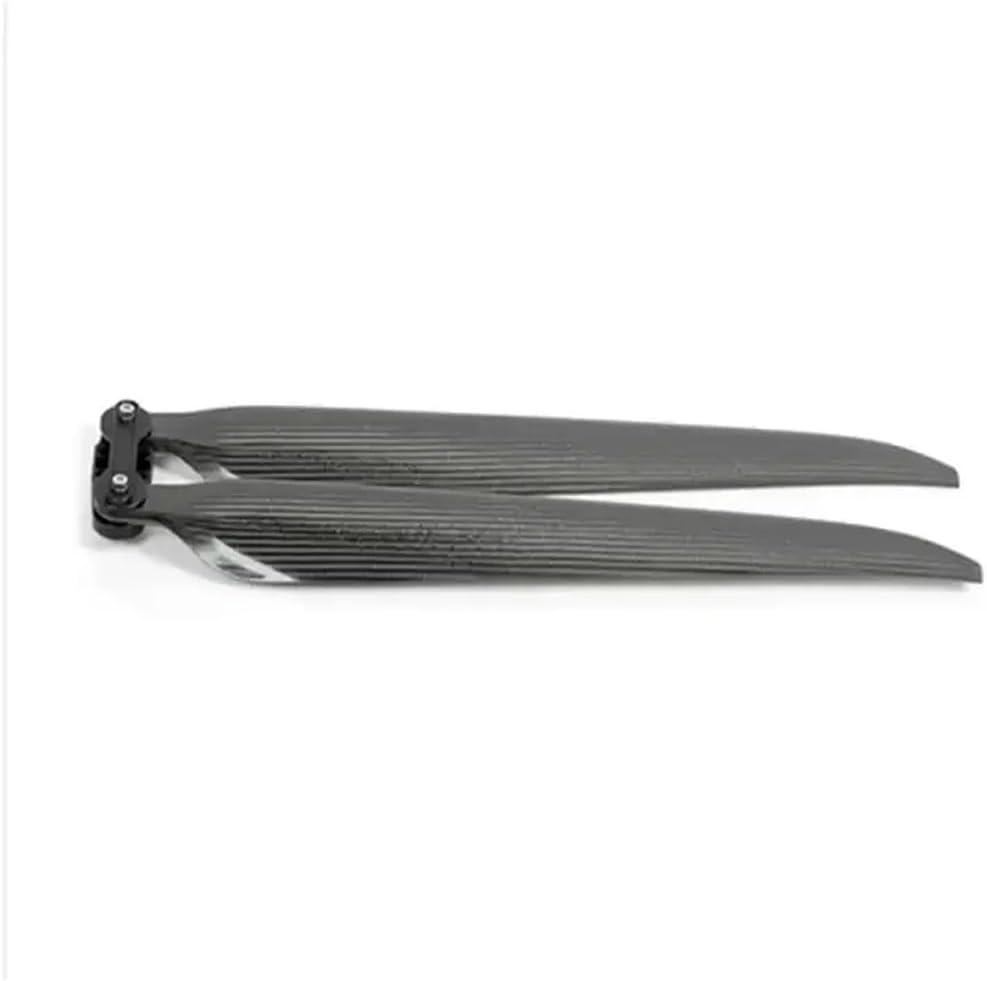
Figure 3.2: The 48-inch carbon fiber propellers, designed for high efficiency and durability.

Figure 3.3: Detail of the propeller mounting hub, showing the secure attachment mechanism.
4. Setup and Installation
Follow these steps for proper installation of the H11M Coaxial Power System onto your drone frame:
- Mounting the System: Securely attach the H11M coaxial power unit to the designated mounting points on your drone's arm or frame using appropriate screws and fasteners. Ensure the unit is oriented correctly according to your drone's design.
- Propeller Attachment: Attach the 48-inch carbon fiber propellers to the motor hubs. Ensure the propellers are installed with the correct rotation direction (clockwise/counter-clockwise) as indicated on the propeller or in your drone's flight controller manual. Tighten the propeller mounting screws firmly but do not overtighten.
- ESC Wiring: Connect the 150A FOC ESC's power input wires to your drone's power distribution board (PDB) or battery connector. Observe correct polarity (positive to positive, negative to negative).
- Signal Wiring: Connect the ESC's signal wire to the appropriate motor output port on your flight controller. Refer to your flight controller's manual for specific wiring diagrams.
- Initial Power-Up: Before connecting the battery, double-check all connections for security and correct polarity. Power up the system and perform initial calibration of the ESCs if required by your flight controller or ESC manufacturer.

Figure 4.1: The H11M system mounted on a drone arm, showing the integrated motor and propeller assembly.
5. Operating Instructions
The H11M system operates in conjunction with your drone's flight controller. Proper configuration of the flight controller is crucial for optimal performance.
- ESC Calibration: Ensure the 150A FOC ESCs are properly calibrated with your flight controller to ensure synchronized motor speeds and smooth operation.
- Pre-Flight Checks: Before each flight, inspect the propellers for any damage (cracks, chips) and ensure they are securely fastened. Check all wiring connections.
- Thrust Management: The system is capable of a maximum pull of 57kg. Operate within safe thrust limits as determined by your drone's overall design and payload.
- Temperature Monitoring: During extended operation, monitor the temperature of the ESC and motor. Excessive heat can indicate an issue or overload.
6. Maintenance
Regular maintenance ensures the longevity and reliability of your H11M system:
- Propeller Inspection: Regularly inspect propellers for wear, damage, or imbalance. Replace damaged propellers immediately.
- Cleaning: Keep the motor and ESC free from dust, dirt, and debris. Use compressed air or a soft brush for cleaning.
- Connection Checks: Periodically check all electrical connections for looseness or corrosion.
- Bearing Inspection: Listen for unusual noises from the motor, which may indicate worn bearings. Consult a professional for bearing replacement if necessary.
- Storage: When not in use, store the system in a dry, cool environment, away from direct sunlight and extreme temperatures.
7. Troubleshooting
This section addresses common issues you might encounter:
| Problem | Possible Cause | Solution |
|---|---|---|
| Motor not spinning or erratic operation | Loose wiring, incorrect ESC calibration, damaged ESC/motor | Check all connections. Re-calibrate ESC. Inspect ESC and motor for visible damage. |
| Reduced thrust or efficiency | Damaged or unbalanced propeller, motor/ESC overheating, insufficient battery power | Inspect and replace propellers. Ensure adequate ventilation. Check battery voltage and capacity. |
| Unusual noise or vibration | Loose propeller, bent motor shaft, worn bearings, foreign object in motor | Tighten propeller. Inspect motor shaft. Clean motor. Consult for bearing replacement. |
| ESC overheating | Insufficient airflow, excessive load, incorrect timing settings | Improve ventilation. Reduce payload. Adjust ESC timing if configurable. |
8. Specifications
Key technical specifications for the H11M Coaxial Power Propeller System:
| Feature | Specification |
|---|---|
| Model Name | YJhGFqS111 (H11M Coaxial Power System) |
| Brand | YJhGFqS |
| Propeller Size | 48 Inch |
| Propeller Material | Carbon Fiber |
| Maximum Pull | 57 kg |
| ESC Type | FOC (Field-Oriented Control) |
| ESC Current Rating | 150A |
| Item Weight | 14.1 ounces (400 Grams) |
| Product Dimensions | 3 x 2 x 1 inches |
9. Warranty and Support
For information regarding warranty coverage, technical support, or service, please refer to the official documentation provided with your purchase or contact the manufacturer directly. Keep your proof of purchase for warranty claims.