
A ~ T ~S30~UR4
Universal Remote Control User Manual
Model: S30-S1B (A ~ T ~S30~UR4)
Introduction
This manual provides comprehensive instructions for the Generic S30 Universal Remote Control, designed for seamless operation with U-Verse receivers and compatible televisions. Please read this manual carefully to ensure proper setup and optimal performance of your remote control.
The S30 remote offers a reliable replacement solution, featuring easy pairing and a wide range of compatibility to simplify your entertainment system control.
Product Overview
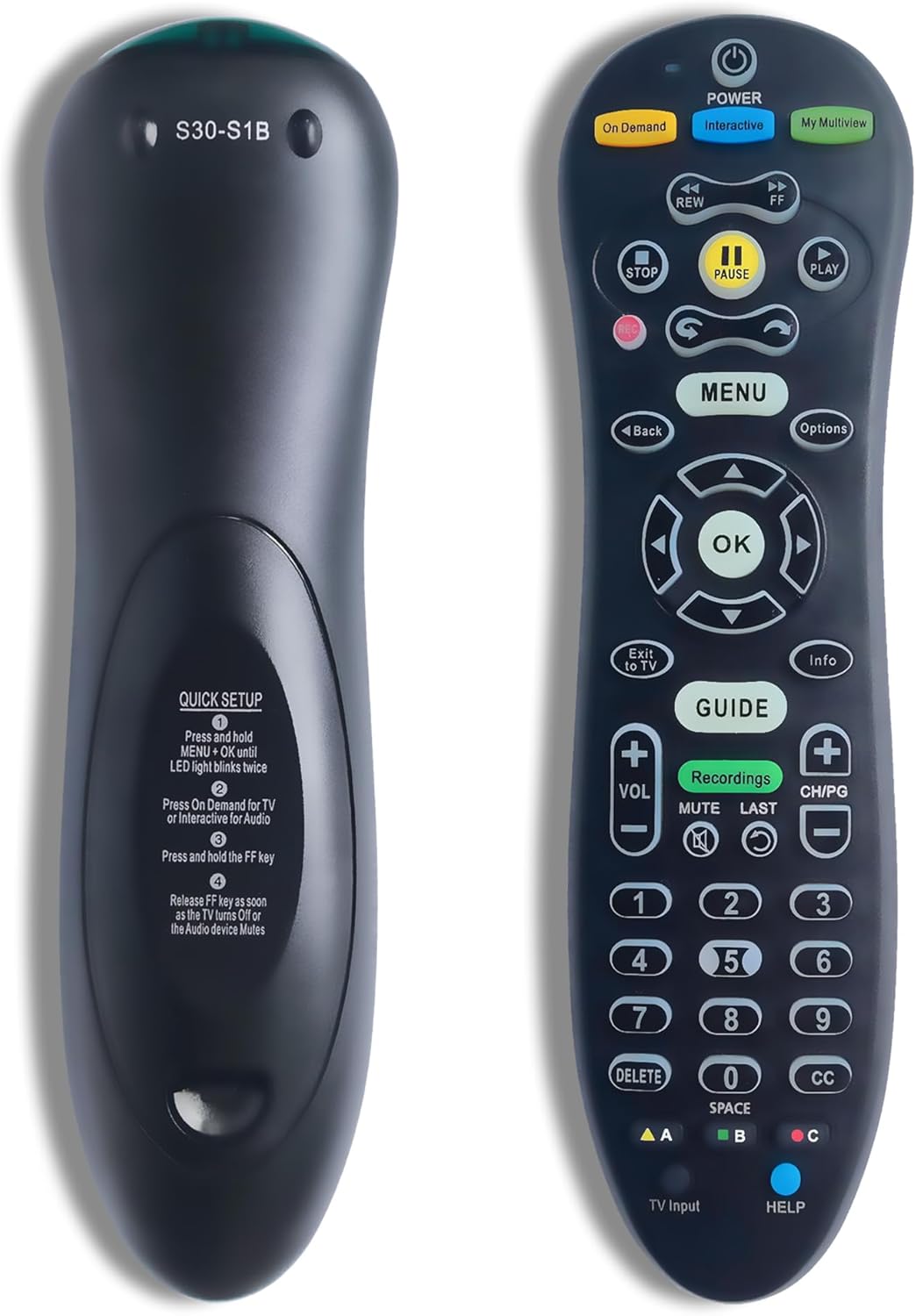
Image: Front and back view of the Generic S30 Universal Remote Control. The front displays the array of control buttons including power, channel, volume, navigation, and number keys. The back panel features a label with the model number S30-S1B and a "QUICK SETUP" guide with four steps for pairing.
Key Features:
- Seamless Pairing Process: Straightforward connectivity with your TV and U-Verse receiver.
- Wide Compatibility: Engineered to support a broad range of TVs and U-Verse receivers.
- Reliable Replacement: A dependable alternative for lost or broken original remotes.
- Enhanced Button Functions: Access and manage advanced features with ease.
- Stylish and Durable Design: Ergonomic and modern design for long-lasting performance.
Setup and Pairing
Follow these steps to pair your S30 Universal Remote Control with your television and U-Verse receiver.
Quick Setup Guide (from remote back):
- Press and hold the MENU button and the OK button simultaneously until the LED light on the remote blinks twice.
- Press the On Demand button for TV pairing or the Interactive button for Audio device pairing.
- Press and hold the FF (Fast Forward) key.
- Release the FF key as soon as the TV turns off or the audio device mutes. This indicates successful pairing.
If the pairing is unsuccessful, repeat the steps. Ensure there are no obstructions between the remote and the device during the pairing process.
Operating Instructions
The S30 Universal Remote Control provides intuitive access to various functions of your U-Verse receiver and television. Below is a guide to common button functions:
| Button Name | Function |
|---|---|
| POWER | Turns the connected device (TV/Receiver) on or off. |
| On Demand | Accesses On Demand content. |
| Interactive | Accesses interactive features or audio device control. |
| My Multiview | Activates My Multiview feature. |
| REW / FF | Rewind / Fast Forward playback. |
| STOP / PAUSE / PLAY | Controls media playback (stop, pause, play). |
| MENU | Opens the main menu. |
| Back | Goes back to the previous screen or menu. |
| Options | Displays options for the current selection. |
| OK | Confirms a selection or enters a menu. |
| Directional Pad | Navigates through menus and options (Up, Down, Left, Right). |
| Exit to TV | Switches back to live TV. |
| Info | Displays program information. |
| GUIDE | Opens the program guide. |
| Recordings | Accesses recorded programs. |
| VOL +/- | Adjusts volume up or down. |
| CH/PG +/- | Changes channels or pages up/down. |
| MUTE | Mutes or unmutes audio. |
| LAST | Returns to the last viewed channel. |
| Number Keys (0-9) | Direct channel entry. |
| DELETE | Deletes selected items. |
| CC | Activates or deactivates Closed Captions. |
| SPACE | Used for text input or specific functions. |
| A / B / C (Colored Buttons) | Context-sensitive functions, often for interactive menus. |
| TV Input | Cycles through TV input sources. |
| HELP | Accesses help features. |
Maintenance
- Cleaning: Use a soft, dry cloth to clean the remote control. Do not use liquid cleaners or abrasive materials.
- Battery Replacement: When the remote's performance degrades or the LED indicator does not light up, replace the batteries. Use only new, high-quality batteries of the specified type (e.g., AAA). Ensure correct polarity.
- Storage: Store the remote in a cool, dry place away from direct sunlight and extreme temperatures.
Troubleshooting
| Problem | Possible Cause / Solution |
|---|---|
| Remote not responding. | Check batteries; replace if necessary. Ensure line of sight to the device. Re-pair the remote if it has lost connection. |
| Buttons not working correctly. | Ensure the remote is pointed directly at the device. Clean any debris around the buttons. Re-pair the remote. |
| Remote only controls one device. | The S30 remote is designed to control a U-Verse receiver and a TV. Ensure both devices were paired correctly using the respective steps. |
| LED light does not blink during setup. | Ensure batteries are inserted correctly and have sufficient charge. Verify that the correct buttons (MENU + OK) are pressed simultaneously and held. |
Specifications
- Model Number: A ~ T ~S30~UR4 (S30-S1B)
- Brand: Generic
- Manufacturer: S30
- Color: Black
- Special Feature: Backlit
- Max Number of Supported Devices: 1 (designed to control U-Verse receiver and TV as an integrated system)
- Compatible Devices: Set Top Box (U-Verse Receiver), Television
Warranty and Support
For warranty information or technical support, please refer to the retailer or manufacturer's website where the product was purchased. Keep your purchase receipt as proof of purchase.
For further assistance, you may also contact the seller through the platform where the product was acquired.
Ask a question about this manual
Ask about setup, troubleshooting, compatibility, parts, safety, or missing instructions. Manuals+ will review the question and use this page’s manual context to help answer it.