
Introduction
This manual provides comprehensive instructions for the proper use, setup, and maintenance of your wiresto 6-in-1 Universal Charging & Data Sync Cable. This versatile cable is designed to offer robust performance and adaptability across a wide range of electronic devices, simplifying your connectivity needs.
Product Overview
The wiresto 6-in-1 USB Cable features a unique design that integrates multiple connection types into a single, durable cable. It is engineered for both fast charging and efficient data transfer.
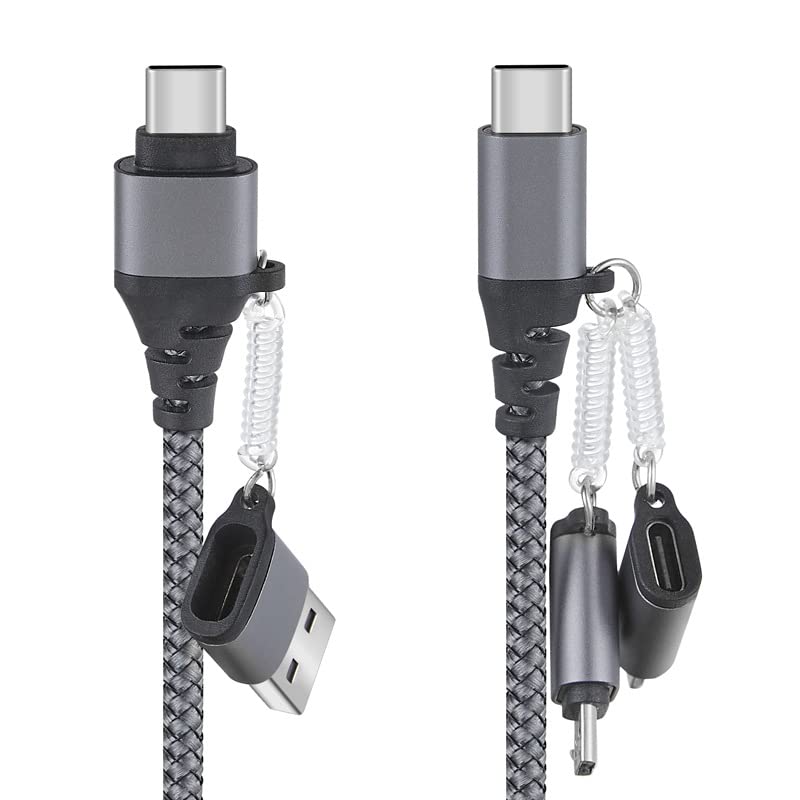
Figure 1: The wiresto 6-in-1 USB Cable showcasing its primary USB-C and USB-A connectors, along with the attached 8-pin and Micro USB adapters. This image illustrates the compact and integrated design of the cable system.
Key Components:
- Main Cable: Features a durable braided nylon jacket for enhanced longevity and tangle resistance.
- USB-A Connector: Standard USB connector for power sources and devices.
- USB-C Connector: Reversible connector for modern devices, supporting power delivery and data.
- 8-Pin Adapter: Attaches to the USB-C connector, providing compatibility with Apple (iOS) devices.
- Micro USB Adapter: Attaches to the USB-C connector, providing compatibility with older Android devices and various peripherals.

Figure 2: A detailed view of the cable's connectors, including the USB-A and USB-C ends, and the detachable 8-pin and Micro USB adapters. This highlights the robust construction and the spring-coil attachment mechanism for the adapters.
Setup
The wiresto 6-in-1 cable is designed for plug-and-play functionality. No software installation is required.
- Identify Your Device's Port: Determine whether your device uses a USB-C, 8-pin (Apple), or Micro USB port for charging/data.
- Select the Correct Cable End:
- For USB-C devices: Use the native USB-C end of the cable.
- For 8-pin (Apple) devices: Attach the 8-pin adapter to the USB-C end.
- For Micro USB devices: Attach the Micro USB adapter to the USB-C end.
- Connect to Power Source/Computer: Plug the other end of the cable (either USB-A or USB-C, depending on your power adapter or computer port) into a compatible power source (e.g., wall charger, power bank) or a computer's USB port.
- Connect to Device: Plug the selected device-compatible end into your smartphone, tablet, laptop, or other electronic device.
Ensure all connections are secure for optimal performance.
Operating Instructions
This cable supports both charging and data synchronization. Performance may vary based on the connected power source and device capabilities.
Charging Devices:
- Connect the cable as described in the "Setup" section.
- The cable supports fast charging protocols, including up to 60W Power Delivery (PD) via USB-C and 3A fast charge for compatible devices.
- Charging speed is dependent on the power adapter's output and the device's charging input capabilities.

Figure 3: An illustrative diagram demonstrating the charging capabilities for various device types (IP, Type-C, Micro USB) and their approximate full charging times. It highlights support for PD 3.0 (60W) and QC 18W.
Data Transfer:
- Connect your device to a computer using the appropriate cable configuration.
- The cable supports data transfer speeds up to 480 Mbps.
- Once connected, your computer should recognize the device, allowing you to transfer files.

Figure 4: The cable connected to a laptop and a smartphone, visually representing its dual function for data transfer and fast charging. The image explicitly states "480 Mbps" for data and "60W 3A" for power delivery.
Universal Compatibility:
The cable is compatible with a wide range of devices, including:
- Apple (iOS) smartphones and tablets (via 8-pin adapter)
- Android phones and tablets (via USB-C or Micro USB adapter)
- USB-C enabled laptops and notebooks
- Cameras, power banks, and other USB-C & Micro USB enabled gadgets.

Figure 5: A schematic diagram detailing the compatibility of the cable's various connectors. It shows examples of devices compatible with 8-pin (e.g., Phone 13, 12, 11, XS), Type-C (e.g., M-book, Pad Pro, Pixel), and Micro USB (e.g., Kindle, Wifi Speaker, BT earbud).
Maintenance
Proper care will extend the lifespan of your cable.
- Cleaning: Use a dry, soft cloth to wipe the cable and connectors. Avoid liquid cleaners.
- Storage: Store the cable in a cool, dry place away from direct sunlight and extreme temperatures. The cable comes with a compact carrying case for convenient storage.
- Handling: Avoid sharp bends, kinks, or excessive pulling on the cable, especially near the connectors. Always grasp the connector head when plugging or unplugging, not the cable itself.
- Tangle-Free Design: The braided nylon exterior helps prevent tangles, but gentle coiling for storage is recommended.

Figure 6: The wiresto 6-in-1 cable neatly stored within its included compact carrying case, demonstrating ideal storage for protection and portability. The image also shows the dimensions of the case.
Troubleshooting
| Problem | Possible Cause | Solution |
|---|---|---|
| Device not charging/slow charging. |
|
|
| Data transfer not working. |
|
|
| Adapters not staying attached. |
|
|
Specifications
| Feature | Detail |
|---|---|
| Brand | wiresto |
| Model Number (ASIN) | B0DR65HZ1N |
| Connector Type | USB Type C, USB Type A, 8-Pin (Apple), Micro USB |
| Cable Type | USB |
| Compatible Devices | Laptop, Tablet, Charging Adapter, Power Bank, Smartphone |
| Special Features | Tangle Free, 480Mbps Data Transfer, 60W Fast Charging |
| First Available Date | December 21, 2024 |
Warranty and Support
For warranty information or technical support, please refer to the product packaging or contact wiresto customer service directly. Keep your purchase receipt for warranty claims.
For further assistance, please visit the official wiresto website or contact their customer support channels.