
POWER PRODUCTS Module SG2400iS
Instruction Manual: Low Oil/Output/Overload Light Indicator Module
Brand: POWER PRODUCTS
Model: Module SG2400iS (for Sigma 2400 Peak Watts / 1800 Running Watts Inverter Generator)
1. Introduction and Overview
This document provides essential information for the installation, operation, and maintenance of the POWER PRODUCTS Low Oil/Output/Overload Light Indicator Module, Model SG2400iS. This module is specifically designed as a replacement part for the Sigma 2400 Peak Watts / 1800 Running Watts Portable Gas-Powered Inverter Generator (without CO Sensor).
The indicator module serves a critical function by providing visual alerts regarding the operational status of your generator, specifically for low oil levels, output issues, and overload conditions. Understanding these indicators is vital for safe and efficient generator operation.
2. Product Features
- Direct replacement for the original indicator module in compatible Sigma SG2400iS inverter generators.
- Provides clear visual indication for three critical generator conditions:
- Low Oil Level
- Output Malfunction
- Overload Condition
- Designed for durability and reliable performance.
3. Specifications
| Specification | Value |
|---|---|
| Product Dimensions | 1.9 x 2.2 x 1.4 inches (48.82mm x 38mm) |
| Item Model Number | Module SG2400iS |
| Manufacturer | POWER PRODUCTS |
| Country of Origin | China |
| ASIN | B0DR3MQ4VT |

Figure 5: Detailed dimensions of the indicator module, showing length and width measurements.
4. Setup and Installation
This indicator module is a replacement part. Installation should be performed by individuals with appropriate technical knowledge and experience in generator maintenance. Always ensure the generator is completely shut down, cooled, and disconnected from any power sources before beginning installation.
- Safety First: Disconnect the spark plug wire and ensure the generator's engine is cool to the touch. Turn off the fuel supply.
- Locate Existing Module: Identify the current indicator module on your Sigma SG2400iS generator. Refer to your generator's original service manual for precise location and access instructions.
- Disconnect Wiring: Carefully disconnect the electrical connector(s) from the existing module. Note the orientation and connection points if necessary.
- Remove Old Module: Unfasten any screws or clips securing the old module in place and remove it.
- Install New Module: Position the new POWER PRODUCTS indicator module (Model SG2400iS) in the designated location. Secure it with the original fasteners.
- Connect Wiring: Reconnect the electrical connector(s) to the new module, ensuring a secure and correct fit.
- Final Checks: Double-check all connections and ensure no tools or debris are left inside the generator housing. Reconnect the spark plug wire.
It is highly recommended to consult the original Sigma SG2400iS generator service manual for detailed, model-specific installation procedures and safety warnings.

Figure 1: Rear view of the indicator module, highlighting the multi-pin electrical connector for installation.
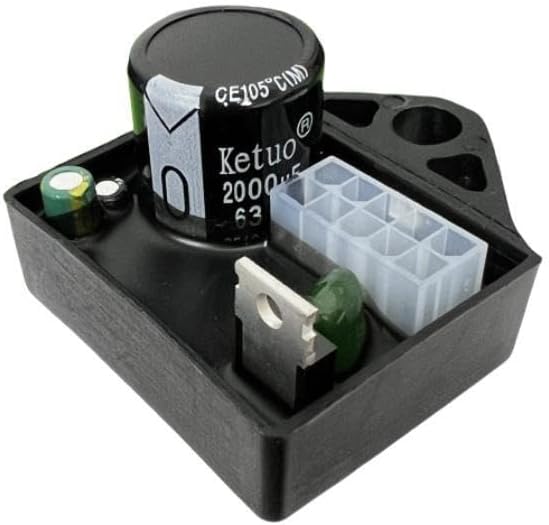
Figure 2: Angled rear view of the module, providing a clearer perspective of the connection interface.
5. Operating and Indicator Meanings
The indicator module features three distinct lights, each corresponding to a specific operational status or warning. Observe these lights during generator operation to ensure proper functioning and to identify potential issues promptly.
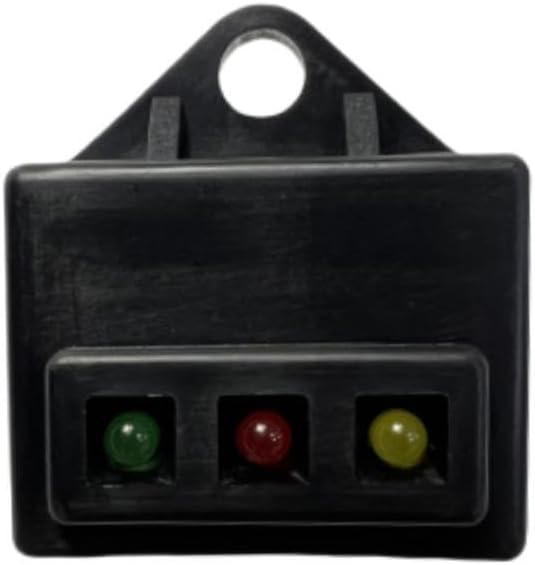
Figure 3: Front view of the indicator module showing the three status lights.
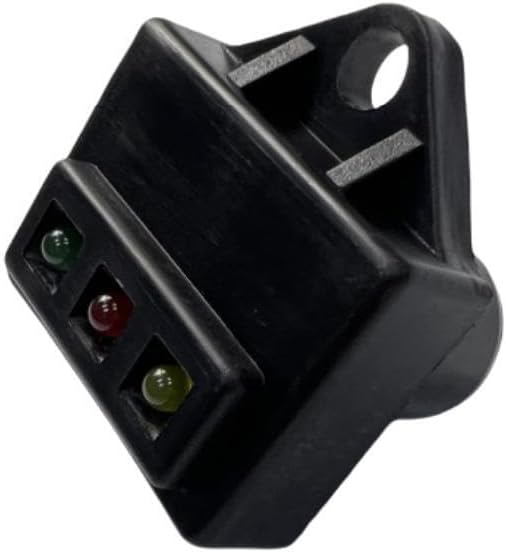
Figure 4: Angled front view of the module, providing a different perspective of the indicator lights.
Indicator Light Meanings:
- Low Oil Light (Typically Red or Yellow):
This light illuminates when the engine oil level is critically low. If this light comes on, immediately shut down the generator and check the oil level. Operating the generator with low oil can cause severe engine damage.
- Output Light (Typically Green or Blue, or Off when normal):
This light indicates the generator's power output status. It typically illuminates when the generator is producing stable AC power. If this light is off when it should be on, or if it flickers, there may be an issue with the generator's power output.
- Overload Light (Typically Red):
This light activates when the generator is being overloaded, meaning the total power draw from connected appliances exceeds the generator's maximum rated output. If this light comes on, immediately disconnect some or all connected loads to prevent damage to the generator and appliances. The generator may automatically shut down to protect itself.
Always refer to your generator's main operating manual for specific color assignments and detailed instructions regarding each indicator light's behavior and corresponding actions.
6. Maintenance
The Low Oil/Output/Overload Light Indicator Module is a sealed electronic component and requires no internal maintenance. For optimal performance and longevity, follow these general guidelines:
- Keep Clean: Periodically wipe the exterior of the module with a soft, dry cloth to remove dust and debris. Avoid using harsh chemicals or abrasive cleaners.
- Inspect Connections: During routine generator maintenance, visually inspect the electrical connections to the module to ensure they remain secure and free from corrosion.
- Environmental Protection: Ensure the generator is stored and operated in conditions that protect all its components, including this module, from excessive moisture, extreme temperatures, and direct impact.
Any internal issues with the module typically require replacement rather than repair. Do not attempt to open or repair the module yourself, as this may void any applicable warranties.
7. Troubleshooting
If you experience issues with your indicator module, consider the following troubleshooting steps:
- No Lights Illuminating:
- Ensure the generator is running and producing power (if applicable for the output light).
- Check all electrical connections to the module for looseness or corrosion.
- Verify that the generator's main power switch is in the "ON" position.
- If the generator itself is not starting or running, address those issues first.
- Incorrect Light Indication:
- Low Oil Light: If this light is on but the oil level is correct, the oil sensor or its wiring may be faulty.
- Overload Light: If this light is on without an actual overload, check for short circuits in connected appliances or issues with the generator's inverter/output system.
- Output Light: If this light is off but the generator is producing power, or vice-versa, there might be an issue with the module or the generator's output sensing circuit.
- Intermittent Light Behavior:
This often points to loose or corroded electrical connections. Carefully inspect and clean all contacts.
If troubleshooting steps do not resolve the issue, it is recommended to contact a qualified generator technician or the manufacturer for further assistance. Do not attempt complex repairs yourself.
8. Warranty and Support
For warranty information regarding your POWER PRODUCTS Low Oil/Output/Overload Light Indicator Module, please refer to the documentation provided at the time of purchase or contact the seller directly. Warranty terms typically cover manufacturing defects.
For technical support or inquiries about this product, please contact POWER PRODUCTS customer service through their official website or the retailer from whom you purchased the module. When contacting support, please have your product model number (SG2400iS) and purchase details readily available.
For issues related to the Sigma 2400 Peak Watts / 1800 Running Watts Inverter Generator itself, please refer to the generator's original manufacturer's support channels.
Ask a question about this manual
Ask about setup, troubleshooting, compatibility, parts, safety, or missing instructions. Manuals+ will review the question and use this page’s manual context to help answer it.