
1. Introduction
Thank you for choosing the YACAISI Solar Street Light. This manual provides detailed instructions for the proper installation, operation, and maintenance of your new solar light. Designed for outdoor use, this light features advanced LED technology, efficient solar charging, and multiple intelligent lighting modes to enhance security and illumination in various environments.
Key features include:
- Upgrade LED Beads: Equipped with 63pcs super-bright 5054 high-power LED lamp beads (8500K) for high brightness and low power consumption.
- Efficient Solar Powered Illumination: Features a 6V/5W polycrystalline solar panel with a 25% energy conversion rate and a 5000mAH battery.
- Three Modes & Remote Control: Offers Twilight to Dawn, Motion Sensor, and Intelligent Time Setting modes, controllable via a multifunctional remote.
- Easy Assembly & Installation: No additional wiring required, suitable for wall mounting in various outdoor locations.
- Long-lasting Build & Reliable Support: IP65 waterproof grade and weather resistance ensure durability.
2. Package Contents
Please verify that all items listed below are included in your package:
- 1 or 2 x YACAISI Solar Street Lights (depending on pack purchased)
- 1 or 2 x Remote Controls (one per light)
- 2 or 4 x Expansion Screws (two per light)
- Additional Installation Accessories (as needed for mounting)

Figure 2.1: Overview of package contents, showing the solar light, solar panel, mounting bracket, remote control, and screws.
3. Product Specifications
| Feature | Specification |
|---|---|
| Brand | YACAISI |
| Model Number | AU-APL-JZ-300W-2PACK-NEW |
| Light Source | 63pcs 5054 High-Power LED Beads |
| Color Temperature | 8500K |
| Wattage | 300 Watts |
| Solar Panel | 6V/5W Polycrystalline, 25% Conversion Rate |
| Battery | 5000mAH (2 x 9V batteries included) |
| Charging Time | 4-6 hours (full sunlight) |
| Illumination Time | 10-12 hours (continuous lighting) |
| Lighting Angle | 220-degree ultra-wide-angle |
| Coverage Area | Approx. 1300 sq ft |
| Control Method | Remote Control |
| Material | Acrylonitrile Butadiene Styrene |
| Water Resistance | IP65 Waterproof |
| Product Dimensions | 4.5"L x 4.5"W x 6"H |
| Item Weight | 1.1 pounds (approx. 500 grams) |
4. Setup and Installation
The YACAISI Solar Street Light is designed for easy installation without the need for complex wiring. It can be mounted on a wall or pole, making it versatile for various outdoor settings.
4.1. Choosing an Installation Location
Select a location that receives direct and sufficient sunlight for 4-6 hours daily to ensure optimal charging of the solar panel. Avoid areas shaded by trees, buildings, or other obstructions that may block sunlight. Ensure the chosen location provides the desired illumination coverage.
4.2. Installation Steps
- Assemble the Mounting Bracket: Attach the mounting pole to the light unit using the provided screws.
- Mark Drilling Points: Hold the assembled light unit with its bracket against the desired mounting surface (wall or pole). Use a pencil or marker to mark the positions for drilling holes.
- Drill Holes: Using an appropriate drill bit for your surface, drill holes at the marked points.
- Insert Expansion Screws: Insert the provided expansion screws into the drilled holes.
- Mount the Light: Align the mounting bracket with the inserted screws and securely fasten the light to the surface. Ensure it is firmly attached to withstand wind and other weather conditions.

Figure 4.1: Example of installed solar street lights providing bright illumination for a garage and surrounding area.
Video 4.1: Demonstration of the YACAISI solar light's features and installation process, including how to activate the light and use the remote control.
5. Operating Instructions
Your YACAISI Solar Street Light comes with a remote control for convenient operation and mode selection.
5.1. Initial Activation
Before first use, ensure the light has been charged under direct sunlight for at least 6-8 hours. Press the red ON/OFF switch on the light unit to activate it. The light will then operate according to the selected mode or automatically at dusk.

Figure 5.1: Visual representation of the motion sensor's functionality, showing the light at 30% brightness, increasing to 100% upon motion detection, and returning to 30% after motion ceases.
5.2. Remote Control Functions
The included remote control allows you to switch between different lighting modes and adjust settings:
- ON/OFF: Turns the light on or off. When turned off, it will automatically turn on at the next dusk-to-dawn cycle.
- Twilight to Dawn Mode (AUTO): The light automatically turns on at dusk at a lower brightness (e.g., 30%) and turns off at dawn.
- Motion Sensor Mode (Sensor 1): The light stays at a low brightness (e.g., 30%) and automatically brightens to 100% when motion is detected within 15-30ft. It returns to low brightness after motion ceases.
- Motion Sensor Mode (Sensor 2): The light remains off and automatically turns on to 100% brightness when motion is detected within 15-30ft. It turns off after motion ceases.
- Intelligent Time Setting (3H/5H/8H): Sets the light to stay on at 100% brightness for a specified duration (3, 5, or 8 hours) after activation, then switches to motion sensor mode or turns off.
- Brightness Adjustment (+/-): Increases or decreases the light's brightness in certain modes.
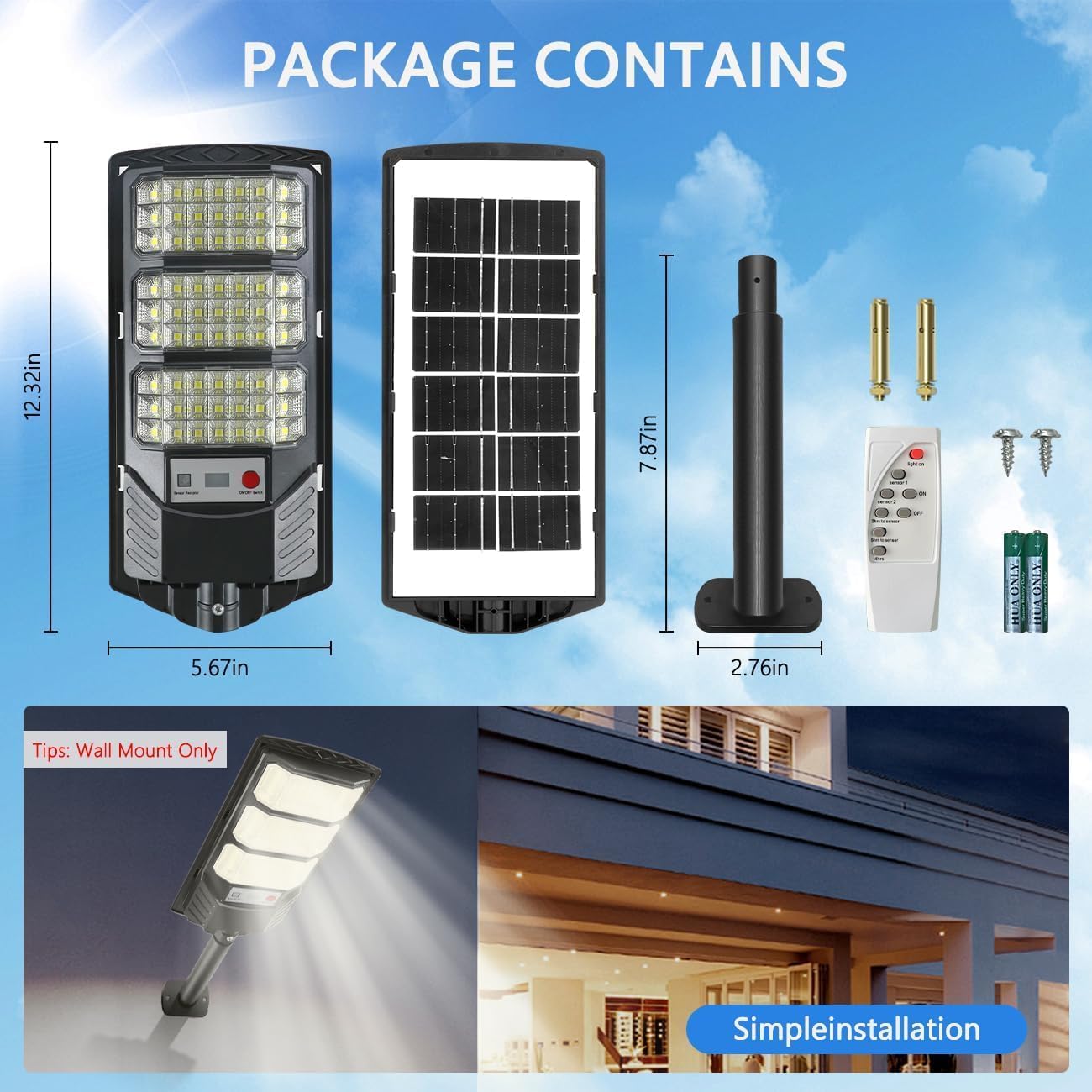
Figure 5.2: The remote control with various buttons for mode selection and brightness adjustment.
6. Maintenance
To ensure the longevity and optimal performance of your YACAISI Solar Street Light, follow these simple maintenance guidelines:
- Clean the Solar Panel: Regularly wipe the solar panel with a soft, damp cloth to remove dust, dirt, leaves, or snow. A clean panel ensures maximum sunlight absorption and efficient charging.
- Inspect for Obstructions: Periodically check that no new obstructions (e.g., growing tree branches) are shading the solar panel.
- Check Mounting: Ensure the light remains securely mounted, especially after severe weather conditions.
- Battery Life: The integrated 5000mAH battery is designed for long-term use. If you notice a significant decrease in illumination time, ensure the solar panel is receiving adequate sunlight.
The light features an IP65 waterproof grade and is designed to withstand various weather conditions, including rain, snow, and extreme temperatures ranging from -22°F to 140°F.

Figure 6.1: The solar light is built to be waterproof (IP65) and heat-resistant, ensuring reliable operation in diverse climates.
7. Troubleshooting
If you encounter issues with your YACAISI Solar Street Light, please refer to the following common problems and solutions:
- Light Does Not Turn On at Dusk:
- Ensure the ON/OFF switch on the light unit is pressed (red button).
- Verify the solar panel is receiving direct sunlight for at least 4-6 hours daily. Clear any obstructions.
- Check if the remote control has been used to turn off the light or set a specific timer that has expired.
- Light Stays Dim or Turns Off Quickly:
- The battery may not be fully charged. Ensure the solar panel is clean and exposed to direct sunlight for a full day.
- Ambient temperature can affect battery performance. In very cold conditions, illumination time might be reduced.
- Motion Sensor Not Working:
- Ensure the light is set to a motion sensor mode (Sensor 1 or Sensor 2) using the remote control.
- Verify there are no obstructions blocking the motion sensor.
- Remote Control Not Responding:
- Check if the batteries in the remote control are correctly inserted and have sufficient power.
- Ensure there is no physical obstruction between the remote and the light's sensor.
If these steps do not resolve the issue, please contact customer support.
8. Warranty and Support
YACAISI offers a 24-month comprehensive support for your solar street light. If you have any questions, concerns, or require assistance with your product, please do not hesitate to contact us. Our customer service team is dedicated to providing prompt and helpful solutions.
Please refer to your purchase documentation for specific contact details or visit the YACAISI official store page on Amazon for support information.