Introduction
This instruction manual provides detailed guidance for the safe and proper installation, operation, and maintenance of the Generic Wall Mount Kit LSA1U. This kit is designed as a compatible replacement part for Chief Fusion large flat panel displays, accommodating TV sizes from 42 inches to 86 inches with VESA mounting compatibility ranging from 100x100mm to 870x500mm. Please read this manual thoroughly before beginning installation.
Safety Information
- Read all instructions completely before installation. If you have any questions, consult a qualified installer.
- Ensure the mounting surface (wall) can safely support the combined weight of the mount and the display.
- Use only the fasteners provided or specified in these instructions. Using incorrect fasteners may result in damage or injury.
- This product is intended for installation by two persons. Do not attempt to install alone.
- Do not overtighten screws. Overtightening can cause damage to the mount or your display.
- Keep children and pets away during installation.
Package Contents
Verify that all components are present and undamaged before proceeding with installation. If any parts are missing or damaged, do not proceed with installation and contact customer support.
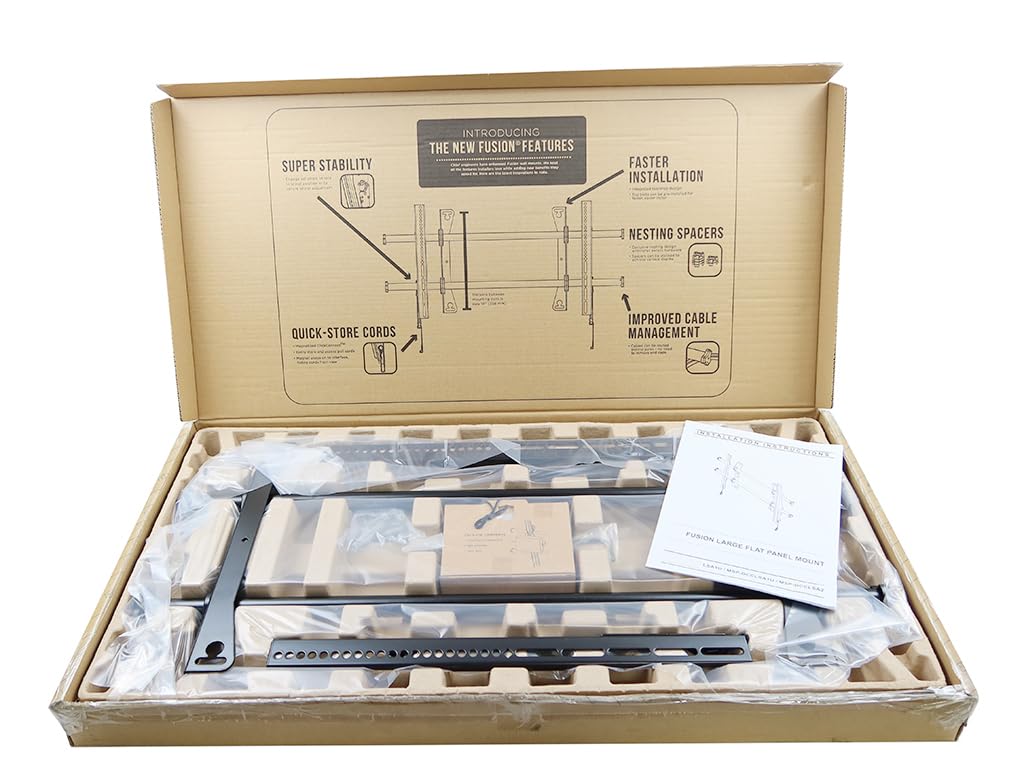
Image: Overview of all components included in the Wall Mount Kit LSA1U. This includes the main wall plate, two horizontal support bars, two vertical TV brackets, a hex wrench, and multiple bags containing various screws, washers, and wall anchors for different installation scenarios.
The package typically includes:
- Main Wall Plate Assembly
- Horizontal Wall Rails (2 pieces)
- Vertical TV Brackets (2 pieces)
- Locking Mechanism / Release Bar
- Hardware Kit (various screws, washers, spacers, wall anchors)
- Hex Key / Allen Wrench
Setup and Installation
Tools Required (Not Included): Pencil, Level, Stud Finder (for wood stud walls), Drill, Drill Bits (appropriate for wall type and fasteners), Phillips Head Screwdriver, Socket Wrench (for lag bolts).
- Prepare the Mounting Location:
- Determine the desired height and center position for your TV.
- Use a stud finder to locate wood studs if mounting to a wood frame wall. Mark the edges of the studs. For concrete or brick walls, ensure the wall is solid and free of obstructions.
- Position the Wall Plate:
- Hold the main wall plate assembly against the wall at your desired mounting height.
- Use a level to ensure the wall plate is perfectly horizontal.
- Mark the drilling locations through the holes on the wall plate with a pencil.
- Drill Pilot Holes:
- For wood stud installation: Drill pilot holes into the center of the marked studs using a drill bit slightly smaller than the lag bolts.
- For concrete/brick installation: Drill pilot holes using a masonry drill bit of the specified size. Insert the appropriate wall anchors (if provided) flush with the wall surface.
- Attach Wall Plate to Wall:
- Align the wall plate with the drilled holes.
- Secure the wall plate to the wall using the provided lag bolts and washers. Tighten them firmly with a socket wrench, but do not overtighten.
- Attach TV Brackets to TV:
- Carefully lay your TV face down on a clean, soft surface (e.g., a blanket on a table).
- Identify the VESA mounting holes on the back of your TV.
- Attach the two vertical TV brackets to the back of the TV using the appropriate screws, washers, and spacers from the hardware kit. Ensure the brackets are oriented correctly so the hooks face upwards and can engage with the wall rails. The brackets should be centered vertically on the TV's mounting pattern.
- Mount TV to Wall Plate:
- With the assistance of another person, carefully lift the TV.
- Hook the top of the TV brackets onto the horizontal rails of the wall plate.
- Gently lower the TV until the brackets are fully seated on the rails.
- Secure the TV:
- Locate the locking mechanisms at the bottom of the TV brackets or the release bar.
- Engage these mechanisms to secure the TV to the wall plate, preventing accidental dislodgement. This may involve tightening screws or engaging a pull-cord release.
- Perform a gentle tug test on the bottom of the TV to ensure it is securely locked in place.
Operating Instructions
The Generic Wall Mount Kit LSA1U is a fixed-position mount. Once installed and secured, your television will remain in a static position on the wall. The mount offers lateral adjustment capabilities, allowing you to slide the TV horizontally along the wall plate for optimal centering after installation. To adjust, ensure the locking mechanisms are slightly loosened (if applicable for lateral movement) and then re-tighten them once the desired position is achieved.
To remove the TV from the mount, you must first disengage the locking mechanisms at the bottom of the TV brackets. With assistance, carefully lift the TV upwards and off the horizontal wall rails.
Maintenance
- Regular Inspection: Periodically check all screws and connections to ensure they remain tight and secure.
- Cleaning: Wipe the mount with a soft, dry cloth. Avoid using abrasive cleaners or solvents, as these may damage the finish.
- Weight Capacity: Do not exceed the maximum weight capacity of the mount or the wall structure.
Troubleshooting
- TV is not level: Ensure the wall plate was installed perfectly level. Some mounts allow for minor post-installation leveling adjustments on the TV brackets; consult the specific design of your brackets. If not, the wall plate may need to be re-adjusted.
- Mount feels unstable: Re-check all wall fasteners and TV bracket screws for tightness. Verify that the wall structure is adequate for the weight of the TV and mount. Ensure the TV is properly seated on the wall rails and the locking mechanisms are engaged.
- TV does not fit the brackets: Confirm that your TV's VESA mounting pattern falls within the specified range (100x100mm - 870x500mm). Ensure you are using the correct screws and spacers from the hardware kit for your TV model.
Specifications
| Model Number | MSP-DCCLSA1U |
| Part Number | LSA1U |
| Compatible Part Numbers | CHF-LSA1U, A8421829, 4GH8, E347918 |
| Screen Size Compatibility | 42" - 86" |
| VESA Mounting Compatibility | 100x100mm - 870x500mm |
| Color | Black |
| Height | 17.9 inches (45.47 cm) |
| Width | 34.8 inches (88.39 cm) |
| Depth | 2 inches (5.08 cm) |
| Item Weight | 19 lb (8.62 kg) |
| Material | Metal |
| Mounting Type | Wall Mount |
| Movement Type | Fixed |
| Features | Cable Management, Lateral Adjustment |
| UPC | 054621068574 |
| Manufacturer | Chief |
Warranty and Support
Specific warranty information for this Generic Wall Mount Kit LSA1U is not provided in the product details. For any support inquiries, missing parts, or warranty claims, please refer to the retailer or the original point of purchase. It is recommended to retain your purchase receipt for proof of purchase.


