

1. Introduction
Thank you for choosing the Byobyc T7 Wireless Earbuds. These earbuds are designed to provide a high-quality audio experience with advanced features such as Bluetooth 5.4 connectivity, an LED touch screen charging case, and smart touch controls. This manual provides detailed instructions for setup, operation, and maintenance to ensure optimal performance and longevity of your device.
2. Safety Information
- Do not disassemble or modify the earbuds or charging case.
- Keep the device away from extreme temperatures, humidity, and corrosive materials.
- Avoid prolonged exposure to high volume levels to prevent hearing damage.
- Clean the earbuds and charging case with a soft, dry cloth. Do not use harsh chemicals.
- Dispose of the device responsibly according to local regulations.
3. Package Contents
Verify that all items are present in your package:
- T7 Wireless Earbuds (2)
- Wireless Charging Case
- Eartips (various sizes)
- Type-C Charging Cable
- User Manual

Image: Contents of the Byobyc T7 package, including earbuds, charging case, eartips, Type-C cable, and user manual.
4. Product Overview
The Byobyc T7 Wireless Earbuds feature an innovative design with a multifunctional LED touch screen on the charging case and intuitive touch controls on the earbuds themselves.
Key Features:
- LED Touch Screen: Adjust brightness, set clocks, customize wallpapers, display battery levels, Bluetooth status, and date/time.
- Bluetooth 5.4: Ensures faster, more stable signal transmission with ultra-low latency and a stable connection range up to 10 meters.
- Smart Touch Control: Manage music playback, volume, calls, and voice assistants directly from the earbuds.
- Noise Cancellation: Features Environmental Noise Cancellation (ENC) to reduce background noise during calls.
- IPX5 Water Resistance: Protects against sweat and light splashes, suitable for workouts and outdoor activities.
- Extended Battery Life: Up to 5 hours of single earbud use and a total of 40 hours with the charging case.

Image: Close-up of the Byobyc T7 charging case's LED touchscreen, illustrating various functions like music control, equalizer settings, and wallpaper customization.
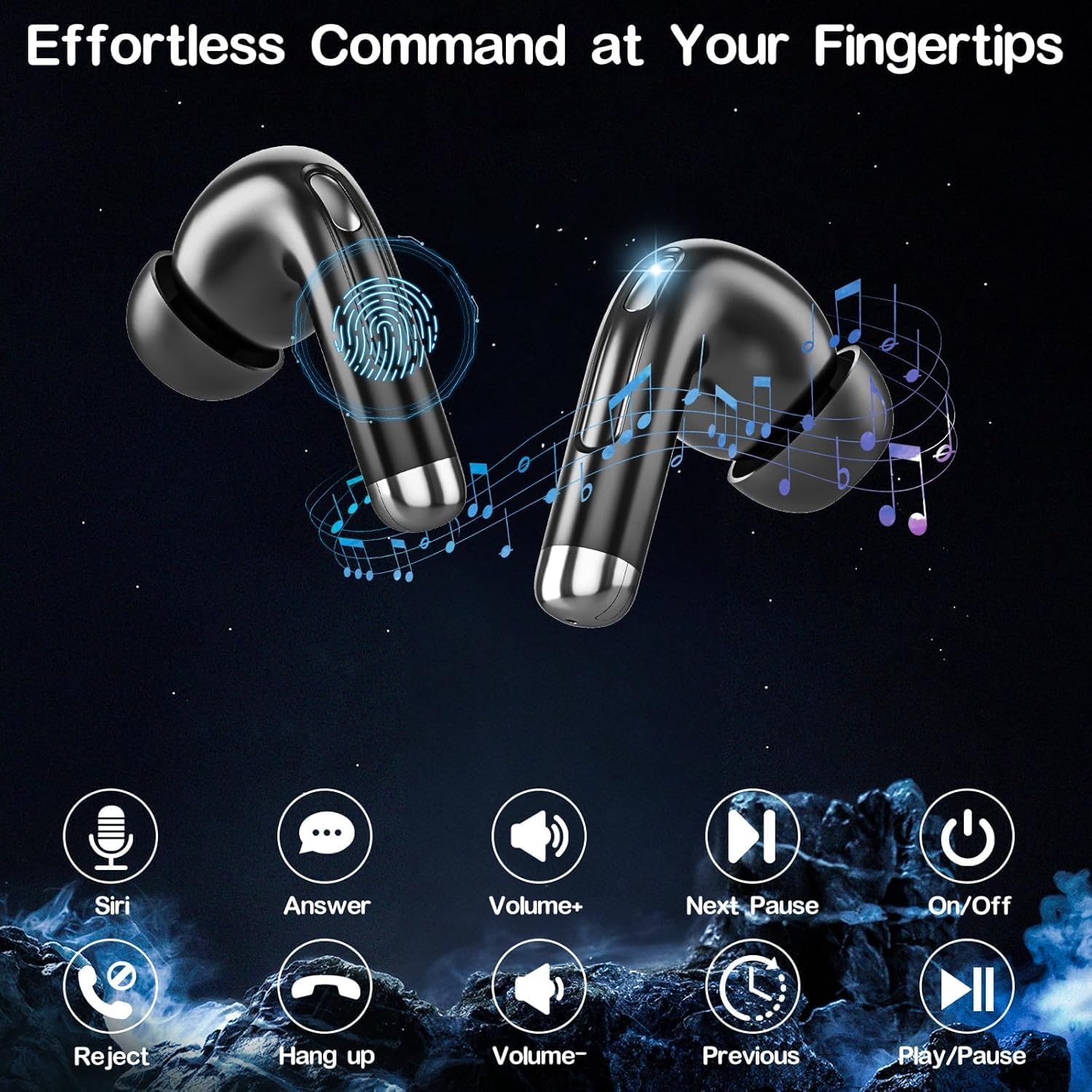
Image: Diagram showing the touch control areas on the Byobyc T7 earbuds and their corresponding functions like Siri activation, call management, and volume adjustment.

Image: Visual representation of the advanced Bluetooth 5.4 chip within the Byobyc T7 earbuds, highlighting faster and more stable data transfer.

Image: Illustration of the Byobyc T7's battery performance, showing 5 hours of single earbud playback and 40 hours total playtime with the charging case.
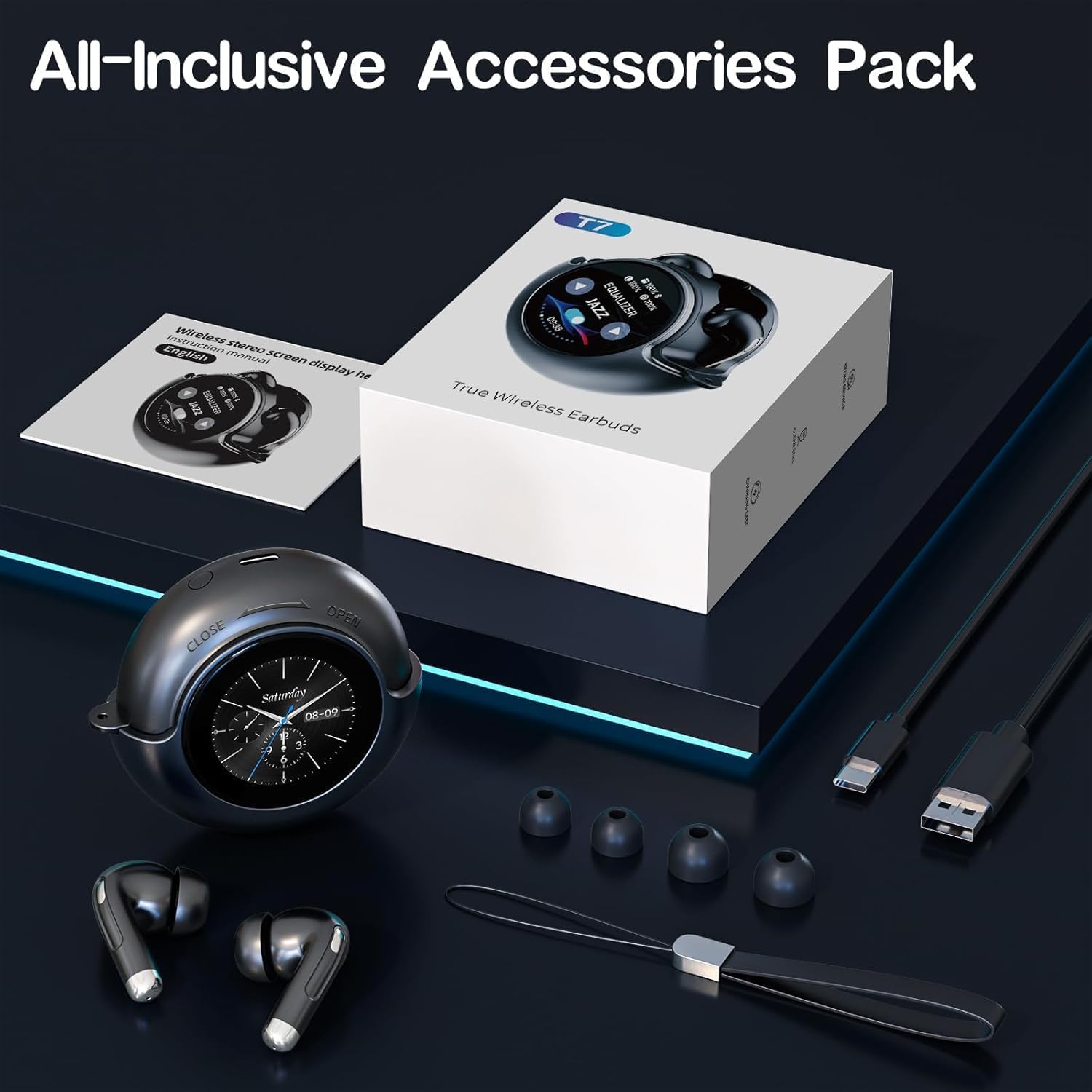
Image: Detailed dimensions of the Byobyc T7 earbuds and their charging case, indicating their compact and delicate design.
5. Setup
5.1 Initial Charging
- Place both earbuds into the charging case.
- Connect the Type-C charging cable to the charging port on the case and a power source.
- The LED display on the case will show the charging status. Fully charge the device before first use.
5.2 Bluetooth Pairing
- Open the charging case. The earbuds will automatically enter pairing mode.
- On your device (smartphone, tablet, laptop), enable Bluetooth.
- Search for "T7" in the list of available Bluetooth devices.
- Select "T7" to connect. A voice prompt will confirm successful pairing.
- Once paired, the earbuds will automatically connect to your device when removed from the case.
6. Operating Instructions
6.1 Earbud Touch Controls
Both left and right earbuds feature sensitive touch zones for various functions:
- Play/Pause: Single tap on either earbud.
- Next Track: Double tap on the right earbud.
- Previous Track: Double tap on the left earbud.
- Volume Up: Triple tap on the right earbud.
- Volume Down: Triple tap on the left earbud.
- Answer/End Call: Single tap on either earbud.
- Reject Call: Press and hold either earbud for 2 seconds.
- Activate Voice Assistant (Siri/Google Assistant): Press and hold either earbud for 3 seconds.
6.2 LED Touch Screen Functions
The charging case's LED touch screen offers additional controls and information:
- Music Control: Play, pause, skip tracks, and adjust volume directly from the screen.
- Equalizer Modes: Select from various equalizer presets (e.g., Jazz, Vocal, Bass, Club, Studio) to customize your audio experience.
- Brightness Adjustment: Control the screen brightness.
- Clock/Date Display: View current time and date.
- Wallpaper Customization: Change the screen's background wallpaper.
- Battery Level Display: Monitor the battery status of both earbuds and the charging case.
- Bluetooth Status: View current Bluetooth connection status.
- Find My Buds: Activate a low-volume alarm on misplaced earbuds to help locate them.
- Flashlight: Activates a white screen for minimal illumination.
- Camera Remote Trigger: Use the screen to remotely trigger your device's camera shutter.
7. Maintenance
7.1 Cleaning
- Regularly clean the earbuds, especially the eartips and charging contacts, with a soft, dry, lint-free cloth.
- Do not use abrasive cleaners or solvents.
7.2 Storage
- Store the earbuds in their charging case when not in use to protect them and keep them charged.
- Avoid storing in direct sunlight or extreme temperatures.
7.3 Water Resistance
The earbuds are IPX5 water-resistant, meaning they can withstand sweat and light splashes. They are not designed for submersion in water. Ensure the charging port is dry before charging.
8. Troubleshooting
- Earbuds not pairing: Ensure earbuds are charged and within range. Turn off and on your device's Bluetooth, then try pairing again.
- Only one earbud working: Place both earbuds back in the case, close it, then open it again. Ensure both earbuds are charged.
- No sound: Check volume levels on both your device and the earbuds. Ensure earbuds are properly connected to your device.
- Charging issues: Verify the charging cable is securely connected to both the case and power source. Clean the charging contacts on the earbuds and inside the case.
- Touch controls unresponsive: Ensure your fingers are clean and dry. Try restarting the earbuds by placing them in the case and taking them out again.
9. Specifications
| Model Name | T7 |
| Connectivity Technology | Wireless (Bluetooth 5.4) |
| Water Resistance Level | IPX5 (Waterproof) |
| Battery Average Life (Earbuds) | 5 Hours |
| Total Playtime (with Case) | Up to 40 Hours |
| Maximum Operating Distance | 10 Meters |
| Control Method | Touch |
| Noise Control | Active Noise Cancellation (ENC for calls) |
| Compatible Devices | Cellphones, Tablets, Laptops |
| Material | Plastic |
10. Warranty and Support
Byobyc products come with a standard manufacturer's warranty. For specific warranty details, please refer to the documentation included with your purchase or contact Byobyc customer support.
If you encounter any issues or have questions not covered in this manual, please contact Byobyc customer support through the retailer's platform or the official Byobyc website for assistance.