
1. Introduction
This manual provides detailed instructions for the safe and effective operation of your LASELION LG50 165ft Green-Beam Laser Measurement Tool. This device is designed for precise distance, area, and volume measurements, featuring a highly visible green laser for both indoor and outdoor use. Please read this manual thoroughly before using the device.

Figure 1: LASELION LG50 Green-Beam Laser Measurement Tool
2. Package Contents
Verify that all items are present in the package:
- 1x LASELION LG50 Green-Beam Laser Measurement Tool (165ft)
- 2x 1.5V AA Batteries
- 1x User Manual
- 1x Hand Strap
- 1x Portable Bag

Figure 2: Included items in the LASELION LG50 package
3. Product Overview
Familiarize yourself with the device's components and display elements.

Figure 3: LASELION LG50 display and button functions
Key Components:
- Laser Emitter/Receiver: Located at the top of the device.
- LCD Backlit Screen: Displays measurements, modes, and status icons.
- Measure Button: Activates the laser and takes measurements.
- Unit Button: Switches measurement units (m/ft/in/ft+in) and reference points.
- Function/Menu Button: Selects measurement modes.
- Addition/Subtraction Button: Performs calculations.
- Clear/Mute Button: Clears current measurement or mutes sound.
- Memory Button: Accesses stored data.
- Power ON/OFF Button: Turns the device on or off.
- Dual Bubble Levels: For horizontal and vertical alignment.
4. Setup
4.1 Battery Installation
- Locate the battery compartment on the back of the device.
- Open the battery cover.
- Insert two 1.5V AA batteries, ensuring correct polarity (+/-).
- Close the battery cover securely.
4.2 Power On/Off
- To Power On: Press the Power ON/OFF button. The device will display the last measurement mode.
- To Power Off: Press and hold the Power ON/OFF button for 3 seconds, or the device will automatically shut down after 150 seconds of inactivity.
4.3 Reference Point Selection
The device can measure from its front or rear edge. Short press the Unit button to switch between reference points. An icon on the display indicates the active reference point.

Figure 4: Switching between front and rear reference points
4.4 Unit Switching
Long press the Unit button to cycle through measurement units: meters (m), feet (ft), inches (in), and feet+inches (ft+in).
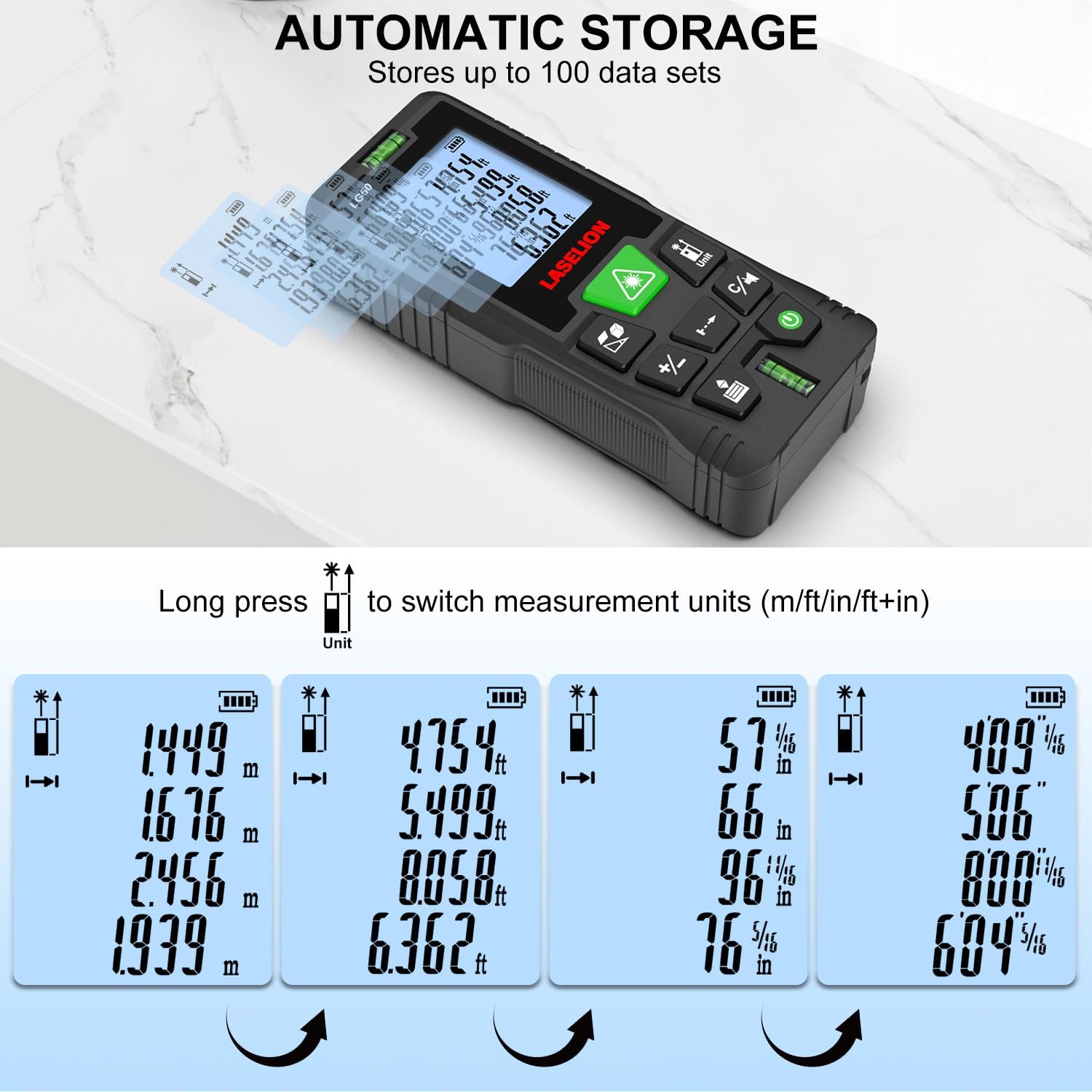
Figure 5: Unit switching and automatic data storage
5. Operating Instructions
5.1 Single Distance Measurement
- Point the laser at the target.
- Press the Measure button once to activate the laser.
- Press the Measure button again to take the measurement. The result will appear on the display.
5.2 Continuous Measurement (Min/Max)
This mode allows for dynamic measurement, displaying the minimum and maximum distances as you move the device.
- Press the Function/Menu button until the continuous measurement icon appears.
- Press the Measure button to start continuous measurement.
- Move the device slowly. The display will show current, minimum, and maximum distances.
- Press the Measure button again to stop.

Figure 6: Continuous measurement displaying minimum and maximum values
5.3 Area Measurement
- Press the Function/Menu button until the area measurement icon appears.
- Measure the first side (e.g., length) by pressing Measure.
- Measure the second side (e.g., width) by pressing Measure. The device will automatically calculate and display the area.
5.4 Volume Measurement
- Press the Function/Menu button until the volume measurement icon appears.
- Measure the length, width, and height sequentially by pressing Measure after each dimension. The device will calculate and display the volume.
5.5 Pythagorean Measurement
This mode allows indirect measurement of height or distance using the Pythagorean theorem.
- Press the Function/Menu button until the Pythagorean mode icon appears.
- Follow the on-screen prompts to measure the required sides (e.g., hypotenuse and one leg for height).
- The device will calculate and display the unknown dimension.
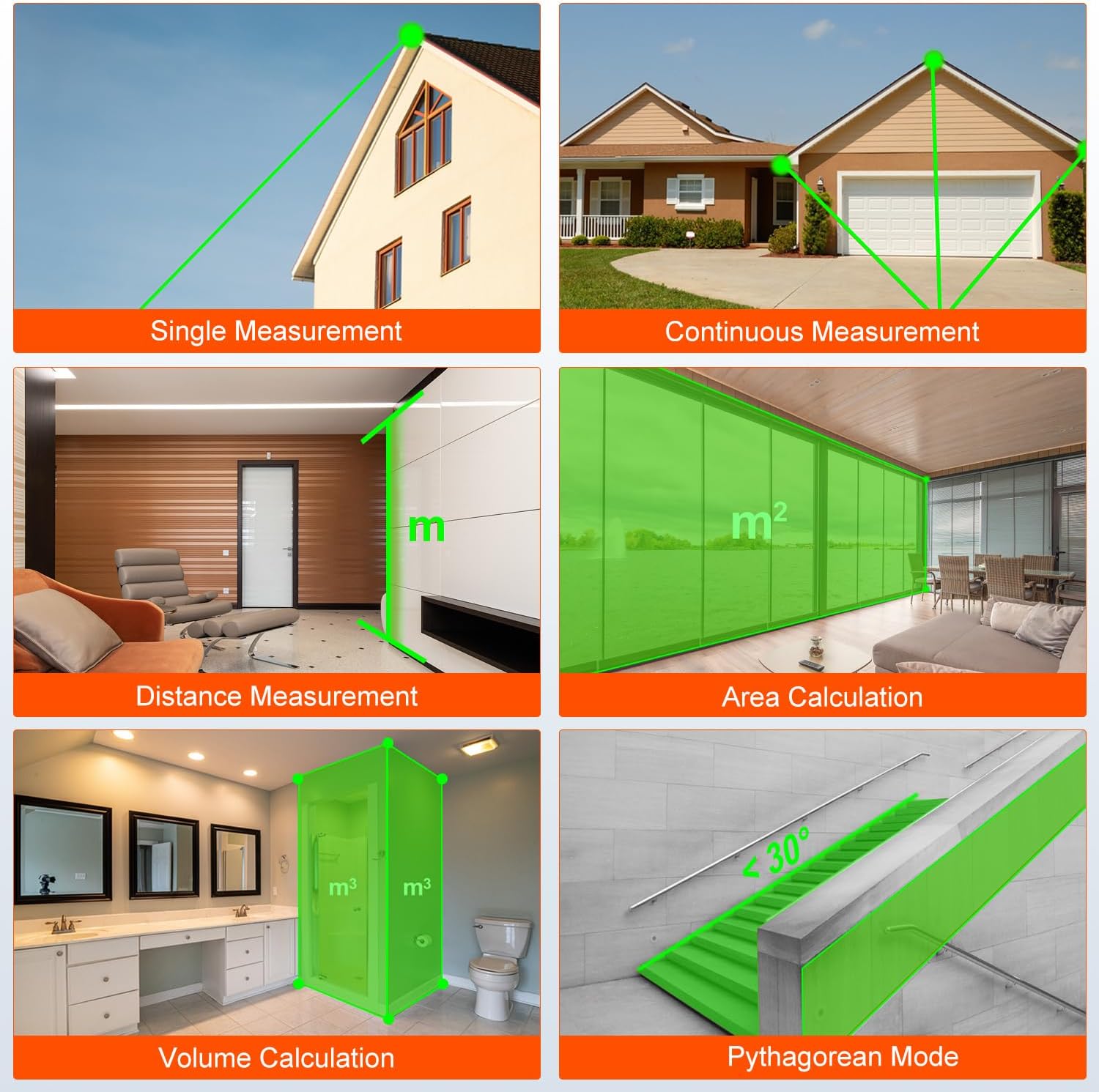
Figure 7: Various measurement modes including Pythagorean
5.6 Addition and Subtraction
After taking a measurement, you can add or subtract subsequent measurements.
- Take a measurement.
- Press the Addition/Subtraction button. A '+' or '-' symbol will appear.
- Take the next measurement. The device will automatically add or subtract it from the previous value.
- Repeat as needed.

Figure 8: Performing addition and subtraction of measurements
6. Advanced Features
6.1 Mute Function
To operate the device silently, long press the Clear/Mute button to toggle the key tone on or off.

Figure 9: Activating the mute function
6.2 Automatic Data Storage
The LASELION LG50 automatically stores up to 100 sets of measurement data. When the memory is full, the oldest record will be overwritten by the newest measurement.
6.3 Green Beam Visibility
The green laser beam is approximately 4 times brighter than standard red lasers, enhancing visibility in bright light conditions and outdoor environments.

Figure 10: Green laser beam visibility in outdoor settings

Figure 11: Comparison of green beam laser brightness versus red beam laser
6.4 Dual Bubble Levels
Integrated dual bubble levels assist in achieving accurate horizontal and vertical alignment for precise measurements.
7. Maintenance
7.1 Cleaning
- Wipe the device with a soft, damp cloth. Do not use abrasive cleaners or solvents.
- Clean the laser lens carefully with a soft, lint-free cloth, similar to cleaning camera lenses.
7.2 Storage
- Store the device in its portable bag when not in use to protect it from dust and impacts.
- Keep the device in a cool, dry place, away from direct sunlight and extreme temperatures.
7.3 Battery Care
- Remove batteries if the device will not be used for an extended period to prevent leakage.
- Replace batteries when the low battery indicator appears on the display.
7.4 Environmental Protection
The LASELION LG50 features an IP54 rating, providing protection against dust ingress and splashing water from any direction. This makes it suitable for various working environments.
8. Troubleshooting
| Problem | Possible Cause | Solution |
|---|---|---|
| Device does not turn on | Low or dead batteries; Incorrect battery installation | Replace batteries; Check battery polarity |
| Inaccurate measurements | Incorrect reference point selected; Obstruction in laser path; Unstable surface; Extreme environmental conditions | Verify reference point; Ensure clear laser path; Use on a stable surface; Avoid measuring in heavy fog or rain |
| Laser not visible outdoors | Very bright sunlight | While the green laser is enhanced, extreme direct sunlight can still reduce visibility. Try to shade the target or measure at different times of day. |
| Display shows 'Error' | Measurement out of range; Laser signal too weak/strong; Device malfunction | Ensure target is within 165ft range; Check for obstructions or highly reflective surfaces; Restart device; If persistent, contact support. |
| Buttons unresponsive | Device frozen; Low battery | Remove and reinsert batteries; Replace batteries. |
9. Specifications
| Feature | Detail |
|---|---|
| Brand | LASELION |
| Model Number | LG50 |
| Measuring Range | 0-165ft (0-50m) |
| Accuracy | ±1/16 inch (±2mm) |
| Laser Type | Green-Beam Laser, Class II, <1mW |
| Measurement Units | m / ft / in / ft+in |
| Measurement Modes | Single Distance, Continuous, Area, Volume, Pythagorean |
| Data Storage | Up to 100 records |
| Automatic Shut-off | Laser: 20s, Device: 150s |
| Batteries | 2 x 1.5V AA Alkaline (included) |
| IP Rating | IP54 (Splash proof, Dustproof) |
| Operating Temperature | 0°C to 40°C (32°F to 104°F) |
| Storage Temperature | -20°C to 60°C (-4°F to 140°F) |
| Item Weight | 3.53 ounces (100 grams) |
| Material | Plastic |
10. Warranty and Support
10.1 Warranty Information
The LASELION LG50 Laser Measurement Tool comes with a 1-year warranty from the date of purchase. This warranty covers defects in materials and workmanship under normal use. It does not cover damage caused by misuse, accidents, unauthorized modifications, or normal wear and tear.
10.2 Customer Support
For technical assistance, warranty claims, or any questions regarding your LASELION LG50 device, please refer to the contact information provided with your purchase or visit the official LASELION website for support resources.