
Important Safety Instructions
Before operating the Neezee Magnetic Elliptical Trainer, please read and understand all safety instructions. Keep this manual for future reference.
- Consult your physician before starting any exercise program.
- Ensure all parts are correctly assembled and tightened before each use.
- Place the elliptical on a flat, stable surface. Use a protective mat if necessary.
- Keep children and pets away from the equipment during operation.
- Maintain a clear space of at least 0.6 meters (2 feet) around the elliptical.
- Do not exceed the maximum user weight of 120 kg (264 lbs).
- Wear appropriate exercise clothing and athletic shoes.
- If you experience pain, dizziness, or shortness of breath, stop exercising immediately.
- Do not attempt to adjust or repair the elliptical yourself. Contact customer service for assistance.
Product Overview
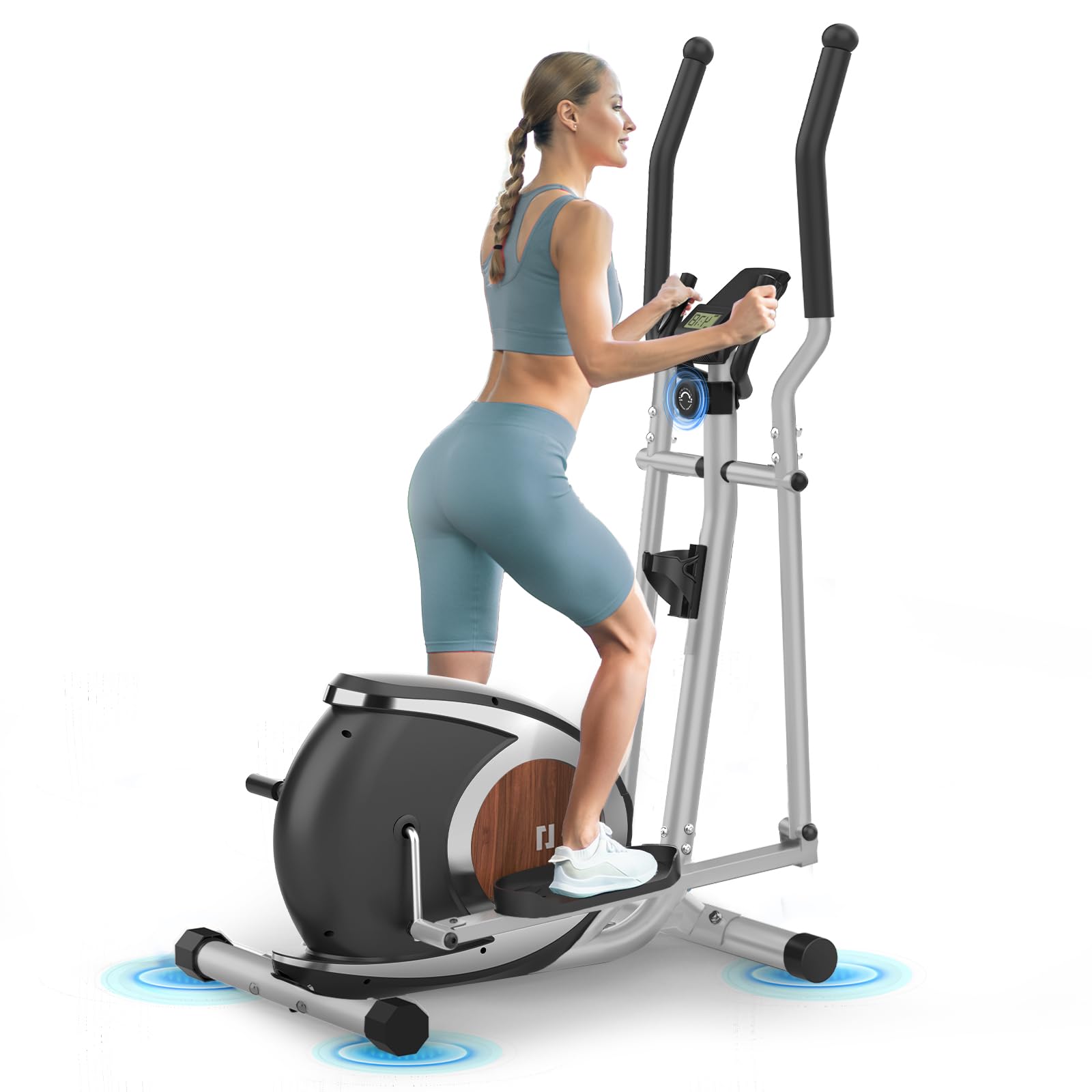
The Neezee AB24001-BK is a magnetic elliptical trainer designed for effective cardiovascular workouts at home. It features a quiet operation and adjustable resistance levels.
Key Features
- Ultra-Quiet Magnetic Resistance: Features a magnetic drive system with a 13.2 lbs flywheel, reducing noise to below 25 dB for smooth and quiet operation.
- 16 Levels of Resistance: Manually adjustable resistance knob allows customization of workout intensity from beginner to advanced levels.
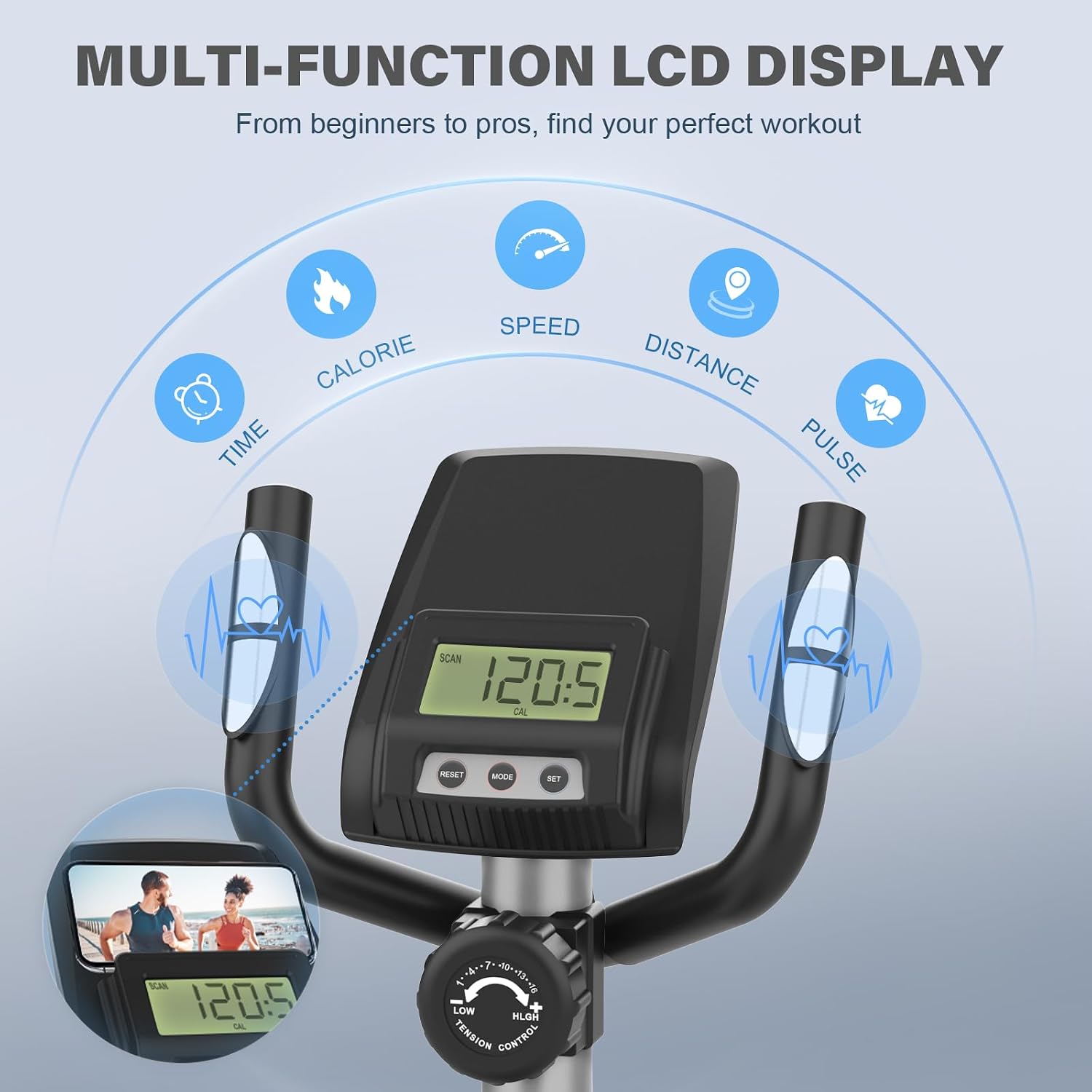
- Multi-Function LCD Display: Tracks time, speed, distance, calories burned, and heart rate. Includes a device holder for convenience.
- Dual Handle Design with Pulse Sensors: Provides a full-body workout with both moving and fixed handles. Fixed handles include integrated pulse sensors for heart rate monitoring.
- Sturdy and Stable Construction: Designed for durability and stability with large, textured anti-slip pedals. Maximum user weight capacity is 120 kg.
- Space-Saving Design: Compact footprint with transport wheels for easy relocation and storage.
Components
- Main Frame
- Handlebars (Moving and Fixed)
- Pedals
- LCD Monitor
- Resistance Adjustment Knob
- Transport Wheels
- Stabilizer Bars
Setup and Assembly
The Neezee Elliptical Trainer requires assembly. Follow the instructions provided in the separate assembly guide included with your product. Ensure all components are present before beginning assembly.
Unpacking
- Carefully remove all components from the packaging.
- Check the contents against the parts list in your assembly guide to ensure all parts are accounted for.
- Keep packaging materials until assembly is complete in case any parts need to be returned.
Assembly Steps
While specific steps are detailed in the included assembly manual, general steps involve:
- Attaching the front and rear stabilizer bars to the main frame.
- Mounting the upright post and handlebars.
- Connecting the pedals and their linkage arms.
- Installing the LCD monitor and connecting any necessary cables.
- Ensuring all bolts and nuts are securely tightened.
Operating Instructions
This section details how to use your Neezee Elliptical Trainer for an effective workout.
Adjusting Resistance
The elliptical features 16 levels of magnetic resistance. To adjust the intensity of your workout:
- Locate the tension control knob, typically positioned below the LCD monitor.
- Turn the knob clockwise to increase resistance (higher numbers for more intensity).
- Turn the knob counter-clockwise to decrease resistance (lower numbers for less intensity).
- Adjust resistance while exercising to find your preferred intensity level.

Using the LCD Monitor
The multi-function LCD display provides real-time workout data:
- Time: Duration of your workout.
- Speed: Current speed in km/h or mph.
- Distance: Total distance covered during the workout.
- Calories: Estimated calories burned.
- Pulse: Your heart rate when holding the pulse sensors.
- Scan: Automatically cycles through all display functions.
Use the 'MODE' button to select a specific display function or 'SCAN' mode. The 'RESET' button clears all workout data.

Heart Rate Monitoring
To monitor your heart rate:
- Grip the fixed handlebars firmly with both hands, ensuring your palms are in full contact with the metal pulse sensors.
- Your heart rate will be displayed on the LCD monitor after a few seconds.
- For accurate readings, maintain a steady grip and avoid excessive movement.
Workout Guidelines
The elliptical trainer provides a low-impact, full-body cardiovascular workout. Engage both your legs and arms by using the moving handlebars for maximum benefit.

Maintenance
Regular maintenance ensures the longevity and optimal performance of your elliptical trainer.
Cleaning
- Wipe down the elliptical with a damp cloth after each use to remove sweat and dust.
- Avoid using abrasive cleaners or solvents, as they may damage the finish or electronic components.
- Keep the LCD monitor dry and clean.
Inspection and Lubrication
- Periodically check all bolts, nuts, and moving parts for tightness. Tighten any loose fasteners.
- Inspect cables and connections for any signs of wear or damage.
- Apply a small amount of silicone-based lubricant to moving joints (e.g., pedal axles, handlebar pivots) if you notice squeaking or stiffness. Do not over-lubricate.
Storage
The Neezee Elliptical Trainer features a compact design and transport wheels for easy storage.
- To move the elliptical, tilt it forward onto its transport wheels located at the front stabilizer.
- Roll the elliptical to your desired storage location.
- Store in a dry, cool place away from direct sunlight and extreme temperatures.

Troubleshooting
This section addresses common issues you might encounter with your elliptical trainer.
| Problem | Possible Cause | Solution |
|---|---|---|
| Elliptical is noisy or squeaks. | Loose bolts; lack of lubrication; worn parts. | Check and tighten all assembly bolts. Apply silicone lubricant to moving joints. If noise persists, contact customer service. |
| Resistance is too easy or too hard. | Resistance knob not adjusted correctly; internal mechanism issue. | Turn the resistance knob to adjust. Ensure the resistance cable is properly connected (refer to assembly guide). |
| LCD monitor not displaying data. | Batteries low or incorrectly installed; loose sensor cable connection. | Replace batteries in the monitor. Check all sensor cable connections to ensure they are secure. |
| Heart rate reading is inaccurate or not displayed. | Hands not fully contacting sensors; dry hands; loose sensor connection. | Ensure both palms are firmly and fully on the pulse sensors. Moisten hands slightly if too dry. Check sensor cable connections. |
Specifications
Detailed specifications for the Neezee Magnetic Elliptical Trainer AB24001-BK.
| Feature | Specification |
|---|---|
| Model Number | AB24001-BK |
| Dimensions (L x W x H) | 160 x 54 x 98 cm (63 x 21.3 x 38.6 inches) |
| Material | Aluminum |
| Resistance Mechanism | Magnetic |
| Number of Resistance Levels | 16 |
| Maximum User Weight | 120 kg (264 lbs) |
| Flywheel Weight | 13.2 lbs (approx. 6 kg) |
| Included Items | Cross Trainer |

Warranty and Support
Warranty Information
The Neezee Magnetic Elliptical Trainer comes with a 12-month parts replacement warranty from the date of purchase. This warranty covers manufacturing defects and material faults under normal use. It does not cover damage caused by misuse, accident, unauthorized modification, or failure to follow instructions in this manual.
Customer Service
For any questions, concerns, or warranty claims, please contact Neezee customer service. Our team is available 24/7 to provide assistance.
Please have your model number (AB24001-BK) and purchase information ready when contacting support.