
Important Safety Information
Please read all safety warnings and instructions carefully before operating the ICARE Ozone Generator. Failure to follow these instructions may result in electric shock, fire, or serious injury.
- Occupancy Warning: This ozone generator produces a strong ozone scent. Ensure no people or pets are present in the treatment area during operation. Ozone can be harmful if inhaled directly.
- Ventilation: After a cleaning cycle, wait at least 30 minutes before re-entering the room. Thoroughly ventilate the area by opening windows and doors to allow any residual ozone to dissipate. The ozone smell will naturally fade over time.
- Placement: Place the unit on a stable, flat surface. Do not block air inlets or outlets.
- Power Supply: Use only the provided power cord and connect to a grounded outlet. Do not operate with a damaged cord or plug.
- Water Contact: Do not immerse the main unit in water. Only the air stone and tubing are designed for water contact during water purification mode.
- Children and Pets: Keep the device out of reach of children and pets.

A 'No Entry' sign is included to remind users not to enter the treated area during operation.
Product Overview
The ICARE Ozone Generator is a versatile 2-in-1 smart multifunction device designed for both air purification and water treatment. It effectively eliminates stubborn odors and purifies liquids, providing a cleaner environment.

The ICARE Ozone Generator, showcasing its compact design and accessories for both air and water treatment.

The intelligent LCD screen provides intuitive touch control for time and mode adjustments, along with a shutdown button.

This diagram illustrates the dual functionality of the ozone generator, capable of producing up to 60,000 mg/h for air purification and 1,000 mg/h for water purification.
Key Features
- Intuitive Touch Control Panel: Easily set deodorization time with a modern touchscreen interface. Features a 5-second delay and 10-second countdown before operation begins.
- Upgraded Metal Ozone Plates: More energy-efficient and durable than traditional ceramic plates, offering over 60,000 hours of continuous ozone production.
- High Capacity Output: Powerful 60,000 mg/h output for air purification, effectively covering up to 3,200 sq. ft. (300 m²).
- High-Speed Fan: A 2800 RPM fan ensures rapid ozone diffusion for optimal performance in air mode.
- "Air" Mode - High-Efficiency Purification: Achieves 99% purification efficiency, targeting smoke, pet odors, food smells, lingering tenant odors, and formaldehyde. Suitable for offices, cars, apartments, bathrooms, kitchens, basements, hotels, schools, and farms.
- "Water" Mode - Multi-Purpose Cleaning: Produces 1,000 mg/hour of ozone for infusing into liquids or small spaces. Includes a high-power air pump and enlarged air stone for efficient water purification in bathtubs, spas, and for cleaning fruits and vegetables.
- Auto Timer & Smart Display: Built-in timer allows setting operating times up to 2 hours. The display shows real-time room temperature and humidity.
- Low Noise Operation: Operates at less than 45 dB for quieter use.
- Filter-Free Design: Utilizes high-voltage ionization to produce ozone, eliminating the need for filter replacements and ensuring no secondary pollution as ozone reverts to oxygen.
- Durable & Portable Design: Constructed with a sturdy aluminum alloy housing, featuring a reinforced metal handle for easy portability and an independent ozone module for extended lifespan.
- Replaceable Fuse: Ensures long-term reliability and easy maintenance.

A comparison highlighting the advanced features of the ICARE Ozone Generator, such as its LCD screen, metal filter plates, and extended service life.
Package Contents
Upon opening your ICARE Ozone Generator package, please verify that all the following items are included:
- ICARE Ozone Generator Unit (Model: IC94)
- Power Cord
- Silicone Hose for Water Mode
- Two Air Stones
- User Instructions Manual
- "No Entry" Door Hanger Sign
- Thank You Card
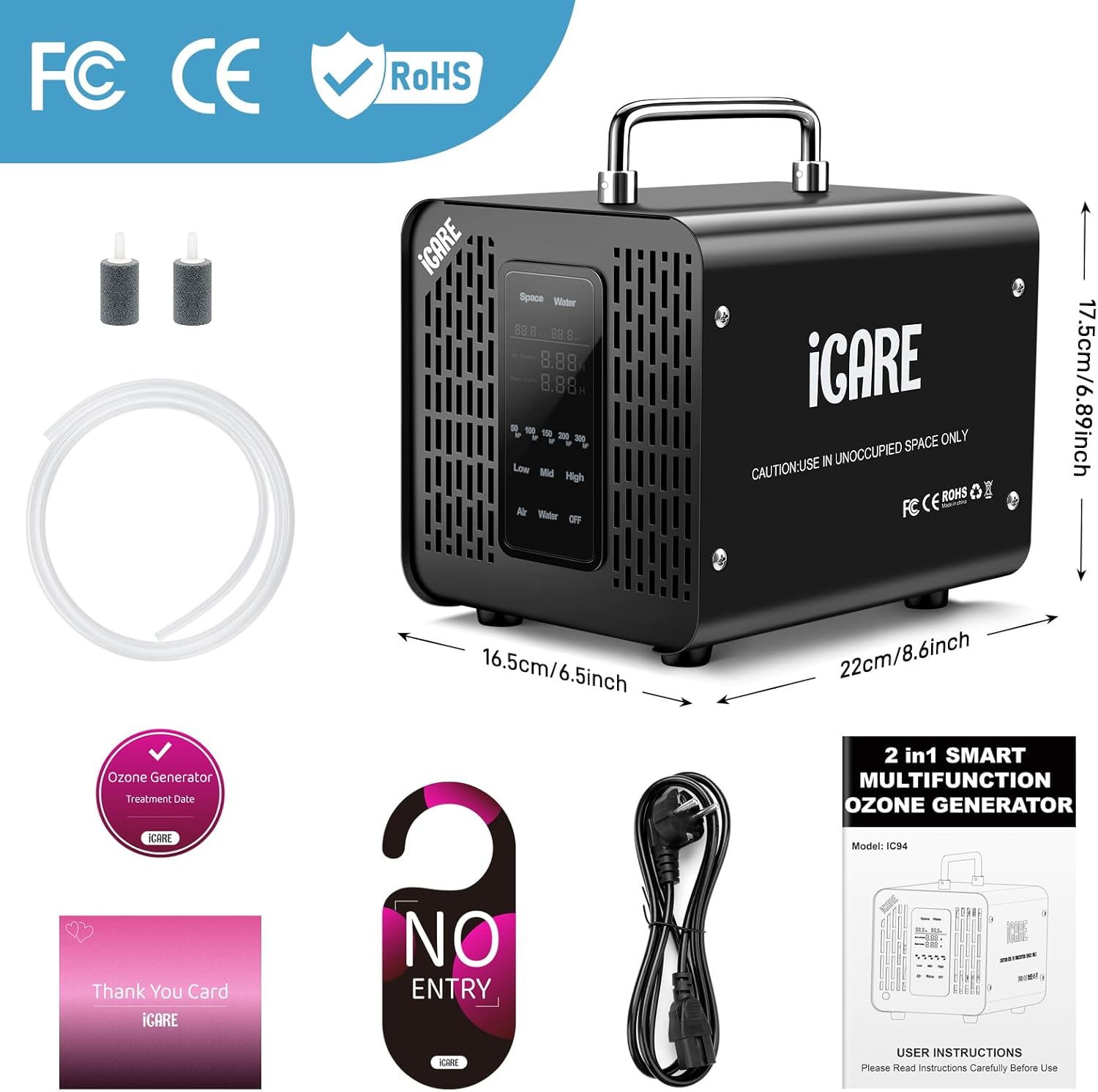
All items included in the ICARE Ozone Generator package, along with the unit's dimensions.
Specifications
| Feature | Specification |
|---|---|
| Model Number | IC94 |
| Product Dimensions | 10.3"D x 8.59"W x 7.2"H (26.16 x 21.82 x 18.29 cm) |
| Weight | 2.2 Pounds (1 kg) |
| Air Ozone Output | 60,000 mg/h |
| Water Ozone Output | 1,000 mg/h |
| Power Consumption | 110 watts |
| Noise Level | < 45 dB |
| Max Air Treatment Area | 3,200 sq. ft. (300 m²) |
| Ozone Plate Lifespan | Over 60,000 hours |
| Timer Settings | Up to 2 hours (120 minutes) |
| Certifications | FCC Certified, CE, RoHS |
Setup
Before operating the ICARE Ozone Generator, ensure you have read and understood all safety warnings. Follow these steps for initial setup:
- Unpack the Unit: Carefully remove the ozone generator and all accessories from its packaging.
- Inspect for Damage: Check the unit and power cord for any visible damage. Do not use if damaged.
- Placement: Place the unit on a firm, level surface in the area you wish to treat. Ensure there is adequate ventilation around the unit and that air inlets/outlets are not obstructed.
- Connect Power: Plug the power cord into the unit's power inlet, then plug the other end into a standard grounded electrical outlet.

Ensure the power supply is securely connected to the unit.
Operating Instructions - Air Mode
Air mode is used for deodorizing and purifying air in unoccupied spaces. Always ensure no people, pets, or plants are present in the area during operation.
- Prepare the Area: Close all windows and doors in the room to be treated. Remove any people, pets, or plants from the area.
- Connect Power: Ensure the unit is plugged into a grounded electrical outlet.
- Select Air Mode: On the touch control panel, press the "Air" button.
- Set Runtime: Use the touch controls to set the desired operating time. Refer to the recommended treatment times below. The unit will start with a 5-second delay and a 10-second countdown (with