
B0DR16K6S2
Smart 65L Automatic Self-Cleaning Cat Litter Box User Manual
Model: B0DR16K6S2
Introduction
This manual provides comprehensive instructions for the setup, operation, and maintenance of your Smart 65L Automatic Self-Cleaning Cat Litter Box. Designed for convenience and efficiency, this advanced pet toilet offers a clean and odor-free environment for your feline companion while simplifying litter management for you. Please read this manual thoroughly before first use to ensure proper function and longevity of your device.

Figure 1: Smart 65L Automatic Self-Cleaning Cat Litter Box - Overall View
This image displays the main unit of the Smart 65L Automatic Self-Cleaning Cat Litter Box. It features a sleek, spherical design in white and grey, with a large opening for cat entry. The control panel is visible at the base of the unit.
Setup and Installation
Follow these steps to set up your automatic litter box for the first time.
- Unpacking: Carefully remove all components from the packaging. Ensure all parts are present: the main unit, power adapter, and any included accessories.
- Placement: Choose a flat, stable surface in a well-ventilated area, away from direct sunlight and moisture. Ensure there is enough space around the unit for proper operation and maintenance.
- Power Connection: Connect the power adapter to the designated port on the back of the litter box, then plug it into a standard electrical outlet. The unit will power on and perform an initial self-check.
- Fill with Litter: Open the top cover or access panel and fill the inner drum with clumping cat litter. Do not exceed the maximum fill line indicated inside the drum. Approximately 4-6 liters of litter are typically required.
- Initial Calibration: After filling with litter, the unit may perform an initial calibration cycle to detect the litter level and prepare for operation. Allow this process to complete.

Figure 2: Front View and Control Panel
This image provides a clear view of the front of the litter box, highlighting the cat entry point and the integrated control panel at the base. The control panel features various buttons for manual operation and status indicators.
Operating Instructions
The Smart 65L Automatic Self-Cleaning Cat Litter Box offers both automatic and manual operation modes, along with smart app control.
Automatic Cleaning Cycle
The unit is designed to automatically detect when your cat has used the litter box and initiate a cleaning cycle after a preset delay. This delay allows the litter to clump properly before sifting. The waste is then deposited into a sealed waste bin located within the unit.
Manual Operation
The control panel at the front of the unit allows for manual control of various functions:
- Clean Button: Press to initiate an immediate cleaning cycle.
- Empty Button: Press to empty all litter from the drum into the waste bin, useful for full litter changes.
- Reset Button: Used for calibration or resetting the unit after maintenance.
- Status Indicators: Lights on the panel indicate power, cleaning status, waste bin full, and other alerts.
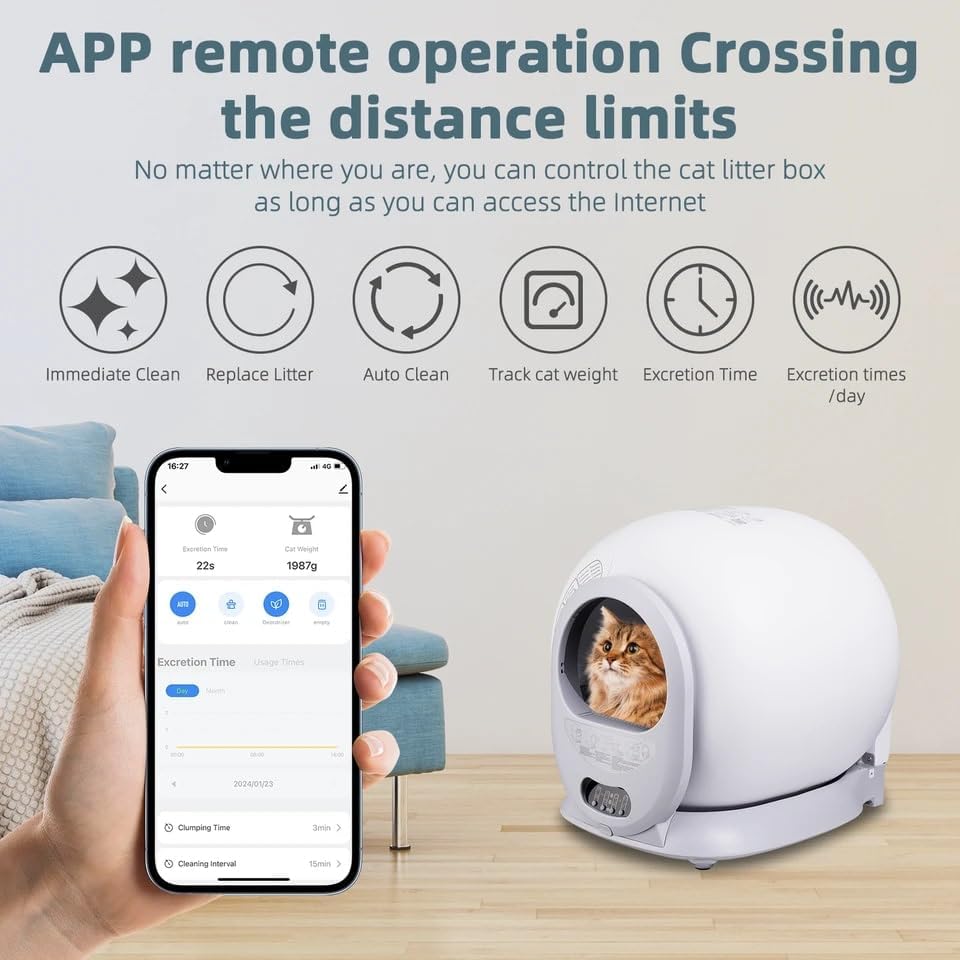
Figure 3: Multi-function Buttons and Features
This image highlights the multi-function button panel, showing icons for various operations such as cleaning, emptying, and status. It also illustrates the one-key disassembly for washing and the method for replacing the waste bag, emphasizing ease of use and maintenance.
Smart App Control
For enhanced control and monitoring, download the dedicated mobile application. The app allows you to:
- Initiate cleaning cycles remotely.
- Schedule automatic cleaning times.
- Monitor litter box usage statistics (e.g., excretion time, cat weight).
- Receive notifications for waste bin full or other alerts.
- Adjust settings and preferences.
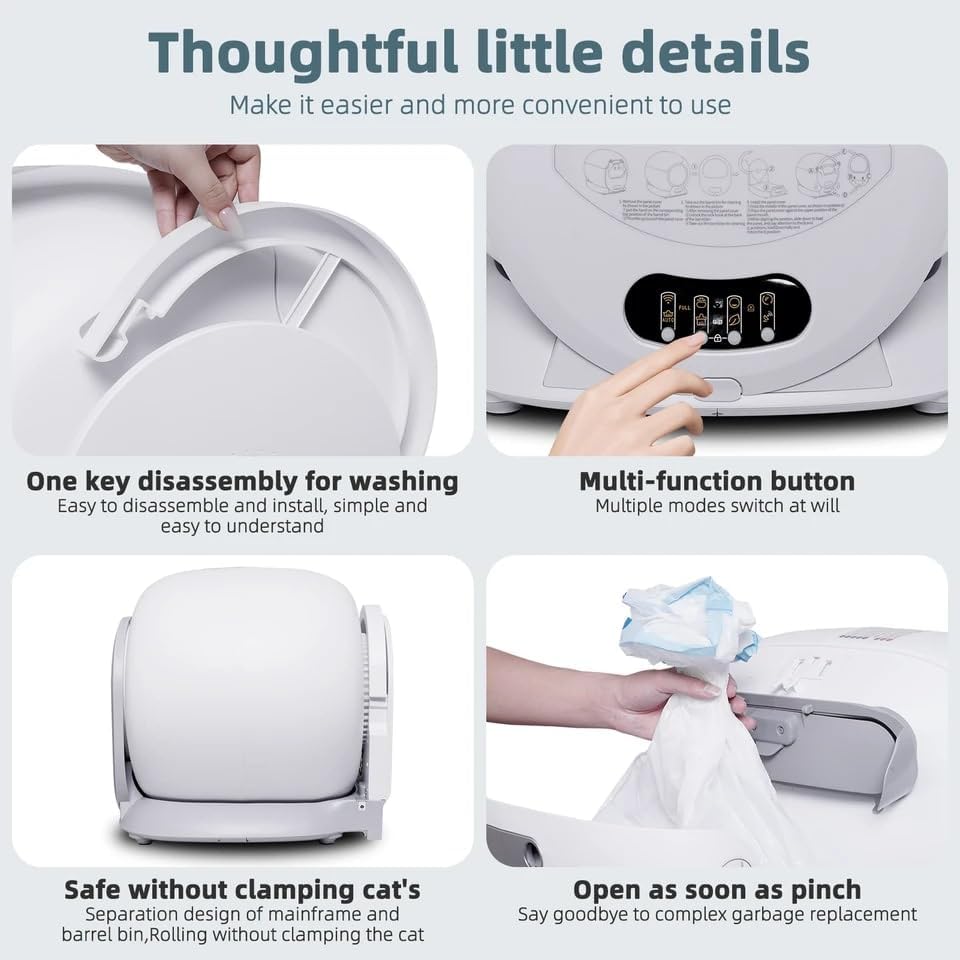
Figure 4: App Remote Operation Interface
This image demonstrates the mobile application's interface, showing various control options and data tracking features available to the user. The app allows for remote management and monitoring of the litter box, enhancing convenience.
Maintenance
Regular maintenance ensures optimal performance and hygiene of your litter box.
Emptying the Waste Bin
The waste bin should be emptied regularly, typically when the "Waste Bin Full" indicator illuminates or as needed. To empty:
- Ensure the unit is in a standby state or powered off.
- Locate the waste bin access panel, usually at the side or front base of the unit.
- Pull out the waste bin. Dispose of the contents and replace the liner bag.
- Slide the waste bin back into place until it clicks securely.
Cleaning the Unit
For thorough cleaning, the inner drum and other components can be disassembled. Refer to Figure 3 for visual guidance on disassembly.
- Daily/Weekly: Wipe down the exterior of the unit with a damp cloth. Clean the entrance area and any visible soiled spots.
- Monthly/As Needed: For deep cleaning, power off and unplug the unit. Disassemble the inner drum and other removable parts. Wash these parts with mild soap and water. Rinse thoroughly and ensure all components are completely dry before reassembling. Do not submerge the main unit or electrical components in water.
- Litter Change: It is recommended to completely change the litter and clean the drum every 2-4 weeks, depending on usage. Use the "Empty" function to remove old litter before cleaning.
Troubleshooting
If you encounter issues with your Smart 65L Automatic Self-Cleaning Cat Litter Box, refer to the following common problems and solutions.
| Problem | Possible Cause | Solution |
|---|---|---|
| Unit not powering on | Power cord not connected; outlet issue | Ensure power cord is securely plugged into the unit and a working outlet. Try a different outlet. |
| Cleaning cycle not starting automatically | Sensor obstructed; litter level too high/low; cat not detected | Check sensors for obstructions and clean if necessary. Adjust litter level. Ensure cat has fully exited the unit. |
| Waste bin full indicator remains on after emptying | Waste bin not properly seated; sensor issue | Ensure the waste bin is fully inserted and clicked into place. Clean the waste bin sensor if accessible. |
| Unusual noises during operation | Obstruction in drum; worn parts | Power off and inspect the drum for any foreign objects. If noises persist, contact customer support. |
If the problem persists after attempting these solutions, please contact customer support for further assistance.
Specifications
Key technical specifications for the Smart 65L Automatic Self-Cleaning Cat Litter Box:
- Capacity: 65 Liters (suitable for 1-8kg cats)
- Dimensions (LxWxH): 18.89 x 5.39 x 19.68 inches (48 x 13.7 x 50 cm)
- Item Weight: 8.8 Pounds (4 kg)
- Material: High-quality Plastic
- Color: White
- Operation: Automatic, Manual, Smart App Control
- Waste Bin Capacity: Approximately 9 Liters (up to 15 days for one cat)

Figure 5: Volume Ratio and Capacity Overview
This infographic visually represents the compact design and large capacity of the litter box, detailing its 65L bucket bin space suitable for cats up to 8kg, a 9L waste bin capacity, and its efficient use of floor area (0.13m³).
Warranty and Support
For information regarding the product warranty, please refer to the warranty card included with your purchase or contact the seller directly. Warranty terms and conditions may vary.
If you require technical support, have questions about operation, or need assistance with troubleshooting beyond what is covered in this manual, please contact the manufacturer or the retailer from whom you purchased the product. Have your model number (B0DR16K6S2) and purchase date ready when contacting support.
no relevant documents