
1. Introduction
Thank you for choosing the T12 Touch-Control Clip-on Wireless Bluetooth Headset. This manual provides essential information for the proper use, setup, and maintenance of your new headset. Designed for sports and gaming, the T12 headset offers a seamless wireless audio experience with its compact design, digital battery display, and touch controls. Its waterproof and sweatproof construction ensures durability during active use.
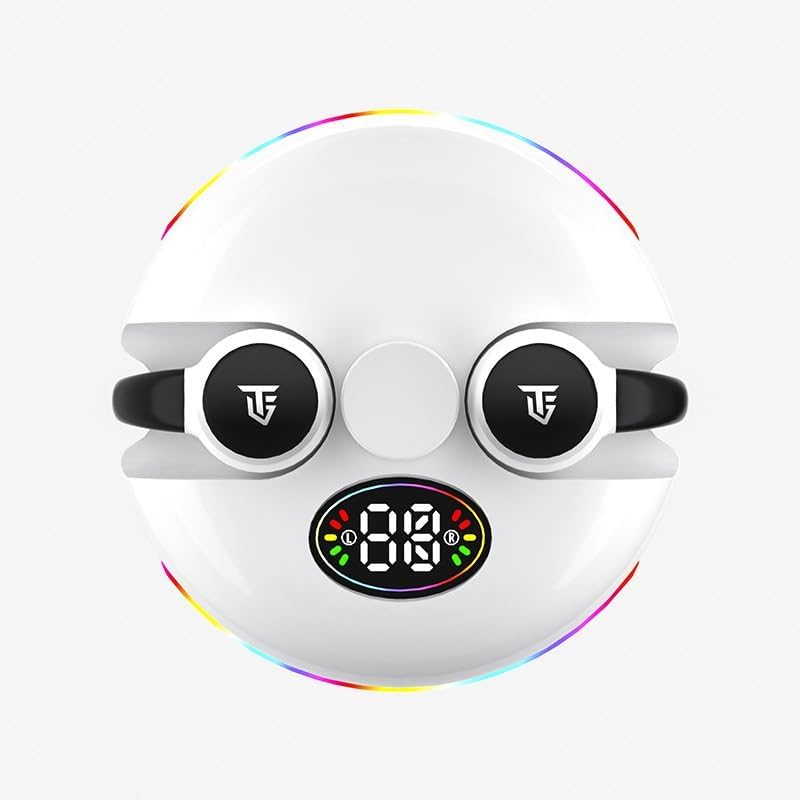
Image: Front view of the T12 headset, showcasing its digital display and clip-on design.
What's in the Box:
- T12 Wireless Bluetooth Earbuds (2)
- Charging Case (integrated with earbuds)
- User Manual
Key Features:
- Wireless Bluetooth 5.3 Connectivity
- Touch-Control Interface
- Digital Battery Display
- Waterproof and Sweatproof Design
- Long Battery Life
- Active Noise Cancellation
- Ergonomic Clip-on Design

Image: Close-up view illustrating the ergonomic clip-on design of the T12 headset for comfortable and secure fit.
2. Setup
2.1 Charging the Headset
Before first use, fully charge the T12 headset. Place the earbuds into the charging case. Connect the charging case to a USB power source using a compatible cable (not included). The digital display on the case will indicate the charging status and battery level. A full charge takes approximately 2 hours.

Image: Illustration depicting the long battery life of the T12 headset, showing play time, endurance time, and standby time.
2.2 Pairing with a Device
- Ensure the earbuds are charged and inside the charging case.
- Open the charging case. The earbuds will automatically enter pairing mode, indicated by a flashing light on the earbuds or case.
- On your device (smartphone, tablet, laptop), enable Bluetooth.
- Search for available Bluetooth devices. Select "T12" or "S190" from the list.
- Once connected, the indicator light on the earbuds will stop flashing, and your device will confirm the connection.
The T12 headset is widely compatible with Android, Apple iOS, HarmonyOS, and Windows systems, as well as other Bluetooth-enabled devices.

Image: The T12 headset shown alongside logos for Android, iOS, HarmonyOS, and Windows, highlighting its broad compatibility.
3. Operating Instructions
3.1 Touch Controls
The T12 headset features intuitive touch controls on each earbud.
| Action | Function |
|---|---|
| Single Tap (Left/Right) | Play/Pause Music, Answer/End Call |
| Double Tap (Right) | Next Track |
| Double Tap (Left) | Previous Track |
| Triple Tap (Left/Right) | Activate Voice Assistant |
| Long Press (2 seconds) | Reject Call |
| Long Press (3 seconds) | Toggle Gaming/Music Mode |
3.2 Gaming Mode
The T12 headset features a dedicated gaming mode to minimize audio latency, providing a more synchronized sound and picture experience. To activate or deactivate gaming mode, long press the touch area for approximately 3 seconds.

Image: Visual representation of the T12 headset enhancing an e-sports level game experience with sound and picture synchronization.
4. Maintenance
4.1 Cleaning
Regular cleaning helps maintain the performance and longevity of your headset.
- Use a soft, dry, lint-free cloth to wipe the earbuds and charging case.
- Do not use abrasive cleaners, alcohol, or chemical solvents.
- Gently clean the charging contacts on both the earbuds and the case with a dry cotton swab if necessary.
4.2 Storage
When not in use, store the headset in its charging case to protect it from dust and damage. Store in a cool, dry place away from direct sunlight and extreme temperatures.
4.3 Water Resistance
The T12 headset is designed to be waterproof and sweatproof, making it suitable for sports and active use. However, it is not designed for submersion in water. Avoid prolonged exposure to water and ensure the earbuds are dry before placing them back in the charging case to prevent damage.
5. Troubleshooting
If you encounter any issues with your T12 headset, please refer to the following common solutions:
- Headset not pairing:
- Ensure the earbuds are charged.
- Turn off and on Bluetooth on your device.
- Place earbuds back in the case, close, then reopen to re-enter pairing mode.
- Forget "T12" or "S190" from your device's Bluetooth list and try pairing again.
- No sound from one earbud:
- Ensure both earbuds are charged.
- Try placing both earbuds back in the case and taking them out again.
- Restart your connected device.
- Charging issues:
- Check the charging cable and power adapter.
- Ensure the charging contacts on the earbuds and case are clean and free of debris.
- Touch controls not responding:
- Ensure your fingers are clean and dry.
- Restart the earbuds by placing them in the case and taking them out.
6. Specifications
| Feature | Detail |
|---|---|
| Model Name | S190 |
| Connectivity Technology | Bluetooth 5.3 |
| Noise Control | Active Noise Cancellation |
| Control Type | Touch Control |
| Ear Placement | In Ear |
| Form Factor | In Ear |
| Material | Plastic |
| Water Resistance Level | Waterproof |
| Charging Time | Approx. 2 Hours |
| Play Time | 5-6 Hours (approx.) |
| Endurance Time (with case) | 48 Hours (approx.) |
| Standby Time | 500 Hours (approx.) |
| Audio Driver Type | Dynamic Driver |
| Impedance | 140 Ohm |
| Manufacturer | Guangzhou Changhong Huixin Technology Co., Ltd. |
7. Warranty and Support
For warranty information and customer support, please refer to the terms and conditions provided by your retailer or contact the manufacturer directly. Keep your proof of purchase for any warranty claims.
Manufacturer: Guangzhou Changhong Huixin Technology Co., Ltd.


