1. Introduction
This manual provides detailed instructions for the installation, operation, and maintenance of the PDN5AI825H-GR 4K/8MP PTZ Camera. Please read this manual thoroughly before using the product to ensure proper and safe operation.
The PDN5AI825H-GR is a high-performance 4K / 8MP PTZ (Pan-Tilt-Zoom) camera designed for dynamic surveillance. It features a 20X optical zoom lens, True WDR, Infrared (IR) night vision, and Starlight technology for superior image quality in various lighting conditions. Advanced Video Content Analysis (VCA) capabilities, including Face Detection and Human/Vehicle Classification, enhance its monitoring functions. Its IP67-rated housing ensures durability for both indoor and outdoor use. The camera supports Power over Ethernet (POE), SD card local storage, and multiple I/O options.
2. Safety Precautions
- Power Supply: Use only the specified power adapter. Ensure the power source is stable and meets the camera's requirements.
- Installation Environment: Avoid installing the camera in extremely hot, cold, dusty, or humid environments. Ensure proper ventilation.
- Handling: Do not drop or subject the camera to strong shocks. Avoid touching the lens directly.
- Cleaning: Use a soft, dry cloth for cleaning. Do not use strong detergents or abrasive materials.
- Disassembly: Do not attempt to disassemble or modify the camera. Refer all servicing to qualified personnel.
3. Product Components
The package typically includes the following items:
- PDN5AI825H-GR PTZ Camera
- Mounting Bracket (if included with specific kit)
- Mounting Screws and Wall Plugs
- Waterproof Connector Kit
- Quick Start Guide
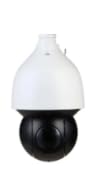
Figure 3.1: Front view of the PDN5AI825H-GR PTZ Camera. This image shows the dome-shaped camera with its white upper housing and black lower lens assembly, designed for versatile surveillance applications.
4. Setup and Installation
4.1 Mounting Considerations
The PDN5AI825H-GR camera supports wall mount installation. Choose a mounting location that provides an unobstructed view of the desired surveillance area and is within reach of power and network connections.
- Ensure the mounting surface is strong enough to support the camera's weight.
- Avoid direct sunlight or strong light sources pointing into the lens, which can cause glare.
- For outdoor installations, ensure proper waterproofing of all connections.
4.2 Physical Installation Steps
- Prepare the Mounting Surface: Use the provided mounting template (if applicable) to mark drill holes on the wall.
- Drill Holes: Drill holes according to the marked positions and insert wall plugs.
- Attach Mounting Bracket: Secure the mounting bracket to the wall using the provided screws.
- Connect Cables: Connect the Ethernet cable (for POE) and any other necessary I/O cables (Alarm In/Out, Audio In/Out) to the camera. Ensure waterproof connections for outdoor use.
- Mount the Camera: Attach the camera securely to the mounting bracket.
- Adjust Angle: Loosen the adjustment screws to set the desired pan, tilt, and zoom angle, then tighten them to secure the camera's position.
4.3 Network Connection
The PDN5AI825H-GR supports Power over Ethernet (POE). Connect the camera to a POE-enabled switch or NVR using an Ethernet cable. If POE is not available, use a separate 12V DC power adapter (not included) and connect it to the camera's power input.
- Ensure your network has DHCP enabled or assign a static IP address to the camera.
- Use the manufacturer's provided software or a web browser to access the camera's web interface for initial configuration.
5. Operating Instructions
5.1 Accessing the Camera
Once connected to the network, you can access the camera's web interface via a web browser (e.g., Chrome, Firefox). Enter the camera's IP address in the browser's address bar. You will be prompted to enter the username and password (default credentials are often provided in the Quick Start Guide or on the camera's label).
5.2 Pan, Tilt, and Zoom (PTZ) Control
From the live view interface, you can control the camera's PTZ functions:
- Pan: Rotate the camera horizontally (left/right).
- Tilt: Adjust the camera vertically (up/down).
- Zoom: Adjust the optical zoom to magnify or de-magnify the view. The PDN5AI825H-GR features a 20X optical zoom.
- Focus: The camera typically features auto-focus, but manual focus may be available for fine-tuning.
5.3 Video Content Analysis (VCA)
The camera supports various VCA features to enhance surveillance:
- Face Detection: Detects human faces within the camera's field of view.
- Human/Vehicle Classification: Distinguishes between human and vehicle targets, reducing false alarms.
- Basic VCA Features: Includes functions like line crossing detection, intrusion detection, and object removal/abandonment detection.
Configure these features through the camera's web interface under the "Event" or "Smart Analysis" settings.
5.4 Recording and Storage
The camera supports local storage via an SD card (up to a specified capacity, refer to specifications for details). You can configure recording schedules, motion-triggered recording, or continuous recording through the web interface. Alternatively, connect the camera to a compatible Network Video Recorder (NVR) for centralized recording and management.
6. Maintenance
- Lens Cleaning: Gently wipe the lens with a soft, clean cloth. For stubborn dirt, use a lens cleaning solution specifically designed for optical lenses.
- Housing Cleaning: Clean the camera housing with a damp cloth. Do not use abrasive cleaners or solvents.
- Firmware Updates: Periodically check the manufacturer's website for firmware updates. Updating firmware can improve performance, add new features, and fix bugs. Follow the update instructions carefully.
- Cable Inspection: Regularly inspect all cables for signs of wear, damage, or corrosion, especially for outdoor installations.
7. Troubleshooting
| Problem | Possible Cause | Solution |
|---|---|---|
| No image/power | No power supply; faulty cable; network issue. | Check power connection; verify POE functionality; inspect Ethernet cable. |
| Image blurry/unclear | Lens dirty; focus issue; lighting conditions. | Clean the lens; adjust focus (if manual); ensure adequate lighting. |
| Cannot access web interface | Incorrect IP address; network connectivity issue; firewall. | Verify IP address; check network cable; temporarily disable firewall; reset camera to factory defaults if necessary. |
| PTZ control unresponsive | Network latency; software glitch; motor issue. | Check network connection; restart camera; update firmware. |
8. Specifications
| Feature | Description |
|---|---|
| Model | PDN5AI825H-GR |
| Resolution | 4K / 8MP (3840 x 2160) |
| Optical Zoom | 20X |
| Night Vision | Infrared (IR) with Starlight technology |
| Dynamic Range | True WDR (Wide Dynamic Range) |
| Video Compression | MPEG-4 |
| Connectivity | Ethernet (POE supported) |
| Storage | SD Card Slot |
| I/O Options | Alarm In/Out, Audio In/Out |
| Ingress Protection | IP67-rated |
| Dimensions (L x W x H) | 9 x 9 x 10 inches |
| Power Source | Corded Electric (POE) |
| Indoor/Outdoor Usage | Outdoor, Indoor |
9. Warranty and Support
For warranty information and technical support, please refer to the documentation provided with your purchase or visit the official website of the manufacturer, ENS. Keep your purchase receipt as proof of purchase for warranty claims.
Manufacturer: ENS
Model Number: PDN5AI825H-GR
Date First Available: December 19, 2024


