Introduction
This user manual provides essential information for the safe and effective use of your Silengold 65W USB-C Charger. This power supply adapter cord is specifically designed for compatibility with Lenovo ThinkPad T490 20N2 and 20N3 series laptops, as well as other compatible USB-C interface devices. Please read this manual thoroughly before using the product.
Product Features
- Compatibility: Designed for Lenovo ThinkPad T490 20N2 20N3 Laptops and other USB-C compatible devices.
- Power Output: Input: 100-240V 50-60Hz; Output: 20V 3.25A (65W Max).
- Connector Type: Standard USB-C.
- Safety Features: Built-in E-Marker chip for safe and fast charging, with multi-protection against short-circuit, over-temperature, over-voltage, over-charge, and over-current.
- Package Contents: Includes 1 x 65 Watt Charger and 1 x 3 Prong Power Cord.

Image: The Silengold 65W USB-C charger unit with its detachable 3-prong power cord and the integrated USB-C cable.

Image: Diagram illustrating the multi-protection features of the charger, including short-circuit, over-temperature, over-voltage, over-charge, and over-current protection, highlighting the internal power delivery chip.
Setup Instructions
- Unpack: Carefully remove the charger unit and the 3-prong power cord from the packaging.
- Connect Power Cord: Insert the 3-prong end of the power cord firmly into the corresponding receptacle on the charger unit.
- Plug into Outlet: Insert the other end of the 3-prong power cord into a standard wall electrical outlet (AC 100-240V).
- Connect to Device: Plug the USB-C connector from the charger into the USB-C charging port of your compatible laptop or device. Ensure the connection is secure.

Image: A visual guide showing the correct USB-C/Type-C port for connection (checked) versus an incompatible square charging port (crossed out).
Operating Instructions
Once connected, the charger will automatically begin supplying power to your device. The charger is designed for efficient and fast charging, adapting its output based on the device's power requirements within its 65W maximum capacity.
- The charger supports various power delivery profiles, including 5V=3A, 9V=3A, 15V=3A, and 20V=3.25A, to optimize charging for different USB-C devices.
- An E-Marker chip is integrated into the USB-C cable to ensure safe and efficient power delivery, communicating with the connected device to regulate voltage and current.

Image: The USB-C charger connected to a laptop, with an overlay showing the various power delivery outputs (5V=3A, 9V=3A, 15V=3A, 20V=3.25A) indicating its 65W max power capability.

Image: A cutaway view of the USB-C cable, highlighting its internal components including the conductor, braided shielding, jacket, and the embedded E-Marker chip for premium quality and safe charging.
Maintenance and Care
- Cleaning: Disconnect the charger from both the power outlet and your device before cleaning. Use a soft, dry cloth to wipe the surface. Do not use liquid cleaners or aerosols.
- Storage: When not in use, store the charger in a cool, dry place away from direct sunlight and extreme temperatures. Avoid tightly coiling the cable to prevent damage.
- Handling: Do not drop, disassemble, or attempt to repair the charger yourself. This can void the warranty and pose safety risks.
- Ventilation: Ensure the charger has adequate ventilation during use. Do not cover it with cloths or place it in enclosed spaces that could trap heat.
Troubleshooting
| Problem | Possible Cause | Solution |
|---|---|---|
| Charger not powering device. | Loose connection, faulty outlet, incompatible device. | Ensure all connections are secure. Try a different electrical outlet. Verify device compatibility with USB-C charging. |
| Slow charging. | Device drawing less power, background processes, cable issue. | Close unnecessary applications on your device. Ensure the USB-C cable is not damaged. Confirm the device supports 65W charging. |
| Charger feels warm. | Normal operation, poor ventilation. | It is normal for chargers to feel warm during operation. Ensure adequate ventilation around the charger. If it becomes excessively hot, disconnect immediately and contact support. |
Specifications
| Attribute | Detail |
|---|---|
| Model Number | AD065W1 |
| Input Voltage | 100-240V ~ 50-60Hz |
| Output Power | 65W Max (20V 3.25A) |
| Connector Type | USB Type-C |
| Compatible Devices | Lenovo ThinkPad T490 20N2 20N3 Laptop, other USB-C Laptops (e.g., Lenovo YOGA series, ThinkPad series (2018-new), Lenovo Chromebook, HP Spectre 13, Dell XPS (12in/13in), MacBook Pro (2015-2016 12in/13in)) |
| Special Features | Automatic Off, Fast Charging, Multi-Protection (Short-Circuit, Over-Temp, Over-Voltage, Over-Charge, Over-Current) |
| Color | Black |
| Item Weight | 8 ounces |
| Package Dimensions | 8 x 5 x 0.5 inches |
| Manufacturer | Dongguan Speed Ronda Electronic Technology Co Ltd |
| Date First Available | December 19, 2024 |
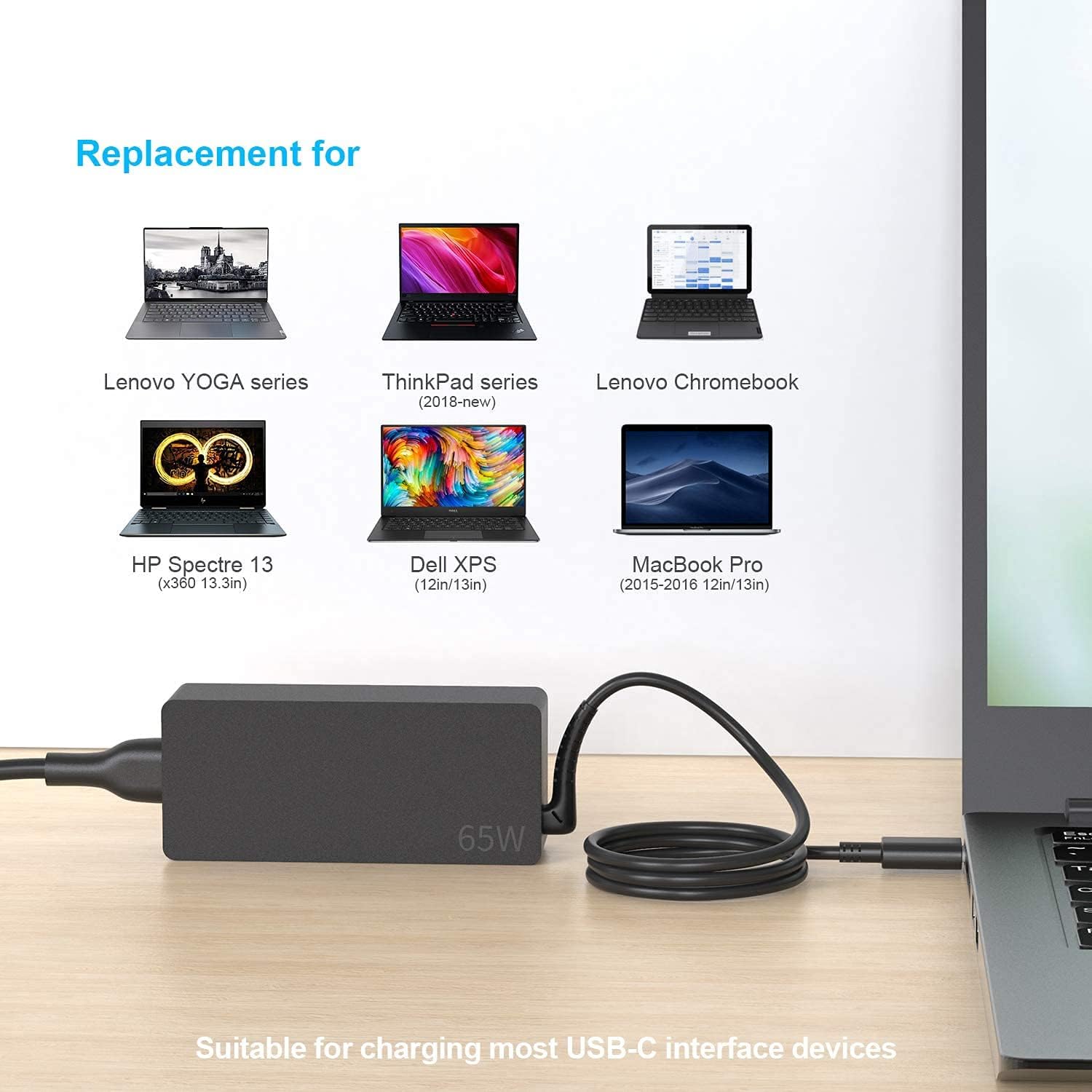
Image: A visual representation of various laptop models compatible with the Silengold 65W USB-C charger, including Lenovo YOGA, ThinkPad, Chromebook, HP Spectre, Dell XPS, and MacBook Pro.
Warranty and Support
This Silengold 65W USB-C Charger comes with a 12 Months Warranty from the date of purchase. This warranty covers manufacturing defects and issues arising from normal use.
For warranty claims, technical support, or any inquiries regarding your product, please contact Silengold customer service through the retailer where you purchased the product or refer to the contact information provided on the product packaging.
Please retain your proof of purchase for warranty validation.