
1. Product Overview
The MISECU 4G LTE Cellular Security Camera CQ1H is an outdoor surveillance solution designed for locations without Wi-Fi or wired power. It features 2.5K UHD resolution, 360° pan-tilt-zoom (PTZ) capabilities, and is powered by a solar panel and a 9000mAh rechargeable battery for continuous operation. This camera includes AI motion detection, color night vision, and supports both local (Micro SD card) and cloud storage options. A built-in 4G LTE SIM card is included, supporting AT&T, T-Mobile, and Verizon networks in the US.
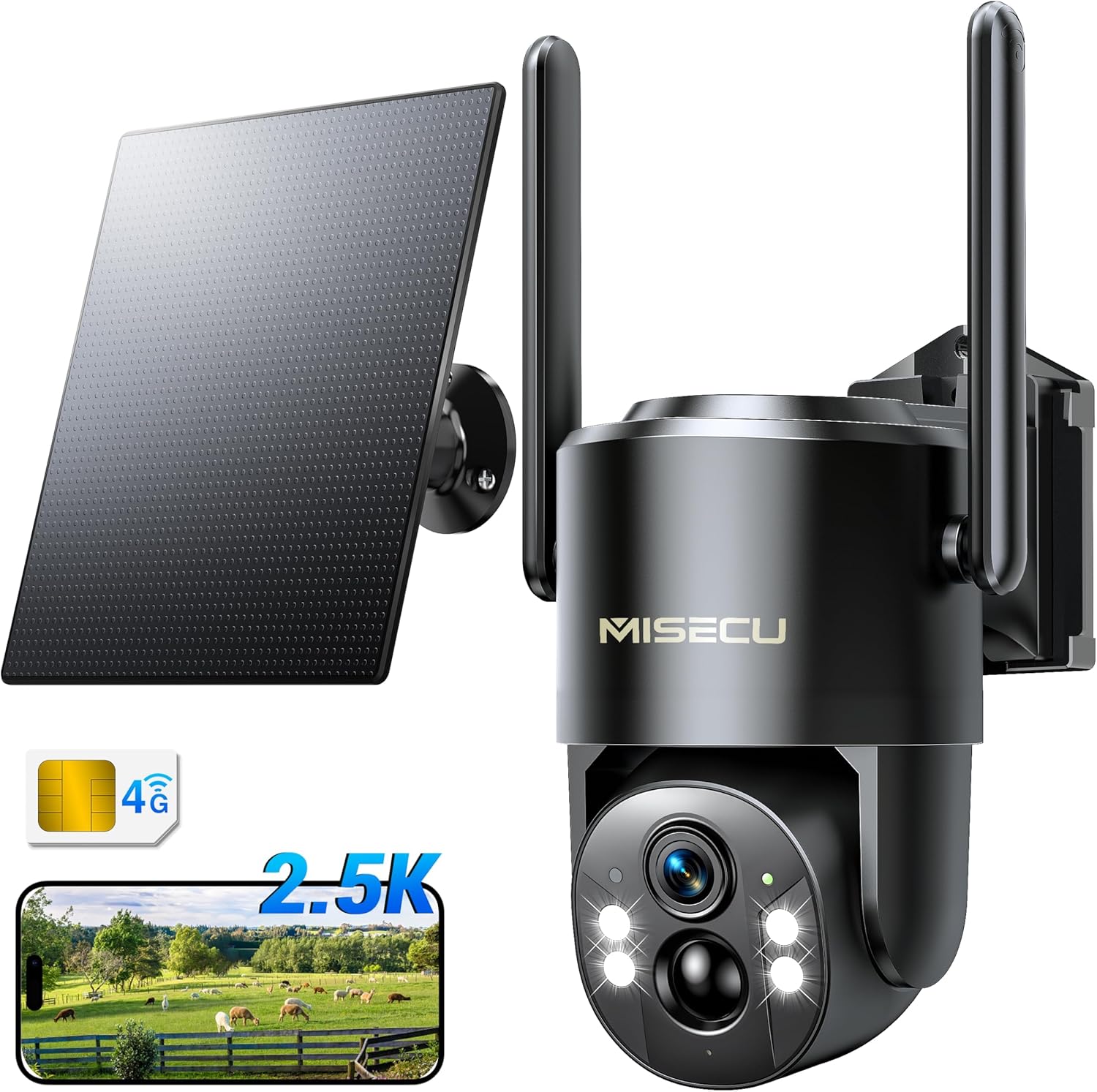
Figure 1.1: MISECU 4G LTE Cellular Security Camera CQ1H. This image displays the main camera unit, a solar panel, and icons indicating 4G connectivity and 2.5K resolution.
2. Package Contents
Verify that all items are present in the package:
- 4G Camera Unit
- Solar Panel
- SIM Card (pre-installed or included separately)
- User Manual
- Mount Kit (screws, wall anchors, mounting bracket)
3. Setup and Installation
Follow these steps to set up and install your MISECU 4G LTE Cellular Security Camera.
3.1. SIM Card and Initial Charge
- Insert SIM Card: If the SIM card is not pre-installed, locate the SIM card slot on the camera and insert the provided 4G LTE SIM card. Ensure it is correctly oriented.
- Initial Battery Charge: Before installation, fully charge the camera's internal 9000mAh battery using a standard USB charger (not included) for optimal performance.
3.2. App Download and Account Creation
- Download Yoosee App: Search for "Yoosee" in your smartphone's app store (iOS or Android) and download the application.
- Create Account: Open the Yoosee app and follow the on-screen instructions to create a new user account.
- Add Device: Within the app, select the option to add a new device. Scan the QR code located on your camera or its packaging to pair the camera with your account.
3.3. Mounting the Camera and Solar Panel
The camera and solar panel are designed for wall mounting. Choose a location that provides optimal solar exposure for the panel and a clear view for the camera.
- Select Mounting Location: Identify a suitable outdoor location for the camera and solar panel. Ensure the solar panel receives direct sunlight for several hours daily.
- Install Mounting Bracket: Use the provided mount kit (screws and wall anchors) to securely attach the camera's mounting bracket to a wall or sturdy surface.
- Attach Camera: Secure the camera unit to the installed mounting bracket. Adjust the camera's angle as needed.
- Install Solar Panel: Mount the solar panel in a location that maximizes sun exposure. Connect the solar panel cable to the camera's charging port.

Figure 3.1: Camera and solar panel installation. This image shows the MISECU camera and its solar panel mounted on an outdoor wooden wall, illustrating a typical installation scenario.

Figure 3.2: Non-stop solar power. This image highlights the camera's 5W solar panel and 9000mAh battery, emphasizing its ability to provide continuous power for 365 days.
4. Operating Instructions
This section details the various functions and operations of your security camera via the Yoosee app.
4.1. Live View and PTZ Control
- Access Live View: Open the Yoosee app and select your camera to view the live feed.
- Pan and Tilt: Use the on-screen controls to rotate the camera 355° horizontally (pan) and 90° vertically (tilt) for a 360° view.
- Digital Zoom: The camera supports 6X digital zoom to focus on specific areas.

Figure 4.1: 360° PTZ view. This image illustrates the camera's ability to pan 355° and tilt 90° to provide comprehensive coverage without blind spots.

Figure 4.2: Panoramic view. This image demonstrates the camera's 360° panoramic view capability, highlighting its pan and tilt functions for complete area coverage.
4.2. Video Resolution and Night Vision
- 2.5K UHD Resolution: The 4MP lens provides 2.5K (2560*1440) high-definition video, offering clear and detailed images.
- Color Night Vision: Four built-in spotlights enable full-color night vision up to 65 feet, providing vivid images even in low-light conditions.

Figure 4.3: Color night vision. This image compares standard black and white night vision with the camera's full-color night vision, showing enhanced detail and color in darkness.

Figure 4.4: 2.5K Ultra HD Resolution. This image demonstrates the clarity of 2.5K resolution compared to 1080P, showing more detail in the captured footage.

Figure 4.5: Full Color Night Vision. This image illustrates the camera's ability to provide colorful details up to 65 feet at night using its four spotlights.
4.3. AI Motion Detection and Alerts
- Object Analysis: Advanced AI technology accurately recognizes persons and vehicles, reducing false alarms.
- Instant Alerts: Receive real-time notifications on your phone when motion is detected.
- Alarm Mode: Activate spotlights and sirens via the app to deter intruders.

Figure 4.6: Smart AI Object Analysis. This image depicts the camera's AI detection capabilities, identifying persons and vehicles in a scene.

Figure 4.7: Spotlights and Sound Alarms. This image illustrates the camera's active deterrence features, including spotlights and a siren, triggered by detected motion at night.
4.4. Two-Way Audio
Utilize the built-in microphone and speaker for two-way communication through the Yoosee app. This allows you to speak to individuals near the camera and hear their responses.

Figure 4.8: Two-Way Audio. This image depicts a user communicating with a child near the camera using the two-way audio feature via a smartphone app.
4.5. Storage Options
- Local Storage: Supports Micro SD cards up to 256GB (not included) for continuous or event-triggered recording.
- Cloud Storage: Lifetime free 7-day loop cloud storage for event recordings (single event logging 8 seconds) is available when using the built-in SIM card. Optional paid data plans offer extended cloud storage.

Figure 4.9: Secure Storage Options. This image illustrates the availability of both local storage via an SD card and cloud storage for recorded video events.
4.6. Data Plans (US Only)
The included SIM card offers a 7-day unlimited trial data. After the trial, data plans can be renewed within the Yoosee app. The SIM card supports AT&T, T-Mobile, and Verizon networks.
- Monthly Plan: $15.99
- 180-Day Plan: $89.99
- Yearly Plan: $149.99

Figure 4.10: Cellular Data Plans. This image details the available data plans for the camera's 4G LTE connectivity, including monthly, 180-day, and 360-day options.
4.7. App Settings and Multi-Device Compatibility
- Intelligent APP Setting: Customize motion detection schedules and sensitivity to optimize power usage and reduce unnecessary alerts.
- Multi-Device Support: The Yoosee app allows remote management of multiple cameras from smartphones, tablets, or PCs. You can also share camera access with family members.

Figure 4.11: Intelligent App Settings. This image displays the app interface for setting motion detection periods and sensitivity levels.

Figure 4.12: Multi-Device Compatibility. This image shows the Yoosee app running on a smartphone, tablet, and laptop, demonstrating its compatibility across various devices for remote camera management.

Figure 4.13: Family Sharing. This image illustrates how multiple users can share and view the camera feed simultaneously through the Yoosee app.
5. Maintenance
- Solar Panel Cleaning: Regularly wipe the solar panel surface with a soft, damp cloth to remove dust, dirt, or debris that may reduce charging efficiency.
- Camera Lens Cleaning: Gently clean the camera lens with a microfiber cloth to ensure clear image quality. Avoid abrasive materials.
- Battery Health: While the camera is solar-powered, ensure it receives adequate sunlight. If the camera is stored for extended periods, fully charge the battery every 3-6 months to maintain its lifespan.
- Weatherproofing: The camera is IP66 weatherproof. Periodically check the seals and connections for any signs of wear or damage to maintain its water resistance.

Figure 5.1: IP66 Weatherproof. This image demonstrates the camera's durability in various weather conditions, including snow, rain, and sun, highlighting its IP66 rating.

Figure 5.2: Weather Resistance. This image visually confirms the camera's IP66 weatherproof rating, showing it functioning in snowy, rainy, and sunny environments.
6. Troubleshooting
If you encounter issues with your MISECU security camera, refer to the following common troubleshooting steps:
- Camera Not Connecting to 4G:
- Ensure the SIM card is correctly inserted and activated with a valid data plan.
- Check for 4G signal strength at the camera's location using a smartphone.
- Restart the camera by powering it off and on.
- No Video Feed in App:
- Verify the camera is powered on and has sufficient battery charge.
- Check your phone's internet connection.
- Ensure the Yoosee app is updated to the latest version.
- Poor Image Quality:
- Clean the camera lens to remove any dirt or smudges.
- Ensure there are no obstructions in the camera's field of view.
- Solar Panel Not Charging:
- Ensure the solar panel is positioned to receive direct sunlight for several hours daily.
- Clean the solar panel surface.
- Check the connection cable between the solar panel and the camera.
- False Motion Alerts:
- Adjust the motion detection sensitivity settings in the Yoosee app.
- Utilize the AI object analysis feature to filter out non-human/vehicle movements.
7. Specifications
| Feature | Detail |
|---|---|
| Model Name | CQ1H |
| Brand | MISECU |
| Connectivity Technology | 4G LTE Cellular Network |
| Indoor/Outdoor Usage | Outdoor |
| Power Source | Solar Powered (9000mAh battery, 5W solar panel) |
| Video Capture Resolution | 2.5K (4MP Effective Still Resolution) |
| Night Vision | Color Night Vision (up to 65 feet) |
| PTZ Capabilities | 355° Horizontal Pan, 90° Vertical Tilt |
| Digital Zoom | 6X |
| Storage Options | Micro SD (up to 256GB), Cloud Storage |
| Weather Resistance | IP66 Waterproof |
| AI Features | Person and Vehicle Detection |
| Audio | Two-Way Audio |
| Dimensions (L x W x H) | 7.2 x 5.5 x 8.5 inches |
| Item Weight | 2.59 pounds |
| Material | Acrylonitrile Butadiene Styrene (ABS) |
| Included Components | 4G Camera, Solar Panel, SIM Card, User Manual, Mount Kit |
8. Warranty and Support
- Warranty: The product comes with a Full One-Year Warranty.
- Returns: A 30-Day Return policy is available.
- Technical Support: Lifetime Technical Help is provided. Expect a reply within 24 hours for support inquiries.
- Manufacturer: MISECU

Figure 8.1: Customer Support. This image shows a team of customer service representatives, symbolizing the available technical support.