
1. Introduction
This manual provides comprehensive instructions for the installation, operation, and maintenance of your Generic Bluetooth 5.0 Tire Pressure Monitoring System (TPMS). This system is designed to monitor your vehicle's tire pressure and temperature in real-time, transmitting data to your mobile device via a dedicated application. Proper use of this system can enhance driving safety and extend tire life.

Image 1.1: Overview of the TPMS sensors and their application on a vehicle.
2. Product Features
- Real-time Monitoring: Displays live tire pressure and temperature data on your mobile device.
- Bluetooth 5.0 Connectivity: Ensures stable and efficient data transmission to the companion app.
- Adjustable Alarm System: Customizable high/low pressure and high-temperature alarm values.
- Leakage Detection: Alerts you instantly in case of rapid air leakage.
- Wide Compatibility: Suitable for various vehicles including sedans, SUVs, MPVs, pickup trucks, RVs, and motorcycles.
- Durable Construction: Sensors made from ABS+Copper material, offering impact, heat, and chemical resistance.
- IP67 Waterproof: Sensors are protected against dust and water ingress, suitable for all weather conditions.

Image 2.1: Illustration of the intelligent monitoring features available through the mobile application.
3. Specifications
| Communication Method | Bluetooth 5.0 (BLE4.1) |
| Display Mode | Mobile APP |
| Working Voltage | 2.1-3.3V |
| Quiescent Current | ≤1μA |
| Bluetooth Transmission Power | 4dB |
| Bluetooth Working Frequency | 2.4GHz |
| Response Time | ≤4s |
| Waterproof Level | IP67 |
| Tire Pressure Monitoring Range | 0-100 PSI |
| Tire Pressure Monitoring Error | ±3 PSI |
| Working Temperature | -30°C to +70°C (-22°F to +158°F) |
| Storage Temperature | -30°C to +70°C (-22°F to +158°F) |
| Battery Capacity (External) | 140mAh |
| Material | ABS + Copper |
4. Package Contents
Your package should contain the following items:
- 2 or 4 x Car Tire Pressure Sensors (depending on purchased variant)
- Anti-theft nuts (pre-installed on sensors or separate)
- Small wrench for installation
- User Manual (this document)
5. Setup and Installation
Follow these steps to install the TPMS sensors and set up the mobile application.
5.1. Mobile Application Installation
- For Android Phones: Scan the QR code provided on the product packaging box to download and install the application.
- For Apple (iOS) Phones: Search for "SYTPMS" in the App Store and install the application.
- After installation, ensure that Bluetooth and Location services are enabled on your mobile device.
5.2. Sensor Installation
Install the sensors onto your vehicle's tire valves according to the following procedure:
- Prepare the Valve: Remove the original valve core cap from the tire valve.
- Install Anti-Theft Nut: Screw on the anti-theft nut onto the valve stem. Do not tighten it yet.
- Attach Sensor: Screw the TPMS sensor onto the tire valve stem.
- Tighten: Use the provided small wrench to rotate and tighten the anti-theft nut against the sensor to secure it.
- Check for Leaks: After installation, check for any air leakage around the valve stem and sensor.

Image 5.1: Steps for preparing the valve and installing the anti-theft nut.
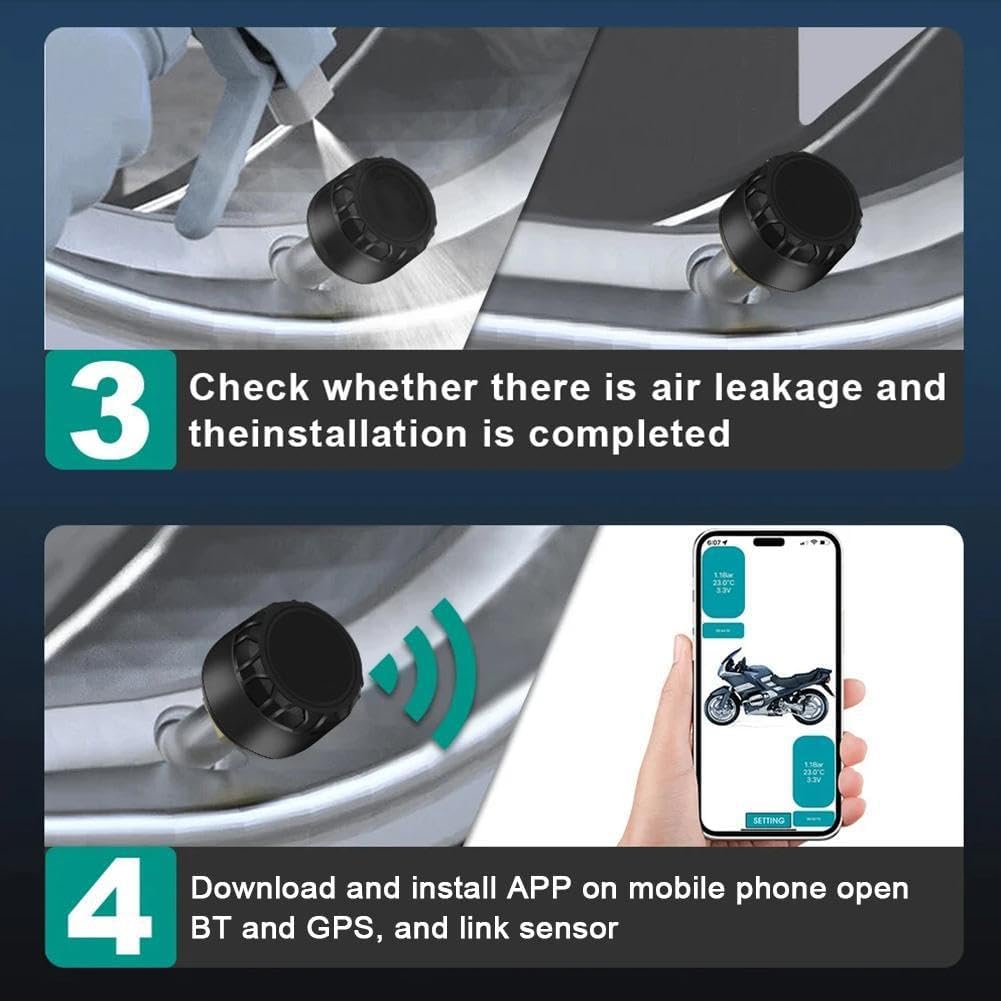
Image 5.2: Steps for attaching the sensor, securing it, and verifying installation.
5.3. Sensor Pairing with App
Important Note: When pairing, do not fully tighten the sensor onto the tire valve initially. Follow these steps:
- Open the SYTPMS application on your mobile device.
- Navigate to the pairing section within the app (usually labeled "Pairing" or "Connect").
- Click the "Pairing" button in the app.
- Screw each sensor onto its respective tire valve in turn. The app should detect and pair with the sensor. You may hear a slight deflation sound during pairing.
- If pairing fails, click "Cancel" in the app and attempt the pairing process multiple times.
- Once paired, ensure the sensors are securely tightened with the anti-theft nuts.
6. Operating Instructions
Once installed and paired, the TPMS system will begin monitoring your tire data.
6.1. Real-time Monitoring
- Open the SYTPMS app on your phone.
- The app will display the current pressure and temperature for each tire.
- You can quickly check the status of all tires simultaneously.

Image 6.1: Real-time tire pressure and temperature display on the mobile application.

Image 6.2: Monitoring tire data on a mobile app while riding a motorcycle.
6.2. Alarm System
- The system is equipped with a reliable alert system.
- The mobile app will provide an audible and/or visual alert if:
- Tire pressure is too high.
- Tire pressure is too low.
- Tire temperature exceeds safe limits.
- Rapid air leakage is detected.
- You can typically adjust the alarm thresholds within the app settings. Refer to the app's internal help section for specific instructions on setting alarm values.
7. Maintenance
- Sensor Cleaning: Periodically clean the exterior of the sensors with a damp cloth to remove dirt and debris. Avoid using harsh chemicals.
- Battery Life: The sensors use external 140mAh batteries. While designed for long life, monitor battery indicators within the app. Replace batteries as needed following the manufacturer's guidelines (if user-replaceable).
- Storage: If removing sensors for extended periods, store them in a cool, dry place away from direct sunlight.
- Waterproof Rating: The IP67 rating ensures protection against dust and temporary immersion in water. However, avoid prolonged submersion or high-pressure water jets directly on the sensors.

Image 7.1: The IP67 rating ensures durability in various environmental conditions.
8. Troubleshooting
- Sensors Not Pairing:
- Ensure Bluetooth and Location services are enabled on your phone.
- Make sure the sensors are screwed onto the valves correctly but not fully tightened during the initial pairing attempt.
- Try restarting the app and your phone's Bluetooth.
- If pairing fails, try clicking "Cancel" in the app and re-attempting the pairing process multiple times.
- Verify sensor batteries are not depleted.
- No Data Displayed:
- Confirm sensors are properly installed and paired.
- Check if the vehicle is moving; some systems require movement to activate sensors.
- Ensure your phone is within Bluetooth range of the sensors.
- Check the app for any error messages or connection status indicators.
- Inaccurate Readings:
- Ensure sensors are securely tightened and there are no air leaks.
- Calibrate your tire pressure gauge against a known accurate source to verify the accuracy of the TPMS readings.
- Environmental factors (extreme cold/heat) can temporarily affect readings.
- App Crashing/Freezing:
- Close and restart the app.
- Ensure your phone's operating system is up to date.
- Clear the app's cache (Android) or reinstall the app.
9. Safety Information
- Always check tire pressure when tires are cold for the most accurate readings.
- Do not attempt to install or remove sensors while the vehicle is in motion.
- Regularly inspect sensors for any signs of damage or wear.
- This system is an aid to monitoring tire pressure; it does not replace regular manual tire pressure checks.
- Ensure sensors are securely tightened to prevent accidental detachment during driving.
- Keep small parts away from children to prevent choking hazards.
10. Warranty and Support
This product comes with a standard manufacturer's warranty against defects in materials and workmanship. Please refer to your purchase documentation for specific warranty terms and duration. For technical support, troubleshooting assistance, or warranty claims, please contact the seller or manufacturer directly through your point of purchase.
For further assistance, please visit the product page on Amazon: Amazon Product Page