
Mytee Products Tf550/750 Unloader Kit
Mytee Products TF550/750 Unloader Kit Instruction Manual
Model: TF550/750 Unloader Kit (Replaces OEM: 107515)
Introduction
This manual provides essential information for the proper installation, operation, and maintenance of the Mytee Products TF550/750 Unloader Kit. This kit is designed as a direct replacement for OEM part number 107515, ensuring compatibility and reliable performance in your pressure washer system. Please read these instructions thoroughly before proceeding with installation or use.
Product Compatibility:
- Replaces OEM: 107515
- Compatible with Automann: 170.107515, 745107515N
- Compatible with Bendix: 107515, 107515BXW, 107515N, BEN 707515, BEN-107515, BEN-107515N, BW 107515N, BX107515, BX107515N
- Compatible with Freightliner: BW107515
- Compatible with OE Aftermarket: 97-8218-00221
- Compatible with PAI: 1098
- Compatible with Rockwell International: EBN107515N
Kit Components
The Mytee Products TF550/750 Unloader Kit includes the following components:
- Gasket
- Pins (2)
- Springs (2)
- O-rings (2)
- Washers (2)
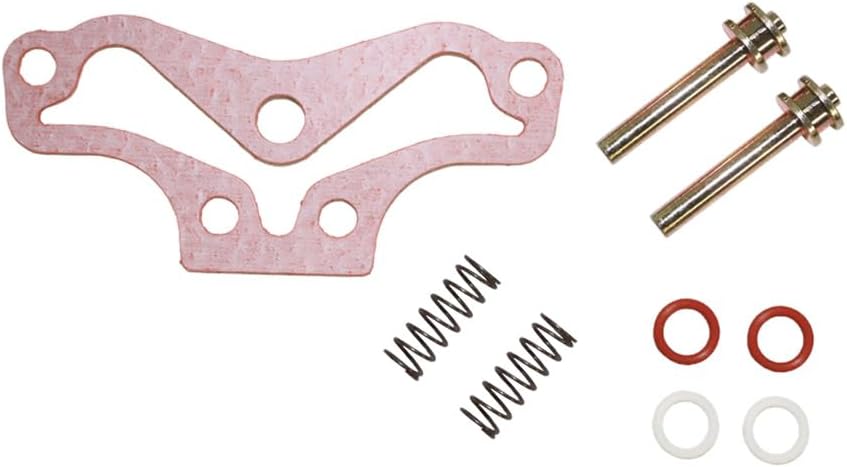
Image: Overview of the Mytee Products TF550/750 Unloader Kit, showing all included parts: a gasket, two pins, two springs, two red O-rings, and two white washers.

Image: Another view of the Mytee Products TF550/750 Unloader Kit components, displaying the gasket, two pins, two springs, two red O-rings, and two white washers.
Installation Instructions
The unloader kit is a critical component of a pressure washer system. Proper installation is essential for safe and efficient operation. Due to variations in pressure washer models, it is recommended to consult your specific pressure washer's service manual for detailed, model-specific installation steps. The following are general guidelines:
- Safety First: Ensure the pressure washer is turned off, unplugged (if electric), and depressurized before beginning any work. Wear appropriate personal protective equipment (PPE), such as gloves and eye protection.
- Locate the Unloader Valve: Identify the existing unloader valve assembly on your pressure washer.
- Disassembly: Carefully disassemble the old unloader valve, noting the position and orientation of all components. It may be helpful to take photos during this process.
- Remove Old Components: Remove the old gasket, pins, springs, O-rings, and washers. Inspect the housing for any damage or wear.
- Install New Components:
- Place the new gasket in its correct position.
- Insert the new pins, ensuring they are properly seated.
- Position the new springs over the pins.
- Install the new O-rings and washers as per your pressure washer's manual.
- Reassembly: Carefully reassemble the unloader valve housing, ensuring all connections are secure and tightened to the manufacturer's specifications.
- Test: After reassembly, slowly turn on the water supply and then the pressure washer. Check for any leaks and ensure the unloader valve is functioning correctly (i.e., diverting water when the trigger is released).
If you are unsure about any step, it is advisable to seek assistance from a qualified technician.
Operating Principles
The unloader valve is a safety and control device in a pressure washer system. Its primary function is to bypass water flow back to the pump inlet or a low-pressure side when the spray gun trigger is released. This prevents pressure buildup in the pump, protecting it from damage and allowing the engine/motor to idle without constant load. When the trigger is pulled, the unloader valve directs water flow through the high-pressure hose to the nozzle.
Ensure your pressure washer is operated according to its manufacturer's guidelines. The unloader kit facilitates the proper functioning of this critical system.
Maintenance
Regular maintenance of your unloader kit components can extend the life of your pressure washer and ensure consistent performance.
- Regular Inspection: Periodically inspect the unloader kit components (gasket, O-rings, pins, springs) for signs of wear, cracks, or corrosion.
- Leak Checks: After each use, check for any water leaks around the unloader valve assembly. Leaks can indicate worn O-rings or a damaged gasket.
- Component Replacement: Replace components as needed. Worn springs can lead to improper bypassing, and damaged O-rings or gaskets can cause leaks and pressure loss.
- Cleanliness: Keep the area around the unloader valve clean and free of debris.
Troubleshooting
If you experience issues with your pressure washer after installing or while using the unloader kit, consider the following common problems and solutions:
| Problem | Possible Cause | Solution |
|---|---|---|
| Pressure Fluctuations / Pulsing | Worn springs, air in the system, or debris in the valve. | Inspect and replace springs if weak. Bleed air from the system. Disassemble and clean the unloader valve. |
| Constant Bypass / No Pressure | Unloader valve stuck open, damaged O-rings/gasket, or incorrect installation. | Check for proper assembly. Inspect O-rings and gasket for damage and replace if necessary. Ensure pins are correctly seated. |
| Water Leaks from Unloader | Damaged O-rings or gasket. | Replace O-rings and gasket. Ensure all connections are tight. |
| Engine/Motor Stalls When Trigger Released | Unloader valve not bypassing correctly (stuck closed). | Disassemble and inspect the unloader valve for obstructions or damage. Ensure springs and pins move freely. |
For issues not covered here, or if problems persist, contact Mytee Products customer support.
Specifications
- Model: TF550/750 Unloader Kit
- Replaces OEM Part Number: 107515
- Mytee Products Part Number: MPN107515
- Item Weight: Approximately 2.08 ounces
- Package Dimensions: Approximately 10 x 10 x 10 inches (packaging)
Warranty Information
Mytee Products provides an 18-Month Warranty for this TF550/750 Unloader Kit. The warranty coverage is valid for one year or 100,000 miles after installation, or 18 months after the purchase date, whichever occurs first.
Warranty Conditions:
- The warranty covers defects in material or workmanship.
- The warranty does not cover parts that fail or are damaged due to misuse, misapplication, accident, or inappropriate application.
- Labor costs or consequential damages of any nature are disclaimed.
Warranty Claim Process:
If you believe your product is covered under warranty, please contact Mytee Products customer support. Our team will conduct a thorough inspection to verify the defect. If a covered defect is found, the product will be replaced without charge. Please await the resolution and settlement of your claim before taking further action.
Customer Support
For any questions, concerns, or warranty claims regarding your Mytee Products TF550/750 Unloader Kit, please contact us:
- Phone: 1 (888) 705 - 8277 (Toll-Free)
- Operating Hours: Monday - Friday, 7 AM to 5 PM (Eastern Time)
- Website: Visit the Mytee Products Store on Amazon for more information and products.
Ask a question about this manual
Ask about setup, troubleshooting, compatibility, parts, safety, or missing instructions. Manuals+ will review the question and use this page’s manual context to help answer it.