
Introduction
The Jura J8 Twin Automatic Coffee Machine in Diamond White is designed to deliver a wide range of coffee specialties with precision and ease. Featuring two high-performance conical grinders, it allows for the use of two different bean varieties, either pure or blended. The intuitive Panorama Coffee Panel touchscreen and innovative Sweet Foam function enhance the user experience, offering over 31 customizable beverage options. This manual provides essential information for setting up, operating, and maintaining your J8 Twin coffee machine.
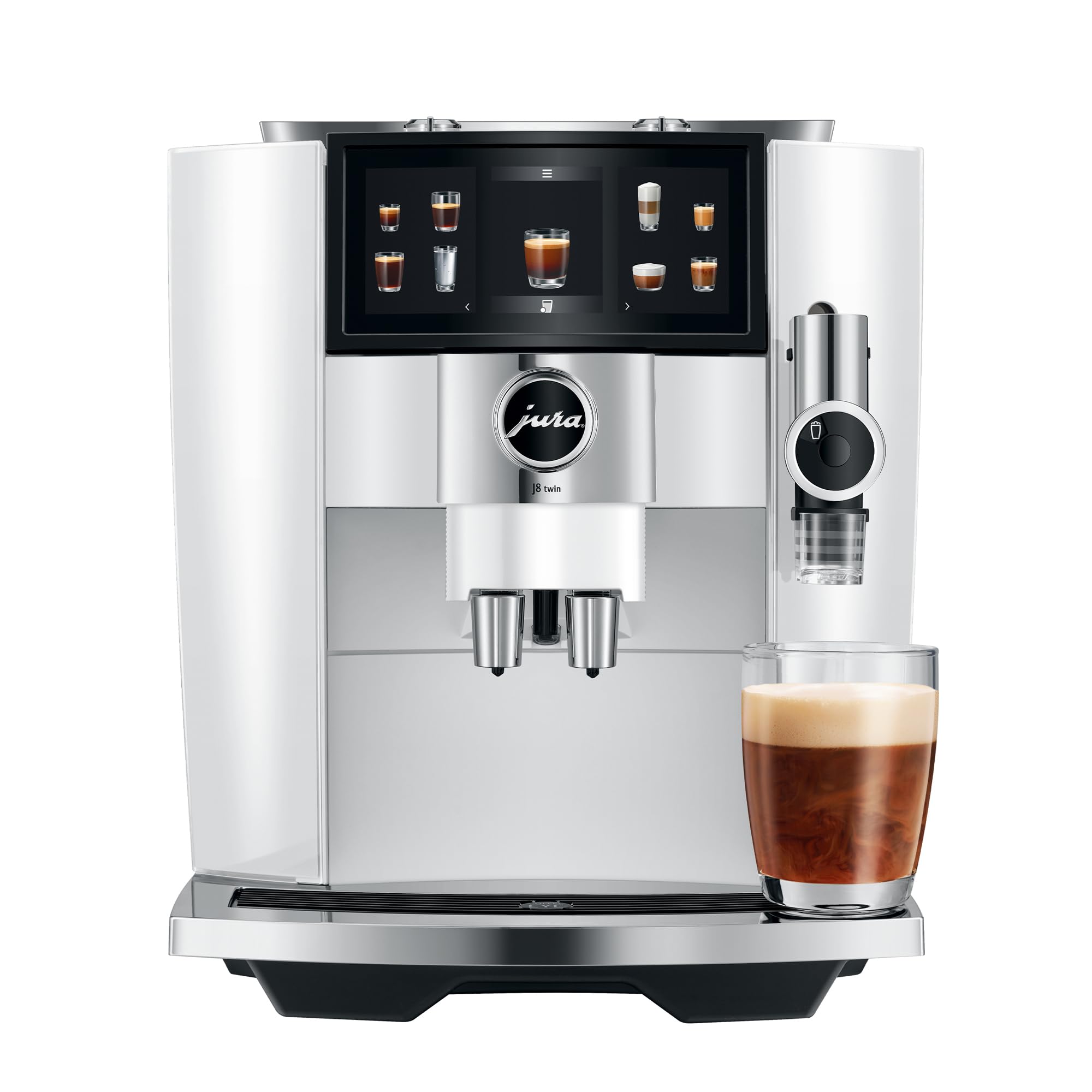
Front view of the Jura J8 Twin Diamond White Automatic Coffee Machine, showcasing its sleek design and touchscreen display.
Setup
1. Unpacking
Carefully remove all components from the packaging. Ensure all protective films and packaging materials are removed from the machine before use. Place the machine on a stable, level surface away from direct sunlight and heat sources.
2. Water Tank and Filter
The J8 Twin features a removable water tank with a capacity of 64 fluid ounces, located on the side of the machine. It includes a filter designed to improve water quality and reduce the need for descaling. Before first use, test your home's water hardness level using the provided test strip and program it into the machine. Fill the water tank with fresh, cold water.

Side view of the Jura J8 Twin, highlighting the transparent water tank with its integrated filter.
3. Bean Hoppers and Grinders
The J8 Twin is equipped with two separate 6.3-ounce bean containers, each with its own high-performance conical grinder. This allows for the use of two different types of coffee beans (e.g., regular and decaf) without mixing. Adjust the grind intensity for each grinder using the aroma control dials located on top of the machine. A finer grind typically results in a stronger coffee.

Top view of the J8 Twin, illustrating the two separate bean hoppers and aroma control dials.

An internal view illustrating the two distinct high-performance conical grinders for different bean types.
4. Milk System Connection
For milk-based specialties, connect the milk hose to the designated port on the side of the machine. The other end of the hose can be placed into a cup of milk or an external milk container (not included). The machine will draw milk as needed for your selected beverage.
Operating the Machine
1. Power On/Off
Press the power button to turn the machine on or off. The machine will perform an automatic rinse cycle upon startup and shutdown.
2. Panorama Coffee Panel
The large 6.7-inch touchscreen Panorama Coffee Panel provides access to over 31 coffee specialties. Navigate through the menu by swiping and tapping. Each beverage option is clearly displayed with an icon.

The intuitive touchscreen display of the J8 Twin, showing various coffee selections.
3. Customization and Profiles
The J8 Twin allows for extensive customization of your beverages. You can adjust grind consistency, coffee strength, volume, and the amount of milk or milk foam. The machine supports user profiles, enabling you to save your preferred settings for quick selection. To adjust settings for a specific drink, select the drink and then modify the parameters on the screen. The machine will remember your preferences.

Coffee beans being added to the dual hoppers, illustrating the machine's capability to handle two different bean types.
4. Coffee Eye Feature
The innovative Coffee Eye feature detects if a cup is placed under the coffee spout. The machine will not start brewing until a cup is detected, preventing spills and ensuring proper operation.

The Coffee Eye sensor ensures a cup is in place before brewing, preventing spills.
5. Making a Drink
Select your desired coffee specialty from the Panorama Coffee Panel. The machine will guide you through any necessary steps, such as placing a cup or connecting the milk system. The J8 Twin will then automatically grind the beans, brew the coffee, and prepare milk foam if required, delivering your drink directly into your cup.

The J8 Twin preparing a Sweet Latte, demonstrating the milk frothing capability.
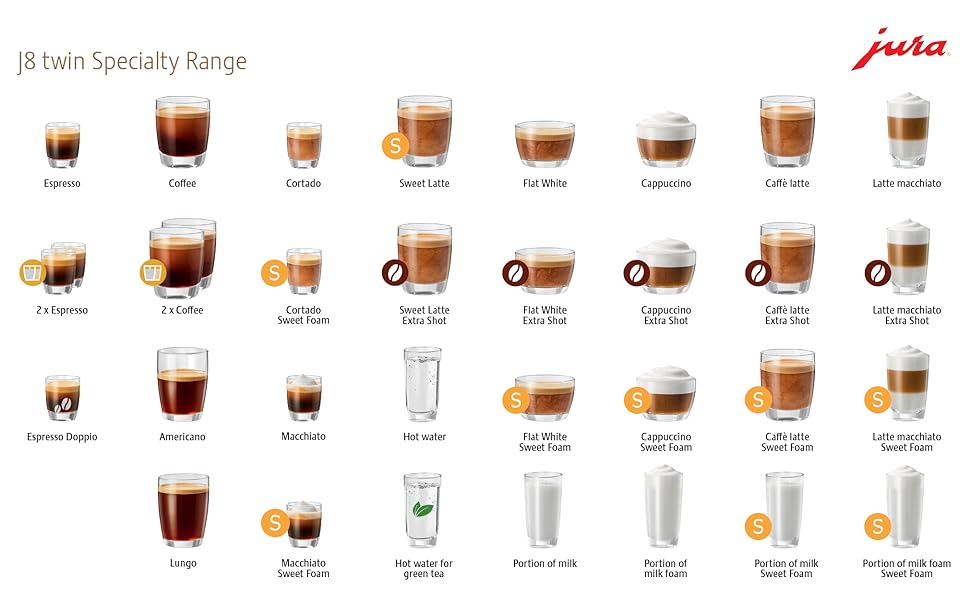
A visual guide to the extensive range of coffee specialties offered by the J8 Twin.
Maintenance
Regular maintenance ensures the longevity and optimal performance of your Jura J8 Twin. The machine will prompt you for necessary cleaning cycles.
1. General Cleaning
The drip tray and coffee grounds container should be emptied and cleaned regularly. These components are easily removable for cleaning.
2. Milk System Cleaning
The milk system requires daily cleaning to prevent blockages and maintain hygiene. The machine has an automatic milk system cleaning program. The milk hose and associated components are designed for easy cleaning, with some parts being dishwasher safe.

The machine's display indicating a cleaning cycle, prompting the user for maintenance.

Illustration of milk system components that are safe for dishwasher cleaning.
3. Descaling
If the water filter is used and replaced as recommended, descaling of the machine should not be necessary. The filter actively prevents limescale buildup. Follow the machine's prompts for filter replacement.
Troubleshooting
Should you encounter any issues with your Jura J8 Twin, consult the on-screen messages for guidance. Common issues often relate to water levels, bean levels, or cleaning cycles. Ensure all removable parts are correctly inserted and that the water tank is filled and the filter is properly installed. For persistent problems, refer to the full product manual or contact Jura customer support.
Specifications
| Feature | Detail |
|---|---|
| Brand | Jura |
| Model Name | J8 twin |
| Model Number | 15657 |
| Color | Diamond White |
| Capacity | 64 Fluid Ounces |
| Product Dimensions | 12.2"D x 17.6"W x 14.2"H |
| Item Weight | 25.4 Pounds |
| Special Features | Programmable, Removable Tank, Sweet Foam Function, Pulse Extraction Process, One-Touch Americano, Milk Specialty Function, 3D Brewing Technology, Intelligent Preheating |
| Coffee Maker Type | Espresso Machine |
| Specific Uses | Americano, Cappuccino, Espresso, Latte |
| Operation Mode | Fully Automatic |
| Wattage | 1450 watts |
| Voltage | 120 |
| Coffee Input Type | Beans |
| Filter Type | Reusable |
| UPC | 794151412569 |
Warranty and Support
For warranty information and customer support, please refer to the documentation included with your Jura J8 Twin Automatic Coffee Machine or visit the official Jura website. It is important to note that warranty terms may vary depending on the retailer and region of purchase. Always retain your proof of purchase for warranty claims.


