
CSZZD 009
CSZZD Vanity Desk Model 009 User Manual
Model: 009 | Brand: CSZZD
Important Safety Information
Always unplug the vanity before assembly or disassembly. Be cautious of sharp edges and pinch points during assembly. Keep electrical components dry and away from heat sources. Do not exceed the weight limit of the vanity.
1. Product Overview
The CSZZD Vanity Desk Model 009 is designed to provide a functional and organized space for personal grooming. It features an illuminated mirror, integrated charging station, RGB lighting cabinet, and various storage solutions including a hidden jewelry rack.

Image 1.1: Front view of the CSZZD Vanity Desk Model 009, showcasing the mirror, drawers, and cabinets.

Image 1.2: Overhead view of the vanity desk with key features labeled, including the jewelry rack, spacious tabletop, drawers, and side cabinet.
2. Setup and Assembly
Assembly of the CSZZD Vanity Desk requires careful attention to the provided instructions. All parts and accessories are labeled to assist with the process. It is recommended to have assistance during assembly due to the size and weight of some components.
2.1. Unpacking and Preparation
- Carefully unpack all components and verify against the parts list in your instruction manual.
- Ensure all electrical components are kept dry and away from potential damage during assembly.
- Prepare a clear, spacious area for assembly.
2.2. Assembly Steps
Follow the step-by-step diagrams in the included assembly guide. While the guide is primarily visual, parts are labeled to aid identification. If you encounter difficulties, refer to the troubleshooting section or contact customer support.

Image 2.1: Detail of the glossy metal handles, which are installed during assembly.
2.3. Anti-Tipping Straps Installation
For safety, it is crucial to install the anti-tipping straps. Anchor the furniture to the wall to prevent accidental tipping, especially in households with children.

Image 2.2: Illustration of anti-tipping straps being installed to secure the vanity desk to a wall.
3. Operating Instructions
3.1. Mirror Lighting System
The large HD LED mirror features three lighting modes and adjustable brightness. A touch switch located in the center of the mirror controls these functions.
- Switching Modes: Tap the touch switch to cycle through Warm, Natural, and Cool light colors.
- Adjusting Brightness: Press and hold the touch switch to adjust the brightness level for the selected mode.

Image 3.1: Visual guide demonstrating the three color lighting effects (Cool White, Warm White, Warm Yellow) and brightness adjustment for the mirror.
3.2. RGB Cabinet Lighting System
The vanity includes a cabinet with an RGB lighting system, offering over 60,000 static colors and multiple dynamic lighting modes. This system can be controlled via a dedicated app or a physical switch.
- App Control: Download the specified app (refer to the full manual for app details) to access a wide range of colors, dynamic modes, music synchronization, microphone modes, timing functions, and DIY color customization.
- Switch Control: Use the physical switch on the cabinet to cycle through basic lighting options.

Image 3.2: Close-up of the RGB cabinet lighting, highlighting its various control options including app control for colors, dynamic modes, and music sync.
3.3. Integrated Charging Station
The vanity desk is equipped with a charging station for convenience.
- AC Outlets: Two 125V/12A AC outlets are provided for powering appliances like curling irons or hair dryers.
- USB Ports: Two 5V/2.1A USB ports are available for charging mobile phones, tablets, and other electronic devices.
- Hair Dryer Stand: A dedicated stand keeps your hair dryer within easy reach.
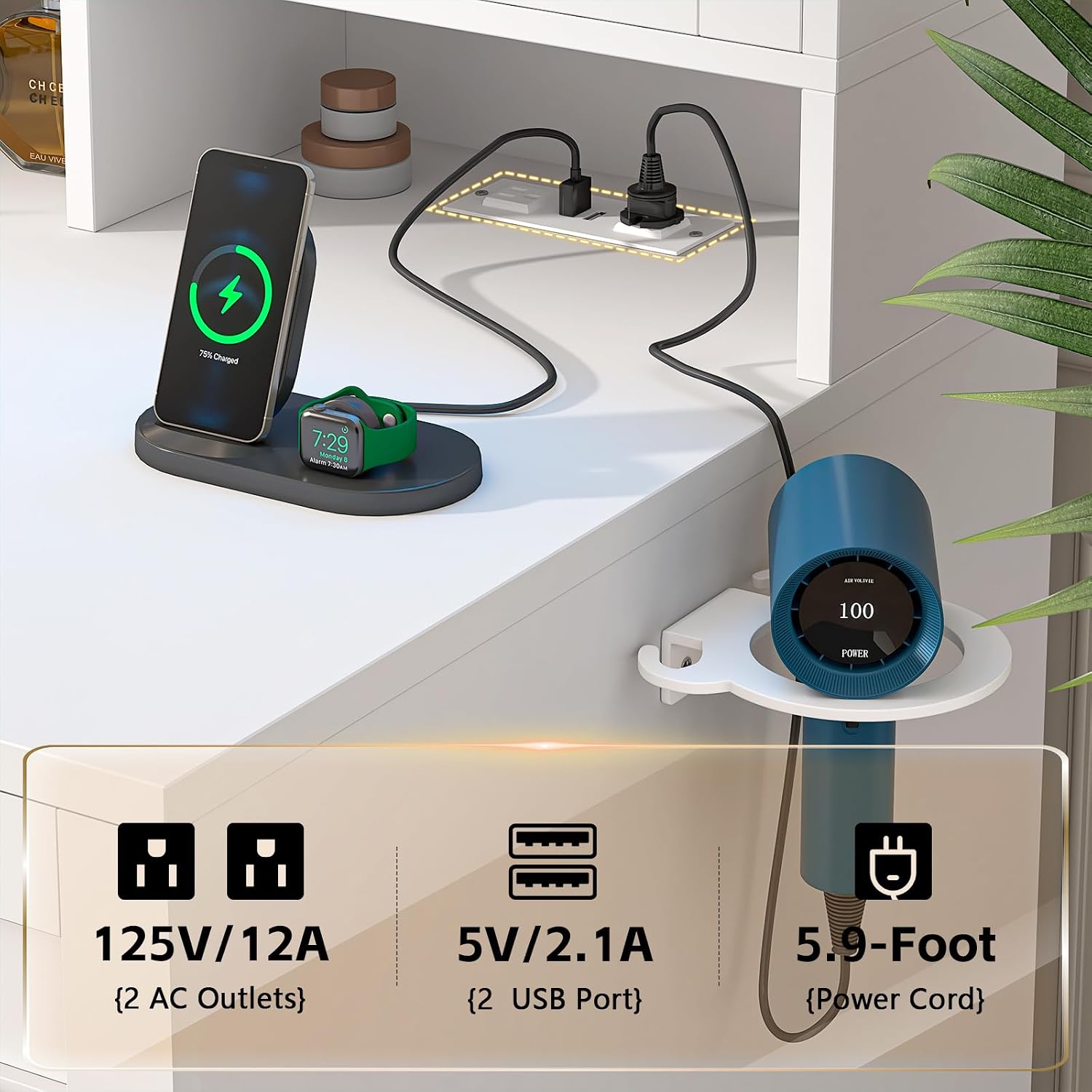
Image 3.3: Detail of the integrated charging station, showing the AC outlets, USB ports, and the hair dryer holder.
3.4. Hidden Retractable Jewelry Rack
A hidden jewelry rack is located behind the large HD mirror, designed for organized storage of jewelry and small cosmetics.
- Access: Gently pull the rack out from behind the mirror.
- Storage Capacity: Features 45 ring slots, 7 necklace hooks, and a cosmetic shelf.

Image 3.4: The pull-out jewelry rack, showing its compartments for rings, necklaces, and other small items.
3.5. Storage Organization
The vanity desk offers various storage options to keep your items organized.
- Drawers: One large drawer and two smaller drawers provide enclosed storage.
- Open Storage: Three open storage areas are available on the desktop for easy access items.
- RGB Cabinet: The RGB cabinet includes height-adjustable laminates for flexible storage of bottles and other items.
- Side Cabinet: An additional storage cabinet is located on the side.

Image 3.5: Overview of the vanity's storage capabilities, including drawers, open shelves, and cabinets, designed for various beauty products and accessories.
4. Maintenance
4.1. Cleaning
- Surface Cleaning: Wipe all surfaces with a soft, damp cloth. Avoid abrasive cleaners or harsh chemicals that may damage the finish.
- Mirror Cleaning: Use a glass cleaner specifically designed for mirrors and a lint-free cloth. Spray cleaner onto the cloth, not directly onto the mirror, to prevent liquid from seeping into the edges.
- Electrical Components: Ensure all electrical components (charging station, light controls) are kept dry. Do not spray liquids directly onto them.
4.2. General Care
- Periodically check all screws and fasteners to ensure they are tight.
- Inspect anti-tipping straps regularly for wear and tear, and ensure they remain securely anchored to the wall.
- Avoid placing excessively hot or cold items directly on the surface without protective coasters.
5. Troubleshooting
If you encounter any issues with your vanity desk, please refer to the following common troubleshooting steps:
- Mirror Lights Not Working:
- Check if the vanity is properly plugged into a working power outlet.
- Ensure the touch switch on the mirror is clean and unobstructed.
- RGB Cabinet Lights Not Working or Malfunctioning:
- Verify power connection.
- If using the app, ensure your device is connected and the app is updated.
- Try controlling with the physical switch to isolate the issue.
- Charging Station Not Providing Power:
- Confirm the vanity is plugged in.
- Test the outlets/USB ports with a different device.
- Ensure devices are properly connected to the ports.
- Assembly Difficulties:
- Re-examine the assembly diagrams carefully.
- Ensure all parts are correctly oriented and matched according to their labels.
- Do not force components together.
For persistent issues or further assistance, please contact CSZZD customer service. Refer to the "Warranty & Support" section for contact details.
6. Specifications
| Feature | Detail |
|---|---|
| Brand | CSZZD |
| Model Number | 009 |
| Product Dimensions (L x W x H) | 39.4 x 15.6 x 57.2 inches |
| Item Weight | 88.6 pounds |
| Frame Material | Wood |
| Color | White |
| Mirror Lighting Modes | 3 (Warm, Natural, Cool) with adjustable brightness |
| RGB Cabinet Lighting | Over 60,000 static colors, multiple dynamic modes, app/switch control |
| Charging Station | 2 AC Outlets (125V/12A), 2 USB Ports (5V/2.1A) |
| Jewelry Rack Capacity | 45 Ring Slots, 7 Necklace Hooks |
| Assembly Required | Yes |
7. Warranty and Support
For warranty information and customer support, please contact the seller directly through your purchase platform. CSZZD is committed to providing satisfactory solutions for any product-related issues.
When contacting support, please have your model number (009) and purchase details readily available.
Ask a question about this manual
Ask about setup, troubleshooting, compatibility, parts, safety, or missing instructions. Manuals+ will review the question and use this page’s manual context to help answer it.