
1. Introduction
Thank you for choosing the Coleshome L-Shaped Gaming Desk. This manual provides essential information for the safe assembly, operation, and maintenance of your new desk. Please read it thoroughly before use and retain it for future reference.
This versatile L-shaped gaming desk features a reversible design, allowing for left or right-hand configuration to suit various room layouts. It includes an interchangeable top shelf, fabric drawers, integrated power outlets, LED lighting, a CPU stand, and a headphone hook, optimizing your workspace efficiency.

Image 1.1: Overview of the Coleshome L-Shaped Gaming Desk in a typical setup, showcasing its LED lighting and storage features.
2. Safety Information
WARNING: Assemble and use with care. Follow all assembly instructions precisely. Keep out of reach of children. Use the integrated power outlets and USB ports safely, adhering to manufacturer guidelines to prevent electrical damage or hazards.
- Ensure all screws and fasteners are tightened securely before use.
- Do not overload the desk or shelves beyond their stated weight capacity.
- Avoid placing hot items directly on the desk surface without protection.
- Keep liquids away from electrical components to prevent short circuits.
- Regularly check for loose connections or damaged parts.
- Do not modify the desk structure or electrical components.
3. Package Contents
Before assembly, verify that all components listed below are present and undamaged. If any parts are missing or damaged, please contact customer support.
- Desk panels (main desktop, side desktop, top shelf)
- Metal frame components (legs, support beams)
- 4 Fabric drawers
- Integrated power strip with 2 AC outlets and 2 USB ports
- LED light strip
- CPU stand
- Headphone hook
- Assembly hardware (screws, bolts, nuts, Allen wrench)
- Illustrated assembly instructions
4. Setup and Assembly
The Coleshome L-Shaped Gaming Desk is designed for easy assembly. All parts are clearly labeled, and illustrated instructions are included. Assembly tools are provided.
- Unpack Components: Carefully remove all parts from the packaging and lay them out on a clean, soft surface to prevent scratches.
- Identify Parts: Match each component to the corresponding labels in the instruction manual.
- Assemble Frame: Begin by assembling the metal frame using the provided screws and Allen wrench. Ensure all connections are snug but do not overtighten initially.
- Attach Desk Panels: Secure the main desktop and side desktop panels to the assembled frame.
- Install Drawers: Insert the four fabric drawers into their designated compartments.
- Mount Top Shelf: Attach the top shelf, noting its reversible design for left or right placement.
- Install LED Lights and Power Strip: Secure the LED light strip and integrated power strip according to the instructions. Connect the power cable.
- Attach Accessories: Install the CPU stand and headphone hook as desired.
- Final Tightening: Once all components are in place, carefully tighten all screws and fasteners to ensure stability.
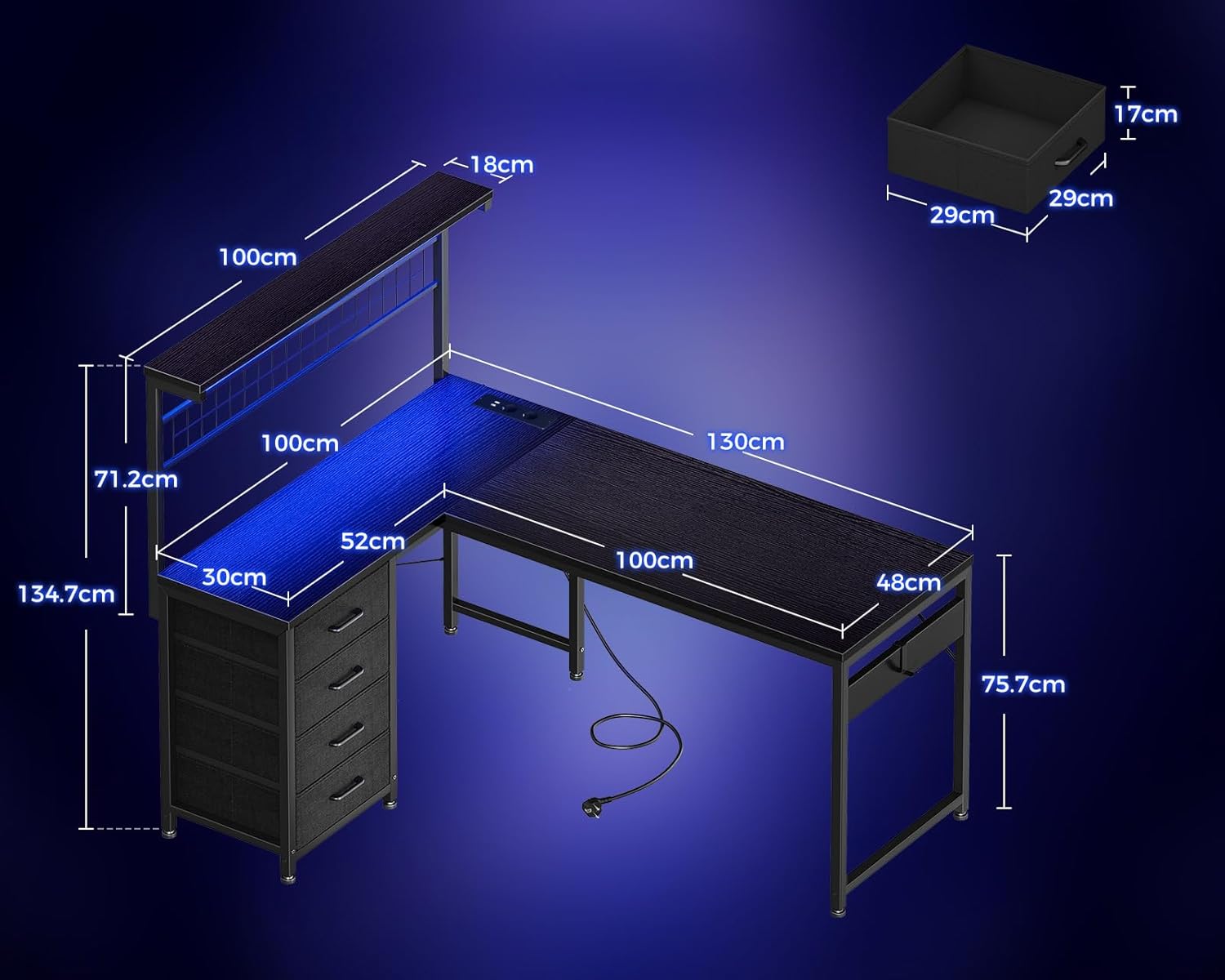
Image 4.1: Dimensional diagram of the L-shaped gaming desk, illustrating key measurements for planning your space.
5. Operating Instructions
5.1 Reversible L-Shape Configuration
The desk's L-shape can be configured for either a left-hand or right-hand setup during assembly. This flexibility allows it to adapt to various room layouts and user preferences. The top shelf is also interchangeable to match your chosen orientation.
5.2 Integrated Power System
The gaming desk is equipped with two AC power outlets and two USB ports, along with a 2-meter extension cable. This allows for convenient charging of desktop computers, laptops, smartphones, headphones, and gaming devices directly from your desk, reducing cable clutter.

Image 5.2.1: Detail of the integrated power strip, showing two AC outlets and two USB ports for convenient device charging.
5.3 Smart LED Lighting
The integrated LED light bar on the top shelf offers 10 color modes with adjustable brightness and color temperature, plus a memory function. Easily switch between work, gaming, or relaxation modes to create an ambient lighting atmosphere that suits your mood and environment.

Image 5.3.1: The LED lighting system, illustrating 10 brightness levels and 10 color variations for customizable ambiance.
5.4 Storage System
The corner desk includes four fabric drawers and a top shelf with a pegboard, ideal for hanging photos, headphones, cables, and other small items. A separate CPU stand and headphone hook ensure organized storage and easy access, keeping your workspace tidy even with extensive equipment.

Image 5.4.1: The top shelf and pegboard, providing space to display items and organize accessories.

Image 5.4.2: The four fabric storage drawers, demonstrating their capacity for keeping the desk area neat and organized.
6. Maintenance
Proper maintenance will extend the life and appearance of your Coleshome Gaming Desk.
- Cleaning: Wipe surfaces with a damp cloth, then dry with a clean, dry cloth. Avoid abrasive cleaners or harsh chemicals that may damage the melamine finish.
- Dusting: Regularly dust all surfaces, including the LED light bar and power strip, to prevent buildup.
- Fasteners: Periodically check all screws and bolts to ensure they remain tight. Retighten if necessary to maintain stability.
- Electrical Components: Ensure the power strip and LED lights are free from dust and moisture. Do not attempt to repair electrical components yourself.
- Fabric Drawers: The fabric drawers can be spot cleaned with a mild detergent and damp cloth. Allow to air dry completely.
7. Troubleshooting
| Problem | Possible Cause | Solution |
|---|---|---|
| Desk is wobbly. | Loose fasteners; uneven floor. | Check and tighten all screws and bolts. Adjust leveling feet if present, or place shims under legs on uneven surfaces. |
| LED lights not working. | Power cable disconnected; faulty connection; LED strip damage. | Ensure the power cable is securely plugged into an outlet and the desk's power strip. Check connections to the LED strip. If still not working, contact customer support. |
| Power outlets/USB ports not working. | Desk power cable disconnected; overloaded circuit; internal fault. | Verify the desk's main power cable is plugged in. Check if the wall outlet is functional. Avoid overloading the power strip. If the issue persists, contact customer support. |
| Drawers do not slide smoothly. | Improper installation; obstruction. | Ensure drawers are inserted correctly and nothing is obstructing their path. |
8. Specifications
| Feature | Detail |
|---|---|
| Model Number | B02SY022701003DE |
| Dimensions (L x W x H) | 130 x 100 x 123.4 cm (51.2 x 39.4 x 48.6 inches) |
| Weight | 18.7 Kilograms (41.2 lbs) |
| Color | Black |
| Material | Melamine (top), Metal (frame) |
| Desk Design | L-shaped Computer Desk |
| Special Features | Integrated USB outlet, Reversible configuration, LED lighting |
| Number of Drawers | 4 (fabric) |
| Power Outlets | 2 AC outlets, 2 USB ports (5V/2.1A) |
| Power Cable Length | 2 meters (6.5 feet) |
| Assembly Required | Yes (Illustrated instructions and tools included) |
9. Warranty Information
This Coleshome Gaming Desk comes with a Limited Warranty. Details regarding the specific terms and duration of the warranty are typically provided with your purchase documentation. Please retain your proof of purchase for any warranty claims.
The warranty generally covers manufacturing defects and material flaws under normal use. It does not cover damage resulting from improper assembly, misuse, accidents, modifications, or normal wear and tear.
10. Customer Support
For any questions, assistance with assembly, or troubleshooting, please do not hesitate to contact our professional customer service team. We are available 24/7 and aim to respond to all inquiries within 24 hours to ensure a worry-free experience.
Please refer to your product packaging or purchase documentation for specific contact details for customer support.
Please have your model number (B02SY022701003DE) and proof of purchase ready when contacting support.

