
1. Introduction
The WZRELB 1800W Pure Sine Wave Inverter converts 36V DC battery power to 110V/120V AC household power. This device is designed for sensitive electronics, providing clean and stable electricity for various applications including home backup, RVs, trucks, and camping. Please read this manual thoroughly before installation and operation to ensure proper use and safety.

Figure 1: WZRELB Pure Sine Wave Inverter in use, demonstrating its capability to power sensitive appliances like mobile phones and laptops.
2. Safety Instructions
Always observe the following safety precautions to prevent injury or damage to the inverter and connected devices:
- Do not open the inverter casing. High voltage is present inside.
- Ensure proper ventilation. Do not block ventilation openings.
- Keep away from water and moisture. This inverter is not waterproof.
- Avoid flammable materials. Do not operate near gasoline, propane, or other flammable liquids or gases.
- Connect to a 36V DC power source only. Connecting to other voltages will damage the inverter.
- Do not exceed the rated output power of 1800W. Overloading can cause damage or fire.
- Ensure correct polarity. Reverse polarity connection will cause immediate damage.
- Ground the inverter properly. Follow local electrical codes.
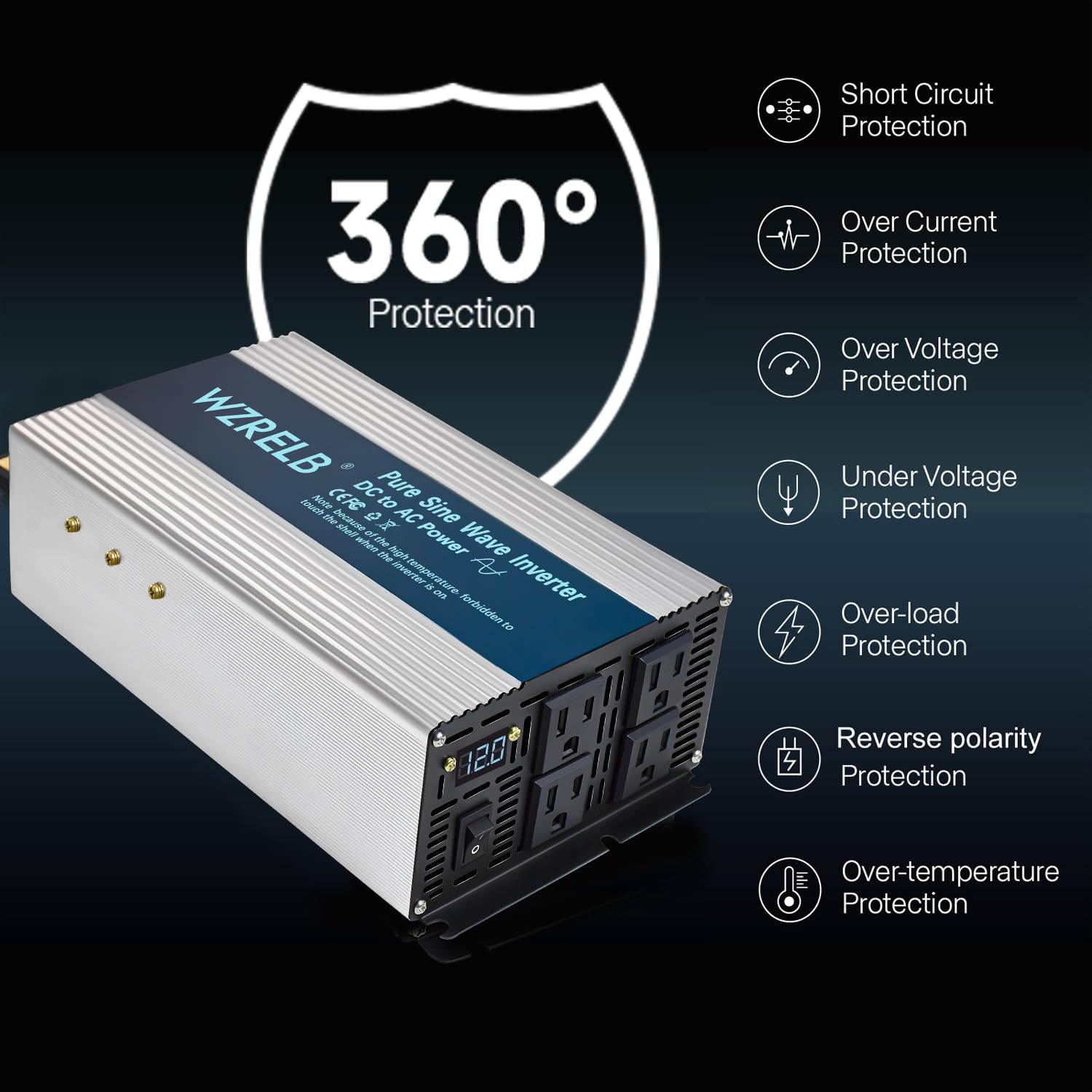
Figure 2: The inverter features multiple protection mechanisms for safe operation.
3. Package Contents
Verify that all items are present in your package:
- WZRELB 1800W Pure Sine Wave Inverter (36V DC to 110V/120V AC)
- DC Input Cables (Red for Positive, Black for Negative)
- User Manual
4. Product Overview
Familiarize yourself with the components of your WZRELB inverter:
- AC Outlets: Four 120V AC outlets for connecting appliances.
- LED Display: Digital display showing input voltage.
- Power Switch: ON/OFF control for the inverter.
- DC Input Terminals: Red (+) and Black (-) terminals for battery connection.
- Cooling Fan: Automatically activates to maintain optimal operating temperature.
- Aluminum Casing: Provides efficient heat dissipation and durability.

Figure 3: Front panel features of the WZRELB Inverter.

Figure 4: The all-aluminum body maximizes the inverter's operating temperature range.
5. Setup and Installation
Follow these steps for safe and correct installation:
- Choose a suitable location: Install the inverter in a dry, well-ventilated area, away from direct sunlight, heat sources, and flammable materials. Ensure adequate space around the inverter for air circulation.
- Prepare the battery: Ensure your battery system is 36V DC. Turn off all loads connected to the battery.
- Connect Negative Cable: Connect the negative (-) cable from your 36V battery bank (in parallel or series configuration) to the negative (-) terminal on the inverter. Tighten securely.
- Spark-Proof Screw Contact (for safety): Briefly contact the positive (+) battery terminal with the spark-proof screw on the inverter's positive (+) terminal for 3-5 seconds. This pre-charges the inverter's capacitors and prevents sparks during final connection.
- Connect Positive Cable: Connect the positive (+) cable from your 36V battery bank to the positive (+) terminal on the inverter. Tighten securely.
- Grounding: Connect the inverter's grounding terminal to a proper earth ground.
- Verify Connections: Double-check all connections for tightness and correct polarity.

Figure 5: DC Connection Guide for the WZRELB Inverter.
Video 1: An official video demonstrating the installation and features of the WZRELB Pure Sine Wave Inverter.
6. Operating Instructions
To operate your WZRELB inverter:
- Power On: After ensuring all connections are secure, press the ON/OFF switch on the inverter. The LED display will illuminate, showing the input DC voltage.
- Connect Appliances: Plug your AC appliances into the inverter's AC outlets. Ensure the total wattage of all connected appliances does not exceed 1800W.
- Monitor Display: The LED display shows the current input voltage. Monitor this to ensure your battery voltage remains within a safe operating range.
- Soft Start Feature: The inverter incorporates a soft start design, which gradually increases AC voltage upon startup. This reduces inrush current, protecting both the inverter and your connected appliances.
- Power Off: When finished, first turn off all connected AC appliances, then press the ON/OFF switch on the inverter to power it down.

Figure 6: The inverter provides stable power for various household appliances.
7. Maintenance
Regular maintenance ensures optimal performance and longevity of your inverter:
- Keep Clean: Periodically clean the exterior of the inverter with a dry, soft cloth. Ensure ventilation openings are free from dust and debris.
- Check Connections: Regularly inspect all DC input and AC output connections for tightness. Loose connections can cause overheating and power loss.
- Battery Maintenance: Ensure your 36V battery bank is properly maintained and charged according to its manufacturer's recommendations.
- Storage: If storing the inverter for an extended period, disconnect it from the battery and store it in a cool, dry place.
8. Troubleshooting
Refer to the table below for common issues and their solutions:
| Problem | Possible Cause | Solution |
|---|---|---|
| No AC output, LED display off | Inverter not powered on; No DC input; Loose battery connections | Press power switch; Check battery voltage; Tighten DC cables |
| No AC output, LED display shows low voltage | Battery voltage too low | Recharge or replace battery |
| Inverter shuts down, LED display shows high voltage | Input voltage too high | Verify battery system is 36V; Disconnect from charging source if overcharging |
| Inverter shuts down, LED display shows overload | Connected load exceeds 1800W | Reduce connected load; Use appliances within inverter's rated power |
| Inverter shuts down, LED display shows over-temperature | Poor ventilation; High ambient temperature; Overload | Improve ventilation; Move to cooler environment; Reduce load |
| Fan runs constantly or loudly | High internal temperature; Dust in fan | Ensure proper ventilation; Clean fan vents; Reduce load |
9. Specifications
| Feature | Specification |
|---|---|
| Model Name | SEFB1800W36V |
| Input Voltage | 36 Volts DC |
| Output Voltage | 120 Volts AC |
| Continuous Output Power | 1800 Watts |
| Peak Output Power | 3600 Watts |
| Electrical Output Waveform | Pure Sine Wave |
| Frequency | 60 Hz |
| AC Outlets | 4 |
| Item Dimensions (L x W x H) | 11.3" x 5.6" x 2.8" |
| Weight | 4.5 lb |
| Recommended Uses | Recreational Vehicle, Camping, Home, Truck, Car |
10. Warranty and Support
The WZRELB 1800W Pure Sine Wave Inverter comes with a 1-year warranty from the date of purchase. This warranty covers manufacturing defects and workmanship under normal use.
For technical support, warranty claims, or any questions regarding your inverter, please contact the seller, RELIABLE Solar Inverter, or visit the official WZRELB store for further assistance:
- Seller: RELIABLE Solar Inverter
- WZRELB Store: Visit WZRELB Store on Amazon
Please have your model number (SEFB1800W36V) and purchase information ready when contacting support.


