
1. Introduction
Thank you for purchasing the COOLECH 42-inch Portable Evaporative Air Cooler. This manual provides important information regarding the safe operation, installation, maintenance, and troubleshooting of your appliance. Please read this manual thoroughly before use and retain it for future reference.
2. Important Safety Instructions
To reduce the risk of fire, electric shock, or injury, always follow basic safety precautions when using this appliance.
- Read all instructions before using the appliance.
- Ensure the power supply voltage matches the rating label on the appliance.
- Do not operate the appliance with a damaged cord or plug. If the cord or plug is damaged, contact customer service for replacement.
- Do not place the appliance near heat sources, open flames, or in direct sunlight.
- Always unplug the appliance before cleaning, servicing, or moving it.
- Do not immerse the appliance, cord, or plug in water or other liquids.
- Keep children and pets away from the appliance during operation.
- Do not block air inlets or outlets. Maintain at least 12 inches of clearance around the unit.
- Use the appliance on a stable, level surface to prevent tipping.
- Do not use the appliance in areas with high humidity, such as bathrooms, to avoid electrical hazards.
- Only use the provided ice packs and ensure they are properly sealed.
- Do not attempt to repair or modify the appliance yourself. Refer all servicing to qualified personnel.
3. Product Overview
The COOLECH 42-inch Portable Evaporative Air Cooler is a versatile 3-in-1 appliance functioning as a fan, humidifier, and air cooler. It features an LED touch screen, remote control, and 90-degree oscillation for wide coverage.
Package Contents:
- 1 x COOLECH Evaporative Air Cooler
- 4 x Upgraded Ice Packs
- 1 x Remote Control (battery included)
- 1 x Non-tip Base
- 1 x User Manual
Key Features:
- 3-in-1 Functionality: Operates as a fan, humidifier, and air cooler.
- 4 Operating Modes: Normal, Nature, Sleep, and Cooling.
- 3 Wind Speeds: Low, Medium, and High.
- 90° Oscillation: Provides wide area air distribution.
- 12-Hour Timer: Allows for scheduled operation and automatic shut-off.
- 1-Gallon Water Tank: Supports extended cooling periods.
- LED Touch Screen & Remote Control: Offers convenient control options.
- Low Noise Operation: Operates at approximately 50 dB.
- No Hose or Window Required: Freestanding design for flexible placement.

Figure 3.1: COOLECH 42-inch Portable Evaporative Air Cooler with included remote control and ice packs.
How Evaporative Cooling Works:
The evaporative air cooler draws in hot, dry air. This air passes through a wet cooling pad, where water evaporates, absorbing heat and converting the hot air into cooler, more humid air. This process is most effective in dry climates. For optimal performance, ensure adequate ventilation in the room.

Figure 3.2: Diagram showing the evaporative cooling process: hot air enters, passes through a wet cooling pad, and exits as cool, humid air.
4. Setup
4.1 Base Assembly
The appliance requires minimal assembly. Follow these steps to attach the non-tip base:
- Align the two halves of the base and snap them together.
- Place the main unit onto the assembled base, ensuring the alignment pins engage correctly.
- Secure the base to the unit using the provided screws.

Figure 4.1: Visual guide for simple and fast base assembly.
4.2 Filling the Water Tank and Using Ice Packs
For cooling and humidifying functions, the water tank must be filled. For enhanced cooling, use the provided ice packs.
- Ensure the appliance is unplugged.
- Locate the water inlet on the unit.
- Fill the water tank with clean water up to the 'MAX' level indicator. Do not overfill.
- For initial use, fill the ice packs with water to the 'MAX' line, shake, and freeze them.
- Place the frozen ice packs into the water tank.
- Monitor the visible water level indicator to know when to refill.

Figure 4.2: The 1-gallon water tank with visible water level indicators.

Figure 4.3: Guide for filling, freezing, and using the included ice packs.
5. Operation
The COOLECH air cooler can be controlled using the LED touch screen on the top of the unit or the included remote control.
5.1 Control Panel and Remote Control
The LED touch screen provides direct access to all functions. The remote control allows for convenient operation from a distance of up to 20 feet.
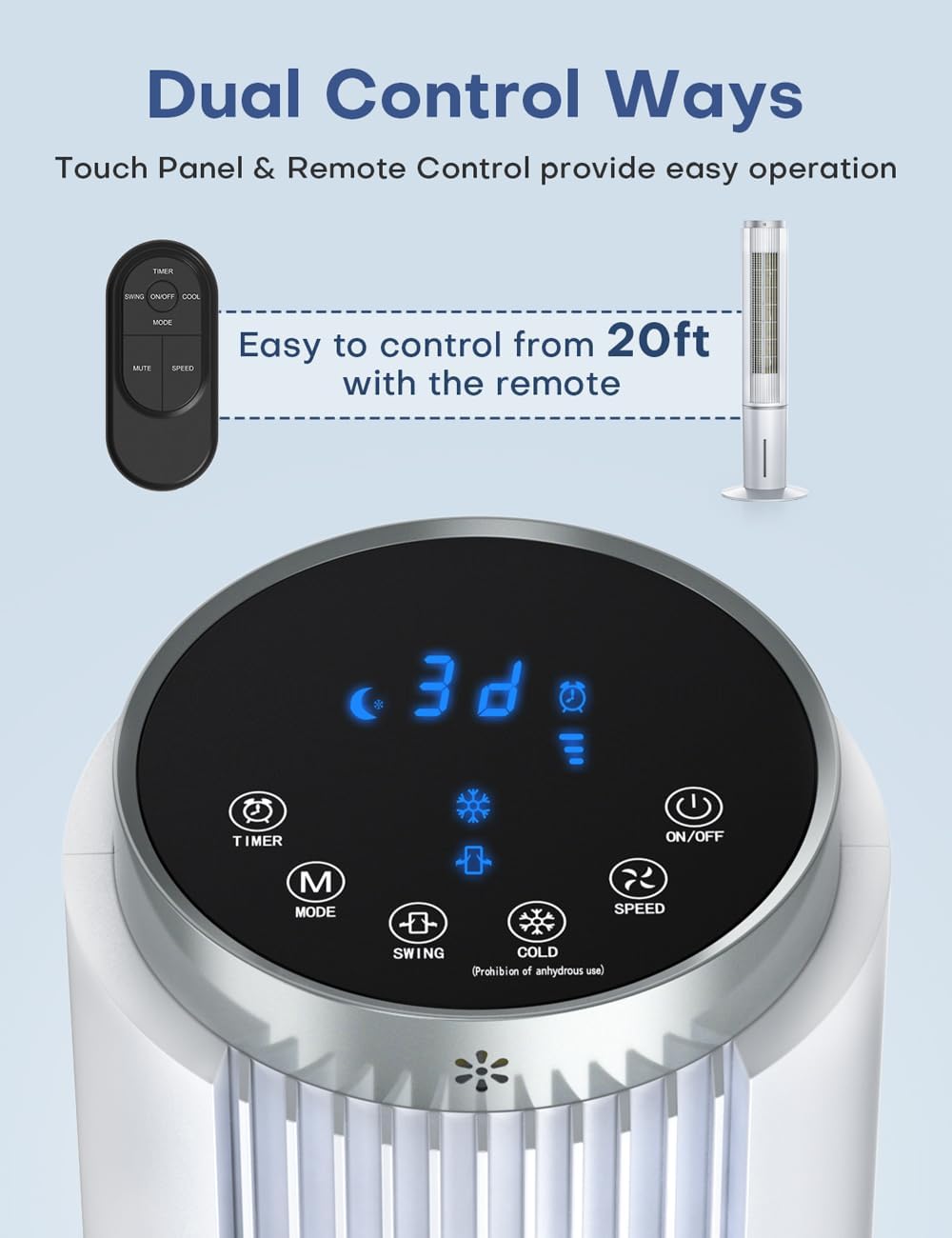
Figure 5.1: The LED touch control panel and the remote control for the air cooler.
5.2 Power On/Off
Press the ON/OFF button on the control panel or remote to turn the unit on or off.
5.3 Mode Selection
Press the MODE button to cycle through the available operating modes:
- Normal Mode: Provides a consistent airflow.
- Nature Mode: Simulates natural wind patterns with varying speeds.
- Sleep Mode: Operates at a lower speed and reduced noise level for quiet environments.
- Cooling Mode: Activates the evaporative cooling function. Ensure the water tank is filled and ice packs are used for optimal cooling.

Figure 5.2: Visual representation of the four operating modes.
5.4 Speed Adjustment
Press the SPEED button to select one of three wind speeds: Low, Medium, or High. The current speed setting will be indicated on the LED display.
5.5 Oscillation Function
Press the SWING button to activate or deactivate the 90-degree oscillation feature. This function helps distribute cool air across a wider area.
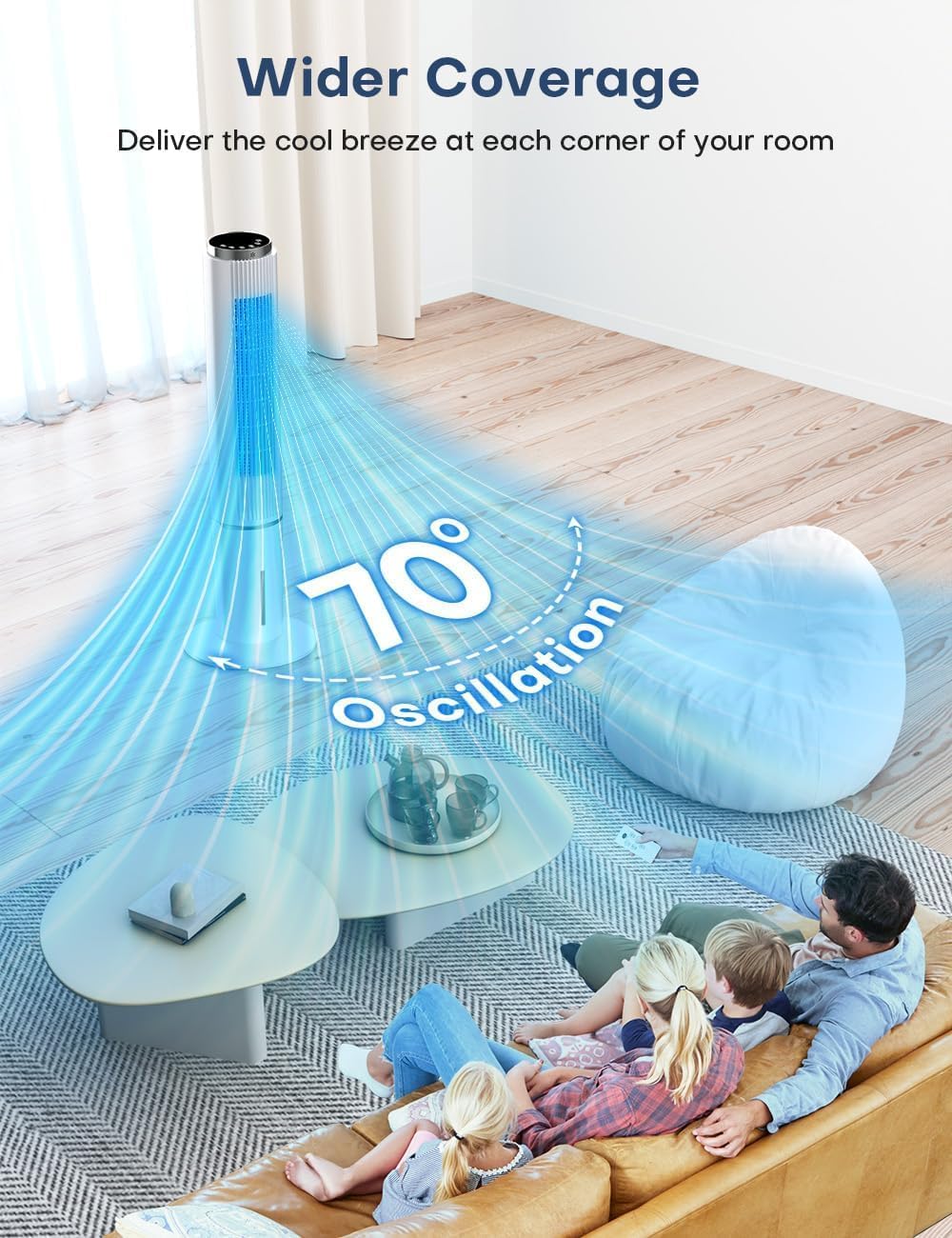
Figure 5.3: The 90-degree oscillation feature provides wider air distribution.
5.6 Timer Setting
Press the TIMER button to set the automatic shut-off timer. The timer can be set from 1 to 12 hours. Each press increases the timer by one hour. The unit will automatically turn off after the set duration.

Figure 5.4: The air cooler features a 12-hour timer and quiet operation, suitable for use in a bedroom.
6. Maintenance
Regular cleaning and maintenance ensure optimal performance and longevity of your air cooler. Always unplug the unit before performing any maintenance.
6.1 Cleaning the Cooling Pad and Rear Grill
The cooling pad and rear grill are removable for easy cleaning.
- Unplug the appliance from the power outlet.
- Carefully remove the rear grill and the cooling pad.
- Wash the cooling pad and grill with mild soap and water. Rinse thoroughly.
- Allow all parts to air dry completely before reassembling.
- Reinstall the cooling pad and rear grill.

Figure 6.1: The removable cooling pad and rear grill facilitate easy cleaning.
6.2 Draining the Water Tank
Regularly drain and clean the water tank to prevent mold and mildew growth.
- Unplug the appliance.
- Locate the drainage outlet at the bottom of the unit.
- Place a container under the outlet and open the drain plug to empty the tank.
- Once empty, clean the inside of the tank with a soft cloth and mild detergent. Rinse thoroughly.
- Close the drain plug securely.
6.3 Storage
If the appliance will not be used for an extended period:
- Ensure the water tank is completely drained and dry.
- Clean all components as described above.
- Store the appliance in a cool, dry place, away from direct sunlight and extreme temperatures.
7. Troubleshooting
If you encounter issues with your COOLECH air cooler, refer to the following table for common problems and solutions.
| Problem | Possible Cause | Solution |
|---|---|---|
| Unit does not power on | No power supply; Power cord not plugged in; Power outlet malfunction. | Check power cord connection; Try a different outlet; Check circuit breaker. |
| Weak or no airflow | Air inlets/outlets blocked; Fan speed too low; Cooling pad dirty. | Ensure clear path for airflow; Increase fan speed; Clean cooling pad. |
| No cooling effect | Water tank empty; No ice packs used; Cooling pad dry; High room humidity. | Fill water tank; Add frozen ice packs; Ensure cooling pad is wet; Use in drier environments or ensure ventilation. |
| Unusual noise | Unit not on a level surface; Obstruction in fan; Water pump issue. | Place on a flat surface; Check for foreign objects; Contact customer service if noise persists. |
| Water leakage | Water tank overfilled; Drain plug not secured; Unit tilted. | Do not overfill water tank; Ensure drain plug is tightly closed; Place unit on a level surface. |
If the problem persists after attempting these solutions, please contact COOLECH customer service.
8. Specifications
| Feature | Specification |
|---|---|
| Brand | COOLECH |
| Model Name | JDAC90R |
| Mounting Type | Freestanding |
| Color | White |
| Product Dimensions (D x W x H) | 42.7" x 9.3" x 9.1" |
| Item Weight | 10.1 pounds |
| Air Flow Capacity | 1320 Cubic Feet Per Minute (CFM) |
| Floor Area Coverage | Up to 250 Square Feet |
| Reservoir Capacity | 1 Gallon |
| Number of Speeds | 3 |
| Noise Level | 50 dB |
| Voltage | 120 Volts |
| Controls Type | Smart LED Top Control & Remote Control |
| Oscillation | 90° Auto-Oscillation |
| Power Cord Length | 5.9 Feet |
| Included Components | Air Cooler, Remote Control, 4 Ice Packs, User Manual |
| UPC | 755139190459 |
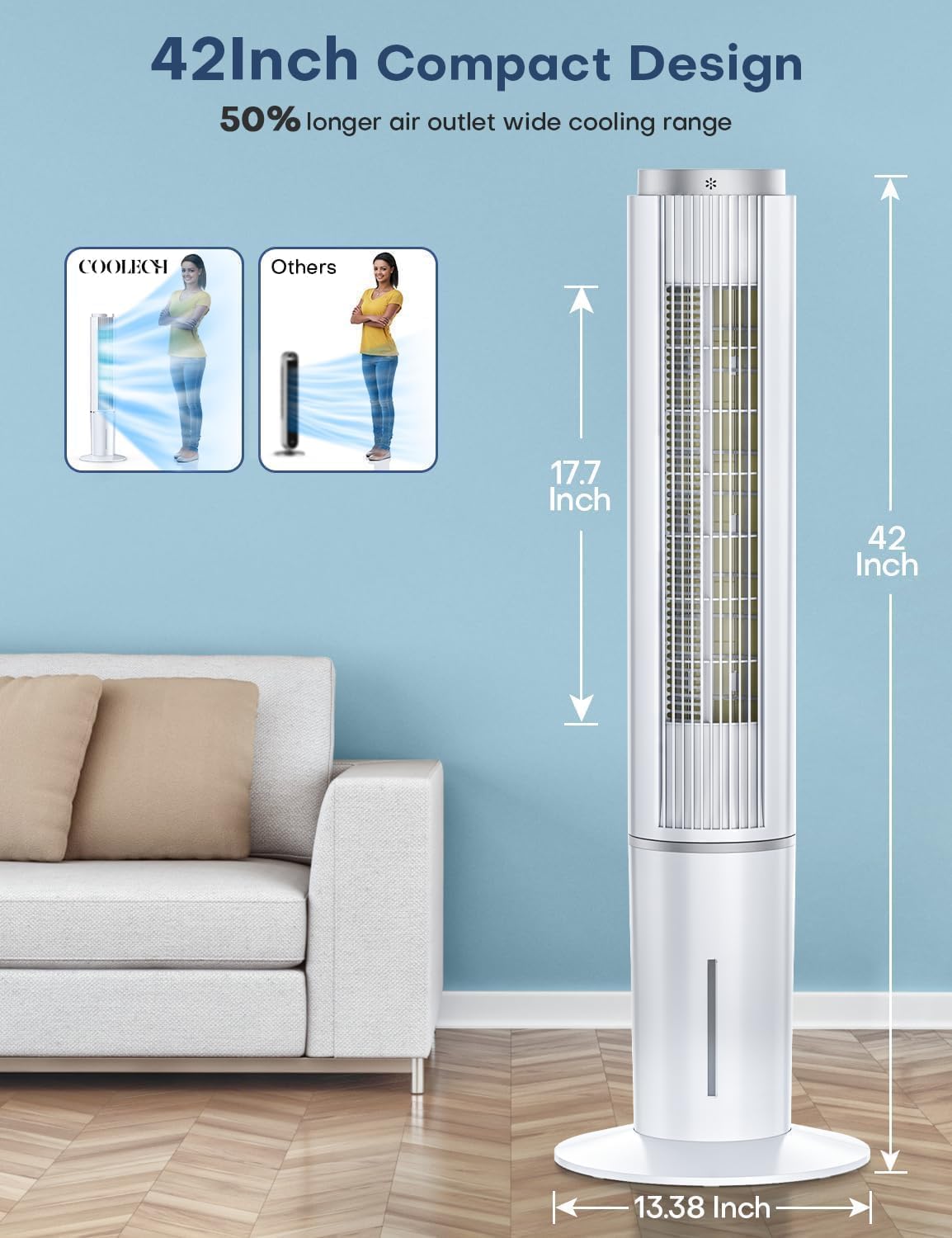
Figure 8.1: Dimensions of the COOLECH 42-inch Portable Evaporative Air Cooler.
9. Warranty and Support
Your COOLECH Evaporative Air Cooler comes with a 1-year warranty from the date of purchase, covering manufacturing defects only.
For any product issues, questions, or support needs, please contact COOLECH customer service. Our support team is available to provide assistance.
Contact Information: Refer to the contact details provided in your purchase documentation or through the Amazon platform.