
ZTIANFOTO Talos Damping Magic Arm
MOFAGE Talos Damping Magic Arm User Manual
Brand: ZTIANFOTO | Model: Talos Damping Magic Arm
1. Introduction
The MOFAGE Talos Damping Magic Arm is an 11-inch adjustable articulating arm engineered for professional and enthusiast photographers and videographers. It provides a robust and flexible mounting solution for various camera accessories such as field monitors, lights, and microphones. Its innovative damping structure allows for precise, real-time adjustments, while the quick-release locking handle ensures rapid and secure setup.
This manual provides detailed instructions on the setup, operation, maintenance, and troubleshooting of your Talos Damping Magic Arm to ensure optimal performance and longevity.

Figure 1.1: The MOFAGE Talos Damping Magic Arm, showcasing its unique articulated design and grey finish.
2. Key Features
- Quick Release Mechanism: A single turn of the Talos locking handle releases 80% of the locking force, enabling faster adjustments and setup compared to traditional magic arms.
- Real-Time Damping Adjustment: Features a newly designed damping structure with strong friction, allowing the arm to maintain its angle even when partially locked. This facilitates real-time angle adjustments, particularly useful with monitors.
- High Load-Bearing Capacity: Capable of supporting up to 5kg (11lbs), providing strong and reliable support for various equipment. Can also function as a handle for small machines.
- Replaceable Interface Design: The arm's interface is designed for future compatibility with upcoming quick-release systems and accessories.
- Structural Optimization: Incorporates a gearless disc design that significantly reduces wear and extends the product's lifespan.
- Patented Anti-Jamming Design: Exclusive patented structure effectively prevents the common issue of spindle jamming that can occur with traditional friction-type magic arms after prolonged locking.
- Retractable Positioning Pin: Compatible with Arri specification locating holes, preventing deflection and ensuring the magic arm remains securely in place without loosening or falling.

Figure 2.1: Detailed view of the damping mechanism, illustrating the precision engineering.
3. Package Contents
Please check the package contents upon unboxing to ensure all items are present and in good condition:
- 1 x MOFAGE Talos Damping Magic Arm (Grey)
- User Manual (this document)
Note: Additional accessories such as monitors, cameras, or lights are not included and must be purchased separately.
4. Setup Instructions
Follow these steps to set up your MOFAGE Talos Damping Magic Arm:
- Identify Mounting Points: The Talos Magic Arm features standard 1/4" and 3/8" thread screws at both ends for versatile mounting.
- Attach to Support System:
- Screw one end of the magic arm onto a compatible mounting point on your camera cage, rig, tripod, or other support system. Ensure it is securely tightened by rotating the knurled knob until snug.
- If your support system has Arri specification locating holes, align the retractable positioning pin on the magic arm with these holes before tightening to prevent rotation.
- Attach Accessory:
- Screw your desired accessory (e.g., field monitor, LED light, microphone) onto the other end of the magic arm. Ensure the accessory's mounting thread matches the arm's 1/4" or 3/8" screw.
- Tighten the accessory securely by rotating its mounting point or the arm's knurled knob.
- Adjust Position: Loosen the main locking handle of the magic arm to adjust its angle and position. Once the desired position is achieved, tighten the locking handle firmly to secure the arm.

Figure 4.1: The versatile 1/4" and 3/8" thread screws for attaching various equipment.

Figure 4.2: Example of the magic arm integrated into a camera setup, supporting a field monitor.
5. Operating the Magic Arm
The Talos Damping Magic Arm is designed for intuitive and efficient operation:
- Quick Release Operation: To adjust the arm's position, simply turn the main locking handle. A single turn is sufficient to release approximately 80% of the locking force, allowing for quick repositioning.
- Real-Time Angle Adjustment: The integrated damping structure provides continuous friction. This means you can make minor angle adjustments even when the locking handle is only partially tightened, without the arm collapsing. This feature is particularly beneficial for fine-tuning monitor angles during live shoots.
- Securing Position: Once the desired angle and position are achieved, firmly tighten the main locking handle. This will engage the full locking force, ensuring your equipment remains stable and secure.
- Load Capacity: Always ensure the total weight of the attached equipment does not exceed the maximum load capacity of 5kg (11lbs) to prevent damage or instability.
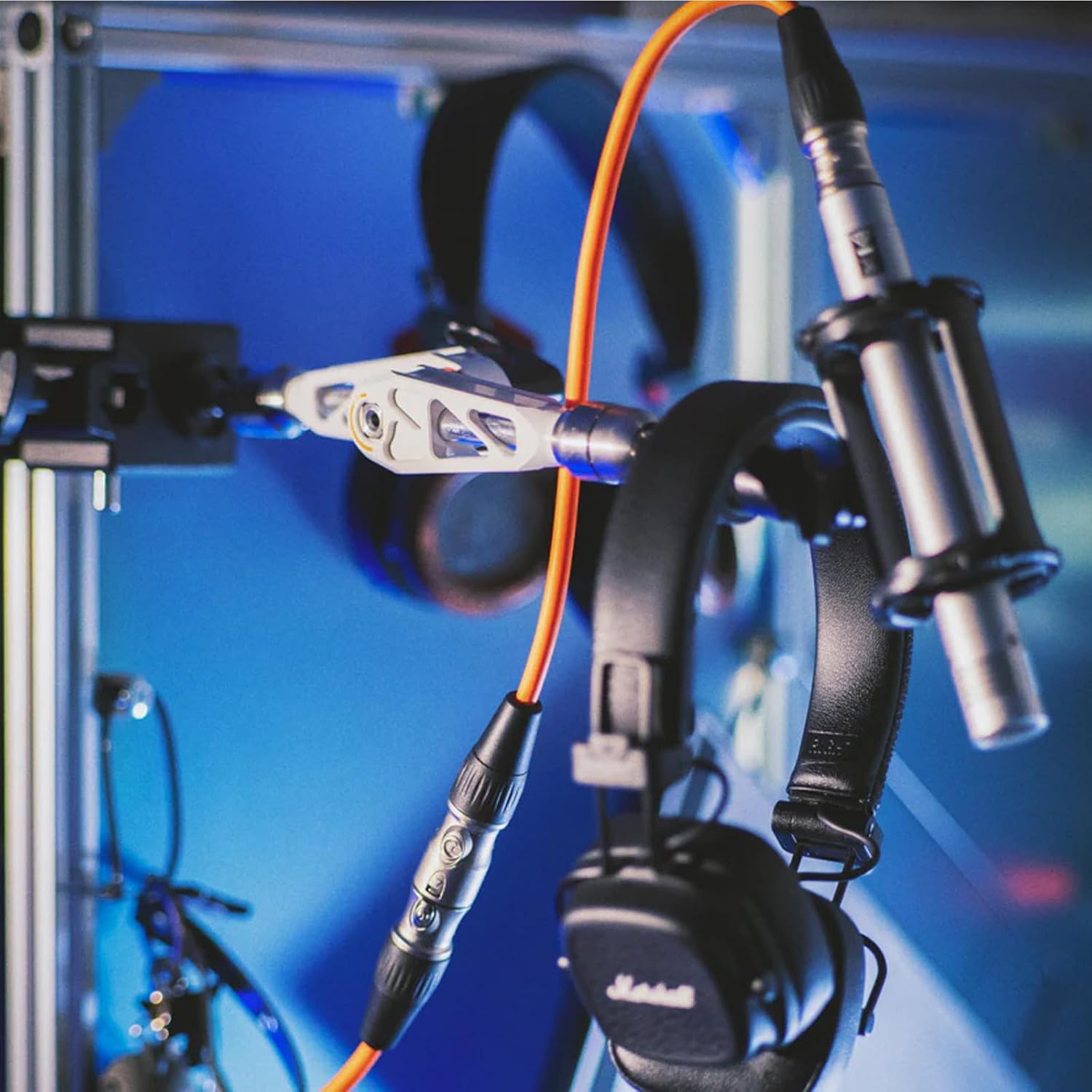
Figure 5.1: The magic arm's versatility in holding various accessories beyond cameras and monitors.
6. Maintenance and Care
Proper maintenance will extend the life and performance of your Talos Damping Magic Arm:
- Cleaning: Wipe the arm regularly with a soft, dry cloth to remove dust and debris. For stubborn dirt, a slightly damp cloth can be used, followed by immediate drying. Avoid using harsh chemicals or abrasive cleaners.
- Lubrication: The gearless disc design minimizes wear and reduces the need for lubrication. Do not attempt to lubricate the internal damping mechanism unless specifically instructed by the manufacturer.
- Storage: Store the magic arm in a clean, dry environment away from extreme temperatures and humidity.
- Inspection: Periodically inspect all screws and joints for any signs of loosening or wear. Ensure the quick-release handle operates smoothly.
- Preventing Spindle Jamming: The patented design helps prevent spindle jamming. However, avoid over-tightening the locking handle excessively for prolonged periods when not in use, as this can still contribute to wear over time.
7. Troubleshooting
If you encounter issues with your MOFAGE Talos Damping Magic Arm, refer to the following common problems and solutions:
| Problem | Possible Cause | Solution |
|---|---|---|
| Arm does not hold position or slips. | Locking handle not fully tightened; Exceeded load capacity; Worn internal components. | Ensure the locking handle is firmly tightened. Verify the weight of your equipment does not exceed 5kg (11lbs). If the issue persists, contact customer support. |
| Accessory wobbles on the arm. | Accessory not securely screwed in; Loose connection at the arm's ends. | Ensure the accessory is tightly screwed onto the arm's 1/4" or 3/8" thread. Check that the arm's end knobs are also securely tightened. |
| Arm feels overly stiff or difficult to adjust. | Over-tightening of the main locking handle; Debris in the joint. | Loosen the main locking handle slightly. Clean any visible debris around the joints. Avoid excessive force when adjusting. |
| Retractable positioning pin does not engage. | Not aligned with Arri locating holes; Pin is stuck. | Ensure the mounting surface has compatible Arri locating holes. Gently press and release the pin to check for free movement. Clean if necessary. |
8. Specifications
| Feature | Detail |
|---|---|
| Brand | ZTIANFOTO |
| Model Name | Talos Damping Magic Arm |
| Color | Grey |
| Compatible Devices | Monitor, Camera, Light, and other accessories with 1/4" or 3/8" threads |
| Maximum Weight Recommendation | 5 kg (11 lbs) |
| Folded Size (Approx.) | 5.5" (L) x 5.5" (W) x 5.5" (H) |
| UPC | 717328761741 |
| Thread Type | 1/4" and 3/8" |
9. Warranty and Support
For warranty information and customer support, please refer to the official ZTIANFOTO website or contact your retailer. Keep your purchase receipt as proof of purchase for any warranty claims.
Please note that extended protection plans, such as those offered by third-party providers on Amazon, are separate from the manufacturer's warranty and are subject to their own terms and conditions.
No official product videos were available for inclusion in this manual.
Related Documents - Talos Damping Magic Arm
 |
Colebrook Bosson Saunders Flo X Monitor Arm: Installation and Configuration Guide Detailed instructions for installing and adjusting the Colebrook Bosson Saunders Flo X Monitor Arm. Covers desk mounting, VESA plate attachment, dual spring configuration for weight adjustment, friction control for rotation and tilt, and cable management. |
 |
MAUL Beamertisch MAULpro: Load Capacity and Adjustability Discover the MAUL Beamertisch MAULpro, a versatile mounting solution with a 30kg maximum load capacity and adjustable features for optimal equipment positioning. |
 |
Ricoo MS061 Desk Mount Arm Assembly and Safety Instructions Comprehensive guide for assembling and safely using the Ricoo MS061 desk mount arm. Includes important safety warnings, load capacity, and step-by-step assembly instructions for indoor use. |
 |
VEVOR Load Arm for Hoists HHDB-300/600KG User Manual User manual for the VEVOR Load Arm for Hoists (Model: HHDB-300/600KG). Learn about its features, specifications, installation, usage, and maintenance for safe and efficient lifting operations. |
 |
Fadini TALOS Retractable Oil-Hydraulic Bollard: Installation and Operation Manual Comprehensive manual for the Fadini TALOS retractable oil-hydraulic bollard, covering installation, operation, maintenance, safety, and technical specifications. Features detailed instructions and diagrams for secure traffic control. |
 |
Newskill Mic Holder Adjustable Microphone Arm - Specs & Assembly Guide Comprehensive details on the Newskill Mic Holder, an adjustable microphone arm. Includes technical specifications, dimensions, and a quick assembly guide for easy setup. Compatible with various microphones. |