
Caruner CN ZWX FS-FGR12B
FGr12B 2.4GHz 12CH Receiver Instruction Manual
Model: CN ZWX FS-FGR12B
Product Overview
The FGr12B is a compact and lightweight 2.4GHz 12-channel receiver designed for remote control cars and boats. It utilizes the advanced AFHDS3 protocol, ensuring reliable communication with compatible Flysky transmitters such as the PL18, NB4, and NB4 Lite. This receiver supports multiple data output types including PWM, PPM, and i-Bus, providing versatility for various RC applications.
Its robust design and wide input voltage range (3.5-9V) make it suitable for a broad range of RC models. The FGr12B also features online update capability for future firmware enhancements.

Figure 1: FGr12B 2.4GHz 12CH Receiver and included connecting wires.
Setup and Installation
Follow these steps to properly set up and install your FGr12B receiver:
- Mounting the Receiver: Choose a secure location in your RC model, away from high heat or vibration sources. Use double-sided tape or a receiver box to fix the receiver firmly. Ensure the antenna is positioned optimally for signal reception, avoiding contact with carbon fiber or metal parts.
- Connecting Power: Connect the receiver to a stable power source within the specified voltage range of 3.5V to 9V. Typically, this is done via an Electronic Speed Controller (ESC) with a built-in Battery Eliminator Circuit (BEC) or a dedicated receiver battery.
- Connecting Servos and Peripherals: Connect your servos, ESC, and other peripherals to the corresponding PWM channels on the receiver. Refer to the receiver overview diagram for channel assignments.
- Binding Process:
- Ensure your compatible Flysky transmitter (e.g., PL18, NB4, NB4 Lite) is powered off.
- Connect the bind plug (if included, or short the bind pins) to the 'Bind' port on the FGr12B receiver.
- Power on the receiver. The LED on the receiver should flash rapidly, indicating it is in binding mode.
- While holding the bind button on your transmitter (or following its specific binding procedure), power on the transmitter.
- The receiver's LED should turn solid, indicating a successful bind.
- Power off both the receiver and transmitter. Remove the bind plug from the receiver.
- Power on the transmitter first, then the receiver. The receiver LED should be solid, confirming the connection.
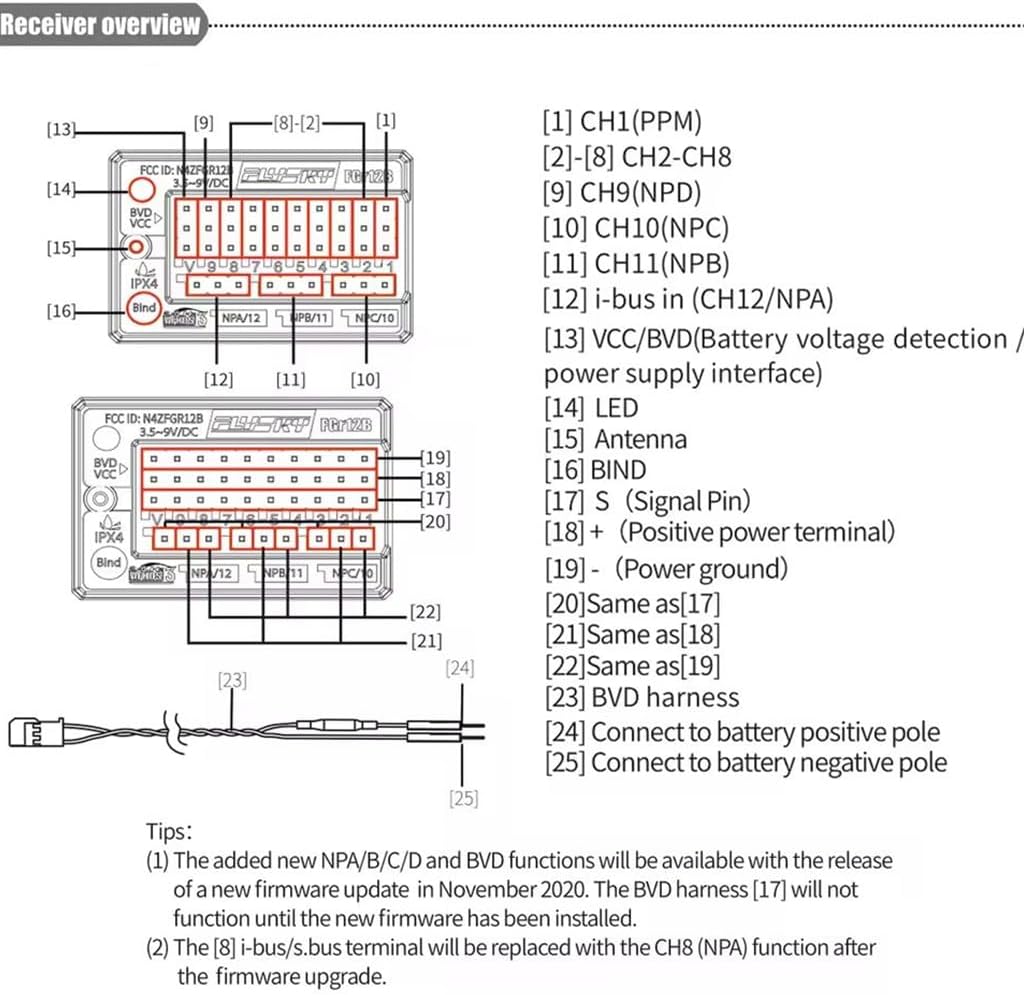
Figure 2: FGr12B Receiver Pinout and Overview Diagram. This diagram illustrates the channel assignments and various connection points including PWM channels, i-Bus, BVD, and power terminals.
Operating Instructions
Once the FGr12B receiver is successfully bound to your transmitter, you can begin operating your RC model. The receiver provides various output types:
- PWM Output: Standard Pulse Width Modulation for direct connection to servos and ESCs. Channels 1-11 (or 1-12 with firmware update) provide individual PWM signals.
- PPM Output: Pulse Position Modulation, a single wire output carrying all channel data, often used for flight controllers or other advanced systems.
- i-Bus Output: Flysky's digital serial bus protocol, offering multi-channel data transmission over a single wire, reducing wiring complexity.
Ensure your RC model's components are correctly configured to receive the chosen output type from the FGr12B. Always perform a range check before operating your model at a distance, especially after any changes to the setup.
Maintenance
Proper maintenance ensures the longevity and reliable performance of your FGr12B receiver:
- Keep Clean: Regularly inspect the receiver for dirt, dust, or moisture. Use a soft, dry brush or compressed air to clean it. Avoid using liquid cleaners.
- Environmental Conditions: Operate and store the receiver within the specified temperature range of -10℃ to +60℃ and humidity limit of 20% to 95%. Extreme conditions can affect performance and lifespan.
- Antenna Care: Ensure the antenna is not kinked, cut, or damaged. A damaged antenna can significantly reduce range and signal reliability.
- Firmware Updates: The receiver supports online firmware updates. Periodically check the manufacturer's website for new firmware versions that may offer improved performance or new features.
- Connection Integrity: Periodically check all wire connections to ensure they are secure and free from corrosion or damage.
Troubleshooting
If you encounter issues with your FGr12B receiver, consider the following common problems and solutions:
| Problem | Possible Cause | Solution |
|---|---|---|
| Receiver LED not solid after binding. | Binding failed or signal interference. | Re-attempt the binding process carefully. Ensure transmitter and receiver are close during binding. Check for other 2.4GHz devices nearby. |
| No response from servos/ESC. | Incorrect wiring, insufficient power, or receiver not bound. | Verify all connections are correct according to the diagram. Check battery voltage. Confirm receiver is successfully bound (solid LED). |
| Reduced range or intermittent signal. | Damaged antenna, poor antenna placement, or environmental interference. | Inspect antenna for damage. Re-position antenna away from carbon fiber, metal, or large electronic components. Avoid operating near Wi-Fi routers or other strong 2.4GHz sources. |
| Receiver not powering on. | No power supply or incorrect voltage. | Check power source connection and ensure voltage is within 3.5V-9V. Test power source with another device if possible. |
Specifications
Detailed technical specifications for the FGr12B receiver:

Figure 3: FGr12B Receiver showing its compact dimensions: 37mm x 25mm x 17.5mm.
| Feature | Detail |
|---|---|
| Product Model | FGr12B |
| Adaptive Transmitter | All transmitters supporting AFHDS3 (PL18, NB4, NB4 Lite, etc.) |
| Model Type | Car/Boat, etc. |
| PWM Channels | 11 (will be upgraded to 12 channels with version 2.0 firmware) |
| RF Frequency | 2.4 GHz |
| 2.4G Protocol | AFHDS 3 |
| Antenna Type | Single Antenna |
| Input Power | 3.5-9 V |
| Data Output | PWM / PPM / i-Bus in |
| Temperature Range | -10 ℃ to +60 ℃ |
| Humidity Limit | 20 % to 95 % |
| Online Update | Yes |
| Dimensions | 37 x 25 x 17.5 mm |
| Weight | 11.2 g |
| Certifications | CE, FCC ID: N4ZFGR12B |
| Manufacturer | Caruner |
| Model Number | CN ZWX FS-FGR12B |
Warranty and Support
Information regarding specific warranty terms for the FGr12B receiver is not explicitly provided in the product details. Please refer to the retailer or manufacturer's official website for the most up-to-date warranty policy.
For technical support, troubleshooting assistance beyond this manual, or inquiries about firmware updates, please contact the product manufacturer, Caruner, or your point of purchase. Keep your purchase receipt as proof of purchase for any warranty claims.
Ask a question about this manual
Ask about setup, troubleshooting, compatibility, parts, safety, or missing instructions. Manuals+ will review the question and use this page’s manual context to help answer it.