
Introduction
This manual provides essential instructions for the setup, operation, and maintenance of your Hugrow Smart Ring R20. Please read this guide thoroughly to ensure optimal performance and longevity of your device. The Hugrow Smart Ring R20 is designed to monitor various health metrics and offer convenient NFC functionalities.

Image: The Hugrow Smart Ring R20, a black ring with internal sensors, shown alongside its white wireless charging case.
Product Overview
Key Features:
- NFC Smart Access Control: Utilize the ring for door cards, elevator cards, parking cards, and community access control.
- Family Interconnection: Add family members as friends within the companion app to share and monitor health information.
- Accurate Health Tracking: Monitors heart rate, sleep patterns (deep sleep, light sleep, REM, wakefulness), steps, distance, and calories burned.
- Data Synchronization: Health data can be synchronized with WeChat and iOS Health applications.
- Durable Design: Features up to 7 days (168 hours) of battery life, Bluetooth 5.0 connectivity, and IP68 waterproof rating.
- Wireless Charging: Comes with a specialized wireless charging case.

Image: Visual representation of the Hugrow Smart Ring R20's health tracking capabilities, IP68 waterproof rating, and extended battery life.
Setup
1. Charging the Ring
Before initial use, fully charge your Hugrow Smart Ring R20 using the provided wireless charging case. Place the ring onto the charging base within the case. The indicator light on the case will show charging status. A full charge typically provides up to 7 days of use.
2. App Installation and Pairing
- Download the App: Search for the companion application (e.g., "SmartHealth" or similar, as indicated in product visuals) on the Apple App Store (for iOS) or Google Play Store (for Android).
- Enable Bluetooth: Ensure Bluetooth is enabled on your smartphone.
- Pair the Ring: Open the installed application and follow the on-screen instructions to pair your Hugrow Smart Ring R20. The app will guide you through the connection process.
- Profile Setup: Complete your personal profile within the app to ensure accurate health data tracking.

Image: Screenshots of the Hugrow Smart Ring R20's companion application, displaying various health metrics and the option to add friends for shared health monitoring.
3. Ring Sizing
For accurate tracking and comfort, ensure your ring is the correct size. Refer to the sizing guide below. If you are unsure, measure your finger circumference carefully.
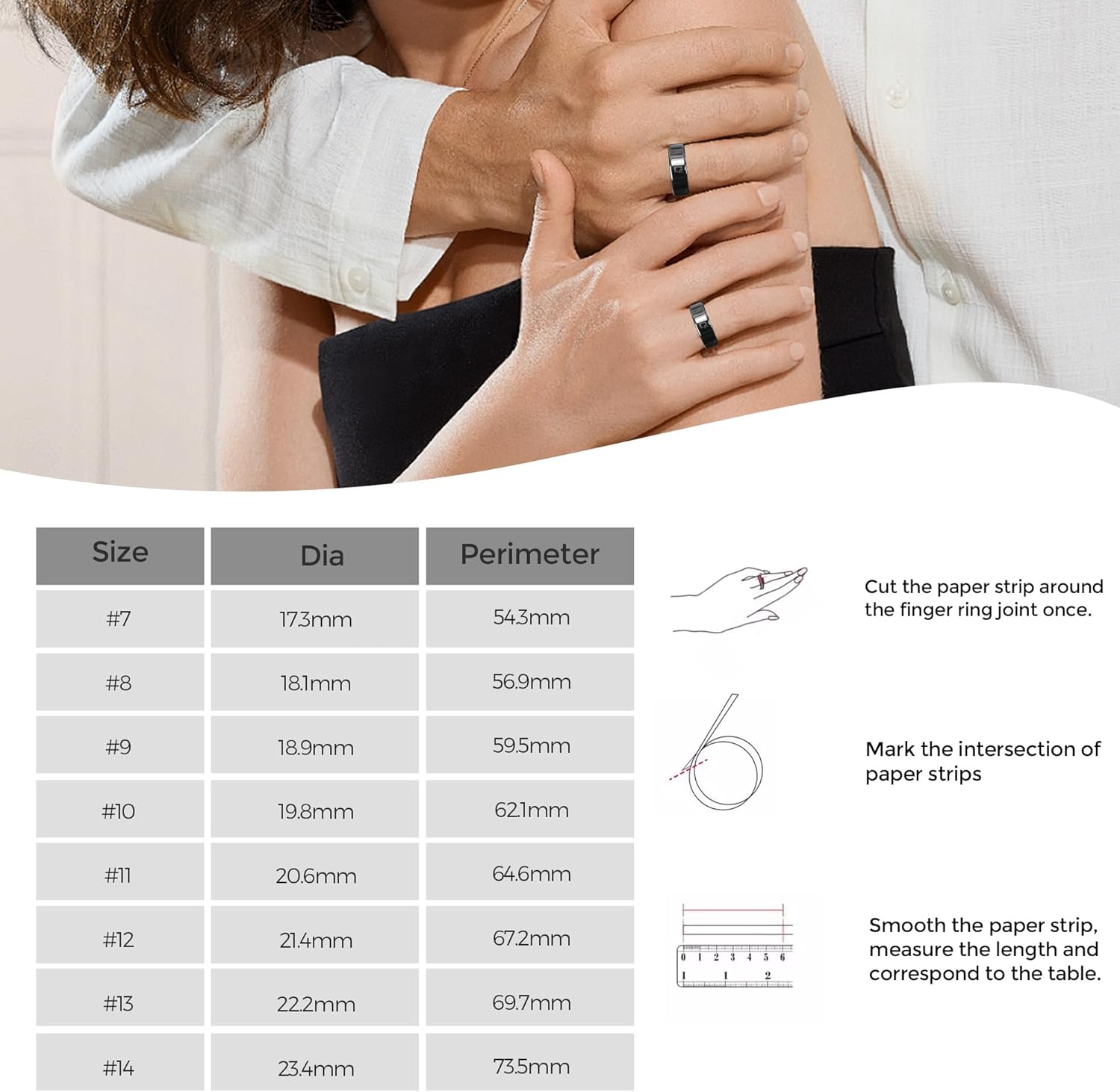
Image: A detailed sizing chart for the Hugrow Smart Ring R20, providing diameter and perimeter measurements for various ring sizes, along with instructions on how to measure your finger.
Operating Instructions
1. Health Tracking
The Hugrow Smart Ring R20 continuously monitors your health data throughout the day and night. Wear the ring on your finger for optimal sensor contact.
- Heart Rate Monitoring: The ring tracks your heart rate, providing insights into your cardiovascular health.
- Sleep Monitoring: It automatically detects and analyzes your sleep stages, including deep sleep, light sleep, REM sleep, and wakefulness. Review your sleep duration and quality in the app.
- Activity Tracking: The ring functions as a fitness tracker, recording your steps, distance traveled, and calories burned during various activities.
- Data Review: Access all your health data, trends, and analysis within the companion application.
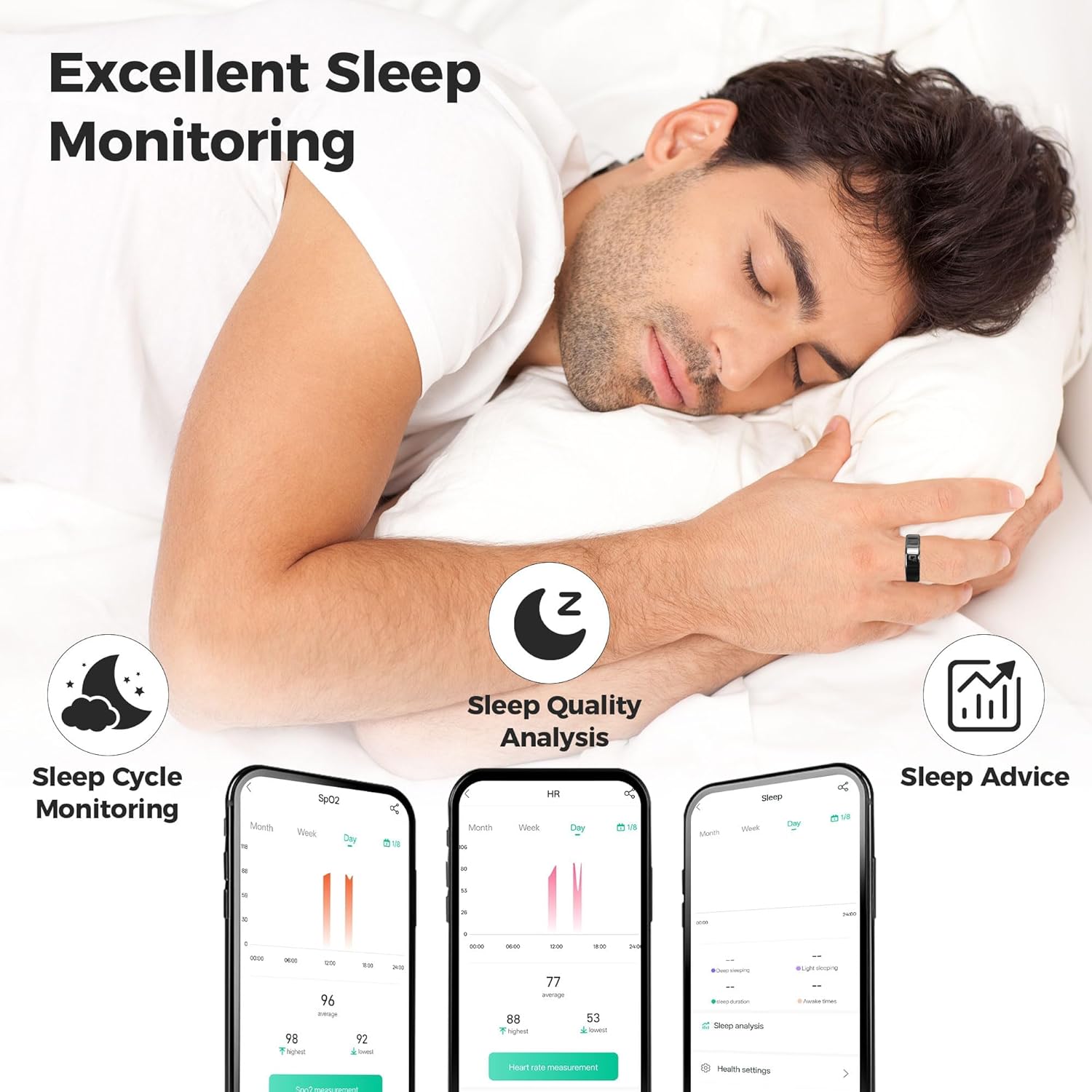
Image: A user sleeping while wearing the Hugrow Smart Ring R20, with accompanying app screenshots illustrating detailed sleep cycle monitoring, analysis, and personalized sleep advice.
2. NFC Functions
The NFC (Near Field Communication) feature allows for various convenient interactions. Ensure NFC is enabled on your smartphone for setup.
- Access Control: The ring can be programmed to function as an access card for compatible NFC-enabled door locks, elevators, and other access systems. Align the NFC logo on the ring with the sensing area of the reader.
- Data Transfer: Use NFC to quickly share information such as URLs, contact details, or trigger specific actions on compatible devices.

Image: Demonstrates the Hugrow Smart Ring R20's NFC capabilities for smart access control, including unlocking household door locks, gaining corridor access, and operating elevators.
NFC Functionality Video Tutorials:
Video: This video demonstrates the NFC capabilities of the Hugrow Smart Ring R20, showing how it can be used for wireless access control with compatible devices.
Video: An Android-specific tutorial demonstrating how to set up and use the NFC functions of the Hugrow Smart Ring R20 with an Android smartphone.
Maintenance
- Cleaning: Gently wipe the ring with a soft, damp cloth to remove dirt or residue. Avoid harsh chemicals or abrasive materials.
- Water Resistance: The ring has an IP68 waterproof rating, making it suitable for handwashing, rain exposure, swimming, and cold showers. However, avoid prolonged submersion in hot water or exposure to high-pressure water jets.
- Storage: When not in use, store the ring in its charging case or a safe, dry place away from extreme temperatures.
Troubleshooting
- Ring Not Connecting:
- Ensure Bluetooth is enabled on your smartphone.
- Check if the ring is charged.
- Restart the companion app and try pairing again.
- Ensure the ring is within Bluetooth range of your device.
- Inaccurate Health Data:
- Verify the ring is worn snugly on your finger, with sensors making good contact with the skin.
- Ensure your personal profile in the app (age, weight, height) is accurate.
- Synchronize data regularly with the app.
- NFC Not Working:
- Confirm NFC is enabled on your smartphone (for programming) or the access device (for use).
- Ensure the NFC logo on the ring is directly aligned with the reader's sensing area.
- Check compatibility of the access system with the ring's NFC standard.
- Battery Draining Quickly:
- Ensure the ring is fully charged before use.
- Background app usage and frequent data synchronization can affect battery life.
Specifications
| Feature | Detail |
|---|---|
| Brand | Hugrow |
| Model Name | Hugrow-R20 |
| Item Model Number | R20 |
| Connectivity Technology | Bluetooth |
| Wireless Communication Standard | Bluetooth |
| Special Feature | Activity Tracker, NFC Access Control |
| Operating System | Linux |
| Battery Type | 1 Nonstandard Battery (Lithium Polymer) |
| Battery Life | Up to 7 days (168 hours) |
| Waterproof Rating | IP68 |
| Item Weight | 4.2 ounces |
| Package Dimensions | 3.39 x 3.03 x 1.73 inches |
| GPS | Via Smartphone |
| Shape | Round |
Warranty and Support
For warranty information, technical support, or customer service inquiries, please refer to the contact details provided with your product packaging or visit the official Hugrow website. Keep your proof of purchase for warranty claims.
You can visit the Hugrow Store for more information: Hugrow Store on Amazon.