
Introduction
The LASELION MS04 is a non-destructive pinless moisture meter designed for quick and accurate detection of moisture levels in various materials such as wood, walls, and other construction materials. Its ball probe allows for scanning large areas and hard-to-reach corners without damaging surfaces. This manual provides essential information for the safe and effective use of your device.

Image: The LASELION MS04 Pinless Moisture Meter, showing its ergonomic design and ball probe.
Package Contents
Verify that all items are present in the package:
- 1 x MS04 Moisture Meter
- 1 x User Manual
- 3 x AAA Batteries
- 1 x Carrying Case

Image: Contents of the LASELION MS04 package, including the meter, manual, batteries, and carrying case.
Key Functions and Display Overview
Familiarize yourself with the components and display indicators of the MS04 moisture meter.

Image: Detailed diagram of the LASELION MS04, highlighting its non-destructive humidity sensor, flashlight status icon, temperature display, moisture content level icon (DRY, MID, WET), battery status icon, analog display, hold icon, measurement value display, maximum/minimum moisture value display, numeric adjustment buttons, set button, power on/off button, MEAS calibration/data hold button, and battery cover.
Setup
1. Installing Batteries
- Open the battery cover located on the back of the device.
- Insert 3 AAA batteries, ensuring correct polarity.
- Close the battery cover securely.
2. Powering On/Off
Press the Power On/Off Button to turn the device on or off. The device will automatically power off after 10 minutes of inactivity to conserve battery life.

Image: A clock indicating 10 minutes, illustrating the automatic shutdown feature of the LASELION MS04 to save battery.
3. Initial Calibration
After powering on, ensure the device is at least 10cm away from any surface. Press the 'MEAS' button once. Calibration will complete within 3 seconds, ensuring precise measurements.

Image: A hand holding the LASELION MS04, demonstrating the simple and quick calibration process by pressing the 'MEAS' button while away from surfaces.
Operating Instructions
1. Taking a Measurement
Place the ball probe directly onto the surface of the material you wish to measure. The device will display the moisture content level. The non-destructive nature of the ball probe allows for scanning large areas and corners without causing damage.

Image: The LASELION MS04 in use, demonstrating non-invasive pinless moisture detection on a tiled surface, with indicators for DRY, MID, and WET moisture levels.
2. Measuring Depth
The MS04 accurately detects moisture levels from 5mm to 40mm below the surface. This allows for the detection of hidden moisture in various materials.

Image: Diagram illustrating the LASELION MS04's ability to locate hidden moisture up to 40mm (1.57in) below the surface, showing signal penetration through different wall thicknesses.
3. Customizable Alarm Thresholds
The device features customizable MID and WET alarm thresholds.
Setting MID Alarm Threshold:
- Before calibrating, press the Set button (gear icon).
- Use the plus (▲) and minus (▼) keys to adjust the MID alarm threshold to the desired value (setting range 1-50, default value 30).
- Press the Set button twice to exit the setting mode and complete the MID alarm threshold setup.

Image: Instructions on how to set the MID alarm threshold on the LASELION MS04, showing the display during the setting process.
Setting WET Alarm Threshold:
- Before calibrating, press the Set button (gear icon) twice.
- Use the plus (▲) and minus (▼) keys to adjust the WET alarm threshold to the desired value (setting range 51-99, default value 60).
- Press the MEAS button once to exit the setting mode and complete the WET alarm threshold setup.

Image: Instructions on how to set the WET alarm threshold on the LASELION MS04, showing the display during the setting process.
4. Audible and Visual Alarms
The MS04 provides instant alerts for high moisture levels with both sound and light signals. Refer to the table below for moisture level indications:
| Moisture Level | Wood | Cement | Gypsum (Mineral) |
|---|---|---|---|
| DRY | < 50 | < 25 | < 30 |
| MID | 50 ~ 80 | 25 ~ 50 | 30 ~ 60 |
| WET | > 80 | > 50 | > 60 |

Image: The LASELION MS04 displaying moisture levels (DRY, MID, WET) with corresponding numerical ranges for wood, cement, and gypsum, indicating audible and visual alarm capabilities.
5. Max & Min Value Capture
The device can track and display the highest and lowest moisture readings during a measurement session. This feature is useful for thorough analysis and precise moisture monitoring.

Image: A hand holding the LASELION MS04, showing its display capturing and presenting maximum and minimum moisture values during a scan on a wooden cabinet.
6. Built-in Flashlight
The MS04 includes a built-in flashlight for added visibility in dim conditions, assisting with measurements in challenging environments.

Image: The LASELION MS04 with its built-in flashlight illuminated, demonstrating its utility in dark or poorly lit areas.
Maintenance
- Keep the device clean and dry. Wipe with a soft, damp cloth if necessary. Do not use abrasive cleaners or solvents.
- Store the device in its carrying case when not in use to protect it from dust and damage.
- Remove batteries if the device will not be used for an extended period to prevent battery leakage.
- Avoid exposing the device to extreme temperatures or direct sunlight.
Troubleshooting
| Problem | Possible Cause | Solution |
|---|---|---|
| Device does not power on. | Low or dead batteries; incorrect battery installation. | Replace batteries with new AAA batteries, ensuring correct polarity. |
| Inaccurate readings. | Device not calibrated; interference from metal/wires; measuring too close to edges. | Perform calibration away from any surface. Avoid measuring near metal objects or electrical wires. Ensure full contact with the surface. |
| Display is blank or flickering. | Low battery power. | Replace batteries. |
| Alarm not triggering. | Alarm thresholds set too high. | Adjust MID and WET alarm thresholds to appropriate levels as described in the Operating Instructions. |

Image: Illustration showing factors affecting detection accuracy, including ideal conditions for wall thickness (5-40mm) and interference from metal or wires.
Specifications
- Model: MS04
- Measurement Principle: Pinless, Non-destructive
- Measuring Depth: 5-40mm
- Power Source: 3 x AAA Batteries (included)
- Auto Power Off: After 10 minutes of inactivity
- Features: Ball Probe, Customizable Humidity Alarms, Built-in Flashlight, Max/Min Value Display, Temperature Display
- Item Weight: 210 Grams
- Package Dimensions: 8.82 x 2.6 x 1.65 inches
Warranty and Support
For warranty information or technical support, please refer to the contact details provided with your purchase documentation or visit the official LASELION website.
Manufacturer: Shenzhen Baisitu Technology Co., Ltd.
Additional Information
Understanding Relative vs. WME Readings
Relative readings, used by the LASELION MS04, provide comparative moisture levels within the same material. By scanning a known dry area and comparing it to other sections, the device detects moisture differences, helping you identify potential problem areas. In contrast, WME (Wood Moisture Equivalent) readings measure the absolute moisture percentage in an object, typically used for wood-specific applications.
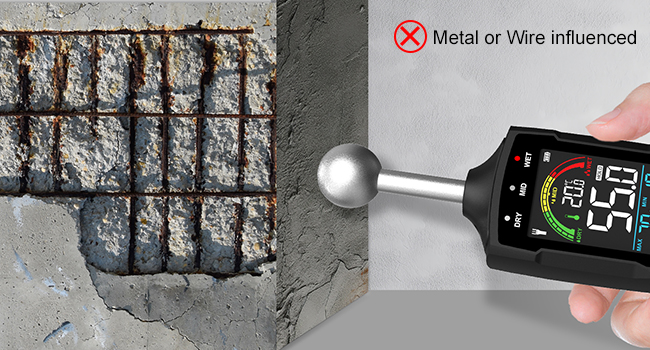
Image: Explanation of the difference between Relative and WME (Wood Moisture Equivalent) readings, with the LASELION MS04 shown in use on wood.
Why Choose a Ball-Tipped, Pinless Moisture Meter?
A ball-tipped, pinless moisture meter, like the LASELION MS04, is non-invasive, preserving the integrity of materials. Its design allows for quick and easy scanning of large areas, including corners and narrow spaces, without damaging surfaces. This is ideal for finished materials such as polished wood or painted walls, and helps detect hidden moisture during inspections or restorations.

Image: A hand holding the LASELION MS04, demonstrating its use on a wooden door frame, highlighting the non-invasive nature of the ball-tipped pinless design.
How Pinless Moisture Meters Work
Pinless moisture meters, such as the LASELION MS04, use electromagnetic waves to measure moisture beneath the surface. The ball sensor sends signals into the material, detecting moisture content at a certain depth without leaving any marks or causing damage.

Image: The LASELION MS04 in use on a tiled wall, illustrating how pinless moisture meters use electromagnetic waves to detect moisture without probes.
Pin vs. Pinless Moisture Meter
Pinless moisture meters, like the LASELION MS04, offer faster, non-invasive scanning over large areas without leaving any marks. Ideal for quick assessments, they allow you to scan a wide surface to detect moisture before pinpointing specific spots. Pin meters are more precise for measuring moisture content in specific areas but require physical contact and can leave small holes. If you need quick, broad moisture detection with minimal disruption, a pinless meter is the way to go.

Image: A comparison illustrating the LASELION MS04 (pinless) detecting moisture on a wall versus a blurred image of a pin-type meter, emphasizing the non-destructive advantage.
Verifying Measurement Accuracy
To verify the accuracy of your readings, take multiple measurements at the same spot to ensure consistency. If the results are similar, the measurements are likely accurate. You can also test the LASELION MS04 on materials with known moisture content to validate its performance. For even more confidence, cross-check readings across different locations and materials. This ensures reliable and accurate results for all your moisture detection needs.

Image: The LASELION MS04 being used to measure moisture near a sink, illustrating the process of verifying measurement accuracy by taking multiple readings.
