
NAGFAK XF23
ERAZER XF23 AI Language Translator Earbuds User Manual
Model: XF23 | Brand: NAGFAK
Introduction
The ERAZER XF23 AI Language Translator Earbuds are designed to provide seamless communication and high-quality audio. These 3-in-1 translation earbuds offer real-time translation in 135 languages, alongside standard audio playback and smart features accessible via a touch screen charging case and a dedicated mobile application. With Bluetooth 5.4 connectivity and a long battery life, they are suitable for various uses, including travel, business, and language learning.

Image: The ERAZER XF23 AI Language Translator Earbuds, showcasing both earbuds and their smart charging case with a digital display.
What's in the Box
- 1 Pair x Headphones
- 1 x Charging Case
- 1 x Charging Cable (USB-C)
- 1 x User Manual for Headphones
- 1 x User Manual for APP

Image: A visual representation of the items included in the product packaging: the earbuds, charging case, USB-C cable, and user manuals.
Setup Guide
1. Initial Charging
Before first use, ensure the charging case and earbuds are fully charged. Place the earbuds into the charging case. Connect the provided USB-C charging cable to the charging case and a suitable power source. The intelligent display on the charging case will indicate the charging status.
2. Bluetooth Pairing with Your Phone
- Ensure your phone's Bluetooth is enabled.
- Take the earbuds out of the charging case. They will automatically enter pairing mode.
- On your phone, search for "ERAZER XF23" in the Bluetooth settings and select it to pair.
- You will hear an audio prompt confirming successful connection.
3. App Download and Connection
To access all AI translation and smart features, you must download and connect to the dedicated ERAZER app.
- Locate the QR code in the physical user manual for the APP. Scan the QR code with your smartphone to download the app (available for iOS and Android).
- Install the app and log in or create an account.
- Open the app and follow the on-screen instructions to connect your ERAZER XF23 earbuds to the app via Bluetooth.
ATTENTION! !! It is crucial to first connect the headphones to your phone via Bluetooth, and then connect the earbuds to the APP in your phone for full functionality.

Image: A visual guide demonstrating the steps to download the app via QR code, log in, and connect the earbuds via Bluetooth within the app.
Operating Instructions
Wearing the Earbuds
The ERAZER XF23 earbuds feature an open-ear design for comfort and awareness of your surroundings. They are lightweight with soft silicone ear hooks and a gravity-balanced design to ensure a secure and comfortable fit for extended wear.

Image: Illustrations highlighting the open-ear comfort, IPX7 waterproof rating, lightweight nature (0.23oz), and soft, perfect fit of the earbuds.
Intelligent Touch Screen Controls (Charging Case)
The charging case is equipped with an intelligent full-color touch screen, allowing you to control various functions directly without needing your phone.
- Music Playback: Control playback, skip tracks.
- Equalizer Sound Adjustment: Fine-tune audio settings.
- Photo Taking: Remotely trigger your phone's camera.
- Alarm Clock: Set alarms directly from the case.
- Find My Earbuds: Locate misplaced earbuds by emitting a sound.
- Voice Assistant: Activate your phone's voice assistant.
- UV Disinfection: Initiate the UV sterilization process for the earbuds.

Image: A detailed view of the charging case's LCD touch screen, displaying various icons representing functions like UV sterilization, call reminders, music control, photo taking, and equalizer settings.
AI Language Translation Features
The XF23 earbuds are equipped with advanced AI technology for real-time language translation, supporting 135 languages. These features are primarily accessed through the dedicated mobile app.
- AI Smart Conversation: Engage in real-time interaction with AI for instant inspiration and solutions.
- Multiple Translation Modes:
- Face-to-Face Mode: Ideal for direct conversations.
- Touch (Binaural) Mode: Each person wears an earbud for seamless two-way communication.
- Speaker (Earbuds + Phone) Mode: One person speaks into the phone, and the translation is heard through the earbuds, or vice-versa.
- Meeting Minutes Feature: Translates meetings or classes in real-time, perfect for global events.
- 135 Language Support: Extensive language coverage including Chinese, English, French, German, Japanese, Korean, Spanish, Russian, and many more.

Image: Two individuals communicating with the aid of the AI translation headphones, demonstrating real-time online translation into 135 languages.

Image: A visual representation of the three main translation modes: AI Dialogue Mode, Free Talk Mode (binaural), and Translation Machine Mode (earbuds + phone).
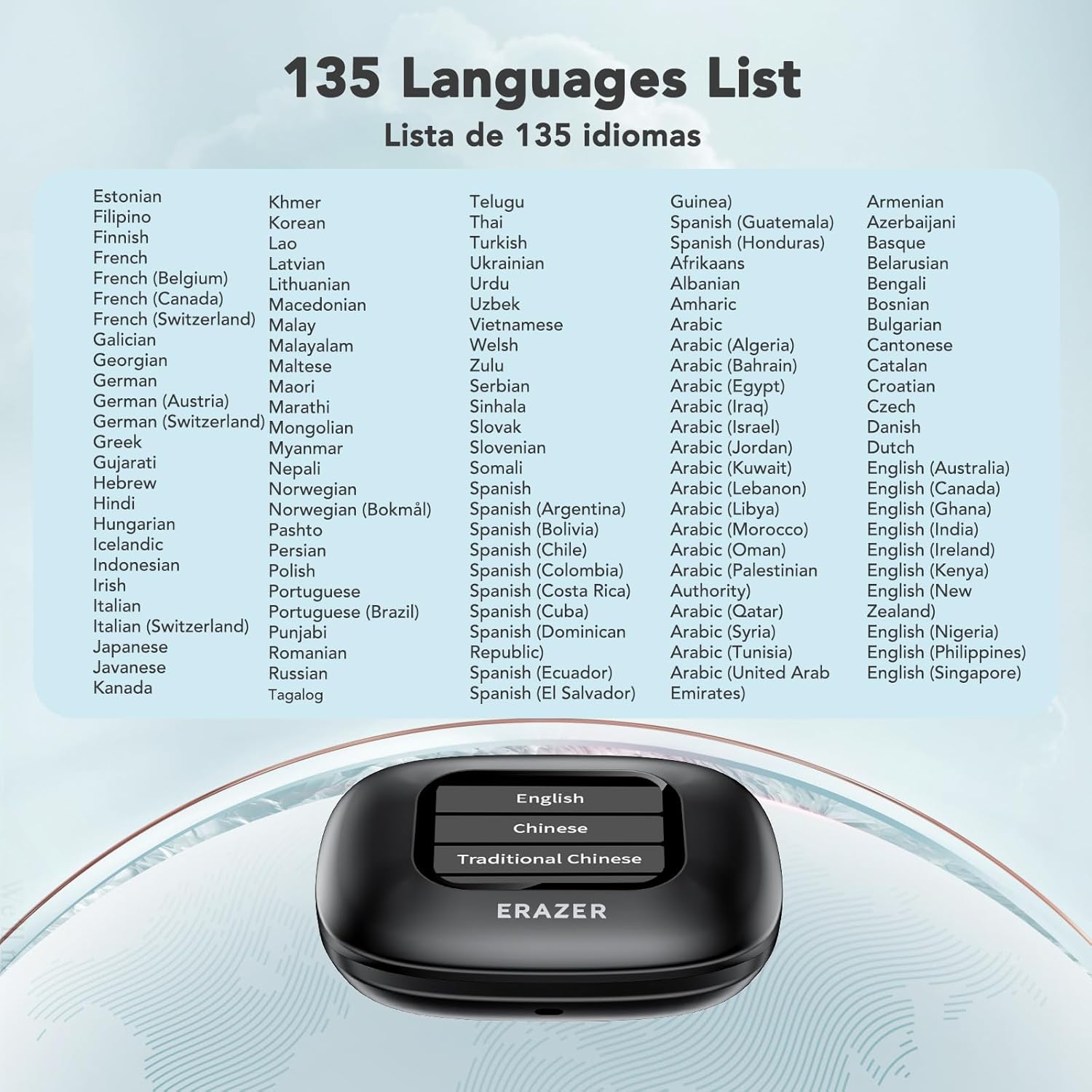
Image: A comprehensive list displaying the 135 languages supported by the ERAZER XF23 AI translator earbuds.
Audio Quality and Connectivity
- High-Speed Bluetooth 5.4: Ensures faster, more stable connections with smart devices, offering ultra-low latency and perfect synchronization with AAC/SBC support.
- Balanced and Clear Sound Quality: Features powerful speakers for immersive audio.
- Dual Built-in Microphones: Provides crisp hands-free calls.
- APP Mode Features: Use the app for EQ adjustment and earbud locator.

Image: Visuals illustrating the premium sound quality, Bluetooth 5.4 capabilities, and the impressive 60-hour total battery life (8 hours single charge) of the earbuds.
Maintenance
UV Disinfection
The charging case is equipped with a Deep UV Sterilization function for daily hygiene. Simply place the earbuds back into the charging case, and the UV disinfection process can be initiated via the touch screen or automatically, ensuring your earbuds remain clean.

Image: An illustration showing the ERAZER XF23 earbuds inside the charging case with a purple glow, indicating the deep UV sterilization process is active.
Water Resistance
The earbuds have an IPX7 waterproof rating, meaning they are built to withstand splashes, rain, and sweat. This makes them suitable for workouts and outdoor activities. Avoid submerging them in water for extended periods.
Troubleshooting
If you encounter any issues with your ERAZER XF23 earbuds, please refer to the following common solutions:
- Earbuds not connecting to phone: Ensure Bluetooth is enabled on your phone. Make sure the earbuds are taken out of the charging case. Try restarting your phone and the earbuds.
- App features not working: Verify that the earbuds are connected to your phone via Bluetooth first, and then connected within the ERAZER app. Ensure the app is updated to the latest version.
- Translation issues: Check your internet connection as online translation requires data. Ensure the correct source and target languages are selected in the app.
- Sound quality issues: Adjust the equalizer settings in the app. Ensure earbuds are clean and properly seated in your ears.
- Earbuds lost: Use the "Find My Earbuds" function via the charging case touch screen or the app to emit a sound from the earbuds.
If you have any problems with using the product that are not resolved by the above steps, please feel free to contact customer support.
Specifications
| Feature | Detail |
|---|---|
| Product Dimensions | 1.97 x 1.81 x 1.18 inches |
| Item Weight | 5.9 ounces |
| Connectivity | Bluetooth 5.4 |
| Translation Languages | 135 (via APP) |
| Battery Life (Earbuds) | Up to 8 hours (single charge) |
| Battery Life (with Charging Case) | Up to 60 hours |
| Waterproof Rating | IPX7 |
| Manufacturer | NAGFAK |
| ASIN | B0DQLB9SKP |
Warranty and Support
For warranty information or technical support, please refer to the contact details provided in the separate "User Manual for Headphones" or "User Manual for APP" included in your product packaging. You may also visit the official NAGFAK store on Amazon for further assistance or product information.
Link to NAGFAK Store: NAGFAK Official Store
Related Documents - XF23
 |
ERAZER X15PRO Wireless Earbuds FCC Test Report This document presents the FCC test report for the ERAZER X15PRO Wireless Earbuds, detailing compliance testing for radio frequency emissions and performance conducted by Dongguan DN Testing Co., Ltd. The report confirms adherence to FCC Part 15 Subpart C and ANSI C63.10:2020 standards. |
 |
RF Exposure Evaluation Report for ERAZER X15PRO Wireless Earbuds This report from Dongguan DN Testing Co., Ltd. provides the RF exposure evaluation for the ERAZER X15PRO Wireless Earbuds, detailing test procedures, compliance requirements, and results according to FCC regulations. |
 |
Shenzhen Xiaoxiang Supply Chain Technology Co., Ltd. Declaration of Model Differences for ERAZER Wireless Earbuds Declaration letter from Shenzhen Xiaoxiang Supply Chain Technology Co., Ltd. confirming identical PCB, circuit, and internal structures across multiple models of ERAZER Wireless Earbuds, with only model numbers differing, for FCC compliance. |
 |
Pavoni Italia Food Contact Declaration for Stainless Steel Items Official declaration from Pavoni Italia S.p.A. confirming that specific stainless steel items (model numbers XF09 through XFO656520) are suitable for food contact and comply with relevant European and Italian regulations. |
 |
Merry Go Round Equipment Rental List Comprehensive catalog of video cameras, lenses, lighting, audio equipment, grip gear, and accessories available for rent from Merry Go Round. Includes model numbers and prices. |