
1. Introduction
This manual provides essential instructions for the installation, operation, and maintenance of your SURAIELEC WiFi Pool Timer (Model TW04A01). This device is designed to automate the control of above-ground pool equipment such as pumps, filters, lights, and salt chlorination systems. Please read this manual thoroughly before use to ensure safe and efficient operation.
2. Safety Information
WARNING: Risk of Electric Shock. Read all instructions before installation and use.
- Ensure the timer is connected to a Ground Fault Circuit Interrupter (GFCI) protected outlet.
- Do not immerse the timer in water. It is weatherproof but not submersible.
- Install the timer at least 3 feet (0.9 meters) above ground level to prevent water ingress.
- Do not exceed the maximum load rating of 15 Amps, 125 Volts, or 1 Horsepower.
- Always disconnect power before performing any maintenance or connecting/disconnecting devices.
- Keep children away from the timer and connected equipment.
- Ensure the protective cover is securely closed when in use outdoors.
3. Package Contents
- SURAIELEC WiFi Pool Timer (Model TW04A01)
- Instruction Manual
4. Product Overview
4.1 Key Features
- Easy Plug-and-Play Design: NEMA 5-15R plug-in timer supports up to 15 Amps, 125V, and 1 HP.
- Smart WiFi Control: Manage equipment remotely via a mobile app, adjust schedules, and monitor device status. Compatible with Alexa and Google voice assistants.
- Weatherproof Design: Constructed with heavy-duty, UV-resistant PC material for outdoor use, resistant to rain, sun, and moisture.
- Dual Outlets: Controls two independent devices simultaneously.
- No Complex Wiring: Designed for direct plug-in use, eliminating the need for electrical work.
4.2 Product Diagram

Figure 1: Timer Installation Overview

Figure 2: Dual Outlets and Power Ratings
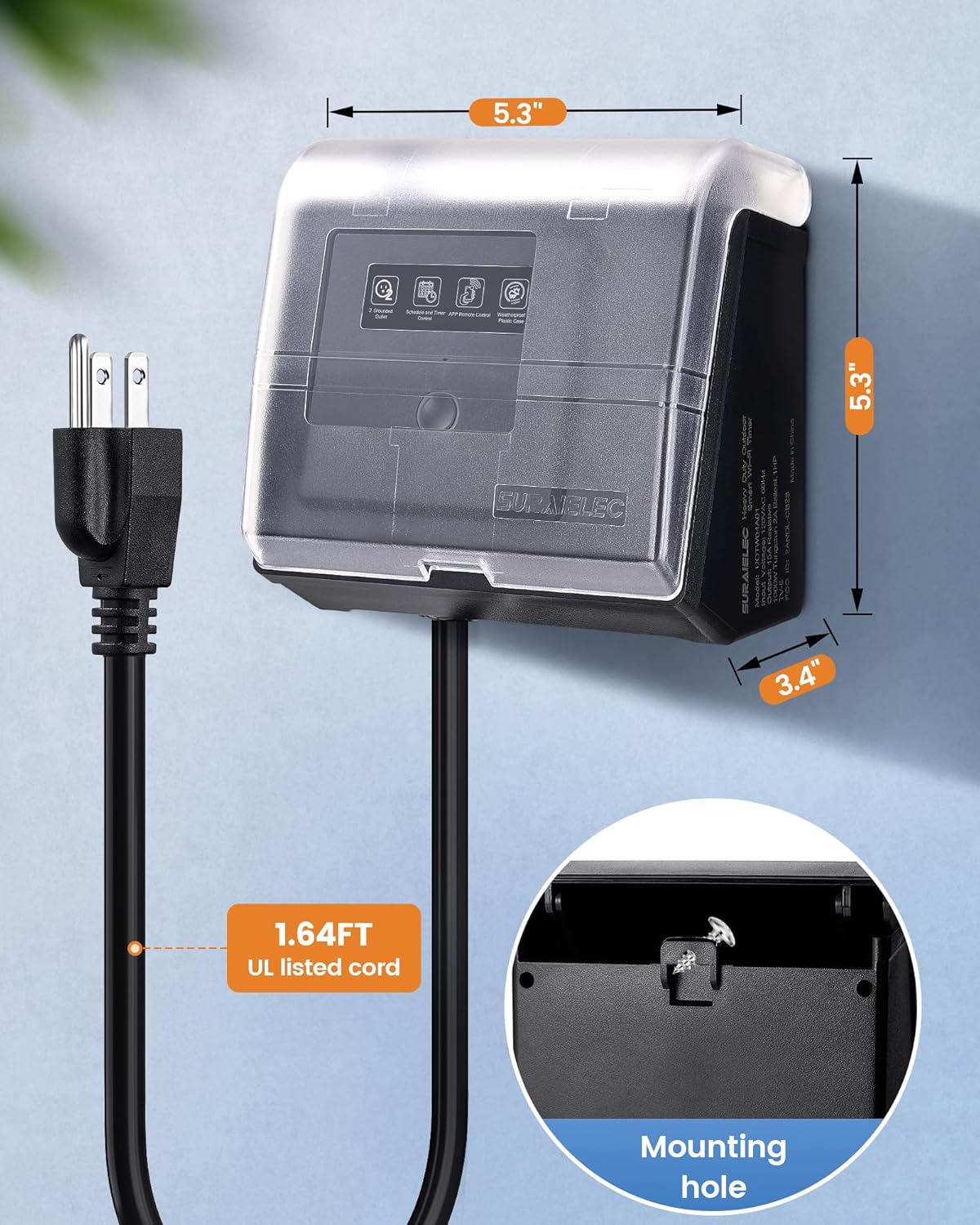
Figure 3: Timer Dimensions and Mounting
5. Setup
5.1 Physical Installation
- Choose Location: Select an outdoor location near your pool equipment that is protected from direct water spray and is accessible for mounting.
- Mounting: Securely mount the timer to a stable surface, such as a wall or post, ensuring it is at least 3 feet (0.9 meters) above ground level. Use the integrated mounting hole for installation.
- Power Connection: Plug the timer's NEMA 5-15P plug into a GFCI-protected 125V outlet.
- Connect Devices: Plug your pool pump, filter, lights, or other compatible equipment into the dual NEMA 5-15R outlets on the timer. Ensure the total load does not exceed 15 Amps or 1 HP.
5.2 App Installation and WiFi Pairing
- Download App: Download the "Smart Life" or "Tuya Smart" app from the Apple App Store or Google Play Store.
- Register/Log In: Open the app and register for a new account or log in with an existing one.
- Add Device: In the app, tap the "+" icon to add a new device. Follow the on-screen instructions to put the timer into pairing mode (usually by pressing and holding the power button on the timer until an indicator light flashes).
- Connect to WiFi: Select your 2.4GHz WiFi network and enter the password. The timer supports 2.4GHz WiFi only. Ensure your phone is connected to the same 2.4GHz network during pairing.
- Complete Setup: Once the timer is successfully added, you can rename it and assign it to a specific room for easier management.

Figure 4: Remote and Voice Control Setup
5.3 Voice Assistant Integration
- Link Account: In your Alexa or Google Home app, navigate to the "Skills" or "Works with Google" section.
- Search for Smart Life/Tuya: Search for the "Smart Life" or "Tuya Smart" skill/service and enable it.
- Authorize: Link your Smart Life/Tuya account with your voice assistant account.
- Discover Devices: Ask your voice assistant to discover new devices. Your SURAIELEC WiFi Pool Timer should now be controllable by voice commands.
6. Operating Instructions
6.1 Manual Control
The timer unit features a manual override button. Pressing this button will toggle the power to the connected devices ON or OFF, regardless of the programmed schedule. The indicator light on the timer will show its current status.
6.2 App Control
Using the Smart Life/Tuya Smart app, you can:
- Turn On/Off: Manually switch the connected devices on or off from anywhere.
- Set Schedules: Create daily or weekly schedules for automatic operation. You can set multiple on/off times for each day.
- Countdown Timer: Set a countdown for the devices to turn off after a specified duration.
- Circulate/Random Modes: Utilize advanced scheduling options for varied operation.
- Monitor Status: View the real-time status of your connected devices.
- Share Control: Share access to the timer with other family members through the app.
6.3 Voice Control
Once integrated with Alexa or Google Assistant, you can use voice commands to control your pool timer. Examples:
- "Alexa, turn on the pool pump."
- "Hey Google, turn off the pool lights."
- "Alexa, set the pool timer to turn off in 2 hours."
7. Maintenance
- Cleaning: Periodically wipe the timer's exterior with a damp cloth to remove dirt and debris. Do not use harsh chemicals or abrasive cleaners.
- Inspect Connections: Regularly check the power cord and device plugs for any signs of damage or wear. Ensure all connections are secure.
- Weather Protection: Ensure the weatherproof cover is always securely closed when the timer is in use outdoors to protect against elements like rain and snow.
- Storage: If storing the timer for an extended period, disconnect it from power and store it in a dry, protected area.
8. Troubleshooting
| Problem | Possible Cause | Solution |
|---|---|---|
| Timer not powering on. | No power from outlet; GFCI tripped; damaged cord. | Check the outlet with another device. Reset the GFCI. Inspect the power cord for damage. |
| Devices not turning on/off as scheduled. | Incorrect schedule settings; WiFi disconnected; manual override active. | Verify schedule settings in the app. Check WiFi connection. Ensure manual override button is not engaged. |
| Cannot connect to WiFi. | Incorrect WiFi password; 5GHz WiFi network selected; timer too far from router. | Ensure correct 2.4GHz WiFi password. Connect phone to 2.4GHz WiFi. Move timer closer to router (within 80 ft in open area). |
| Voice control not working. | App account not linked; device not discovered; incorrect commands. | Ensure Smart Life/Tuya account is linked in Alexa/Google Home app. Ask assistant to discover devices. Use correct voice commands. |
| Connected device trips GFCI. | Overload; faulty device; water ingress. | Ensure total load does not exceed 15A/1HP. Test connected device directly in GFCI outlet. Inspect timer and device for water damage. |
9. Specifications
| Specification | Detail |
|---|---|
| Model Number | TW04A01 |
| Input Voltage | 125V AC, 60Hz |
| Max Load | 15A / 1875W / 1HP |
| Outlets | 2 x NEMA 5-15R |
| Plug Type | NEMA 5-15P |
| Material | Polycarbonate (PC) |
| Dimensions (D x W x H) | 3.4" x 5.3" x 5.3" |
| Cord Length | 1.64 ft (UL listed) |
| Wireless Connectivity | 2.4GHz WiFi only |
| Smart Home Compatibility | Amazon Alexa, Google Assistant |
| Operating Environment | Outdoor (Weatherproof) |
10. Warranty and Support
SURAIELEC products are designed for reliability and performance. For warranty information, technical support, or assistance with your SURAIELEC WiFi Pool Timer, please refer to the contact information provided on the official SURAIELEC website or your purchase documentation.
Please retain your proof of purchase for warranty claims.