
1. Introduction
The METAK WD60 Water Leak Detector is designed to provide early warning of water leaks and potential flooding in your home. This device helps prevent costly water damage by alerting you with a loud alarm when water is detected. It is ideal for placement in areas prone to leaks such as kitchens, bathrooms, basements, and utility rooms.
2. Product Features
- Drip & Flood Detection: Features top drip and bottom water flood probes for comprehensive leak detection.
- Loud 100dB Alarm: Alerts you instantly with a powerful 100dB alarm, ensuring you can hear it across large areas.
- AAA Battery Powered: Operates with 2 AAA batteries for long-lasting performance, providing reliable power without frequent replacements.
- Easy to Use: Simple operation with a top "Test" button for testing and pausing alerts.
- Versatile Usage: Ideal for home use in kitchen, bathroom, basement, and utility room, protecting sinks, dishwashers, water heaters, and laundry machines.
- Important Note: This Water Leak Sensor (Model: WD60) does not have WiFi and Bluetooth functions, does not support connecting to the METAK W13 WiFi gateway, and cannot work with another product (ASIN: B0DKFGH6MC) in this store.
3. Package Contents
- 5 x METAK WD60 Water Leak Detectors (Black)
- 10 x AAA Batteries (2 per detector, included)
- 1 x User Manual
- 1 x Opening Tool (small plastic pick for battery cover)

Image: Exploded view of the METAK WD60 Water Leak Detector showing internal components, dimensions, and the location of the horn, drip detector, button, and 2 AAA batteries.
4. Setup
- Battery Installation:
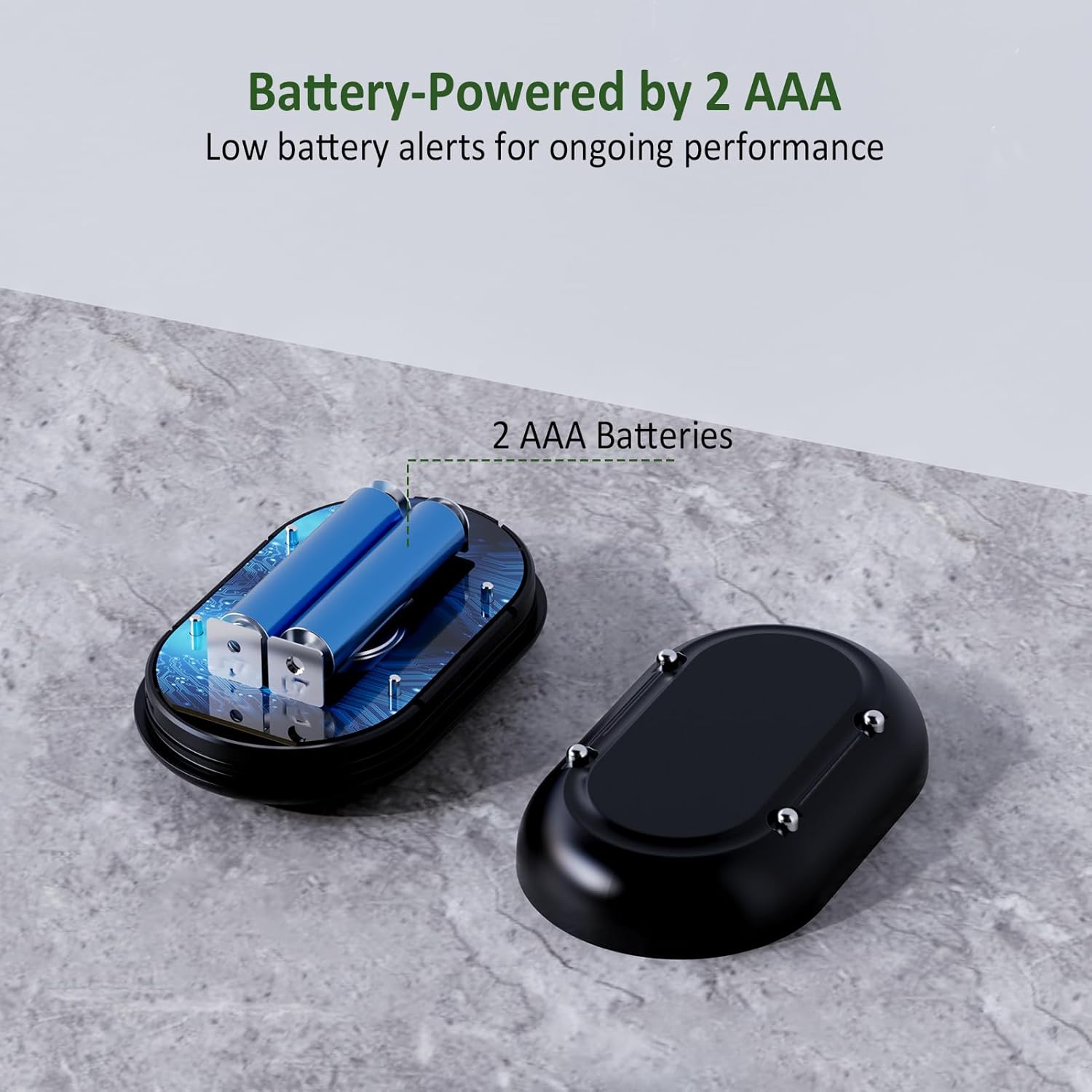
Image: The METAK WD60 Water Leak Detector with its bottom cover removed, revealing the compartment for two AAA batteries.
- Carefully use the provided opening tool (small plastic pick) to pry open the bottom cover of the detector.
- Insert 2 AAA batteries into the battery compartment, ensuring correct polarity (+/-).
- Close the bottom cover securely until it clicks into place.
- Power On/Off:
- To power on, press and hold the "TEST" button for approximately 10 seconds until you hear a beep, indicating it's active.
- To power off, press and hold the "TEST" button for approximately 10 seconds.
- Volume Adjustment:

Image: A hand pressing the test button on the METAK WD60 Water Leak Detector to adjust its volume settings.
- While the device is on, press and hold the "TEST" button for 3 seconds to cycle through 4 different volume settings (maximum, 3 levels, 2 levels, mute/flashing light only).
5. Operating Instructions
- Water Detection:
- The detector features metal probes on its bottom surface and a drip detector on top. When water makes contact with these sensors, the alarm will activate.
- The alarm will sound at the selected volume level (up to 100dB) and a light will flash to indicate a leak.

Image: A METAK WD60 Water Leak Detector sitting on a wet floor, demonstrating its activation upon contact with water.
- Testing the Device:
- Press the "TEST" button briefly to confirm the alarm is working.
- To simulate a leak, place the bottom sensors in a small amount of water. The alarm should sound immediately.

Image: A hand pressing the 'TEST' button on the METAK WD60 Water Leak Detector, indicating a functional check.
- Pausing Alerts:
- If the alarm is sounding due to a detected leak, press the "TEST" button briefly to pause the alert. The alarm will resume if water is still present after a short delay.
6. Placement Recommendations
Place the water leak detector on a flat surface in areas where water leaks are likely to occur or accumulate. Ensure the bottom metal probes are in direct contact with the surface.

Image: A collage showing various recommended placements for the METAK WD60 Water Leak Detector, including under a kitchen sink, next to a washing machine, near a toilet, and in a basement near industrial equipment.
- Kitchen: Under sinks, near dishwashers, refrigerators with ice makers.
- Bathroom: Under sinks, behind toilets, near showers or bathtubs.
- Laundry Room: Behind or next to washing machines, near utility sinks.
- Basement/Utility Room: Near water heaters, sump pumps, pipes, or any area prone to flooding.
7. Maintenance
- Battery Replacement: The device will provide a low battery alert. Replace the 2 AAA batteries as soon as possible to ensure continuous protection. Follow the battery installation steps in Section 4.1.
- Cleaning: Periodically wipe the device, especially the metal probes, with a dry cloth to remove dust or debris. Do not use harsh chemicals or immerse the device in water.
8. Troubleshooting
- Alarm not sounding:
- Check if the batteries are correctly installed and not depleted. Replace if necessary.
- Ensure the device is powered on (press and hold TEST button for 10 seconds).
- Verify that at least two bottom metal probes are in contact with water.
- Test the alarm functionality using the "TEST" button.
- False alarms:
- Ensure the device is placed on a dry, stable surface.
- Avoid placing the device in areas with high humidity or condensation that might trigger the sensors.
9. Specifications
| Specification | Detail |
|---|---|
| Color | Black |
| Brand | METAK |
| Power Source | Battery Powered |
| Product Dimensions | 3.3"L x 2.8"W x 1.2"H |
| Battery Description | Alkaline |
| Number of Batteries | 2 AAA batteries required (included) |
| Voltage | 3 Volts |
| Audible Noise | 100 Decibels |
| Mounting Type | Tabletop Mount |
| Sensor Technology | Contact Sensor |
10. Warranty and Support
For warranty information and customer support, please refer to the contact details provided on the product packaging or visit the official METAK website. Keep your purchase receipt for warranty claims.
