1. Introduction
Thank you for choosing the GUOWENHA 8X30 Compact Binoculars. These binoculars are designed to provide clear and bright images for various outdoor activities such as bird watching, sports events, concerts, and general observation. This manual provides essential information on how to set up, operate, and maintain your binoculars to ensure optimal performance and longevity.
2. Package Contents
Please check the package contents upon unboxing. If any items are missing or damaged, please contact customer support.
- GUOWENHA 8X30 Compact Binoculars
- Carrying Case (may vary by package)
- Neck Strap (may vary by package)
- Lens Cleaning Cloth
- User Manual
3. Product Overview
Familiarize yourself with the main components of your binoculars:

Figure 1: Front view of the GUOWENHA 8X30 Compact Binoculars, showing the objective lenses and eyepieces.
- Eyepieces: Where you look through.
- Diopter Adjustment Ring: Located on the right eyepiece, used to compensate for differences in vision between your eyes.
- Central Focus Wheel: Used to adjust the focus for both eyes simultaneously.
- Central Hinge: Allows adjustment of the interpupillary distance.
- Objective Lenses: The large lenses at the front of the binoculars that gather light.
- Strap Lugs: Attachment points for the neck strap.
4. Setup
4.1 Adjusting Interpupillary Distance (IPD)
The distance between the centers of your pupils (interpupillary distance) varies from person to person. To match your IPD:
- Hold the binoculars with both hands.
- Look through the eyepieces at a distant object.
- Bend the binoculars at the central hinge until you see a single, clear circular field of view. If you see two overlapping circles, adjust until they merge into one.
4.2 Focusing
To achieve a sharp image, follow these steps:
- Close your right eye or cover the right objective lens.
- Look through the left eyepiece at a distant object. Rotate the central focus wheel until the image in your left eye is sharp.
- Close your left eye or cover the left objective lens.
- Look through the right eyepiece. Rotate the diopter adjustment ring on the right eyepiece until the image is sharp. Do not use the central focus wheel for this step.
- Now, with both eyes open, your binoculars are adjusted for your vision. For future focusing, simply use the central focus wheel.
4.3 Attaching the Neck Strap
Thread the neck strap through the strap lugs on the sides of the binoculars. Ensure it is securely fastened to prevent accidental drops.
5. Operating Instructions
5.1 General Use
Once the binoculars are adjusted for your vision, simply point them at the desired object and use the central focus wheel to bring the image into sharp focus. Hold the binoculars steady for the best viewing experience.
5.2 Low Light Viewing
These binoculars are designed with features that enhance performance in low light conditions, such as twilight or dawn. They are not intended for use in complete darkness. The large objective lenses and quality prisms help gather more available light for a brighter image.
6. Maintenance
6.1 Cleaning Lenses
To clean the lenses:
- Gently brush away any dust or debris with a soft lens brush or compressed air.
- Use the provided lens cleaning cloth to wipe the lenses in a circular motion. For stubborn smudges, a small amount of lens cleaning fluid designed for optics can be applied to the cloth, not directly to the lens.
- Avoid using abrasive cloths, paper towels, or household cleaners, as these can scratch or damage the lens coatings.
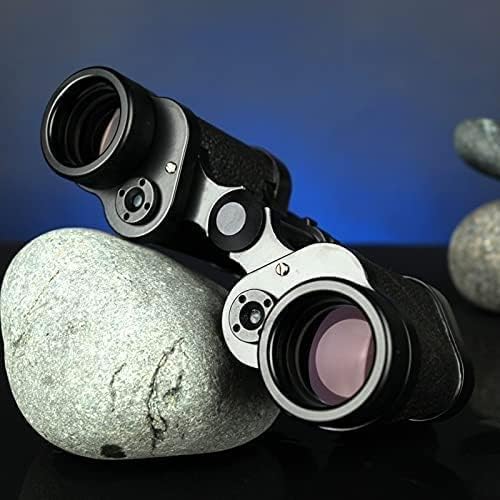
Figure 2: Close-up of the objective lens, showing the multi-coated surface.
6.2 Storage
Store your binoculars in a cool, dry place when not in use. Keep them in their carrying case to protect them from dust, moisture, and impacts. Avoid prolonged exposure to direct sunlight or extreme temperatures.
6.3 Handling
Handle your binoculars with care. Avoid dropping them or subjecting them to harsh impacts, as this can misalign the optical components.
7. Troubleshooting
If you encounter issues with your binoculars, refer to the following common problems and solutions:
- Problem: Image is blurry or out of focus.
Solution: Ensure you have correctly performed the focusing steps (Section 4.2), including adjusting the diopter for your right eye. - Problem: I see two overlapping images or a non-circular field of view.
Solution: Adjust the interpupillary distance by bending the binoculars at the central hinge until a single, clear circular field of view is achieved (Section 4.1). - Problem: Image is dim or dark.
Solution: Ensure the objective lens caps are removed. Check if you are trying to view in extremely low light conditions beyond the binoculars' capability. - Problem: Dust or smudges on the lenses.
Solution: Clean the lenses carefully using the methods described in Section 6.1.
8. Specifications
| Feature | Specification |
|---|---|
| Magnification | 8x |
| Objective Lens Diameter | 30 mm |
| Prism Material | BAK4 |
| Exit Pupil Diameter | Approx. 3.75 mm |
| Eye Relief | 13.5 mm |
| Diopter Adjustment | ±5 Diopters |
| Interpupillary Distance Adjustment | 56-72 mm |
| Dimensions (L x W x H) | 160 x 48 x 123 mm |
| Weight (Gross) | 805 g |
| Operating Temperature | -43°C to +55°C |
9. Warranty and Support
For information regarding warranty coverage or technical support, please refer to the documentation included with your purchase or contact the manufacturer directly. If you have any questions, please contact us in time, we will answer your inquiry within 24 hours.