1. Introduction
Thank you for choosing the GUOWENHA Digital Infrared Night Vision Binoculars. This device is designed for observation in both low light and complete darkness, making it ideal for hunting, camping, security, and other outdoor activities. This manual provides detailed instructions on how to set up, operate, and maintain your night vision binoculars to ensure optimal performance and longevity.
2. Safety Information
- Do not attempt to disassemble or repair the device yourself. This may void the warranty and cause damage.
- Avoid direct exposure of the lens to strong light sources, especially sunlight, as this can damage the internal components.
- Keep the device away from water and moisture. If it gets wet, power it off immediately and allow it to dry completely before use.
- Use only the specified charging cable and power adapter to prevent damage to the built-in battery.
- Store the device in a cool, dry place when not in use.
3. Package Contents
Please check the package contents upon unboxing. If any items are missing or damaged, contact customer support.
For 4K Model:
- 1 x Night Vision Device
- 1 x Cleaning Cloth
- 1 x Storage Bag
- 1 x Card Reader
- 1 x Packing Box
- 1 x Data Cable (Type-C)
- 1 x User Manual
- 1 x Neck Strap
For 1080P Model:
- 1 x Night Vision Device
- 1 x Data Cable (Type-C)
- 1 x User Manual
- 1 x Neck Strap
- 1 x Packing Box
- 1 x Card Reader
4. Product Overview
The GUOWENHA Night Vision Binoculars feature a robust design for outdoor use, equipped with infrared illumination for clear viewing in complete darkness and a large display screen for comfortable observation.
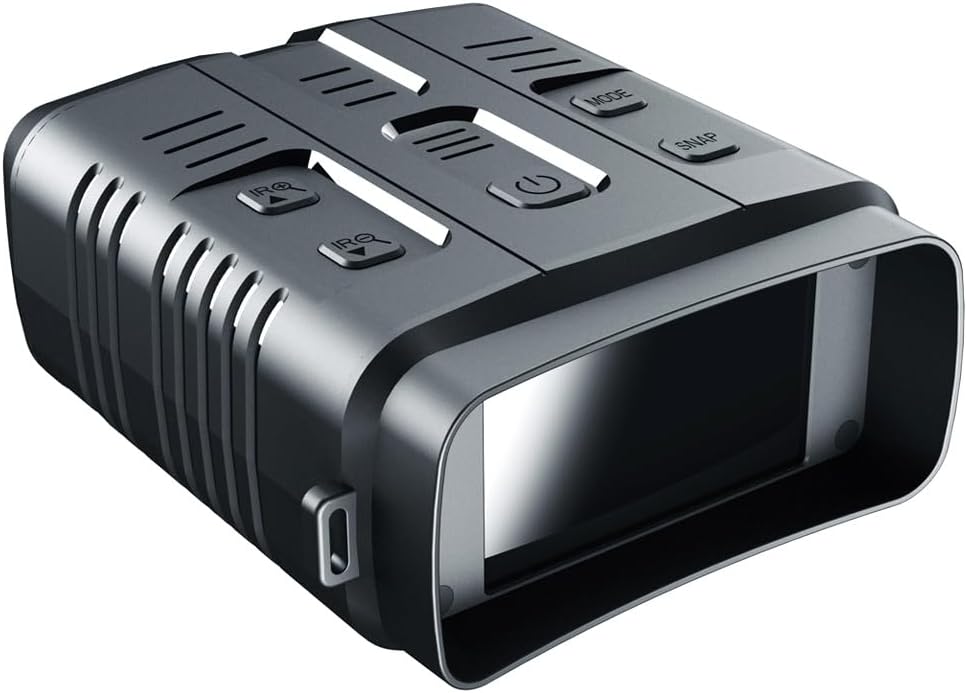
Image: The GUOWENHA Night Vision Binoculars, showcasing its ergonomic design and control buttons on the top panel.
Key Features:
- High-Resolution Imaging: Up to 42M still image size (4K model) and 4K video recording.
- Large Display Screen: 3-inch TFT inner screen for comfortable viewing.
- Infrared Illumination: 7-speed adjustable 850nm IR LED for clear vision in total darkness up to 500m (4K model).
- Digital Zoom: Up to 10x digital zoom (4K model) for detailed observation.
- Multi-functional: Capture photos, record videos, and playback directly on the device.
- Built-in Rechargeable Battery: Convenient power source for extended use.

Image: The 3-inch ultra HD screen provides a broad and comfortable visual experience, allowing users to capture, record, and play back observations.
5. Setup
5.1 Charging the Device
- Connect the provided Type-C data cable to the device's Type-C port.
- Connect the other end of the cable to a standard USB power adapter (not included) or a computer's USB port.
- The charging indicator will illuminate. Allow the device to charge fully before first use.
5.2 Inserting the TF Card
- Locate the TF card slot on the device.
- Gently insert a compatible TF card (up to 512GB for 4K model, up to 128GB for 1080P model) into the slot until it clicks into place. Ensure the card is inserted in the correct orientation.
- To remove, gently press the card inward until it springs out.
6. Operating Instructions
6.1 Power On/Off
- To power on, press and hold the power button (usually marked with Ⓘ) until the screen illuminates.
- To power off, press and hold the power button again until the screen turns off.
6.2 Mode Selection
The device supports Photo, Video, and Playback modes.

Image: The multi-use night vision goggles offer Day and Night use with three distinct modes: Photo, Video, and Playback, each with its own interface.
- Press the MODE button to cycle through Photo, Video, and Playback modes.
- In Photo mode, press the SNAP button to capture a still image.
- In Video mode, press the SNAP button to start recording. Press again to stop recording.
- In Playback mode, use navigation buttons (if available) to browse recorded files.
6.3 Adjusting IR Brightness
The infrared illuminator enhances visibility in dark conditions. There are 7 levels of IR brightness.

Image: Demonstrates the effect of 7 levels of IR brightness. Higher levels provide clearer target visibility in darkness, utilizing an 850nm IR illuminator.
- Press the IR+ button to increase the infrared brightness level.
- Press the IR- button to decrease the infrared brightness level.
- Adjust the IR level based on ambient light conditions for optimal viewing.
6.4 Digital Zoom
The device features digital zoom to magnify your view.

Image: Illustrates the Full HD pixel and clear focus capabilities with examples of 2X and 5X digital zoom, enhancing the adventure experience.
- Use the zoom buttons (often integrated with IR buttons or separate) to adjust the digital magnification.
- The 4K model supports up to 10x digital zoom, while the 1080P model supports up to 5x.
6.5 Viewing Distance

Image: The device offers a long viewing distance of up to 1640 feet (500 meters) in 100% darkness, enabling clear observation of distant subjects.
The maximum viewing distance in complete darkness is approximately 500m for the 4K model and 200m-300m for the 1080P model. In daylight, the viewing distance is 3 meters to infinity.
6.6 Data Transfer (Type-C)
- Connect the device to a computer using the provided Type-C cable.
- The device will appear as a removable disk on your computer.
- You can then transfer photos and videos to your computer.
6.7 WiFi Functionality (4K Model Only)
The 4K model includes WiFi capabilities for enhanced connectivity. Refer to the on-screen menu or a dedicated app (if available) for instructions on connecting to your smartphone or other devices.
7. Maintenance
- Cleaning: Use the provided cleaning cloth to gently wipe the lenses and screen. For stubborn smudges, use a lens cleaning solution specifically designed for optics. Do not use abrasive materials or harsh chemicals.
- Storage: When not in use for extended periods, store the binoculars in the provided storage bag in a cool, dry place. Ensure the battery is partially charged (around 50%) to prolong its lifespan.
- Battery Care: Avoid fully discharging the battery frequently. Recharge the device regularly, even if not in use, to maintain battery health.
8. Troubleshooting
- Device not powering on: Ensure the battery is charged. Connect to a power source and try again.
- Poor image quality: Check if the lenses are clean. Adjust the IR brightness level. Ensure you are within the effective viewing range.
- Cannot record/save files: Verify that a TF card is properly inserted and has sufficient free space. The card may need to be formatted (refer to device menu for formatting option).
- Device freezes: Press and hold the power button for an extended period (e.g., 10-15 seconds) to force a restart.
9. Specifications
9.1 4K Model Specifications:
- Still Image Size: 42M (7424x5568), 24M (5664x4248)
- Video Size: 4K (3840x2160), 2.5K (2560x1440), 1080P (1920x1080)
- Aperture: F 1.0 f=25mm
- Lens: FOV=10° (Diagonal)
- Screen Display: Inner screen 3" TFT
- Digital Zoom: 10x
- Storage Medium: Support TF card up to 512GB
- Max Viewing Distance in Darkness: Approx 500m
- Viewing Distance in Daylight: 3 meters to infinity
- IR LED: 3W, 850nm, strong infrared spotlight, 7-speed infrared adjustment
- USB Interface: Type-C (For power and data transfer)
- Power Source: Built-in Rechargeable Lithium Battery
- Operating Temperature: -20°C to +60°C
- Storage Temperature: -30°C to +35°C
- Net Weight: 314g
- Size: 14.3 x 12.4 x 5.4 cm
9.2 1080P Model Specifications:
- Still Image Size: 10M (4032*2520), 8M (3800*2160), 5M (3200*1800), 3M (2560*1440), VGA (640x480)
- Video Size: 960P (1280x960@30FPS), VGA (640x480@30FPS)
- Aperture: F 1.2 f=25mm
- Lens: FOV=10°, Diameter 24mm
- Screen Display: 3" HD TFT
- Digital Zoom: 5x
- Storage Medium: TF card, 1080P max 128GB
- Full Dark Observation Distance: 200m~300m
- Low Light Observation Distance: 3 meters to infinity
- Infrared Light: 3W, 850nm, strong infrared spotlight, 7-speed infrared adjustment
- USB Interface: Type-C (Only for data transfer)
- Operating Temperature: -20°C to +60°C
- Storage Temperature: -30°C to +70°C
- Product Size: About 120 x 150 x 60 mm
- Product Weight: About 290g
- Power Supply: Built-in Rechargeable Lithium Battery
10. Warranty and Support
GUOWENHA products are manufactured to high-quality standards. For warranty information, technical support, or service inquiries, please refer to the warranty card included with your product or contact your retailer. Keep your purchase receipt as proof of purchase.


