
DeepSage 2208A
DeepSage Smart Health Bracelet User Manual
Model: 2208A
Brand: DeepSage

The DeepSage Smart Health Bracelet, a sleek black device designed for comprehensive health monitoring.
1. Product Overview
The DeepSage Smart Health Bracelet (Model 2208A, Basic Version) is a versatile wearable that seamlessly combines fashion, sports, and health monitoring. Specially designed for remote health tracking systems, this bracelet offers a free SDK for customization. Its comprehensive features include 24/7 automatic monitoring of heart rate, blood oxygen (SpO2), HRV, stress levels, and blood pressure. It also tracks skin temperature, sleep patterns, multi-sport activities, and women's menstrual cycles. With all-day activity tracking and long battery life, this bracelet is a new choice for those seeking a stylish and functional health companion. Available in sleek gray, rose gold, and black colorways, it effortlessly complements any outfit or workout routine.

The DeepSage Smart Health Bracelet is available in multiple colors, offering a blend of fashion, sports, and health monitoring capabilities.
2. Package Contents
Please verify that all items are present in your package:
- 1x Smart Health Bracelet
- 1x Charging Dock/USB Cable
- 1x User Manual
The bracelet is ready to use straight out of the box, with a simple setup process.
3. Key Features
The DeepSage Smart Health Bracelet offers a comprehensive suite of features designed to support your well-being:
- All-in-One Health Monitoring: Continuous tracking of heart rate, blood oxygen (SpO2), blood pressure, stress levels, skin temperature, and sleep quality.
- Fitness and Activity Tracking: Monitors steps, calories burned, distance, and activity duration with multi-sport exercise modes.
- Women's Health Management: Features for menstrual cycle tracking, pregnancy preparation, and pregnancy monitoring.
- Longer Endurance Battery: Provides 7-10 days of active use and up to 20 days on standby on a single charge.
- Durable Design: IP68 dustproof and waterproof rating, suitable for daily wear.
- Connectivity: Bluetooth for seamless connection to your smartphone.
- Operating System Compatibility: Supports Android & iOS devices.
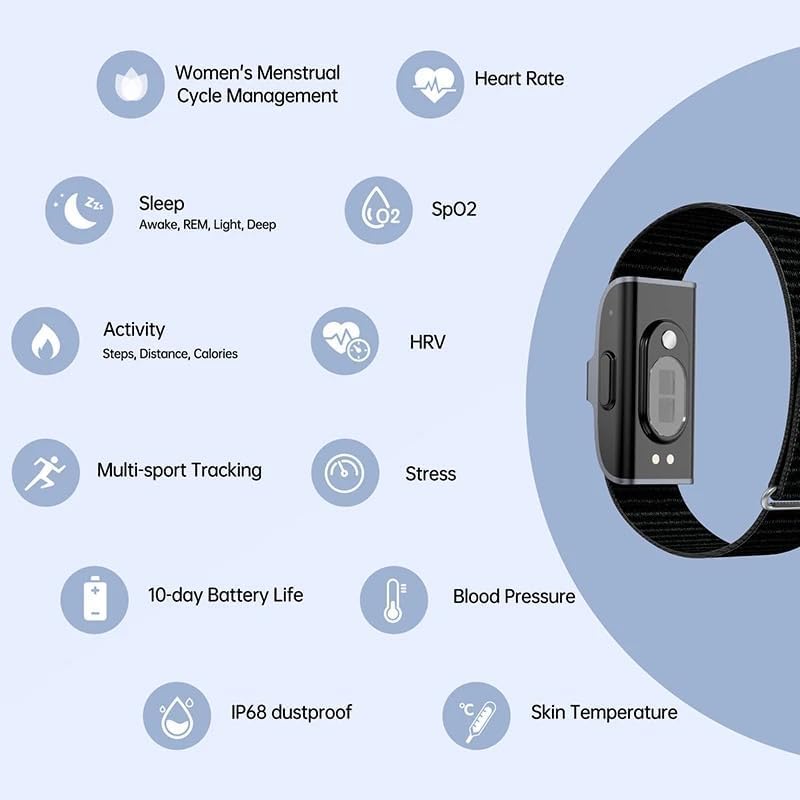
Detailed view of the bracelet's health monitoring capabilities, including continuous heart rate, sleep quality, oxygen saturation, HRV, stress, blood pressure, skin temperature, and all-day activity tracking.

An overview of the key features of the DeepSage Smart Health Bracelet, presented with illustrative icons.
4. Getting Started
4.1. Charging the Device
Before first use, fully charge your DeepSage Smart Health Bracelet. Connect the charging dock to a USB power source and place the bracelet onto the dock, ensuring the charging pins align. A full charge typically takes a few hours.

The DeepSage Smart Health Bracelet being charged using its dedicated charging dock.
4.2. Downloading the App
The DeepSage Smart Health Bracelet works with the JCWear app. Download the app from your smartphone's app store (Google Play for Android or Apple App Store for iOS). You can also scan the QR code below to quickly access the download link:

The JCWear app interface and data flow, showing how the bracelet connects to your smartphone and the cloud for health data management. The QR code for app download is also visible.
4.3. Pairing with Your Smartphone
- Ensure Bluetooth is enabled on your smartphone.
- Open the JCWear app and follow the on-screen instructions to create an account or log in.
- Navigate to the device pairing section within the app.
- The app will search for nearby devices. Select 'DeepSage Smart Health Bracelet' or '2208A' from the list.
- Confirm the pairing request on both your phone and, if prompted, on the bracelet.
5. Operating Your Smart Health Bracelet
5.1. Monitoring Health Metrics
The bracelet continuously monitors various health metrics. To view detailed data and trends:
- Open the JCWear app on your smartphone.
- The dashboard will display your current heart rate, blood oxygen (SpO2), blood pressure, stress levels, and skin temperature.
- Tap on specific metrics to view historical data, graphs, and analysis.
5.2. Activity and Multi-Sport Tracking
The bracelet automatically tracks your daily steps, distance, and calories burned. For specific workouts:
- In the JCWear app, navigate to the 'Sport' or 'Exercise' section.
- Select your desired activity (e.g., walking, running, cycling) from the available multi-sport modes.
- Start the activity tracking in the app. The bracelet will record performance metrics, which will be synchronized to the app upon completion.
5.3. Women's Health Tracking
This feature helps women track their menstrual cycles, predict ovulation, and monitor health during pregnancy:
- Enable and configure the Women's Health feature within the JCWear app settings.
- Input relevant data such as last period date to allow the app to predict cycles.
- The app will provide insights and reminders based on your entered data.

The DeepSage Smart Health Bracelet supports women's health tracking, including menstrual cycle management and pregnancy monitoring, in addition to multi-sport tracking.
6. Care and Maintenance
6.1. Cleaning
Regularly clean your bracelet to ensure optimal performance and hygiene. Wipe the device and strap with a soft, damp cloth. Avoid using harsh chemicals or abrasive materials.
6.2. Water Resistance
The DeepSage Smart Health Bracelet has an IP68 rating, meaning it is dustproof and resistant to immersion in water up to 1.5 meters for 30 minutes. It is suitable for daily use, including hand washing and light rain. However, it is not recommended for swimming, showering with hot water, or diving.

The DeepSage Smart Health Bracelet is IP68 waterproof, making it suitable for everyday activities like hand washing.
6.3. Battery Care
To prolong battery life, avoid exposing the bracelet to extreme temperatures. Charge the device using only the provided charging dock and cable. If the device will not be used for an extended period, charge it to about 50% before storing.
7. Troubleshooting Common Issues
- Bracelet not turning on: Ensure the device is fully charged. Connect it to the charging dock and a power source for at least 30 minutes.
- Cannot pair with smartphone:
- Ensure Bluetooth is enabled on your phone.
- Make sure the bracelet is within Bluetooth range (typically 10 meters).
- Restart both your smartphone and the bracelet.
- Check if the JCWear app is updated to the latest version.
- Inaccurate readings:
- Ensure the bracelet is worn snugly on your wrist, not too tight or too loose.
- Clean the sensor on the back of the bracelet.
- Avoid excessive movement during measurements for static readings (e.g., blood pressure).
- App not syncing data:
- Check your phone's internet connection.
- Ensure the JCWear app has necessary permissions (e.g., location, Bluetooth).
- Close and reopen the app.
8. Technical Specifications
| Feature | Specification |
|---|---|
| Model Name | 2208A |
| Brand | DeepSage |
| Connectivity Technology | Bluetooth |
| Operating System | Android & iOS |
| Battery Capacity | 94.96 Milliamp Hours |
| Battery Type | Lithium Ion |
| Item Weight | 100 Grams (3.53 ounces) |
| Special Features | Cycle Tracking, Multisport Tracker, Activity Tracker, Daily Workout memory |
| Water Resistance | IP68 |
| GPS | Built-in GPS |
9. Warranty and Customer Support
DeepSage stands behind its product with reliable after-sales support. For any issues, questions, or troubleshooting assistance, please contact our customer service team. Our team is ready to assist you with satisfactory solutions for complete peace of mind.
Please refer to your purchase documentation for specific warranty terms and contact information.
Ask a question about this manual
Ask about setup, troubleshooting, compatibility, parts, safety, or missing instructions. Manuals+ will review the question and use this page’s manual context to help answer it.