Introduction
The ERAZER XP6 Translation Earbuds are designed to facilitate real-time language translation and serve as high-quality Bluetooth headphones. This manual provides essential information for operating and maintaining your device.
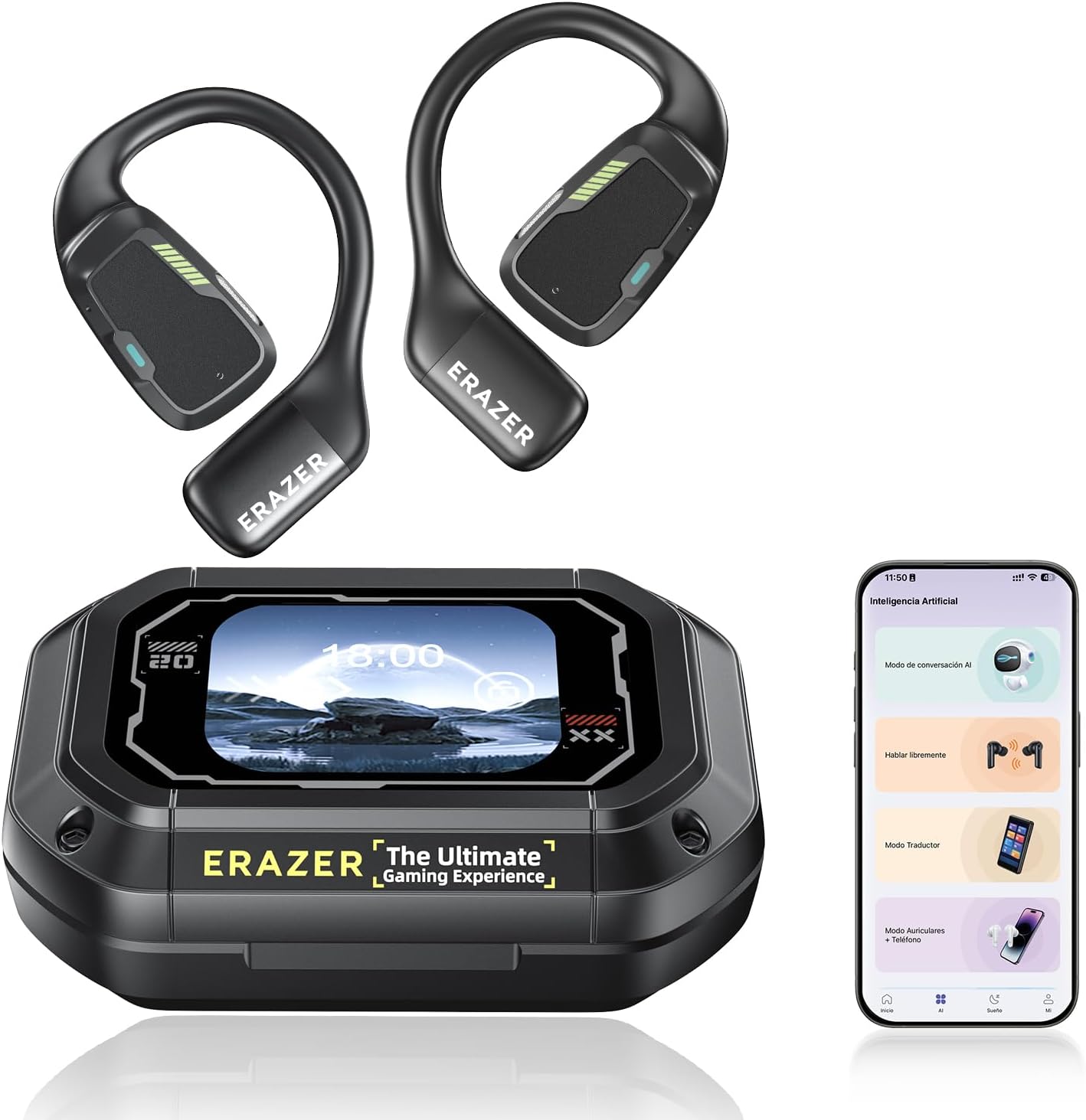
Image: The ERAZER XP6 Translation Earbuds, showing both earbuds and the smart charging case with a display screen, alongside a smartphone displaying the companion app interface.
Package Contents
- ERAZER XP6 AI Translator Earbuds (Left and Right)
- Smart Charging Case with Display Screen
- USB Type-C Charging Cable
- User Manual
- Earloops
Video: An unboxing video demonstrating the contents of the ERAZER XP6 package, including the earbuds, charging case, and accessories.
Setup
1. Charging the Device
Before first use, fully charge the earbuds and the charging case. Connect the provided USB Type-C cable to the charging port on the case and to a power source. The display screen on the case will indicate the charging status.

Image: A close-up of the ERAZER XP6 charging case, highlighting the USB Type-C charging port and the multifunction button.
2. Downloading the Companion App
The AI translation functions require the dedicated companion app. Scan the QR code provided in the user manual or search for "Earjoy" in your device's app store to download and install the application.

Image: A visual guide showing the steps to download the companion app, including a QR code, app login screen, and Bluetooth connection process.
3. Pairing with Your Device
- Open the charging case and remove the earbuds.
- Ensure Bluetooth is enabled on your smartphone or tablet.
- Open the Earjoy app and follow the on-screen instructions to add a new device.
- Select "ERAZER XP6" from the list of available Bluetooth devices to complete pairing.
Video: A demonstration of connecting the ERAZER XP6 earbuds to the companion app via Bluetooth, showing the pairing process and successful connection.
Operating Instructions
Earbud Controls
The earbuds feature smart touch controls for various functions. Refer to the app for customizable touch gestures.

Image: A close-up of a single ERAZER XP6 earbud, highlighting the multi-function key touch position and Bluetooth LED display light.
Smart Charging Case Display Functions
The charging case features an LCD full-color smart screen that allows control over various settings without needing your phone.
- Music Playback: Control music playback (play/pause, skip tracks) and adjust volume.
- Camera Control: Remotely trigger your phone's camera for photos.
- Language Switch: Change the display language of the case.
- Light Level: Adjust the brightness of the case's display.
- Alarm Clock: Set an alarm directly from the case.
- Find Earphone: Activate a sound on a misplaced earbud to locate it.
- Spatial Sound/Equalizer: Select audio modes (music, gaming) and adjust equalizer settings.
- TikTok Control: Like or skip videos on TikTok (requires app integration).
Video: A short demonstration of the ERAZER XP6 charging case's display functions, including music control, camera remote, and other settings. This is a preview video, showing key features quickly.
Translation Modes
The ERAZER XP6 earbuds support 135 languages and offer multiple translation modes:
- AI Dialogue Mode: Engage in real-time voice conversations. Speak by clicking a button, and the app will respond verbally.
- Translation Machine Mode: Click the translation button on your phone and speak one sentence at a time. The speech is recognized, translated, and played through your phone's speaker.
- Headphone + Phone Mode: One person wears the headphones, the other uses the phone. Click on either the headphones or phone to speak, and speech is automatically recognized and processed.
- Binaural Translation: Each participant wears an earbud. Place the phone between you, click on an earbud to start, and speech is automatically recognized and translated into the other person's language, including punctuation.

Image: A visual representation of the different translation modes available with the ERAZER XP6 earbuds, including AI Dialogue Mode, Headphone+Phone Mode, and Dual Headphones Translation Mode.
Video: A detailed video demonstrating the AI Translation Earbuds in various real-time translation scenarios, showcasing the different modes and their applications.
Maintenance
Cleaning
Regularly clean the earbuds and charging case with a soft, dry cloth. Avoid using harsh chemicals or abrasive materials. Ensure charging contacts are free of debris for optimal performance.
Storage
When not in use, store the earbuds in their charging case to protect them and ensure they remain charged.
Troubleshooting
| Issue | Possible Cause | Solution |
|---|---|---|
| Earbuds not pairing | Bluetooth off, earbuds not in pairing mode, interference. | Ensure Bluetooth is on. Place earbuds in case, close, then reopen. Restart phone. |
| Translation inaccuracy | Background noise, unclear speech, internet connectivity issues. | Speak clearly and at a moderate pace. Reduce background noise. Check internet connection. |
| No sound from earbuds | Low battery, volume too low, not connected. | Charge earbuds. Increase volume on device and case. Re-pair earbuds. |
| Case display not lighting up | Low battery, screen lock active. | Charge the case. Press the multifunction button on the case to wake the screen. |
Specifications
- Model: XP6
- Brand: ERAZER (by QYGCKJ)
- Supported Languages: 135
- Bluetooth Version: 5.4
- Speaker Size: 16mm dynamic drivers
- Accuracy: Up to 98% (AI translation engine)
- Weight: 5.9 ounces (total package)
- Package Dimensions: 5.67 x 3.7 x 2.09 inches
- Manufacturer: QYGCKJ

Image: An exploded view of an ERAZER XP6 earbud, showcasing its internal 16mm driver unit and open-ear design.
Warranty and Support
For warranty information and technical support, please refer to the official ERAZER website or contact QYGCKJ customer service. Keep your purchase receipt for warranty claims.


