
USIE SEL-H8
USIE Electric Scooter Instruction Manual
Brand: USIE | Model: SEL-H8
1. Important Safety Information
Before operating your USIE Electric Scooter, please read and understand all safety instructions. Failure to follow these instructions may result in serious injury or property damage.
- Always wear a helmet and appropriate safety gear (knee pads, elbow pads) when riding.
- Ensure the scooter meets UL-2272 safety standards, as certified.
- Do not ride in wet conditions, on slippery surfaces, or in heavy rain.
- Avoid riding on uneven terrain, steep inclines, or over obstacles.
- Maintain a safe distance from other riders, pedestrians, and vehicles.
- Do not exceed the maximum weight limit of 220 pounds (approximately 100 kg).
- This scooter is designed for users aged 14 and above.
- Regularly inspect the scooter for any damage, loose parts, or wear before each use.
- Familiarize yourself with the braking system and practice stopping in a safe area.
- Do not modify the scooter in any way, as this may compromise its safety and void the warranty.
2. Product Overview
The USIE Electric Scooter (Model SEL-H8) is a lightweight, foldable electric scooter designed for convenient urban commuting and recreational use. It features an 8-inch solid wheel design, a powerful 250W motor, and a dual braking system for enhanced safety.

Figure 2.1: USIE Electric Scooter (Black) - Upright and Folded View. This image displays the sleek design of the black electric scooter, both in its ready-to-ride upright position and its compact folded state, highlighting its portability.
Key Features:
- Powerful Motor: Equipped with a 250W motor for efficient propulsion, reaching speeds up to 15.5 MPH (25 KM/H).
- Long Range Battery: Features a 4000mAh Lithium-ion battery providing a maximum range of 12 miles (19 KM) on a single charge.
- Dual Braking System: Incorporates both an E-Brake and a rear foot brake for reliable and responsive stopping power.
- Solid 8-Inch Wheels: Durable solid wheels provide a stable and maintenance-free riding experience.
- Foldable Design: Lightweight (28 lbs / 13 KG) and easily foldable for convenient storage and transport.
- Smart LCD Display: Provides real-time information including speed, battery level, and gear mode.
- Integrated Lighting: Bright LED headlight and automatic tail light ensure visibility and safety during night rides.
- UL2272 Safety Certified: Meets stringent safety standards for electric scooters.
Component Identification:

Figure 2.2: Key Components of the USIE Electric Scooter. This diagram highlights essential parts of the scooter, including the suspension system for a smoother ride, the foot-operated kick-stand for convenient parking, the non-slip rubber mat on the deck for rider stability, and the durable 8-inch solid tires.
- Handlebars: For steering and control, with grips and brake levers.
- LCD Display: Located on the handlebar, shows operational data.
- Headlight: Front-mounted for illumination.
- Folding Mechanism: Allows the scooter to be compactly folded.
- Deck: The platform where the rider stands, featuring a non-slip mat.
- Kick-stand: For upright parking.
- Motor: Integrated into the rear wheel.
- Wheels: 8-inch solid wheels, front and rear.
- Tail Light: Rear-mounted for visibility.
- Charging Port: For connecting the power adapter.
3. Setup and Assembly
The USIE Electric Scooter comes mostly pre-assembled. Follow these simple steps to prepare your scooter for its first ride.
- Unpack the Scooter: Carefully remove the scooter and all accessories from the packaging. Check for any visible damage or missing parts.
- Unfold the Scooter:
- Place the scooter on a flat surface.
- Lift the red switch located near the folding mechanism.
- Simultaneously press the red button and unfold the stem upwards until it locks securely into place with an audible click. Ensure the locking mechanism is fully engaged.
- Attach the Handlebars:
- Locate the two handlebars.
- Align each handlebar with its respective slot on the crossbar at the top of the stem.
- Push firmly until they click into place. Ensure they are securely fastened and do not wobble.
- Initial Charge: Before first use, fully charge the scooter's battery. Refer to the "Charging the Battery" section under Maintenance for detailed instructions.
- Pre-Ride Check: Before every ride, ensure all bolts are tight, tires are in good condition, and brakes are functioning correctly.
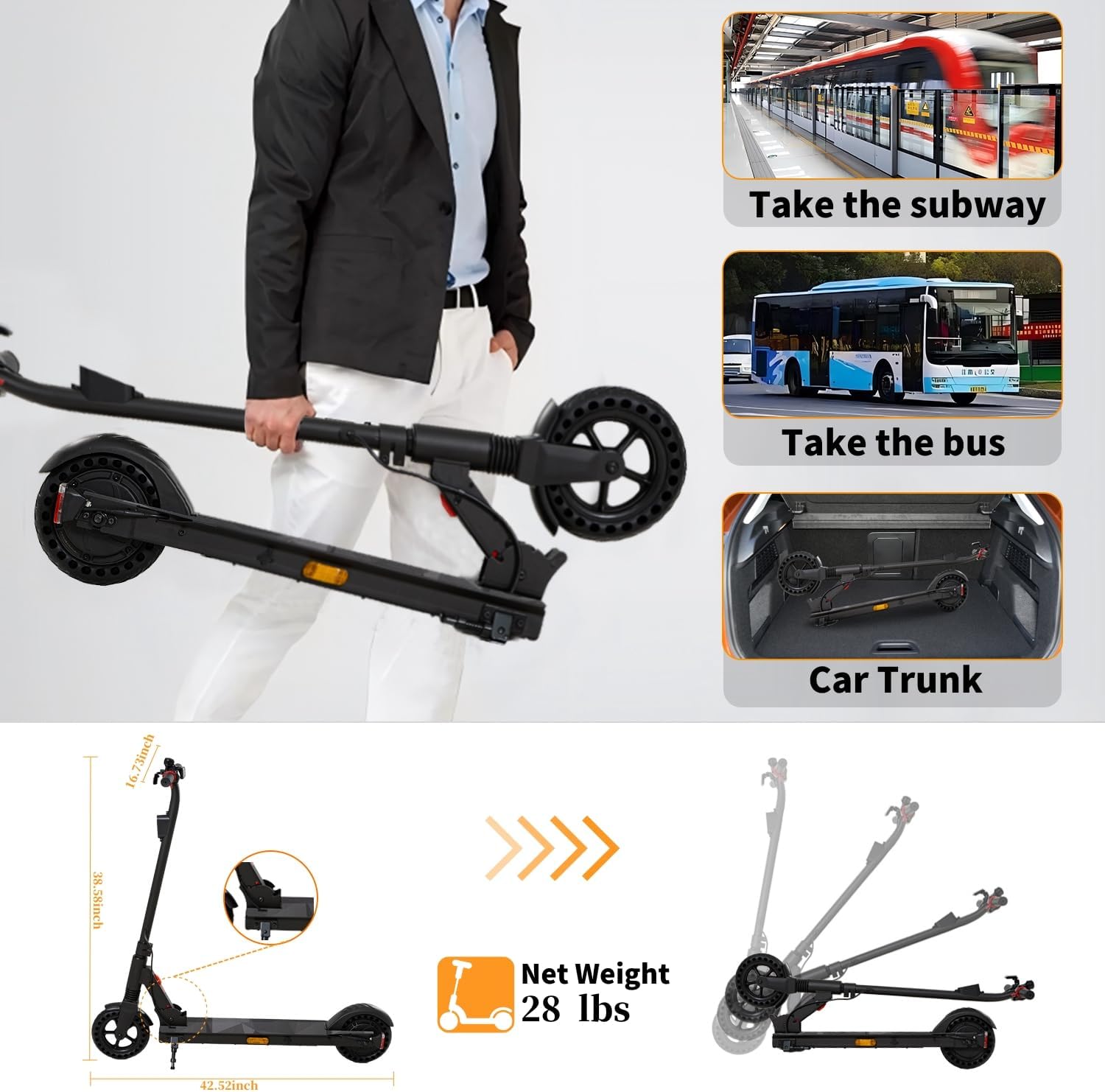
Figure 3.1: Scooter Portability and Folding. This image illustrates how easily the scooter can be folded and carried, making it suitable for public transport or storage in a car trunk. It also shows the scooter's dimensions and net weight of 28 lbs.
4. Operating Instructions
4.1 Power On/Off
- To Power On: Press and hold the power button on the LCD display for a few seconds until the screen illuminates.
- To Power Off: Press and hold the power button again until the display turns off.
4.2 Riding the Scooter
- Kick Start: Place one foot on the deck and use the other foot to push off the ground, gaining some initial momentum.
- Engage Motor: Once you have some speed (typically around 2-3 MPH), gently press the throttle lever (usually on the right handlebar) to engage the motor.
- Speed Modes: The scooter offers three speed modes (4 mph, 9.5 mph, 15.5 mph). Use the mode button on the display to cycle through these settings to match your riding environment and skill level.
- Steering: Lean your body and gently turn the handlebars in the desired direction.
4.3 Braking System
The USIE Electric Scooter is equipped with a dual braking system for maximum safety:
- E-Brake (Electronic Brake): Located on the left handlebar. Squeeze the lever to activate the electronic brake, providing immediate stopping power.
- Rear Foot Brake: Apply pressure to the rear fender with your foot to activate the physical friction brake on the rear wheel. This provides an additional layer of control and can be used for gradual stops or in conjunction with the E-Brake for emergency stops.

Figure 4.1: Safety Dual Brake System. This image illustrates the two braking methods: the E-Brake lever on the handlebar and the rear foot brake located above the rear wheel, both designed for quick and safe stopping.
4.4 Smart LCD Display
The integrated LCD display provides essential riding information at a glance:

Figure 4.2: Smart LCD Display. This close-up view of the handlebar-mounted display shows key metrics such as current speed, remaining battery level, and the selected gear level (speed mode).
- Speed: Displays your current riding speed in KM/H.
- Battery Level: Indicates the remaining battery charge.
- Gear Level: Shows the selected speed mode (e.g., 1, 2, or 3).
4.5 Lighting System
For enhanced safety and visibility, the scooter is equipped with a bright LED headlight and an automatic tail light.

Figure 4.3: Integrated Lighting System. This image highlights the bright LED headlight at the front for illuminating your path and the automatic tail light at the rear for increased visibility to others, especially during low-light conditions.
- Headlight: Turn on the headlight for riding in low-light conditions or at night.
- Tail Light: The tail light automatically activates when the scooter is in use, providing rear visibility.
5. Maintenance
5.1 Charging the Battery
To ensure optimal battery life and performance, follow these charging guidelines:

Figure 5.1: Upgraded Battery System. This image provides a visual representation of the scooter's 4000mAh Lithium-ion battery, capable of providing up to 12 miles of range and achieving a full charge in approximately 3 hours.
- Only use the original charger provided with your scooter.
- Connect the charger to the scooter's charging port, then plug it into a standard wall outlet.
- The charging indicator on the charger will change color (e.g., red to green) when charging is complete.
- A full charge typically takes approximately 3 hours.
- Do not overcharge the battery. Disconnect the charger once charging is complete.
- Store the scooter in a cool, dry place when not in use, and ensure the battery is partially charged (50-70%) if storing for extended periods.
5.2 General Care and Cleaning
- Clean the scooter regularly with a damp cloth. Do not use harsh chemicals or abrasive cleaners.
- Avoid direct water spray or submersion, as the scooter has IPX4 water resistance, meaning it is resistant to splashing water from any direction, but not fully waterproof.
- Keep the scooter dry, especially the charging port and electronic components.
5.3 Tire and Brake Inspection
- Regularly check the 8-inch solid wheels for any signs of wear or damage. While solid, they can still be affected by debris.
- Test the E-Brake and rear foot brake before each ride to ensure they are responsive and effective.
- Ensure the brake levers are not loose and provide firm resistance when squeezed.
6. Troubleshooting
This section addresses common issues you might encounter with your USIE Electric Scooter. If the problem persists, please contact customer support.
| Problem | Possible Cause | Solution |
|---|---|---|
| Scooter does not power on. | Battery is depleted or power button not pressed correctly. | Charge the battery fully. Press and hold the power button firmly for several seconds. |
| Motor does not engage. | Insufficient initial speed, low battery, or throttle issue. | Ensure you kick-start to at least 2-3 MPH before engaging the throttle. Check battery level. Contact support if throttle is unresponsive. |
| Reduced range or speed. | Low battery charge, riding uphill, heavy load, or cold weather. | Fully charge the battery. Avoid steep inclines or heavy loads. Battery performance can be affected by temperature. |
| Brakes feel weak or unresponsive. | Brake mechanism wear or adjustment needed. | Inspect brake levers and rear foot brake for wear. Ensure cables (if any) are not loose. Contact support for brake adjustment or replacement. |
| Unusual noises during operation. | Loose components, debris in wheels, or motor issue. | Check all visible bolts and connections. Inspect wheels for trapped debris. If noise persists, contact customer support. |
7. Specifications
Detailed technical specifications for the USIE Electric Scooter (Model SEL-H8).
| Specification | Value |
|---|---|
| Brand | USIE |
| Model Name | SEL-H8 |
| Color | Black |
| Motor Power | 250W |
| Top Speed | Up to 15.5 MPH (25 KM/H) |
| Maximum Distance Range | 12 Miles (19 KM) |
| Battery Type | 4000mAh Lithium-ion (36V) |
| Charging Time | Approximately 3 Hours |
| Wheel Size | 8 Inches |
| Wheel Type | Solid |
| Brake Style | EABS, Rear Braking |
| Frame Material | Aluminum |
| Net Weight | 28 Pounds (13 KG) |
| Weight Limit | 220 Pounds (100 KG) |
| Age Range (Description) | Youth, Adult (14+ Years Old) |
| Special Feature | Foldable |
| Safety Certification | UL2272 Certified |
| Water Resistance | IPX4 |
8. Warranty and Support
USIE stands behind the quality of its products. Your Electric Scooter (Model SEL-H8) comes with a limited warranty.
- Warranty Period: Different parts of the scooter come with a 1-year limited warranty from the date of purchase. Please refer to your purchase documentation for specific terms and conditions.
- What is Covered: The warranty typically covers manufacturing defects in materials and workmanship under normal use.
- What is Not Covered: The warranty does not cover damage caused by misuse, accidents, unauthorized modifications, normal wear and tear, or failure to follow the instructions in this manual.
Customer Support:
If you have any questions, require technical assistance, or need to make a warranty claim, please contact USIE customer support through the retailer where you purchased the product or visit the official USIE store page on Amazon:
Visit the USIE Store on Amazon
Please have your model number (SEL-H8) and purchase date ready when contacting support.
Ask a question about this manual
Ask about setup, troubleshooting, compatibility, parts, safety, or missing instructions. Manuals+ will review the question and use this page’s manual context to help answer it.