
MECOLOUR ME-121
MECOLOUR Heat Press Machine User Manual
Model: ME-121
1. Introduction
Thank you for choosing the MECOLOUR Heat Press Machine. This machine is designed for efficient and precise heat transfer applications on various materials such as T-shirts, tote bags, pillows, and more. Its user-friendly interface and advanced heating technology ensure high-quality results for both personal and professional projects.
Please read this manual thoroughly before operation to ensure safe and optimal performance of your heat press machine.

Image: The MECOLOUR Heat Press Machine, a compact and portable heat transfer device, shown with various items it can customize, including a T-shirt, pillow, tote bag, and drawstring bag.
2. Safety Information
WARNING: This device operates at high temperatures that can cause burns or other injury. Please use with extreme caution.
- Always place the heat press on a stable, heat-resistant surface.
- Do not touch the heating plate during or immediately after operation as it will be extremely hot.
- Keep hands and fingers away from the heating plate when the machine is powered on.
- Ensure the machine is unplugged when not in use or during cleaning.
- Do not immerse the machine in water or any other liquid.
- Keep out of reach of children and pets.
- Do not operate the machine if the power cord or plug is damaged.
- The machine features an overheating protection system that will shut off the function if pressed longer than expected to prevent fire.

Image: Close-up view of the MECOLOUR Heat Press Machine highlighting its insulated safety base, designed to protect work surfaces from heat.
3. Package Contents
Upon opening the package, please verify that all the following items are included:
- 1x Heat Press Machine (12" x 10" heating area)
- 1x Insulated Safety Base
- 1x Canvas Bag (for storage)
- User Manual (this document)
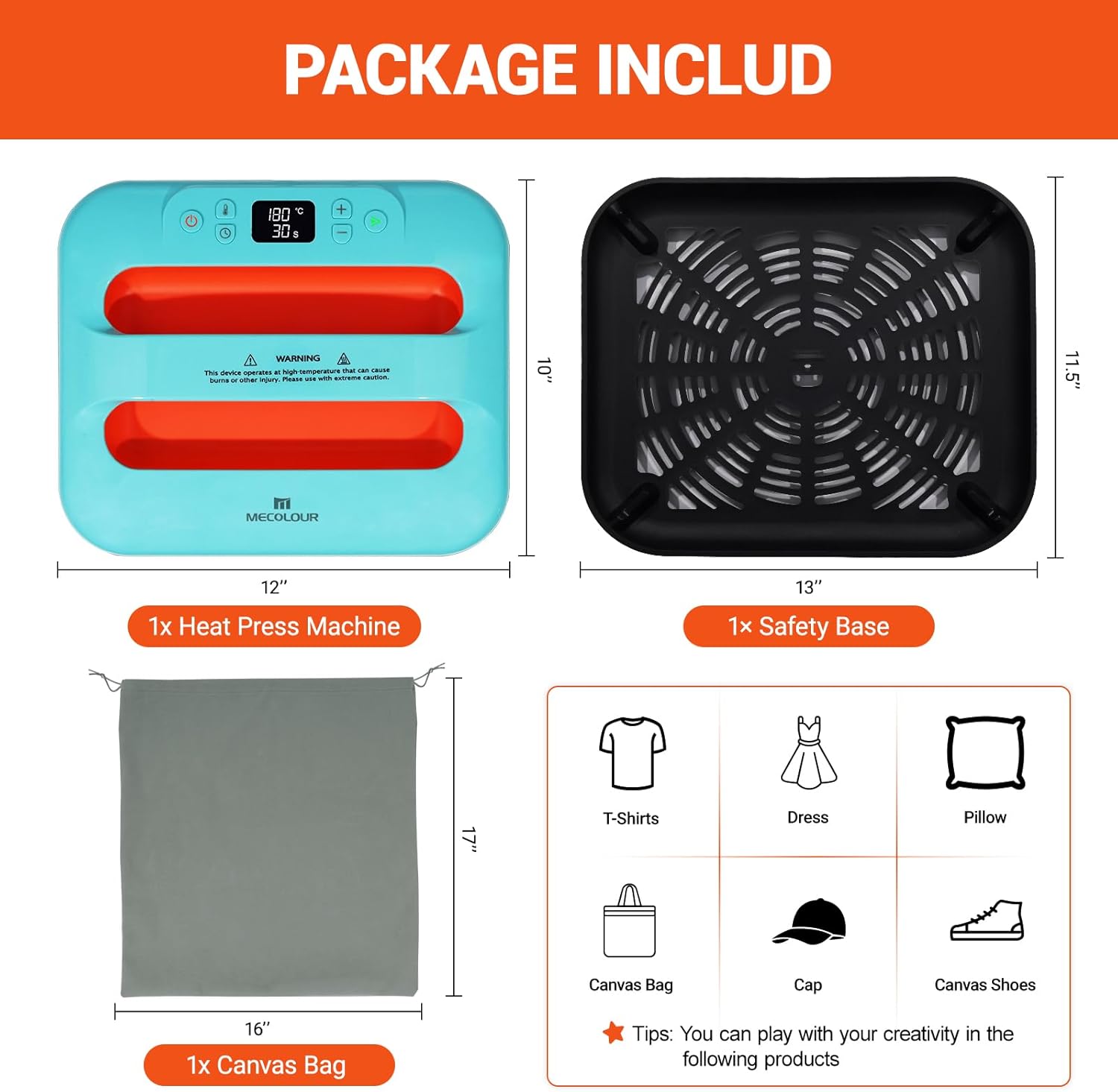
Image: Diagram showing the contents of the MECOLOUR Heat Press Machine package, including the heat press, safety base, and canvas bag, along with their dimensions.
4. Product Overview
Familiarize yourself with the main components of your MECOLOUR Heat Press Machine:
- Heating Plate: The main surface that heats up to transfer designs.
- Control Panel: Features buttons for power, temperature adjustment, and time settings.
- Handle: For applying pressure and moving the machine.
- Insulated Safety Base: Provides a safe resting place for the hot machine.
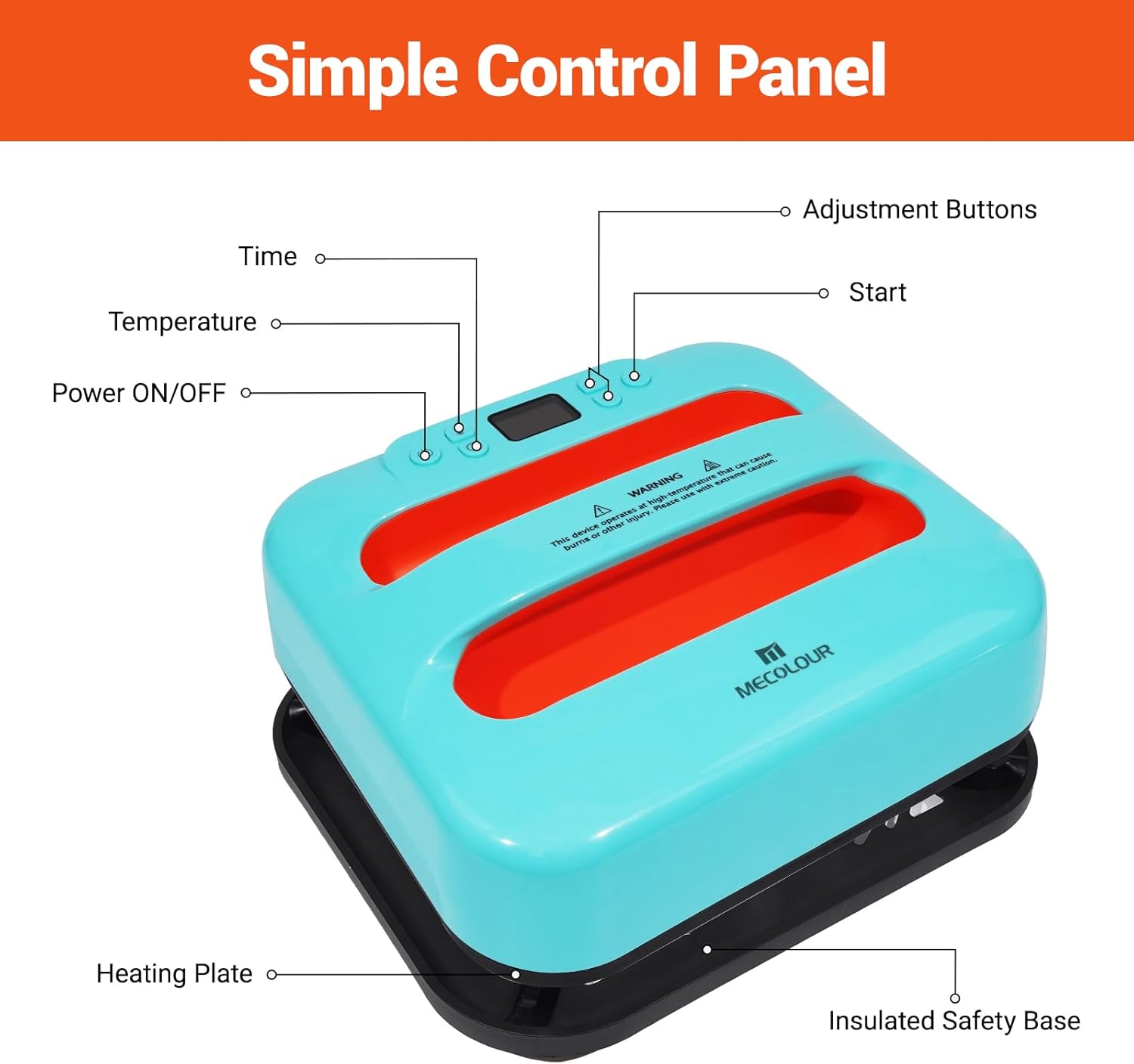
Image: Detailed view of the MECOLOUR Heat Press Machine's simple control panel, indicating the Power ON/OFF, Time, Temperature, Adjustment Buttons, and Start functions, along with the Heating Plate and Insulated Safety Base.
5. Setup
- Unpack all components from the box.
- Place the heat press machine on a flat, sturdy, and heat-resistant surface.
- Ensure there is adequate ventilation around the machine.
- Plug the power cord into a standard 110V electrical outlet.
6. Operating Instructions
Follow these steps for successful heat transfer:
- Prepare Your Material: Place your fabric (e.g., T-shirt, bag) on a flat surface. Ensure it is smooth and wrinkle-free.
- Power On: Press the power button on the control panel.
- Set Temperature and Time: Use the adjustment buttons to set the desired temperature and time according to your transfer material's specifications. The maximum temperature is 410°F (210°C).
- Preheat: Allow the machine to preheat until it reaches the set temperature. The display will indicate when it's ready.
- Position Design: Place your transfer paper or vinyl design onto the fabric in the desired position. You may use a Teflon sheet over the design for protection.
- Apply Heat and Pressure: Carefully place the heat press machine over the design. Press down firmly with even pressure for the set duration.
- Remove Heat Press: Once the timer beeps, lift the heat press machine and immediately place it back on its insulated safety base.
- Peel Off Transfer: Depending on your transfer material, peel off the transfer paper either hot or cold. Refer to your transfer material's instructions.

Image: A visual guide demonstrating the four easy steps of operating the heat press: 1. Set Time & Temp, 2. Place Vinyl Pattern, 3. Apply Heat Pressure, and 4. Peel Off and Finish It.

Image: A chart providing reference temperatures for various heat press projects, including T-shirts, dresses, pillows, canvas bags, caps, and canvas shoes, with recommended temperatures of 165°C/330°F and 170°C/340°F.
6.1. Instructional Video
Video: An official MECOLOUR video demonstrating the heat press machine in action, showing how to apply designs to T-shirts, bags, and other fabric items. This video provides a visual guide to the heat transfer process.
7. Applications
The MECOLOUR Heat Press Machine is versatile and can be used for a wide range of heat transfer projects, including but not limited to:
- T-shirts and other apparel
- Tote bags and canvas bags
- Pillows and cushion covers
- Socks
- Caps and hats
- Mouse pads
- And other flat, heat-resistant materials suitable for HTV, sublimation, DTF, and infusible ink transfers.

Image: A collage showcasing various items that can be customized using the heat press machine, including T-shirts, bags, pillows, socks, caps, and mouse pads, demonstrating its wide range of applications.
8. Maintenance
Proper maintenance ensures the longevity and optimal performance of your heat press machine:
- Cleaning: After each use, ensure the machine is unplugged and completely cooled down. Wipe the heating plate with a soft, damp cloth to remove any residue. Do not use abrasive cleaners.
- Storage: Store the machine in a dry, cool place, preferably in the provided canvas bag, to protect it from dust and damage.
- Regular Inspection: Periodically check the power cord for any signs of wear or damage. If any damage is found, discontinue use and contact customer support.
9. Troubleshooting
| Problem | Possible Cause | Solution |
|---|---|---|
| Machine does not power on. | Not plugged in; power outlet issue; damaged cord. | Ensure plug is fully inserted. Test outlet with another device. Inspect cord for damage; if damaged, do not use. |
| Heating plate not heating up. | Temperature not set; machine not powered on; internal malfunction. | Verify temperature setting. Ensure machine is powered on. Contact customer support if issue persists. |
| Design not transferring properly. | Incorrect temperature/time; insufficient pressure; wrong peeling method. | Adjust temperature and time according to transfer material. Apply firm, even pressure. Check transfer material instructions for hot/cold peel. |
| Machine shuts off unexpectedly. | Overheating protection activated. | This is a safety feature. Allow the machine to cool down before resuming operation. Ensure not to press for excessively long periods. |
10. Specifications
- Model: ME-121
- Brand: MECOLOUR
- Heating Area: 12" x 10"
- Voltage: 110V
- Maximum Temperature: 410°F (210°C)
- Product Dimensions: 11.69"L x 5.11"W x 13.66"H
- Item Weight: 8.41 pounds
- Material: Plastic (housing), High-temperature resistant materials (soleplate)
- Color: Blue
11. Warranty and Support
MECOLOUR stands behind the quality of its products. For warranty information, technical support, or any inquiries regarding your heat press machine, please contact MECOLOUR customer service through the retailer where you purchased the product or visit the official MECOLOUR store online.
Protection Plans: Additional protection plans may be available for purchase to extend coverage beyond the standard warranty. Please check with your retailer for details on 3-Year, 4-Year, or Complete Protect plans.
For further assistance, please refer to the contact information provided on the MECOLOUR official website or your purchase documentation.
Ask a question about this manual
Ask about setup, troubleshooting, compatibility, parts, safety, or missing instructions. Manuals+ will review the question and use this page’s manual context to help answer it.