
Lloyd's LC-1400
Lloyd's Smart Aroma Diffuser
Model: LC-1400
User Manual
Important Safety Information
Please read all safety instructions carefully before using the device. Keep this manual for future reference.
- Do not connect to electrical power if the device is empty. Ensure there is sufficient water in the tank before plugging in.
- Only use 100% natural essences. Chemical residues from synthetic oils can damage the product and affect its performance.
- It is recommended to use purified or distilled water to prevent mineral buildup and ensure optimal misting.
- Keep the device on a stable, flat surface away from direct sunlight, heat sources, and out of reach of children and pets.
- Do not immerse the device in water or any other liquid.
- Unplug the device from the power outlet when not in use or before cleaning.
Product Overview
The Lloyd's Smart Aroma Diffuser LC-1400 combines the functions of an aroma diffuser and a humidifier, dispersing a fragrant vapor through ultrasonic waves to create a relaxing and elegant atmosphere. It features a unique anti-gravity drip technology for a captivating visual experience and offers smart control capabilities.

Image: Lloyd's Smart Aroma Diffuser LC-1400 and its retail packaging.
Key Features:
- Anti-Gravity Drip System: Creates a unique visual effect with water droplets appearing to defy gravity.
- Smart Control: Full control via a mobile application (on/off, LED light adjustment, timer).
- Voice Assistant Compatibility: Works with Google Assistant, Amazon Alexa, and Siri Shortcuts for hands-free operation.
- Humidifier Function: Disperses fine mist to humidify the air.
- Large Capacity Tank: 500 ml water tank provides up to 13 hours of continuous aromatherapy.
- Automatic Shut-off: Safety feature that automatically turns off the device when water runs out.
- Soft White LED Light: Creates a relaxing ambiance.
- Geolocalization Automation: Can be set to activate automatically when you approach your home.
- Ecosystem Integration: Create routines with other Lloyd's smart products.

Image: The Lloyd's Smart Aroma Diffuser showing its main components, including the base and the top misting unit.

Image: Visual representation of key features: anti-gravity drip, voice control, included rose essence, and soft mood lighting.
Setup Guide
Package Contents:
- 1 x Lloyd's Smart Aroma Diffuser
- 1 x 10 ml Rose Scent Oil Bottle
- 1 x USB Type-C Cable
- 1 x User Manual (this document)
Initial Setup Steps:
- Prepare the Device: Place the diffuser on a flat, stable surface. Ensure it is not near any electronic devices sensitive to moisture.
- Add Water: Carefully remove the top cover. Fill the water tank with up to 500 ml of purified or distilled water. Do not exceed the MAX fill line.
- Add Essential Oil: Add 5-10 drops of your preferred 100% natural essential oil directly into the water tank. The included 10 ml rose scent oil can be used.
- Close the Device: Securely place the top cover back onto the diffuser.
- Connect Power: Connect the USB Type-C cable to the diffuser and plug the other end into a compatible USB power adapter (not included).
- Download the App: Ensure your smartphone has iOS 11.0 or higher or Android™ 5.0 or higher. Download the official Lloyd's smart home application from your device's app store.
- Connect to Wi-Fi: Open the Lloyd's app and follow the on-screen instructions to add your new device. Ensure your Wi-Fi network is 2.4 GHz, as the device is compatible only with this frequency. The device supports quick Bluetooth configuration, eliminating the need for a separate HUB.
Operating Instructions
Manual Operation:
- Power Button: Press the power button on the top of the diffuser to turn it on or off.
- Light Control: The soft white LED light will illuminate when the diffuser is on. Further light adjustments can be made via the mobile app.
Smart Control via Mobile App:
Once connected to the Lloyd's app, you gain full control over your diffuser:
- On/Off: Remotely turn the diffuser on or off.
- LED Light Adjustment: Control the brightness or mode of the soft white LED light.
- Timer Function: Program the diffuser to operate for a specific duration (1-6 hours).
- Geolocalization: Set up automated routines where the diffuser activates as you approach your home, creating a welcoming environment.
- Device Sharing: Share control of the diffuser with multiple users within the app.

Image: Control your smart home, including the diffuser, from a single app on your smartphone.
Voice Control:
The diffuser is compatible with popular voice assistants. Link your Lloyd's account to Google Assistant, Amazon Alexa, or Siri Shortcuts to enable voice commands.
- Google Assistant: "Hey Google, turn on diffuser." / "Hey Google, turn off diffuser."
- Amazon Alexa: "Alexa, turn on diffuser." / "Alexa, turn off diffuser."
- Siri Shortcuts: Create custom shortcuts for specific actions.

Image: Control the diffuser using voice commands with Google Assistant or Amazon Alexa.

Image: Seamlessly activate your diffuser with a simple voice command.
Anti-Gravity Drip Feature:
The unique anti-gravity drip system creates a mesmerizing visual effect. This feature operates automatically when the diffuser is active, showcasing water droplets moving upwards.
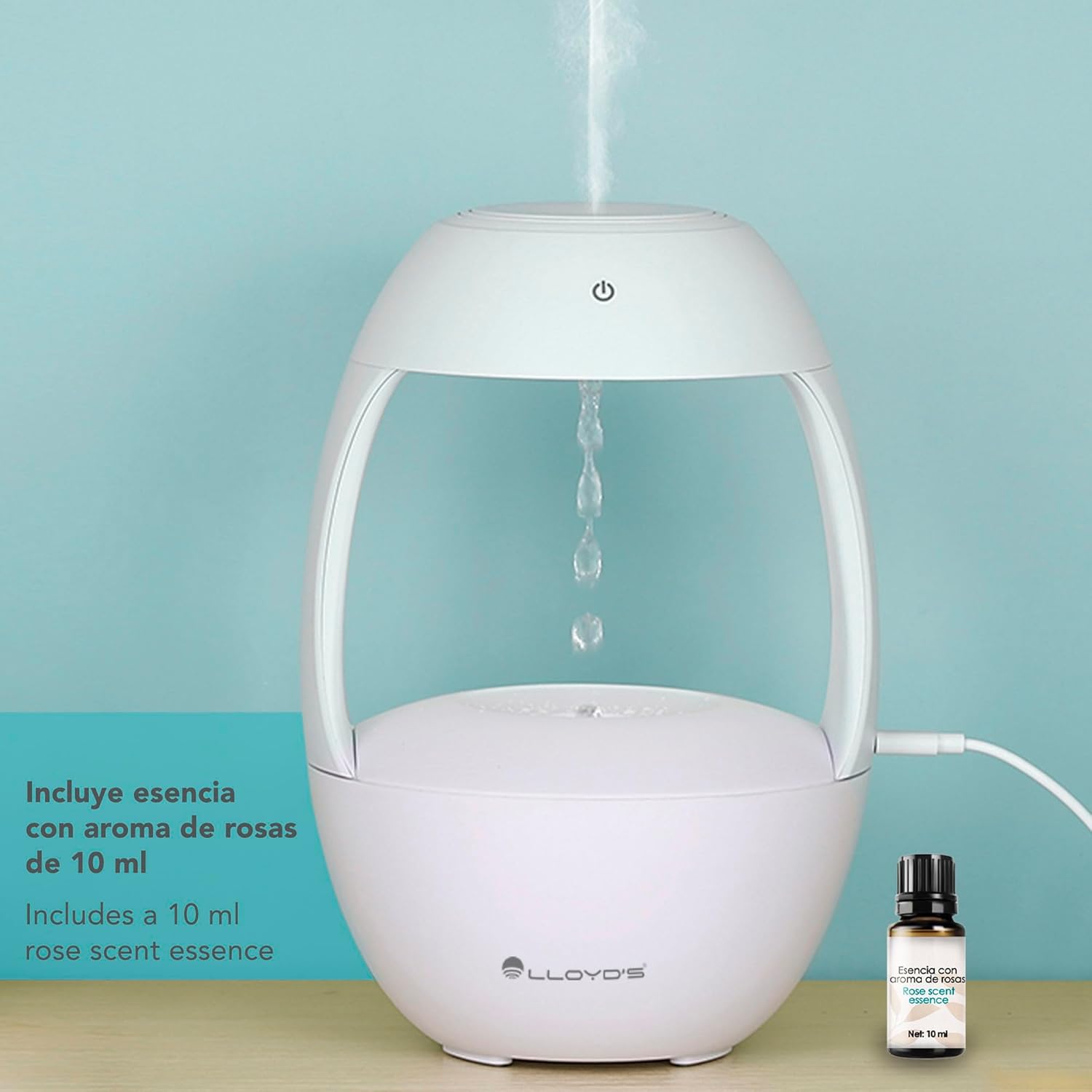
Image: The diffuser demonstrating its anti-gravity water drip effect, with the included rose scent essence bottle.
Maintenance
Proper maintenance ensures the longevity and optimal performance of your aroma diffuser.
- Water Quality: Always use purified or distilled water to minimize mineral buildup, which can affect mist output and device lifespan.
- Oil Type: Use only 100% natural essential oils. Synthetic or chemical-based oils can corrode internal components.
- Regular Cleaning:
- Unplug the diffuser before cleaning.
- Empty any remaining water from the tank.
- Wipe the inside of the water tank and the ultrasonic disc with a soft, damp cloth. For stubborn residue, use a cotton swab dipped in white vinegar.
- Rinse the tank with clean water, ensuring no vinegar residue remains.
- Wipe the exterior of the diffuser with a soft, dry cloth.
- Do not use abrasive cleaners or solvents.
- Storage: If storing the diffuser for an extended period, ensure it is clean and completely dry. Store in a cool, dry place.
Troubleshooting
| Problem | Possible Cause | Solution |
|---|---|---|
| Device does not turn on. | No power connection; Water tank empty. | Ensure the USB-C cable is securely connected to a power source. Fill the water tank with water. |
| No mist or weak mist. | Insufficient water; Water level too high; Ultrasonic disc dirty; Fan blocked. | Add water to the appropriate level. Clean the ultrasonic disc. Ensure the fan opening is clear. |
| Unusual odor. | Old or contaminated water; Residue from essential oils. | Empty and clean the water tank thoroughly. Use fresh, purified water and natural essential oils. |
| App connection issues. | Incorrect Wi-Fi frequency; Bluetooth not enabled; Device too far from router. | Ensure your Wi-Fi is 2.4 GHz. Enable Bluetooth on your phone. Move the diffuser closer to your router. Restart the app and device. |
| Voice control not working. | Not linked to voice assistant; Incorrect commands. | Verify the Lloyd's account is linked in your voice assistant app. Use the correct commands as specified in the app. |
Specifications
| Feature | Detail |
|---|---|
| Model | LC-1400 |
| Dimensions (L x W x H) | 16 x 16 x 24 cm (6.3 x 6.3 x 9.4 inches) |
| Item Weight | 481 Grams (1.06 lbs) |
| Material | Acrylonitrile Butadiene Styrene (ABS) |
| Color | White |
| Water Tank Capacity | 500 ml |
| Operating Time | Up to 13 hours (continuous mist) |
| Timer Settings | 1-6 hours (via app) |
| Connectivity | Wi-Fi 2.4 GHz, Bluetooth (for quick setup) |
| Voice Assistant Compatibility | Google Assistant, Amazon Alexa, Siri Shortcuts |
| Power Source | USB Type-C (adapter not included) |
| Recommended Water Type | Purified or Distilled Water |
| Included Accessories | 10 ml Rose Scent Oil, USB Type-C Cable |

Image: Dimensions of the Lloyd's Smart Aroma Diffuser: 24 cm height, 10 cm width (at base).
Warranty and Support
Lloyd's products are designed and manufactured to the highest quality standards. For detailed warranty information, please refer to the warranty card included with your purchase or visit the official Lloyd's website.
If you encounter any issues or have questions regarding your Lloyd's Smart Aroma Diffuser, please contact our customer support team:
- Online Support: Visit the official Lloyd's website for FAQs, troubleshooting guides, and contact forms.
- Customer Service: Refer to the contact information provided in your product packaging or on the official website.
Please have your product model (LC-1400) and purchase details ready when contacting support.
Ask a question about this manual
Ask about setup, troubleshooting, compatibility, parts, safety, or missing instructions. Manuals+ will review the question and use this page’s manual context to help answer it.