
E-Motie LDH076
User Manual: Full Size Bed Frame with Storage, LED Lights & Charging Station
Model: LDH076 | Brand: E-Motie
Introduction
This manual provides detailed instructions for the assembly, operation, and maintenance of your E-Motie Full Size Bed Frame. Designed for comfort and convenience, this bed frame features integrated LED lighting, a built-in charging station, and four large storage drawers. Please read this manual thoroughly before beginning assembly or operation to ensure safe and proper use.

Figure 1: Overview of the E-Motie Full Size Bed Frame.
Safety Information
Please adhere to the following safety guidelines to prevent injury or damage to the product:
- Always follow the assembly instructions carefully to prevent instability or collapse.
- Be cautious around sharp edges during assembly and handling.
- Do not exceed the maximum weight recommendation of 1000 pounds.
- Ensure all connections for the LED lights and charging station are secure before use.
- Keep liquids away from the charging station to prevent electrical hazards.
Components List
Before assembly, verify that all components are present and undamaged. Refer to the detailed installation guide included in your package for part numbering.
- Headboard (with integrated LED lights and charging station)
- Footboard
- Side Rails
- Metal Slats (12 pieces)
- Support Legs (9 pieces)
- 4 Storage Drawers (with wheels and screw clips)
- Assembly Hardware (screws, bolts, tools)
- Installation Manual

Figure 2: Product Dimensions and Drawer Components.
Setup and Assembly
Assembly of the E-Motie bed frame is designed to be straightforward, typically taking around 45 minutes. All parts are clearly numbered, and a detailed installation guide is provided.
Assembly Steps:
- Unpack and Identify Parts: Lay out all components and hardware. Match each part to its corresponding number in the installation manual.
- Assemble the Headboard and Footboard: Follow the manual to attach the side rails to the headboard and footboard. Ensure all connections are secure.
- Install Support Legs: Attach the 9 sturdy support legs to the frame. These are crucial for stability and weight distribution.
- Place Metal Slats: Position the 12 metal slats across the frame. The double row of screws at the center support point will help fix the slats more firmly.
- Insert EVA Sponge Strips: Apply the included EVA sponge strips to the metal frame where indicated to prevent noise from metal-on-metal friction.
- Assemble Storage Drawers: Assemble the four storage drawers according to the manual. Attach the smooth wheels and ensure the screw clips are functional for securing the drawers under the bed.
- Connect Electrical Components: Plug in the LED lights and charging station. Ensure proper connection to a power source.

Figure 3: Sturdy Metal Frame and Noise-Free Design.

Figure 4: Key Assembly Features.
Operating Instructions
LED Lighting System:
The upholstered headboard features an RGB LED lighting system with over 60,000 color options. Control the lights using the included remote or a compatible smartphone application.
- Color Selection: Choose from a wide spectrum of colors to match your mood or room decor.
- Brightness Adjustment: Adjust the light intensity to your preference, from a subtle glow to bright illumination.
- Lighting Modes: Explore various pre-set lighting modes, including static colors, fades, and flashes.
- Music Synchronization: Activate the music synchronization mode to make the LED lights flash and change with the rhythm of your music, creating a dynamic atmosphere.
- Timing Functions: Set timers for the lights to turn on or off automatically.

Figure 5: LED Light Control and Music Sync Feature.
Integrated Charging Station:
The headboard is equipped with a convenient charging station, allowing you to power your electronic devices directly from your bed.
- 2 Standard Sockets: (125V/12A) for larger electronics or chargers.
- 1 USB Port: (5V/2A) for standard USB charging.
- 1 Type-C Port: (5V/2A) for modern devices requiring USB-C.

Figure 6: Convenient Charging Station.
Storage Drawers:
The bed frame includes four large-capacity storage drawers located underneath, perfect for organizing clothes, bedding, or other items.
- Smooth Operation: Each drawer is equipped with smooth wheels for easy pulling out and closing.
- Secure Placement: A screw clip design allows you to fix the drawers to the bottom of the bed, preventing them from sliding out unintentionally.

Figure 7: Large Capacity Storage Drawers.
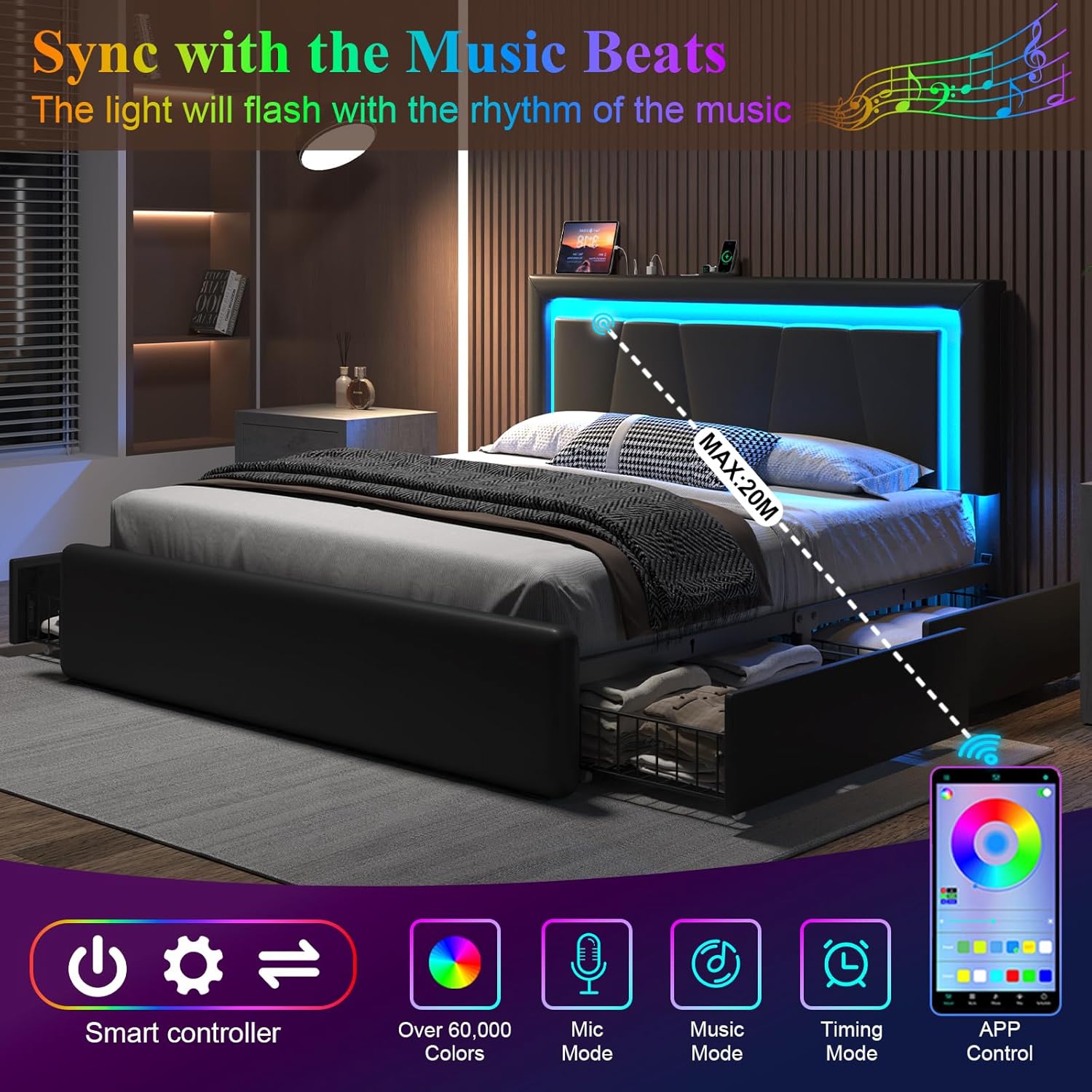
Figure 8: Drawer Mechanism Details.
Adjustable Headboard:
The upholstered headboard is designed for comfort and versatility, wrapped in high-quality soft PU leather fabric with built-in high-resilience memory foam.
- Height Adjustment: The headboard can be adjusted to two different heights: 41.93 inches or 45.87 inches, to accommodate various mattress thicknesses (10-14 inches).
- Ergonomic Support: Provides excellent support and comfort for sitting up in bed.

Figure 9: Adjustable Headboard Heights.
Maintenance
Proper care will extend the life and appearance of your bed frame:
- Cleaning: Wipe the faux leather surfaces with a dry cloth. For tougher spots, a slightly damp cloth with mild soap can be used, followed by immediate drying. Avoid harsh chemicals or abrasive cleaners.
- Frame Inspection: Periodically check all screws and bolts to ensure they remain tight. Re-tighten as necessary to maintain stability.
- Noise Reduction: The frame includes EVA sponge strips to prevent noise. If squeaking occurs, inspect these strips and ensure they are properly placed.
- Drawer Maintenance: Keep drawer wheels free of debris. If a wheel detaches, it can typically be reattached by aligning it with its slot and applying gentle pressure until it clicks into place.
Troubleshooting
| Problem | Possible Cause | Solution |
|---|---|---|
| Bed frame is noisy/squeaks. | Loose connections; missing/misplaced EVA sponge strips. | Check and tighten all bolts and screws. Ensure EVA sponge strips are correctly installed on metal slats to prevent friction. |
| Storage drawers do not slide smoothly or detach. | Debris in wheels; wheel detached; screw clip not engaged. | Clean wheels and tracks. Reattach any detached wheels by aligning and pressing firmly. Ensure screw clips are engaged to secure drawers. |
| LED lights not working. | Power connection issue; remote battery low; app connectivity problem. | Check power cable connection to the outlet and headboard. Replace remote battery. Re-pair the app with the LED system if necessary. |
| Charging station not providing power. | Power connection issue; device not compatible. | Ensure the bed frame is properly plugged into a working wall outlet. Test with different devices and cables. |
Specifications
| Feature | Detail |
|---|---|
| Size | Full |
| Product Dimensions (L x W x H) | 77.95" x 56.1" x 41.34" |
| Adjustable Headboard Height | 41.93" or 45.87" |
| Compatible Mattress Thickness | 10" - 14" |
| Material | Faux Leather, Metal |
| Color | Black |
| Weight Capacity | 1000 lbs |
| Storage Drawers | 4 (with smooth wheels and screw clips) |
| LED Lighting | RGB, 60,000+ colors, music sync, timing functions |
| Charging Station | 2 x 125V/12A AC Outlets, 1 x 5V/2A USB Port, 1 x 5V/2A Type-C Port |
| Assembly Required | Yes (approx. 45 minutes) |
| Care Instructions | Wipe with Dry Cloth |
Warranty Information
Specific warranty details for this product are not provided in the available information. Please refer to the product packaging or contact E-Motie customer support for warranty terms and conditions.
Customer Support
For any questions, assistance with assembly, or troubleshooting, please contact E-Motie customer support. Contact information is typically found on the product packaging or the brand's official website.
You can also visit the E-Motie Store on Amazon for more information and product updates.
Ask a question about this manual
Ask about setup, troubleshooting, compatibility, parts, safety, or missing instructions. Manuals+ will review the question and use this page’s manual context to help answer it.