
1. Introduction
Thank you for choosing the Karlak K88 Compact Mechanical Keyboard. This manual provides detailed instructions for setting up, operating, and maintaining your new keyboard. Please read this manual carefully to ensure optimal performance and longevity of your device.

Image Description: A top-down view of the Karlak K88 Compact Mechanical Keyboard, showcasing its multi-colored keycaps and the detachable USB-C cable connected to the top left. The keyboard features a compact layout with a vibrant RGB backlight visible around the keys.
2. Package Contents
Please check the package contents upon unboxing. If any items are missing or damaged, contact customer support.
- Karlak K88 Compact Mechanical Keyboard
- Detachable USB Type-C to USB-A Cable
- User Manual
3. Product Overview
3.1 Key Features
- Compact Design: Available in 61-key or 68-key layouts for space efficiency.
- Mechanical Blue Shaft Switches: Provides tactile feedback and an audible click for a satisfying typing experience.
- Ergonomic Design: Engineered for comfort during extended use, reducing hand fatigue.
- Detachable USB Type-C Cable: Offers convenient portability and easy replacement.
- Dual-Color Injection Keycaps: Ensures legends do not fade over time.
- Multi-System Compatibility: Compatible with various operating systems, including Windows.
- Durable Construction: Designed for a working life of over 50 million keystrokes.
- All Keys Non-Conflict Input: Guarantees every keystroke is registered accurately, even during rapid, simultaneous presses.
3.2 Components
- Keycaps: Dual-color injection molded.
- Switches: Mechanical Blue Shaft.
- USB Type-C Port: Located on the keyboard for cable connection.

Image Description: A close-up view of the Karlak K88 keyboard with several keycaps removed, revealing the mechanical blue shaft switches underneath. An isolated blue switch is shown in the upper left corner for detailed inspection.
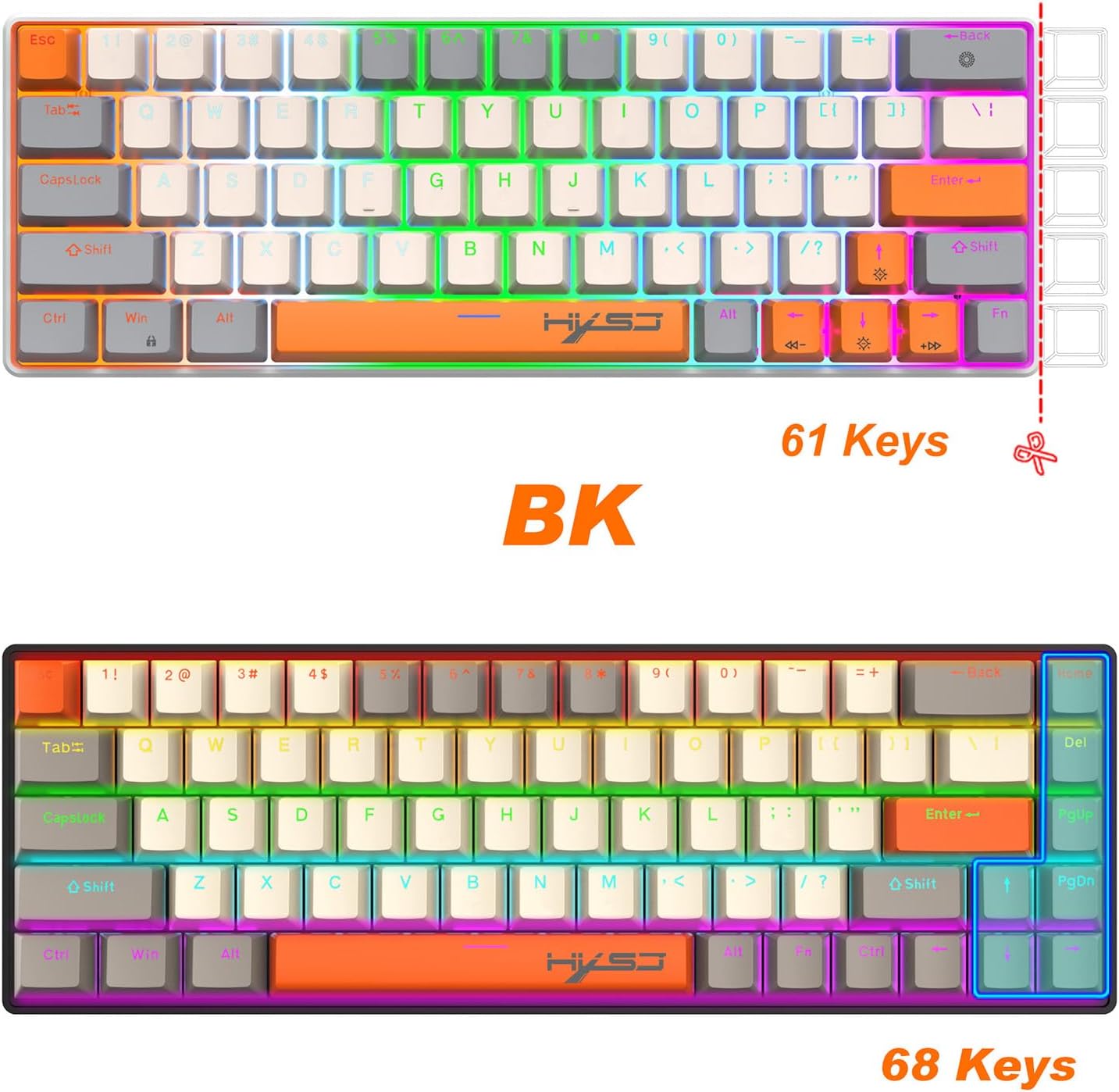
Image Description: A visual comparison between a 61-key keyboard layout and a 68-key layout, illustrating the differences in key count and arrangement for compact designs.

Image Description: A close-up view of the keyboard's USB Type-C port and the detachable USB-C to USB-A cable, showing how it connects to the keyboard.

Image Description: A hand positioned on the Karlak K88 keyboard, demonstrating its ergonomic design which aims to provide comfort during prolonged typing sessions.

Image Description: The Karlak K88 keyboard in use, with a graphic overlay emphasizing its durability with a claim of over 50 million keystrokes.

Image Description: A diagram illustrating the 'all keys non-conflict input' feature, showing multiple keys being pressed simultaneously with indicators for trigger stroke and trigger pressure.
4. Setup
Follow these steps to set up your Karlak K88 keyboard:
- Unpack the keyboard and the USB Type-C cable from the box.
- Connect the USB Type-C end of the cable to the port on the keyboard.
- Connect the USB-A end of the cable to an available USB port on your computer.
- Your computer should automatically detect and install the necessary drivers. The keyboard will be ready for use once the installation is complete.

Image Description: The Karlak K88 keyboard connected to a silver laptop via its USB-C cable, positioned on a desk alongside a smartphone and a small plant, illustrating a typical setup.
5. Operating Instructions
5.1 Basic Usage
The Karlak K88 keyboard functions as a standard QWERTY keyboard. Simply plug it into your computer, and it will be ready for typing.
5.2 Lighting Adjustment Functions
The keyboard features customizable backlighting. Use the following key combinations with the Fn key to adjust the lighting effects:
- Fn + \|: Switch between different lighting modes.
- Fn + ↑ / ↓: Adjust the lighting brightness (5-grade adjustment).
- Fn + ← / →: Adjust the lighting speed (5-grade adjustment).

Image Description: A visual guide on the Karlak K88 keyboard illustrating the key combinations for light adjustment functions: Fn + \| for lighting switch, Fn + Up/Down arrows for 5-grade brightness adjustment, and Fn + Left/Right arrows for 5-grade speed adjustment.
6. Maintenance
To ensure the longevity and optimal performance of your keyboard, follow these maintenance guidelines:
- Cleaning: Use a soft, dry cloth to wipe the keyboard surface. For deeper cleaning, you may use a can of compressed air to remove dust and debris from between the keycaps. Avoid using harsh chemicals or abrasive materials.
- Storage: Store the keyboard in a cool, dry place away from direct sunlight and extreme temperatures.
- Handling: Avoid dropping the keyboard or exposing it to liquids. The detachable cable should be connected and disconnected gently.
7. Troubleshooting
If you encounter any issues with your Karlak K88 keyboard, refer to the following troubleshooting tips:
- Keyboard Not Responding:
- Ensure the USB cable is securely connected to both the keyboard and the computer.
- Try connecting the keyboard to a different USB port on your computer.
- Test the keyboard on another computer to determine if the issue is with the keyboard or the computer.
- Restart your computer.
- Backlight Not Working or Incorrect:
- Check the lighting adjustment functions (Fn + \|, Fn + ↑/↓) to ensure the backlight is not turned off or set to minimum brightness.
- Ensure the keyboard is properly connected and receiving power.
- Keys Not Registering:
- Clean around the affected key to remove any debris that might be obstructing the switch.
- If a specific key consistently fails, it might indicate a hardware issue. Contact customer support.
8. Specifications
| Feature | Specification |
|---|---|
| Brand | Karlak |
| Model | K88 |
| Switch Type | Mechanical Blue Shaft |
| Key Layout | Compact (e.g., 61-key or 68-key) |
| Connectivity | Wired, Detachable USB Type-C |
| Keycap Material | Dual-Color Injection |
| Keystroke Lifespan | 50 Million+ |
| Compatible OS | Windows (Multi-System Compatibility) |
| Theme | Rainbow (Backlight) |
| ASIN | B0DQ759G41 |
9. Warranty and Support
The Karlak K88 Compact Mechanical Keyboard comes with a standard manufacturer's warranty. For specific warranty terms and conditions, please refer to the documentation included with your purchase or visit the official Karlak website.
If you require technical assistance, have questions about your product, or need to report a defect, please contact Karlak customer support through the contact information provided on the product packaging or the official website.