
WXWBFAO 4GB RAM+64GB ROM
WXWBFAO Android 13 Car Stereo for Hyundai I10 (2008-2012) User Manual
Model: 4GB RAM+64GB ROM
1. Introduction
This manual provides detailed instructions for the installation, operation, and maintenance of your WXWBFAO Android 13 Car Stereo. This unit is specifically designed for Hyundai I10 models manufactured between 2008 and 2012, offering advanced features such as a 10.1-inch touchscreen, wireless CarPlay, Android Auto, GPS navigation, and support for a reverse camera.
2. Package Contents
Verify that all items listed below are included in your package. If any items are missing or damaged, please contact customer support.
- 1x Android Car Stereo Unit (10.1" Touchscreen)
- 1x Mounting Bezel
- 1x Wiring Harness Kit
- 1x Power Cord
- 1x RCA Line
- 1x Microphone (MIC)
- 2x USB Cables
- 1x Setting Tool
- 1x GPS Antenna
- 1x Reversing Camera Input Cable
- 1x Reverse Camera
- 1x User Manual
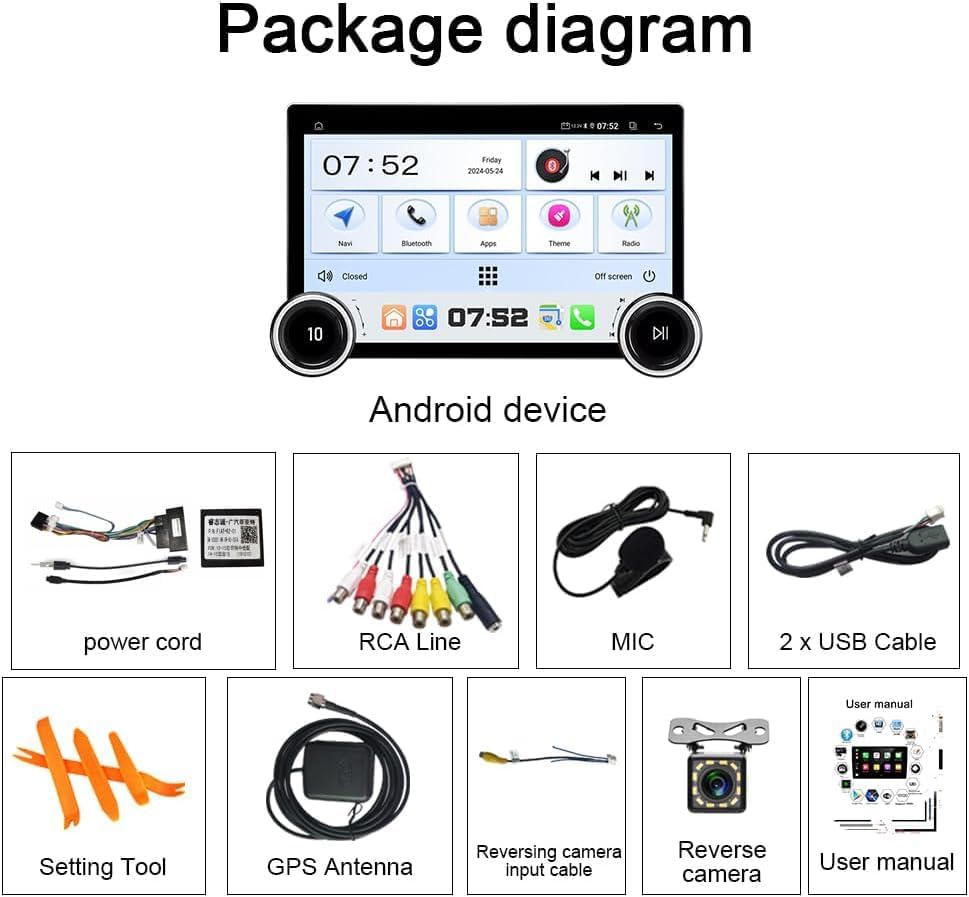
Figure 2.1: Diagram illustrating the components included in the product package, such as the Android device, power cord, RCA cables, microphone, USB cables, setting tool, GPS antenna, reversing camera input cable, reverse camera, and user manual.
3. Key Features
- Android 13 Operating System: Equipped with a 10.1-inch 2.5D 1080P HD touchscreen, 4GB RAM, and 64GB ROM, powered by a quad-core CPU.
- Wireless CarPlay & Wired Android Auto: Seamless integration with your smartphone for navigation, calls, messages, and music.
- GPS Navigation: Built-in offline maps for North America and support for online navigation via Wi-Fi.
- Wi-Fi Connectivity: Allows installation of Android applications, online video streaming, and internet browsing.
- Radio with Bluetooth and RDS: High-quality digital stereo FM tuner with automatic/semi-automatic station search. Bluetooth for hands-free calls and audio streaming.
- 36-Band EQ & DSP: Advanced audio settings for customized sound effects and sound field adjustments.
- Steering Wheel Control: Supports learning functions for existing steering wheel buttons.
- Reverse Camera Support: Automatically switches to backup camera mode when reversing.
4. Setup and Installation
The WXWBFAO Android 13 Car Stereo is designed for a perfect fit in Hyundai I10 models from 2008 to 2012. No additional accessories are typically required for installation beyond what is provided.
4.1. Pre-Installation Considerations
Before beginning installation, ensure the vehicle's power is disconnected. Review the wiring diagram provided in the physical user manual for specific connections. Professional installation is recommended.

Figure 4.1: Visual comparison of the Hyundai I10 dashboard before and after the installation of the WXWBFAO Android 13 Car Stereo, demonstrating the integrated fit.
5. Operating Instructions
This section details the primary functions and operations of your car stereo unit.
5.1. User Interface Overview
The unit features a responsive 10.1-inch touchscreen display. The main interface provides quick access to core functions such as music, navigation, radio, and phone calls. Customizable home screens allow for personalized layouts.

Figure 5.1: The primary user interface of the car stereo, displaying a music widget, a clock widget, and various application icons for quick access.
5.2. CarPlay and Android Auto
The car stereo supports both wireless CarPlay and wired Android Auto. This functionality allows you to integrate your smartphone's features directly into the car's display. You can access navigation, make calls, send messages, and enjoy music through a familiar interface, enhancing safety and convenience while driving.

Figure 5.2: Illustration of the CarPlay and Android Auto interfaces, showing how smartphone applications are mirrored and controlled on the car stereo's display.
5.3. GPS Navigation
The unit comes with pre-installed offline maps for North America. For real-time traffic updates and broader map coverage, connect the stereo to Wi-Fi to utilize online navigation services like Google Maps or Waze. You can also download additional offline map data packages.

Figure 5.3: The car stereo displaying a Google Maps navigation route, indicating real-time directions and estimated arrival times.
5.4. Audio Settings (DSP & 36-Band EQ)
Customize your audio experience with the built-in Digital Sound Processor (DSP) and 36-band equalizer. Adjust frequency bands, select from various preset sound effects (Jazz, Rock, Pop, Classical, etc.), and fine-tune the sound field to optimize audio output for your vehicle's interior.

Figure 5.4: The audio settings screen, showing the 36-band equalizer for precise sound adjustments and options for configuring the sound field within the vehicle.
5.5. Radio and Bluetooth
The unit features an RDS/FM radio tuner for clear reception and automatic station scanning. Bluetooth connectivity enables hands-free calling and wireless audio streaming from your paired smartphone. To pair, navigate to the Bluetooth settings on the stereo and your phone, then select 'Car BTo' from the available devices.
5.6. Rear View Camera
When the vehicle is shifted into reverse, the stereo automatically displays the feed from the connected rear view camera. This feature assists with parking and maneuvering, enhancing safety by providing a clear view of the area behind your vehicle.

Figure 5.5: The car stereo screen displaying the rear view camera feed, complete with dynamic parking guidelines for assistance.
5.7. Steering Wheel Control
The car stereo supports learning functions for your vehicle's existing steering wheel controls. This allows you to map functions such as volume adjustment, track skipping, and answering calls directly to your steering wheel buttons for convenient and safe operation.

Figure 5.6: The interface for configuring steering wheel controls, showing options to assign various functions to physical buttons on the steering wheel.
5.8. Wi-Fi Connection and App Installation
Connect the car stereo to a Wi-Fi network to access online features. This enables you to download and install applications from the Google Play Store, browse the internet using Chrome, stream videos from platforms like YouTube, and utilize other internet-dependent services.

Figure 5.7: A visual representation of the car stereo's Wi-Fi connectivity, highlighting its ability to access online content and applications.
5.9. Media Playback
The unit supports local media playback from USB drives. You can play various audio and video formats directly on the device. The file manager allows you to browse and select media files stored on internal storage or connected USB devices.
5.10. Interface Demonstration Video
For a comprehensive visual guide on the various functions and user interface of the Android car stereo, please refer to the video below. It demonstrates navigation settings, music playback, audio adjustments, Bluetooth calls, radio operation, video playback, car information display, web browsing, file management, steering wheel key learning, manual viewing, sound recording, and app store access.
Video 5.1: Demonstration of the Android car radio's upgrade function interface, showcasing various features and user interactions.
6. Troubleshooting
This section provides general guidance for common issues. For specific problems not addressed here, please consult the full user manual or contact customer support.
- No Power: Check all power connections and ensure the vehicle's ignition is on. Verify fuses are intact.
- No Sound: Check volume levels, audio settings (EQ/DSP), and speaker connections. Ensure the correct audio source is selected.
- GPS Signal Loss: Ensure the GPS antenna is properly installed and has a clear view of the sky.
- Bluetooth Connection Issues: Ensure Bluetooth is enabled on both the stereo and your device. Delete previous pairings and attempt to re-pair.
- Touchscreen Unresponsive: Try restarting the unit. If the issue persists, a factory reset may be necessary (note: this will erase user data).
7. Specifications
| Feature | Specification |
|---|---|
| Operating System | Android 13 |
| Display Size | 10.1 Inches |
| Memory (RAM) | 4GB |
| Storage (ROM) | 64GB |
| Connectivity | Bluetooth, USB, Wi-Fi |
| Special Features | Touchscreen, GPS Navigation, Wireless CarPlay, Android Auto, RDS/FM Radio, DSP, 36-Band EQ, Steering Wheel Control Support, Reverse Camera Input |
| Compatible Car Models | Hyundai I10 (2008-2012) |
| Item Weight | 3.83 pounds |
| Package Dimensions | 14.65 x 10.16 x 5.79 inches |
8. Warranty and Support
The WXWBFAO Android 13 Car Stereo comes with a 1-year manufacturer's warranty. This warranty covers defects in materials and workmanship under normal use. For warranty claims, technical assistance, or any other inquiries, please contact your retailer or the manufacturer's customer support directly. Please retain your proof of purchase for warranty validation.
Ask a question about this manual
Ask about setup, troubleshooting, compatibility, parts, safety, or missing instructions. Manuals+ will review the question and use this page’s manual context to help answer it.