
HZIME PJ30
HZIME Replacement Remote Control User Manual
Model: PJ30
1. Introduction
This user manual provides detailed instructions for the HZIME Replacement Remote Control, designed to be compatible with various projector models. This remote offers a seamless and reliable control experience for your compatible devices.
Compatible Projector Models:
- NexiGo PI30, PJ20, PJ10 5GHz Wi-Fi Native 1080P Movie Projector
- Agreago V3 Portable Mini Outdoor Projector
- Groview JQ818C Projector
2. Product Features
The HZIME Replacement Remote Control is engineered for optimal performance and user convenience. Key features include:
- Brand new and durable ABS material construction.
- Fully functional with no programming or pairing required; works directly out of the packaging.
- Highly responsive to every key press, ensuring reliable operation.
- Provides a stable signal for consistent control.
- Designed with fine workmanship for a comfortable grip and durable lifespan.
- Features soft buttons for comfortable use.
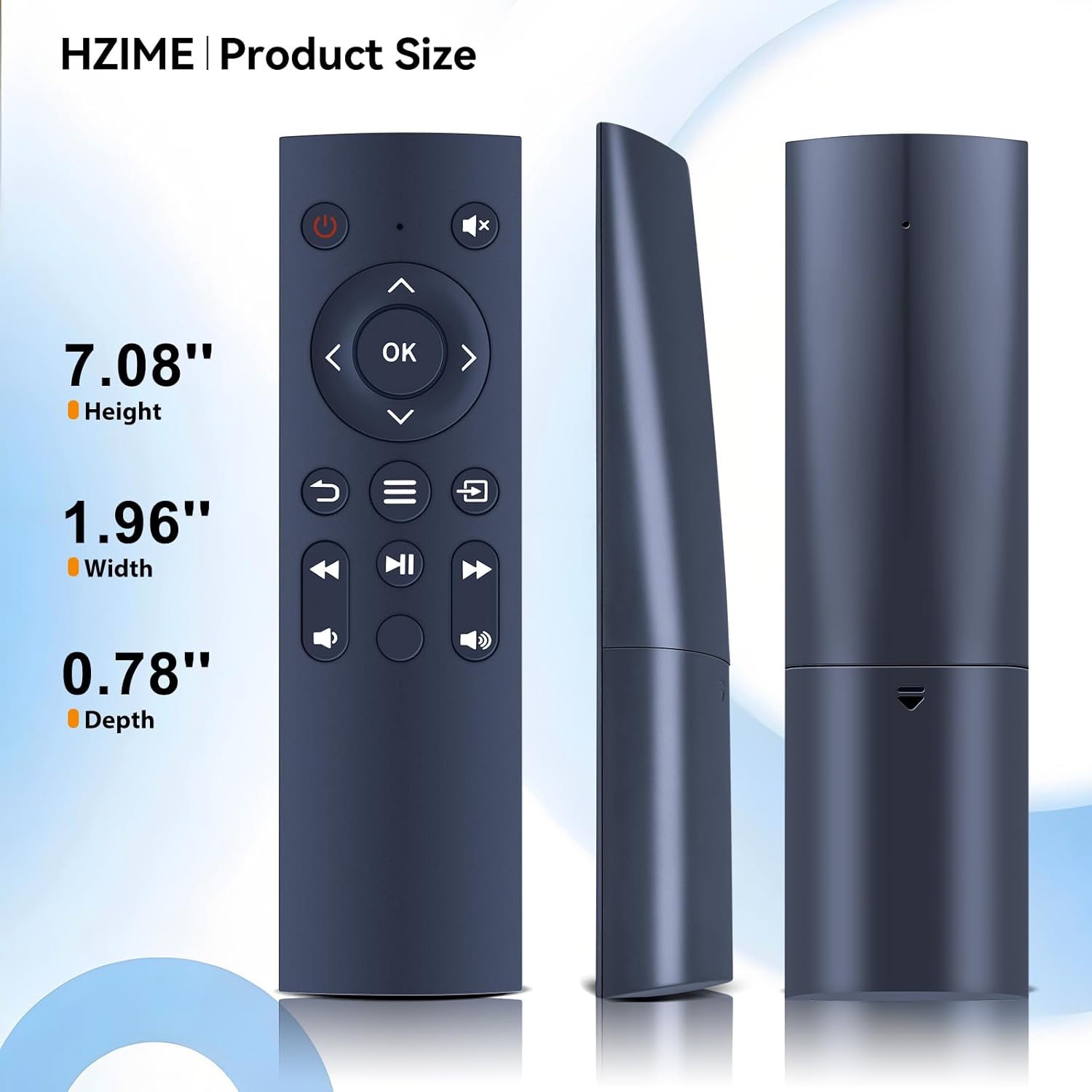
Image: This diagram highlights the quality assurance aspects of the remote control, such as sensitive buttons for precise input, the convenience of no pairing or programming needed, a stable signal for reliable operation, and overall fine workmanship.
3. Setup
3.1 Battery Installation
The HZIME Replacement Remote Control requires two (2) 1.5V AAA batteries for operation. Batteries are not included with the remote and must be purchased separately.
- Locate the battery compartment cover on the back of the remote control.
- Slide the cover downwards or press the latch to open the compartment.
- Insert two (2) AAA batteries, ensuring the positive (+) and negative (-) terminals align correctly with the markings inside the compartment.
- Close the battery compartment cover by sliding it back into place until it clicks securely.

Image: This visual guide demonstrates that the remote control requires two 1.5V AAA batteries, which are not supplied with the product and need to be acquired separately for operation.
4. Operating Instructions
Once batteries are installed, the remote control is ready for immediate use with compatible projectors. No additional setup or programming is required.
4.1 Basic Operation
Point the remote control directly towards the infrared receiver on your projector. Ensure there are no obstructions between the remote and the projector for optimal signal transmission.
- Power Button (⏻): Press to turn the projector on or off.
- Mute Button (🔇): Toggles sound on or off.
- Navigation Buttons (▲ ▼ ◀ ▶): Use to navigate menus and select options.
- OK Button: Confirms selections.
- Menu Button (☰): Accesses the projector's main menu.
- Return/Back Button (↩): Returns to the previous screen or menu.
- Playback Controls (⏮ ⏯ ⏭): Control media playback (e.g., play, pause, skip).
- Volume Buttons (🔉 🔊): Adjust the audio volume.

Image: This image provides a clear front view of the HZIME replacement remote control, detailing the arrangement and labeling of all its buttons for easy identification and use.
4.2 Control Range and Angle
The remote control is designed for effective operation within a range of up to 26 feet (approximately 8 meters) and supports multi-angle control up to 120 degrees, allowing for flexible use within your viewing area.

Image: This illustration demonstrates the remote control's operational capabilities, highlighting its effective long-range control up to 26 feet and its wide 120-degree multi-angle control for flexible use.
5. Maintenance
To ensure the longevity and proper functioning of your remote control, follow these maintenance guidelines:
- Cleaning: Use a soft, dry cloth to wipe the remote control. Do not use liquid cleaners or abrasive materials, as they may damage the surface or internal components.
- Battery Replacement: Replace batteries promptly when the remote's responsiveness decreases or it stops functioning. Always replace both batteries at the same time with new ones of the same type (AAA).
- Storage: Store the remote in a cool, dry place away from direct sunlight, extreme temperatures, and high humidity. If storing for an extended period, remove the batteries to prevent leakage.
6. Troubleshooting
If you encounter issues with your HZIME Replacement Remote Control, please refer to the following common solutions:
- Remote Not Responding:
- Check if the batteries are inserted correctly with the correct polarity (+/-).
- Replace old or depleted batteries with new 1.5V AAA batteries.
- Ensure there are no obstructions between the remote control and the projector's infrared receiver.
- Confirm you are within the effective operating range (up to 26 feet) and angle (120 degrees).
- Intermittent Functionality:
- This may indicate low battery power. Replace batteries.
- Ensure the remote's infrared emitter is clean and free from dust or debris.
If the remote control continues to not work well after attempting these troubleshooting steps, please contact customer service for further assistance.
7. Specifications
| Feature | Specification |
|---|---|
| Brand | HZIME |
| Model Number | PJ30 |
| Compatible Devices | Projectors (NexiGo PI30 PJ20 PJ10, Agreago V3, Groview JQ818C) |
| Connectivity Technology | Infrared |
| Power Source | 2 x 1.5V AAA Batteries (Not Included) |
| Item Weight | 1.6 ounces |
| Package Dimensions | 8 x 3 x 1 inches |
| Material | Durable ABS Plastic |
8. Customer Support
For any questions, concerns, or issues regarding your HZIME Replacement Remote Control, please do not hesitate to contact our professional and dedicated customer service team. Messages will be replied to by our well-trained support team within 49 hours.
Please refer to your purchase platform or product packaging for specific contact information.
Ask a question about this manual
Ask about setup, troubleshooting, compatibility, parts, safety, or missing instructions. Manuals+ will review the question and use this page’s manual context to help answer it.