
1. Introduction
Thank you for choosing the QOEKUEY 3.5mm Wired Earbuds USB Wired Headphones. These open-ear headphones are designed for comfortable, all-day wear, providing high-fidelity audio and clear call quality. With their rotatable ear hooks and durable construction, they are ideal for various activities including fitness, commuting, and gaming. This manual provides detailed instructions for setup, operation, maintenance, and troubleshooting to ensure optimal performance and longevity of your device.
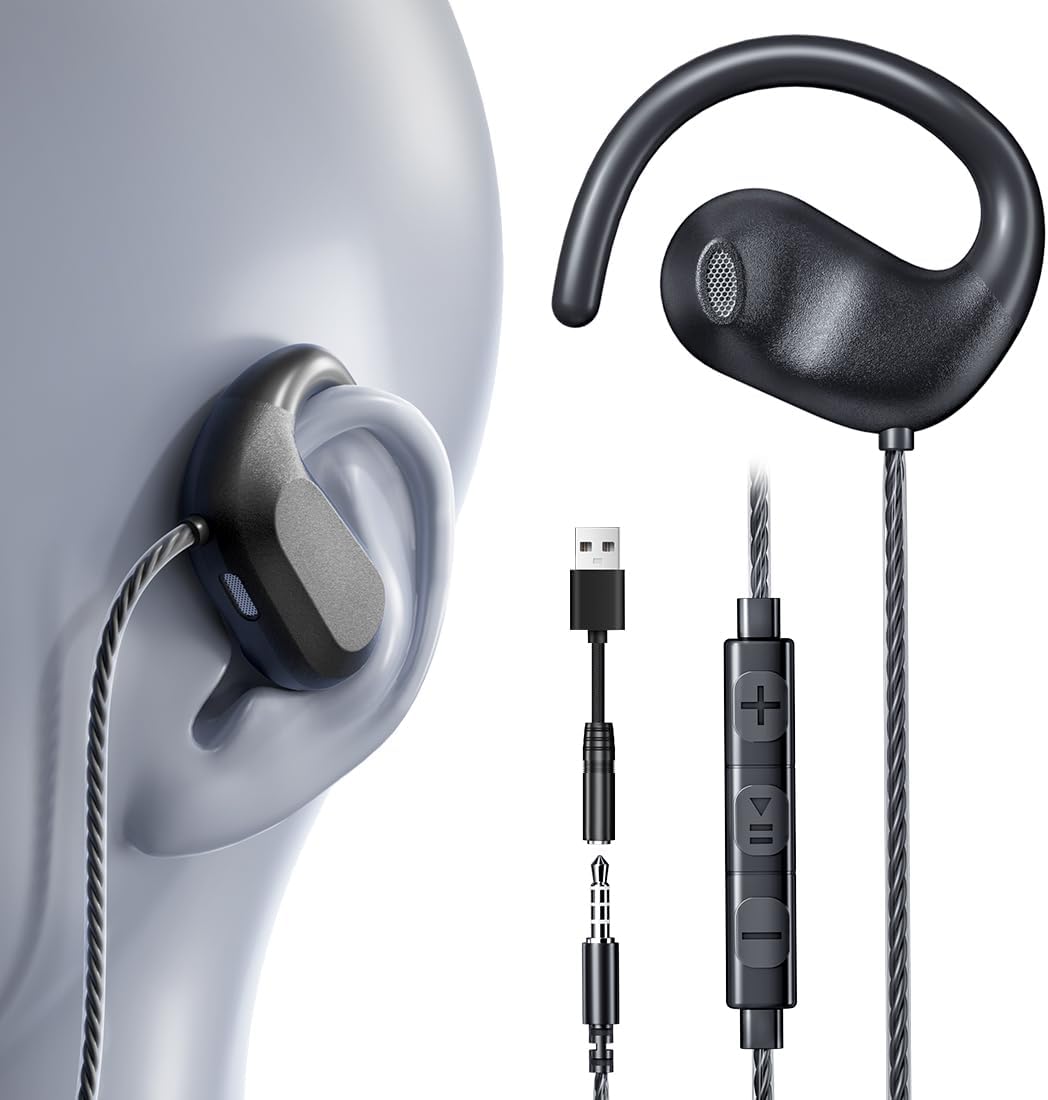
Image: QOEKUEY 3.5mm Wired Earbuds, showcasing the earbud design, the 3.5mm jack with USB-A adapter, and the in-line remote control.
2. Key Features
- Open Ear Design: Non-invasive, pain-free listening experience, preventing ear canal pressure and fatigue.
- High-Fidelity Sound: Equipped with 16.2mm drivers and air conduction technology for 3D stereo surround sound, deep bass, crystal-clear treble, and studio-grade vocals.
- Clear Calls: Built-in upgraded chip with automatic noise reduction and sensitive microphone for crisp calls in various environments.
- Secure & Comfortable Fit: Ultra-lightweight (0.14oz) with flexible 00b1 30 00b0 rotation adjustable ear hooks for stability during active use.
- Durable CrystalFlex Cables: Oxygen-free copper core cables, tested for over 5000 bends, resistant to cuts, knots, and pulls, ensuring lossless audio transmission and longevity.
- Universal Compatibility: 3.5mm plug compatible with a wide range of devices including phones, tablets, laptops, MP3 players, gaming consoles (Nintendo Switch, PS4/PS5/Xbox), and car AUX. Includes a USB-A adapter for broader PC/desktop compatibility.

Image: Illustrates the benefits of open-ear headphones compared to traditional in-ear and over-ear designs, highlighting comfort and situational awareness.

Image: Diagram showing the internal 16.2mm giant driver and dual-ring acoustic technology for enhanced sound quality.

Image: Visual comparison demonstrating the superior durability and tangle-free nature of CrystalFlex cables against typical plastic cables.
3. Setup and Wearing Instructions
3.1 Connecting Your Earbuds
Your QOEKUEY earbuds offer versatile connectivity options:
- For 3.5mm Jack Devices: Insert the 3.5mm audio jack directly into the headphone port of your smartphone, tablet, laptop, MP3 player, or gaming console.
- For USB-A Port Devices: Attach the included USB-A adapter to the 3.5mm jack, then plug the USB-A connector into an available USB-A port on your laptop, desktop computer, PS4/PS5/Xbox console, smart TV, or car audio system.
Note: These wired headphones are NOT compatible with Lightning or USB-C ports directly. An appropriate adapter (not included) would be required for such devices.

Image: Illustrates the dual compatibility of the earbuds with both 3.5mm audio jacks and USB-A ports via the included adapter, showing various compatible devices.
3.2 How to Wear Your Earbuds
For optimal comfort and sound, follow these steps to properly wear your open-ear headphones:
- Identify Left/Right: Locate the 'L' and 'R' markings on each earbud to ensure correct placement.
- Position Ear Hook: Gently bend the ear hook to mirror the curve of your ear's upper helix.
- Adjust Fit: Slightly twist the earbud until the speaker is positioned near your ear opening. The flexible ear hooks allow for 00b1 30 00b0 rotation for a customized, secure, and comfortable fit.

Image: A visual guide demonstrating the three steps for correctly wearing the earbuds, including identifying L/R, positioning the ear hook, and adjusting for fit.
4. Operating Instructions
4.1 In-line Remote Control Functions
The in-line remote control allows for easy management of your audio and calls:
| Button Action | Function |
|---|---|
| Volume + | Increase volume |
| Volume - | Decrease volume |
| Press Once (Middle Button) | Play / Pause music; Answer call |
| Long Press (Middle Button) | Hang up call |
| Press Twice (Middle Button) | Next Track |
| Press Three Times (Middle Button) | Previous Track |
Tip: When on a call, the middle button also functions as a one-key mute.

Image: Detailed diagram illustrating the multi-function buttons on the in-line remote control and their corresponding actions for music playback and call management.
5. Maintenance and Care
To ensure the longevity and optimal performance of your QOEKUEY earbuds, follow these maintenance guidelines:
- Cleaning: Use a soft, dry cloth to wipe the earbuds and cables. Avoid using harsh chemicals, solvents, or abrasive cleaners.
- Storage: Store the earbuds in a clean, dry place when not in use. Avoid extreme temperatures and direct sunlight. While the cables are tangle-free, gentle coiling is recommended for storage.
- Handling: Do not pull the cable directly to unplug the earbuds from a device. Always grasp the plug itself. Avoid excessive bending or twisting of the cable, although it is designed for durability.
- Water Exposure: These earbuds are not waterproof. Avoid exposure to water, sweat, or high humidity.
6. Troubleshooting
If you encounter any issues with your earbuds, please refer to the following common solutions:
| Problem | Possible Cause | Solution |
|---|---|---|
| No sound or low volume | Incorrect connection; Device volume too low; Damaged cable/jack | Ensure the plug is fully inserted. Increase device volume. Test with another device to rule out earbud issue. |
| Sound distortion or static | Loose connection; Interference; Damaged cable | Reconnect the plug firmly. Move away from strong electromagnetic sources. Inspect cable for visible damage. |
| Microphone not working | Microphone muted on device; Incorrect audio input setting; Damaged mic | Check device settings to ensure microphone is enabled and not muted. Ensure the correct audio input is selected. |
| In-line controls not responding | Incompatibility with device; Software glitch | Some older devices may not fully support all control functions. Restart your device. |
If the problem persists after trying these solutions, please contact QOEKUEY customer support for further assistance.
7. Specifications
| Feature | Detail |
|---|---|
| Model Name | H20 |
| Connectivity Technology | Wired (3.5mm Jack + USB-A Adapter) |
| Ear Placement | Open Ear |
| Form Factor | Open ear with Rotatable Earhook |
| Driver Size | 16.2mm |
| Frequency Range | 20 Hz - 20,000 Hz |
| Impedance | 6 Ohm |
| Item Weight | 0.14 oz (per earbud) / 2.39 ounces (total package) |
| Cable Feature | Tangle Free, Oxygen Free Copper Core |
| Included Components | Headphones, USB-A to 3.5mm Jack Audio Adapter |
| Color | Black |
8. Warranty and Support
QOEKUEY is committed to providing high-quality products and excellent customer service.
8.1 12-Month Warranty
Your QOEKUEY 3.5mm Wired Earbuds are covered by a one-year (12-month) warranty from the date of purchase. This warranty covers any defects in material or workmanship under normal use during the warranty period. Please retain your proof of purchase for warranty claims.
8.2 Customer Support
If you have any questions, concerns, or require assistance with your product, please do not hesitate to contact our customer service team. We are dedicated to providing you with the best possible support.
For support, please visit the QOEKUEY brand page on Amazon or refer to the contact information provided with your product packaging.