
1. Introduction
This manual provides essential instructions for the safe and efficient operation, assembly, maintenance, and troubleshooting of your Generic 4-Wheel Mobility Scooter. Please read this manual thoroughly before using the scooter to ensure proper understanding and to prevent injury or damage. Keep this manual for future reference.
2. Safety Information
Your Generic 4-Wheel Mobility Scooter is designed with safety in mind, featuring anti-rollover rear wheels and adherence to ISO and AE certifications. However, it is crucial to follow all safety guidelines to ensure a safe operating experience.
- Always read and understand the entire instruction manual before operating the scooter.
- Ensure the scooter is fully assembled and all components are securely fastened before use.
- Do not exceed the maximum weight capacity of 400 pounds.
- Operate the scooter on stable and appropriate surfaces. Avoid steep inclines or uneven terrain that could compromise stability.
- Use caution when operating near pedestrians, children, or in crowded areas.
- Regularly check the tires for wear and proper inflation (if applicable for solid tires, ensure they are free from damage).
- Ensure the battery is adequately charged before each use to avoid unexpected power loss.
- Do not operate the scooter under the influence of alcohol or medication that may impair your judgment or reaction time.
- Always engage the brakes when stopping or parking the scooter.
3. Product Overview
The Generic 4-Wheel Mobility Scooter is a compact and portable electric device designed for individuals seeking enhanced mobility. It features a robust 300W brushless motor, flat-free non-marking 8-inch tires, and a maximum speed of 4.7 mph, offering a driving range of 12.4-15 miles per charge. The scooter is equipped with LED lights for visibility, anti-tipping safety features, and a height-adjustable swivel seat for comfort.
Its foldable design allows for quick disassembly into four independent components, making it convenient for storage and transportation in vehicles. The scooter includes a folding rudder handle, detachable seat, and a front basket for personal items.

Figure 3.1: The Generic 4-Wheel Mobility Scooter, showcasing its compact design and front basket.

Figure 3.2: Illustration of the scooter's long travel distance per charge, suitable for various destinations.

Figure 3.3: Visual representation of the scooter's adjustable features, including speed, weight capacity, range, and climbing ability.
4. Setup and Assembly
The Generic 4-Wheel Mobility Scooter is designed for quick and efficient assembly without the need for special tools. Follow these steps to set up your scooter:
- Unfolding the Scooter:
Carefully unfold the scooter from its compact state. Ensure all locking mechanisms engage securely.
Video 4.1: Demonstrates the unfolding process of the mobility scooter, including raising the handle and pulling up the seat.
- Installing the Seat Post:
Insert the seat post into the designated slot on the scooter's base. Secure it by inserting the detent pin and tightening the screw.

Figure 4.1: Illustrates the installation of the seat post, detent pin, and securing screw.
- Installing the Seat:
Place the seat onto the installed seat post. Ensure it is firmly seated and locked into position.
- Installing the Armrests:
Attach the armrests to the sides of the seat. Adjust the armrest width for comfort and secure them with the provided screws.
- Attaching the Basket:
Hook the front basket onto the tiller. No tools are required for this step.
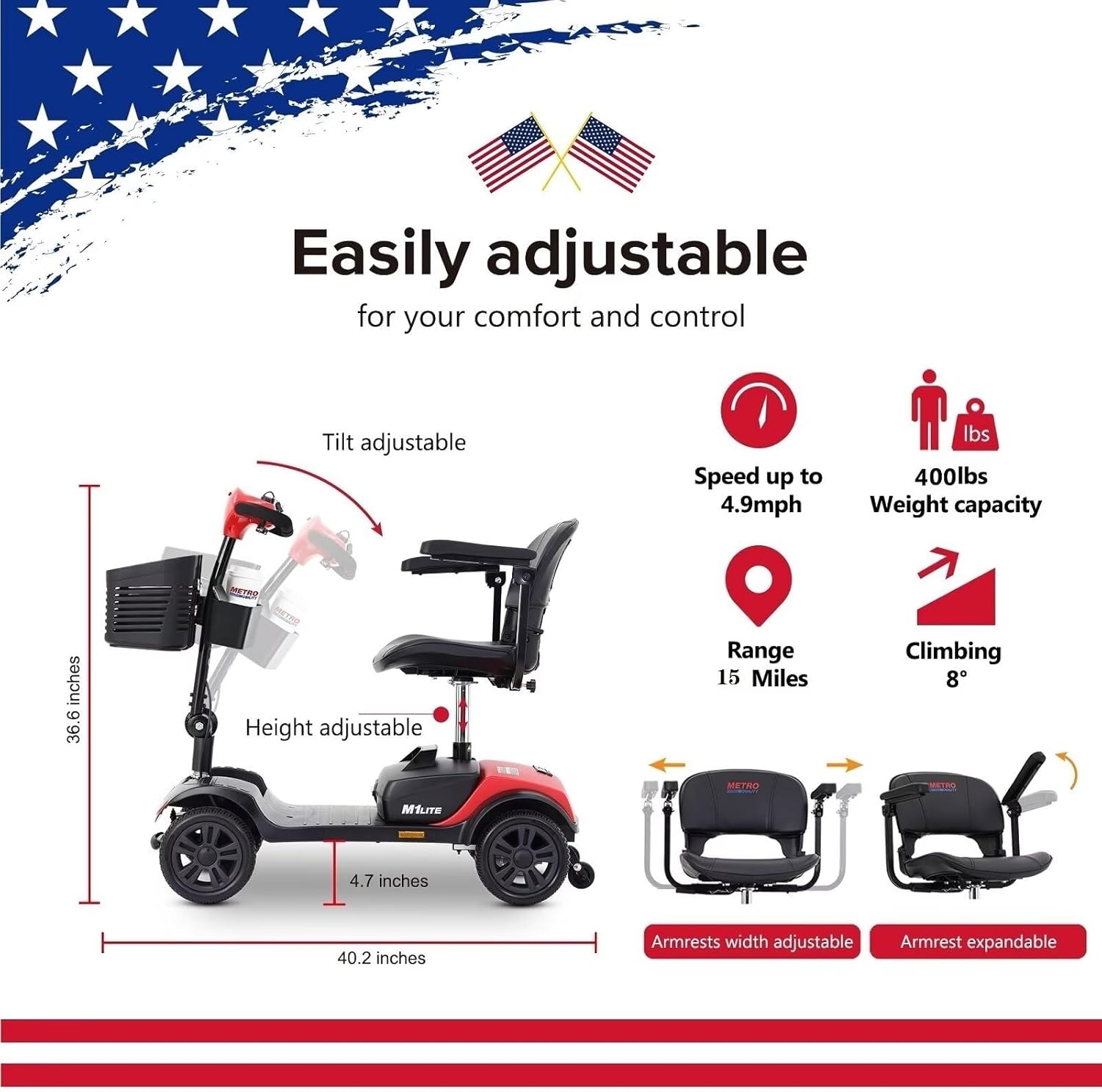
Figure 4.2: Shows the quick and efficient assembly of the scooter, highlighting the basket, battery box, and seat with armrests.
5. Operating Instructions
Familiarize yourself with the controls before operating your scooter. The control panel is designed for intuitive use.

Figure 5.1: Detailed view of the intuitive control panel, indicating the battery level indicator, speed control dial, power switch, and horn button.
- Powering On:
Insert the key into the ignition and turn it to the "ON" position. The battery indicator lights will illuminate.
- Adjusting Speed:
Use the speed control dial on the tiller to adjust your desired speed. The dial typically ranges from a slower "turtle" setting to a faster "rabbit" setting.
- Driving:
To move forward, gently press the right lever. To move backward, gently press the left lever. Release the levers to engage the automatic braking mechanism.
Video 5.2: Illustrates the driving operation of the mobility scooter, including forward and backward movement, and speed regulation.
- Braking:
The scooter features an automatic braking mechanism that engages when the drive levers are released. For immediate stopping, release both levers.

Figure 5.2: Shows the automatic braking mechanism in action, with friction-induced wheels preventing slipping on inclines.
- Horn and Lights:
Use the dedicated buttons on the control panel for the horn and LED headlights as needed for safety and visibility.
6. Maintenance
Regular maintenance ensures the longevity and optimal performance of your mobility scooter.
- Battery Charging:
Connect the charger to the charging port located on the scooter's base. Ensure the circuit breaker is in the "ON" position before charging. Charge the battery fully after each use or when the battery indicator shows low power.
Video 6.1: Demonstrates how to connect the charger to the mobility scooter's charging port.
- Cleaning:
Wipe down the scooter with a damp cloth. Avoid using abrasive cleaners or spraying water directly onto electrical components.
- Tire Inspection:
Periodically inspect the tires for any signs of wear or damage. Although flat-free, physical damage can still occur.
- General Check:
Ensure all nuts, bolts, and fasteners are tight. Check for any loose parts or unusual noises during operation.
7. Troubleshooting
If you encounter issues with your scooter, refer to the following common troubleshooting steps:
- Scooter does not power on:
Check if the key is fully inserted and turned to the "ON" position. Verify that the battery is charged. Ensure the circuit breaker is not tripped (it should be in the "ON" position).
- Scooter does not move:
Confirm the scooter is powered on and the battery has sufficient charge. Check that the speed control dial is not set to the lowest speed. Ensure the drive levers are fully engaged.
- Reduced range or power:
This typically indicates a low battery. Fully charge the battery. If the issue persists after a full charge, the battery may need replacement or professional inspection.
- Unusual noises during operation:
Stop the scooter immediately and inspect for any loose parts, obstructions, or damaged components. Contact customer support if the source of the noise cannot be identified or resolved.
For issues not covered here, please contact customer support.
8. Specifications
| Feature | Specification |
|---|---|
| Product Dimensions | 39 x 19 x 36 inches |
| Weight | 102 Pounds |
| Wheel Size | 9 Inches |
| Turn Radius | 42.5 Inches |
| Maximum Speed | 5 Miles per Hour |
| Power Source | Battery Powered |
| Frame Material | Metal |
| Maximum Weight Recommendation | 400 Pounds |
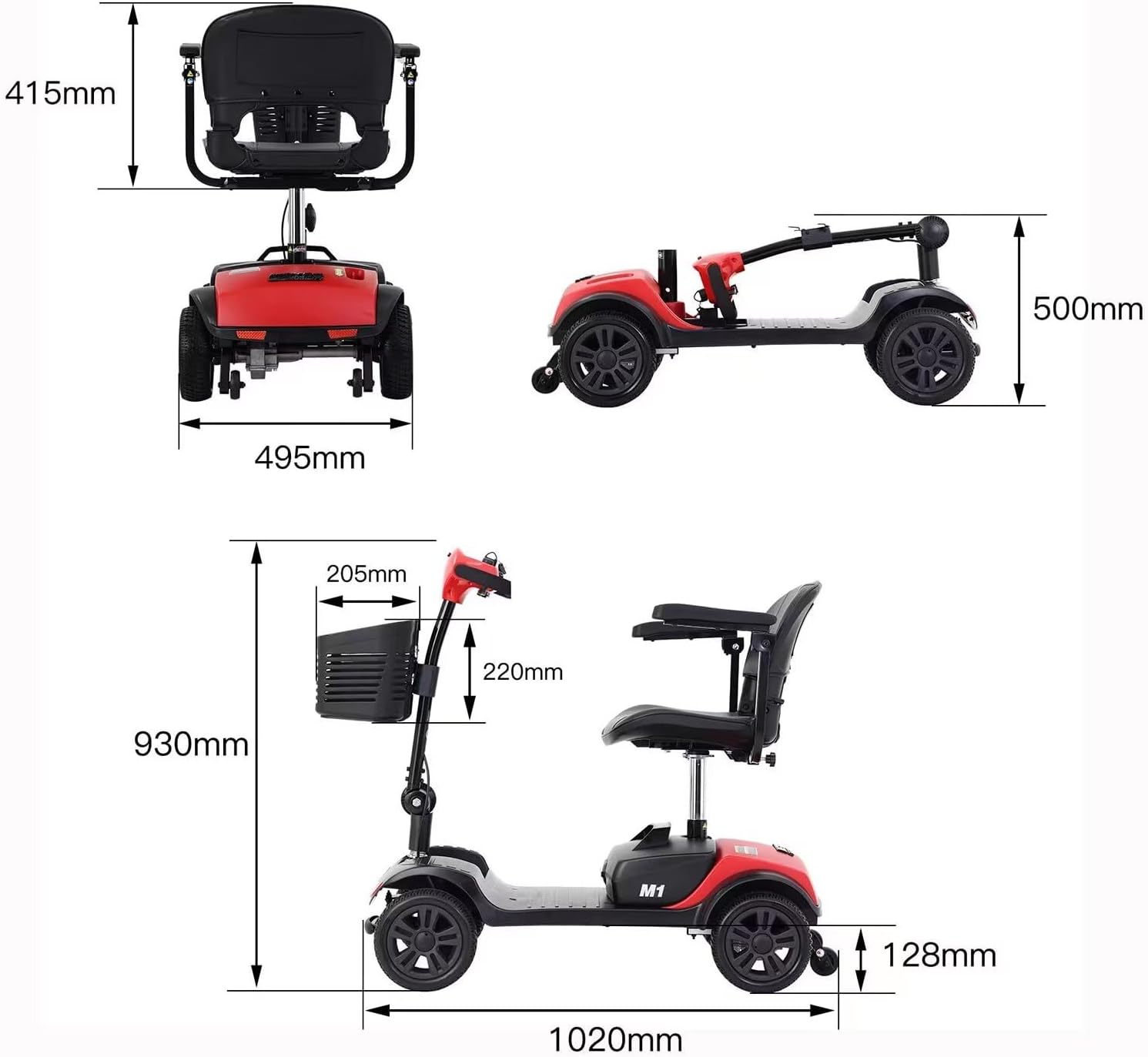
Figure 8.1: Technical drawing illustrating the key dimensions of the mobility scooter.
9. Warranty and Support
Your Generic 4-Wheel Mobility Scooter comes with a one-year warranty covering manufacturing defects. We also provide lifetime technical support to assist you with any operational or maintenance questions. Replacement parts are readily available to ensure your scooter remains in optimal condition.
For warranty claims, technical assistance, or to order replacement parts, please contact our customer support team. We also have over 50 service centers across the United States for local support.

Figure 9.1: Map indicating the distribution of over 50 service centers available for support across the United States.