
Gerbala 5-in-1 Wireless Charger 01
Gerbala 5-in-1 Wireless Charger User Manual
Model: 5-in-1 Wireless Charger 01
Product Overview
The Gerbala 5-in-1 Wireless Charger is a versatile charging station designed to power multiple devices simultaneously, including smartphones, smartwatches, and earbuds. It features a foldable design for portability, an integrated digital clock with temperature and humidity display, and a night light function. Built-in safety features ensure secure and efficient charging.

Image: The Gerbala 5-in-1 Wireless Charger in use, showing a smartphone, smartwatch, and earbuds being charged, alongside the digital clock display.
Package Contents
- Gerbala 5-in-1 Wireless Charger
- USB Charging Cable
- User Manual (this document)
Note: A power adapter is not included and must be purchased separately. For optimal performance, use a QC3.0 or PD compatible power adapter.
Image: The wireless charger unit and its included USB charging cable.
Setup
- Unpack the Device: Carefully remove the Gerbala 5-in-1 Wireless Charger and the USB charging cable from its packaging.
- Connect Power: Insert the USB-C end of the provided charging cable into the input port on the back of the wireless charger. Connect the USB-A end of the cable to a compatible power adapter (not included).
- Power On: Plug the power adapter into a wall outlet. The digital display on the charger will illuminate, indicating it is powered on and ready for use.
- Adjust Angle (Optional): The charging pad can be adjusted between 0° and 90° for optimal viewing or charging orientation. Gently push or pull the phone charging stand to set the desired angle.

Image: Demonstrates the foldable design of the charger, showing how it can be adjusted and stored compactly.
Operating Instructions
Charging Devices
The Gerbala 5-in-1 Wireless Charger supports simultaneous wireless charging for up to three devices: a smartphone, a smartwatch, and wireless earbuds.
- Smartphone Charging: Place your Qi-compatible smartphone on the main charging stand. The phone can be charged in both vertical and horizontal orientations. Ensure the phone is centered on the charging area for optimal connection.
- Smartwatch Charging: Place your compatible smartwatch on the dedicated magnetic charging module.
- Earbuds Charging: Place your wireless earbuds case on the designated charging pad at the base of the unit.
Note: For efficient charging, remove any magnetic or metallic accessories from your phone case. The charger supports cases up to 5mm thick.

Image: Illustrates the flexibility of the charger, allowing smartphones to be charged vertically for video calls or horizontally for media viewing.
Using the Digital Clock and Night Light
The integrated digital display shows time, temperature, and humidity. It also features a night light function.
- Time Display: The clock displays time in either 12-hour or 24-hour format. Use the control buttons on the unit to switch between formats.
- Temperature/Humidity: The display provides real-time temperature and humidity readings.
- Night Light: Press the dedicated night light button to activate the light. There are three adjustable brightness levels. Press the button repeatedly to cycle through brightness settings or turn off the light.
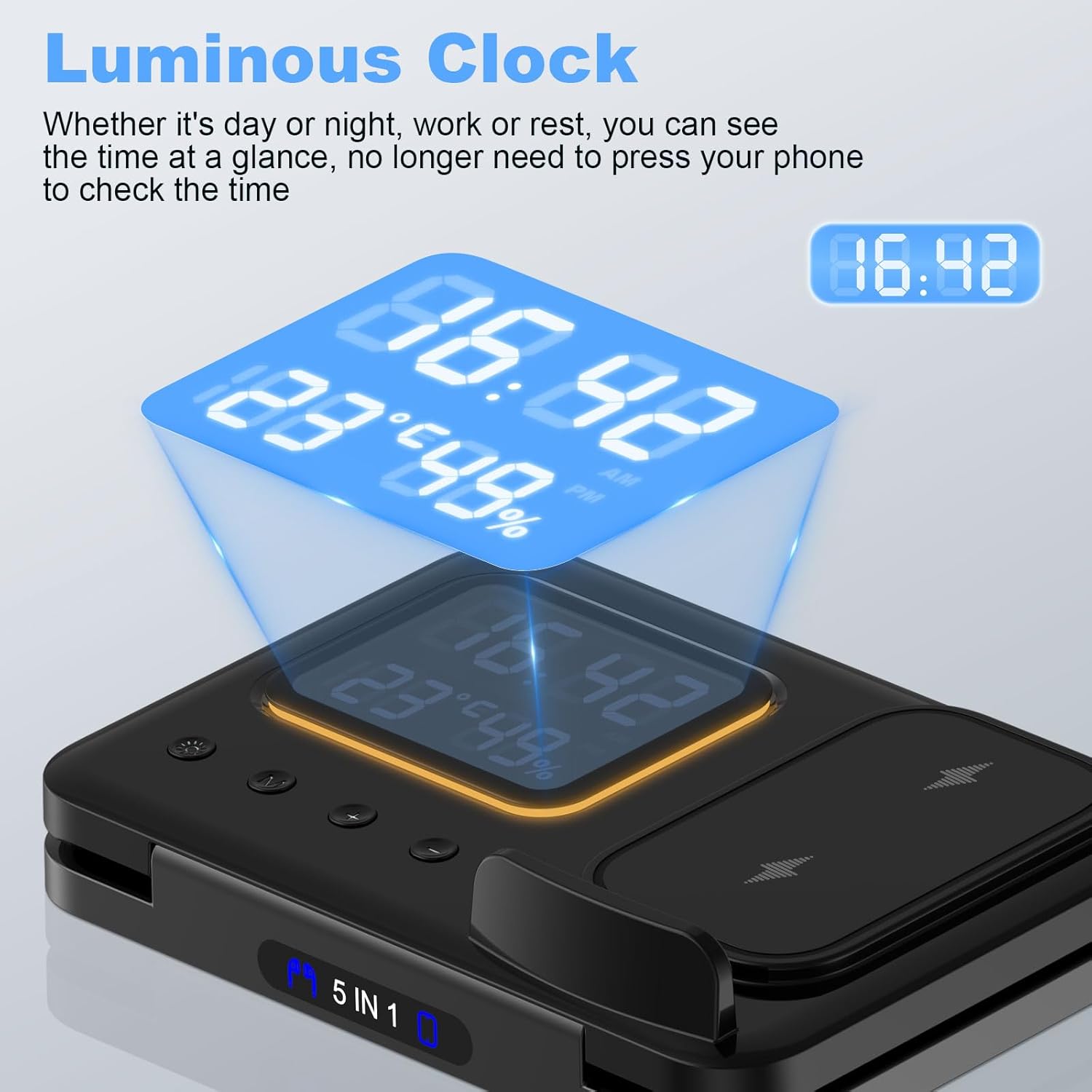
Image: Close-up of the charger's digital display, highlighting the luminous clock, temperature, and humidity readings.
Safety Features
The Gerbala 5-in-1 Wireless Charger is equipped with multiple safety protections to ensure safe and reliable charging for your devices.
- Over-Charge Protection: Prevents devices from being overcharged, protecting battery health.
- Over-Current Protection: Safeguards against excessive current flow.
- Overheat Protection: Monitors temperature to prevent overheating during charging.
- Short-Circuit Protection: Protects against short circuits.
- Foreign Object Detection (FOD): Detects metallic foreign objects on the charging surface to prevent damage and ensure safety.

Image: Visual representation of the charger's superior safety features, including icons for over-charge, foreign object detection, short-circuit, over-current, and overheat protection.
Maintenance
- Cleaning: Disconnect the charger from the power source before cleaning. Use a soft, dry cloth to wipe the surface. Do not use abrasive cleaners or immerse the device in water.
- Storage: When not in use, store the charger in a cool, dry place. Its foldable design makes it easy to store or transport.
- Avoid Obstructions: Ensure the cooling vents at the bottom of the charger are not blocked to prevent overheating.
Troubleshooting
| Problem | Possible Cause | Solution |
|---|---|---|
| Device not charging |
|
|
| Charging is slow |
|
|
| Digital display not working |
|
|
Specifications
| Brand | Gerbala |
| Model | 5-in-1 Wireless Charger 01 |
| Connectivity Technology | USB |
| Compatible Devices | Mobile phones, earbuds, smartwatches |
| Compatible Phone Models | iPhone 16/16Pro/16Pro Max/15/15Pro/15Pro Max/14/14Pro/14Pro Max/14 Plus/13/13Pro/13Pro Max/13 Mini/iPhone 12/12Pro/12Pro Max/12 Mini/iPhone 11/11Pro/11Pro Max/X/XR/XS/XSMax/8/8Plus, Samsung Galaxy S23/S22/S21/S20/S10/S10 Plus/S10E/S9/S9 Plus/S8/S8 Plus/Note 10/Note 9/Note 8/Note 7/S7/S7 Edge/S6/S6 Edge/S6 Edge Plus and other Qi-compatible devices. |
| Included Components | USB Cable |
| Color | 01 (Black) |
| Input Voltage | 5 Volts |
| Amperage | 2 Amperes |
| Wattage | 15 Watts (Max) |
| Number of Items | 1 |
| Dimensions (Folded) | Approx. 18cm x 12cm x 4.2cm (7.08in x 4.72in x 1.65in) |

Image: Highlights the fast and safe charging capabilities, along with key features like clock, temperature, humidity, night light, and foldable design.
Warranty and Support
This product is covered by a standard manufacturer's warranty. For specific warranty terms and conditions, please refer to the product packaging or contact Gerbala customer support.
For technical support, troubleshooting assistance, or warranty claims, please contact the seller or manufacturer directly. Contact information can typically be found on the product packaging or the seller's page on the platform where the product was purchased.
Note: No specific warranty period or direct support contact information was provided in the product details.
Ask a question about this manual
Ask about setup, troubleshooting, compatibility, parts, safety, or missing instructions. Manuals+ will review the question and use this page’s manual context to help answer it.