
PerfectAire 1PHL24D
PerfectAire 160 sq ft Electric Digital Oil Filled Heater 5120 BTU Instruction Manual
Model: 1PHL24D
Important Safety Information
Please read and understand all instructions before using this heater. Failure to follow these instructions may result in electric shock, fire, or serious injury. Keep this manual for future reference.
- Always plug heaters directly into a wall outlet/receptacle. Never use with an extension cord or relocatable power tap (outlet/power strip).
- This heater is hot when in use. To avoid burns, do not let bare skin touch hot surfaces. Use handles when moving this heater.
- Keep combustible materials, such as furniture, pillows, bedding, papers, clothes, and curtains at least 3 feet (0.9 m) from the front of the heater and keep them away from the sides and rear.
- Extreme caution is necessary when any heater is used by or near children or invalids and whenever the heater is left operating and unattended.
- Do not operate any heater with a damaged cord or plug or after the heater malfunctions, has been dropped or damaged in any manner. Discard heater or return to authorized service facility for examination and/or repair.
- Do not use outdoors.
- To disconnect heater, turn controls to OFF, then remove plug from outlet.
- Do not insert or allow foreign objects to enter any ventilation or exhaust opening as this may cause an electric shock or fire, or damage the heater.
- To prevent a possible fire, do not block air intakes or exhaust in any manner. Do not use on soft surfaces, like a bed, where openings may become blocked.
- A heater has hot and arcing or sparking parts inside. Do not use it in areas where gasoline, paint, or flammable vapors or liquids are used or stored.
- Use this heater only as described in this manual. Any other use not recommended by the manufacturer may cause fire, electric shock, or injury to persons.
- Always plug into a grounded outlet.
Product Overview
The PerfectAire Digital Oil Filled Heater is designed to provide efficient and consistent warmth for spaces up to 160 sq ft. It features a digital control panel for precise temperature and timer settings, along with integrated wheels for easy portability.

Figure 1: Front view of the PerfectAire Digital Oil Filled Heater, showcasing its sleek black design, digital control panel, and integrated caster wheels for mobility.
Setup
- Unpacking: Carefully remove the heater from its packaging. Retain packaging for off-season storage.
- Placement: Place the heater on a firm, level surface. Ensure it is at least 3 feet (0.9 m) away from walls, furniture, and other combustible materials. Do not place the heater on soft surfaces like rugs or carpets that could block the air vents.
- Power Connection: Plug the heater directly into a 120V AC, 60Hz grounded wall outlet. Do not use extension cords or power strips.
- Caster Wheels: The heater comes with pre-installed caster wheels for easy movement. Ensure all wheels are securely attached and can rotate freely.
Operating Instructions
The digital control panel allows for easy adjustment of settings. Refer to Figure 2 for button identification.
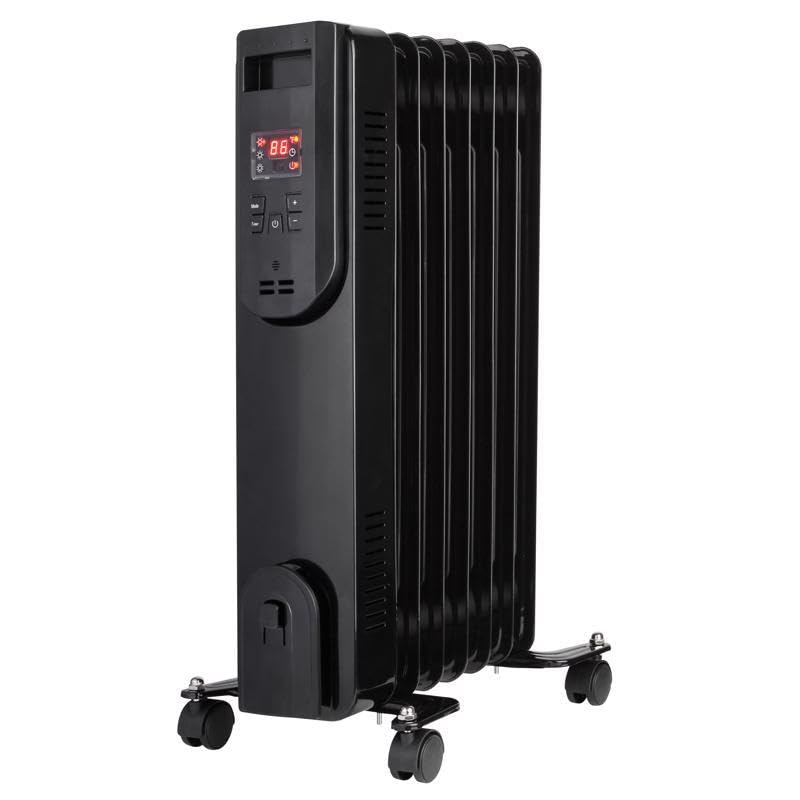
Figure 2: Digital control panel of the PerfectAire heater, showing the display and control buttons.
- Power On/Off: Press the Power button to turn the heater ON or OFF. The display will show the current room temperature when on.
- Setting Temperature:
- When the heater is ON, use the Up arrow button and Down arrow button to adjust the desired temperature. The temperature range is typically between 41°F (5°C) and 95°F (35°C).
- The heater will automatically turn ON or OFF to maintain the set temperature.
- Setting Timer: Press the Temp/Time button to cycle between temperature and timer settings. When the timer is selected, use the Up arrow button and Down arrow button to set the desired operating duration (up to 24 hours).
- Fahrenheit/Celsius: Press the F/C button to switch the temperature display between Fahrenheit and Celsius.
- Heat Settings: The heater may have multiple heat settings (e.g., Low, Medium, High). These can typically be adjusted using a dedicated button or by cycling through options with the Temp/Time button.
Maintenance
Regular maintenance ensures optimal performance and longevity of your heater.
- Cleaning:
- Always unplug the heater and allow it to cool completely before cleaning.
- Use a soft, damp cloth to wipe the exterior surfaces of the heater. Do not use abrasive cleaners or solvents.
- Do not immerse the heater in water or allow water to drip into the interior of the heater.
- Storage:
- Store the heater in a cool, dry location when not in use.
- To prevent damage, coil the power cord neatly and secure it with a tie.
Troubleshooting
If your heater is not operating correctly, consult the following common issues and solutions:
| Problem | Possible Cause | Solution |
|---|---|---|
| Heater does not turn on. | No power to the unit; Power switch is off; Overheat protection activated; Tip-over switch activated. | Check if the unit is plugged into a working outlet. Ensure the power switch is ON. Unplug the heater, wait 10 minutes, and plug it back in. Ensure the heater is on a flat, stable surface. |
| Heater is not heating. | Temperature setting is too low; ECO mode is active and room temperature is above set point. | Increase the desired temperature setting. Adjust the mode or temperature as needed. |
| Heater makes unusual noises. | Normal expansion/contraction of internal components; Loose parts. | Minor noises are normal during operation. If noises are loud or persistent, discontinue use and contact customer support. |
If the problem persists after attempting these solutions, please contact PerfectAire customer support.
Specifications
- Model: 1PHL24D
- Brand: PerfectAire
- Heating Area: Up to 160 sq ft
- Heat Output: 5120 BTU
- Power: 1500 Watts
- Voltage: 120V AC, 60Hz
- Item Dimensions (LxWxH): Approximately 5 x 14.3 x 25 inches
- Item Weight: 14.78 Pounds
- Material: Plastic (exterior)
- Color: Black
- Included Components: Electric Digital Oil Filled Heater
Warranty and Support
This PerfectAire product comes with a manufacturer's warranty. For specific warranty details, claims, or technical support, please refer to the warranty card included with your product or visit the official PerfectAire website. Keep your purchase receipt as proof of purchase.
Manufacturer: ACE TRADING - PERFECT AIRE 6 FANS
Ask a question about this manual
Ask about setup, troubleshooting, compatibility, parts, safety, or missing instructions. Manuals+ will review the question and use this page’s manual context to help answer it.