
Hama 00221754
Hama Freedom Light II Bluetooth Earbuds User Manual
Model: 00221754 | Brand: Hama
1. Introduction
Thank you for choosing the Hama Freedom Light II Bluetooth Earbuds. These True Wireless Stereo (TWS) earbuds are designed for comfortable and convenient audio experiences, whether for music, calls, or voice assistant interaction. This manual provides comprehensive instructions to help you get the most out of your new earbuds.
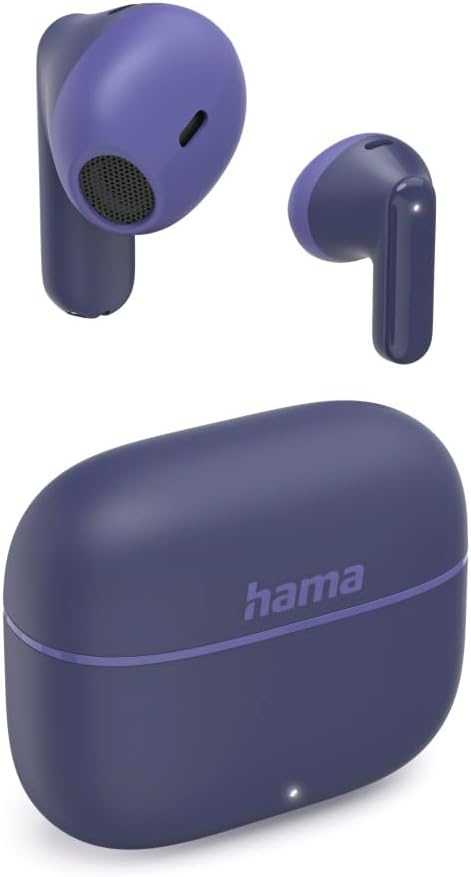
Image: The Hama Freedom Light II Bluetooth Earbuds shown with their compact charging case. The earbuds are a deep blue color, designed for in-ear comfort.
2. Key Features
- True Wireless Freedom: Enjoy complete freedom of movement with no tangled cables.
- Automatic Pairing: Earbuds automatically activate and connect to each other and your mobile phone when removed from the charging case.
- Intuitive Touch Control: Manage music playback, calls, and voice assistants with simple touch gestures on the earbuds.
- Integrated Microphone: Seamlessly switch between listening to music and taking calls.
- Voice Assistant Support: Compatible with existing voice assistants like Siri and Google Assistant for hands-free control.
- Extended Playtime: Up to 5 hours of music/talk time on a single charge, extended to 20 hours with the portable charging case.
- USB-C Charging: The charging case is conveniently recharged via a USB-C port.
- Eco-Friendly Packaging: Packaging made from FSC-certified paper, cardboard, and cartons from sustainable forest management.

Image: Icons illustrating key features: 5 hours of playtime per charge, 3 additional charges from the case, and Bluetooth connectivity.
3. Package Contents
Please check the package contents upon unboxing to ensure all items are present:
- 1 pair of Hama Freedom Light II Bluetooth Earbuds
- 1 Charging Case
- 1 USB-C Charging Cable
- 1 User Manual (this document)
4. Setup and First Use
4.1 Initial Charging
Before first use, ensure the charging case and earbuds are fully charged.
- Place both earbuds into the charging case.
- Connect the supplied USB-C charging cable to the charging port on the case and the other end to a suitable USB power source (e.g., USB wall charger, computer USB port).
- The LED indicator on the charging case will show the charging status. Allow the case and earbuds to charge completely.

Image: The charging case with a USB-C cable connected, indicating the charging process.
4.2 Bluetooth Pairing
The earbuds are designed for automatic pairing.
- Ensure Bluetooth is enabled on your mobile phone or device.
- Open the charging case and remove both earbuds. They will automatically power on and attempt to connect to each other.
- On your device, go to the Bluetooth settings and search for "Hama Freedom Light II" in the list of available devices.
- Select "Hama Freedom Light II" to complete the pairing process. Once connected, you will hear an audio confirmation.
- If pairing fails, place the earbuds back into the case, close the lid, wait a few seconds, and then repeat the steps.
5. Operating the Earbuds
5.1 Power On/Off
- Power On: The earbuds automatically power on when removed from the charging case.
- Power Off: Place the earbuds back into the charging case and close the lid. They will automatically power off and begin charging.
5.2 Touch Controls
The Hama Freedom Light II earbuds feature touch-sensitive surfaces for easy control. The specific functions are:
| Action | Function |
|---|---|
| Single Tap (Left/Right Earbud) | Play/Pause music, Answer/End call |
| Double Tap (Left/Right Earbud) | Activate Voice Assistant (Siri/Google Assistant) |
| Long Press (Left/Right Earbud) | Reject incoming call |
| Triple Tap (Left/Right Earbud) | Redial last number |
Note: Volume adjustment is primarily controlled via your connected device's volume settings or through the voice assistant.

Image: A user demonstrating the touch control feature on the earbud while wearing it.
6. Charging
6.1 Charging the Earbuds
The earbuds charge automatically when placed inside the charging case.
- Ensure the charging case has sufficient power.
- Place each earbud into its corresponding slot in the charging case.
- The earbuds will begin charging, indicated by their respective LED lights (if present).
6.2 Charging the Charging Case
The charging case provides portable power for your earbuds and needs to be recharged periodically.
- Connect the supplied USB-C cable to the USB-C port on the back of the charging case.
- Connect the other end of the cable to a USB power adapter (5V/1A recommended) or a computer's USB port.
- The LED indicator on the front of the case will illuminate to show charging status. A solid light typically indicates a full charge.

Image: A close-up view of the charging case, highlighting the USB-C charging port at the bottom.
7. Maintenance and Care
Proper care will extend the lifespan of your Hama Freedom Light II earbuds.
- Cleaning: Use a soft, dry, lint-free cloth to clean the earbuds and charging case. Do not use liquid cleaners or aerosols.
- Storage: When not in use, always store the earbuds in their charging case to protect them and keep them charged.
- Avoid Extreme Conditions: Do not expose the earbuds or case to extreme temperatures, humidity, or direct sunlight.
- Water Resistance: These earbuds are not waterproof. Avoid contact with water or excessive moisture.
8. Troubleshooting
If you encounter issues with your earbuds, try the following solutions:
8.1 No Sound or Intermittent Connection
- Ensure the earbuds are fully charged.
- Check that Bluetooth is enabled on your device and the earbuds are connected.
- Move the earbuds closer to your device to avoid interference.
- Try unpairing and re-pairing the earbuds with your device.
- Restart your mobile device.
8.2 Earbuds Not Charging
- Ensure the charging cable is securely connected to both the case and the power source.
- Verify that the power source is active.
- Check for any debris in the charging ports of the case and earbuds.
- Try a different USB-C cable or power adapter.
8.3 Only One Earbud Working
- Place both earbuds back into the charging case, close the lid, and then remove them again to force them to re-sync.
- Ensure both earbuds are charged.
- Perform a full reset (refer to manufacturer's website if a specific reset procedure is not in this manual).
9. Technical Specifications
| Feature | Specification |
|---|---|
| Brand | Hama |
| Model Number | 00221754 |
| ASIN | B0DQ1Q38GL |
| Connectivity | Bluetooth |
| Frequency Range | 20 Hz - 20 kHz |
| Control Method | Touch |
| Earbud Playtime (Music/Talk) | Up to 5 hours / 3 hours |
| Total Playtime with Charging Case | Up to 20 hours / 12 hours |
| Charging Port | USB-C |
| Rechargeable Battery | Yes (1 included) |
| Item Weight | 58.71 Grams |
| Specific Product Usage | Music, Sport |
| Headphone Jack | No jack |
10. Safety Information
Please read and follow these safety guidelines to ensure safe operation and prevent damage:
- Do not disassemble, repair, or modify the device.
- Keep the device away from water, moisture, and high humidity.
- Avoid exposing the device to extreme temperatures (hot or cold).
- Do not use abrasive cleaners or harsh chemicals.
- Keep out of reach of children and pets.
- Do not use the earbuds at high volume for extended periods to prevent hearing damage.
- Be aware of your surroundings when using earbuds, especially in traffic or dangerous situations.
11. Warranty and Support
Hama products are covered by a manufacturer's warranty. For detailed warranty terms and conditions, please refer to the warranty card included with your product or visit the official Hama website.
For technical support, troubleshooting assistance, or spare parts inquiries, please contact Hama customer service through their official website or the contact information provided in your product packaging.
Online Resources: For the latest information, FAQs, and support, please visit: www.hama.com
Related Documents - 00221754
 |
Hama Freedom Light II Bluetooth Earphones: User Guide & Controls Official user guide for Hama Freedom Light II Bluetooth earphones. Learn about pairing, controls, charging, and safety instructions for your wireless earbuds. |
 |
Hama Freedom Light II Bluetooth® Earphones: Operating Instructions and User Guide Comprehensive operating instructions and user guide for Hama Freedom Light II Bluetooth® True Wireless Earphones. Learn about setup, features, controls, and safety. |
Ask a question about this manual
Ask about setup, troubleshooting, compatibility, parts, safety, or missing instructions. Manuals+ will review the question and use this page’s manual context to help answer it.