
1. Introduction
This manual provides detailed instructions for the safe and effective use of your CtrlCV USB-C Type C COB LED Strip. This flexible LED strip is designed for various lighting applications, offering efficient and versatile illumination.
The CtrlCV COB LED strip features a convenient USB-C connection for effortless setup, allowing it to be powered by various USB-C compatible devices. It is available in multiple color temperatures and lengths to suit diverse needs.

Image 1.1: The CtrlCV USB-C COB LED Strip, showing the product packaging, the coiled LED strip, and the attached USB-C power cable.
2. Product Features
- USB-C Connectivity: Plug & Play design for easy power connection via any standard USB-C port.
- COB LED Technology: Provides uniform, dot-free illumination.
- Flexible Design: The strip is highly flexible, allowing it to conform to various shapes and surfaces.
- Cuttable: Can be cut at designated marks to achieve desired lengths.
- Strong Adhesive Backing: Equipped with 3M 9448 double-sided tape for secure installation.
- Energy-Efficient: Low power consumption for long-lasting illumination.
- Color Options: Available in 3000K (Warm White), 4000K (Natural White), 6000K (Cool White), and Red light.
- Versatile Applications: Suitable for indoor and outdoor use (note: not water resistant).

Image 2.1: Illustration of the LED strip's key features: strong adhesive backing for secure mounting, its soft and flexible nature for easy shaping, and designated cut points for customization.
3. Package Contents
Verify that all items are present and in good condition upon opening the package:
- 1 x CtrlCV USB-C Type C COB LED Strip (with integrated USB-C cable)
4. Setup and Installation
4.1 Power Source Requirements
The LED strip requires a standard Type-C/USB-C 5V, 2A or above power source. Compatible power sources include:
- PC USB-C ports
- Wall chargers with USB-C output
- Mobile power banks with USB-C output
- Laptop USB-C ports
- TV USB-C ports

Image 4.1: The LED strip can be powered by various USB-C sources such as a PC, wall adapter, mobile power bank, or laptop, demonstrating its versatility.
4.2 Surface Preparation
- Ensure the installation surface is clean, dry, and smooth. Dust, dirt, or moisture can compromise the adhesive's effectiveness.
- For optimal adhesion, clean the surface with rubbing alcohol and allow it to dry completely.
4.3 Attaching the LED Strip
- Carefully unroll the LED strip.
- Peel off a small section of the protective backing from the adhesive tape on the back of the strip.
- Press the exposed adhesive firmly onto the prepared surface, starting from one end.
- Continue to peel off the backing and press the strip along your desired path, ensuring it adheres smoothly without bubbles or wrinkles.
- The strip's flexibility allows it to be shaped around corners and curves.
4.4 Cutting the LED Strip (Optional)
The LED strip can be cut to a shorter length if needed. Locate the designated cut marks (usually indicated by a scissor icon or copper pads) along the strip. Use sharp scissors to cut precisely at these marks. Cutting elsewhere may damage the circuit and render a section of the strip inoperable.
4.5 Power Connection
- Once the strip is securely installed, plug the integrated USB-C connector into a compatible 5V/2A (or higher) USB-C power source.
- Ensure the connection is firm.
5. Operating Instructions
The CtrlCV USB-C COB LED Strip operates as a plug-and-play device. There is no integrated on/off switch on the cable. To turn the light strip on or off, connect or disconnect the USB-C plug from its power source.
5.1 Color Temperature Options
This product is available in various fixed color temperatures:
- 3000K: Warm White, similar to traditional incandescent light, providing a cozy ambiance.
- 4000K: Natural White, a balanced white light suitable for general illumination.
- 6000K: Cool White, a bright, crisp white light.
- Red: A vibrant red light option.
The specific color temperature of your strip is indicated on the product packaging and description.
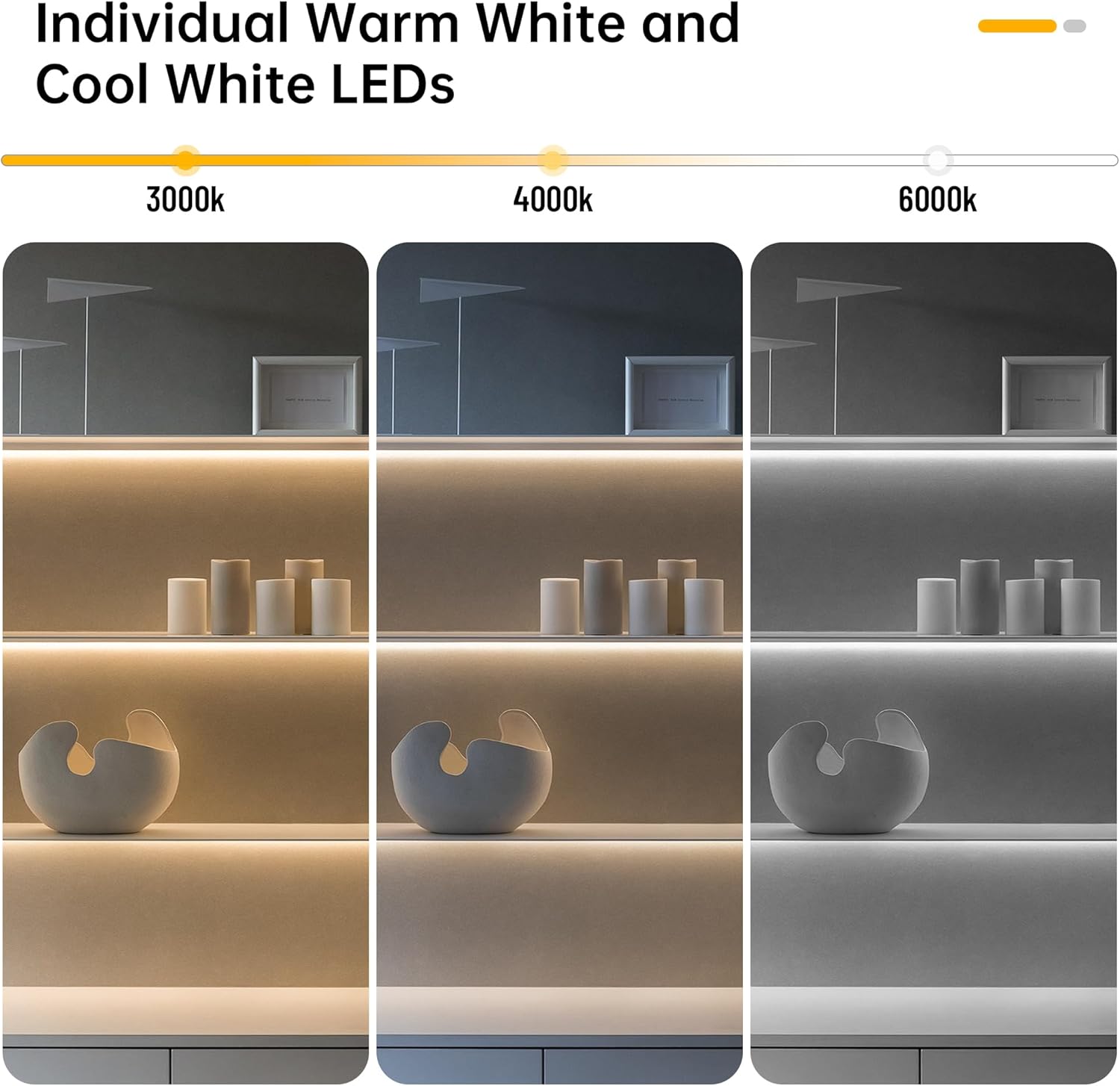
Image 5.1: Visual representation of the different color temperatures available: 3000K (warm white), 4000K (natural white), and 6000K (cool white).
6. Maintenance
6.1 Cleaning
To clean the LED strip, gently wipe it with a soft, dry cloth. Avoid using abrasive cleaners, solvents, or excessive moisture, as these can damage the strip or its components.
6.2 Storage
If storing the LED strip, ensure it is clean and dry. Coil it loosely to prevent kinking or damage to the internal wiring. Store in a cool, dry place away from direct sunlight and extreme temperatures.
6.3 Cable Management
To enhance longevity, secure the USB-C cable at the connection point to the strip to prevent excessive bending or strain, which could lead to breakage over time.
7. Troubleshooting
- LED Strip Does Not Light Up:
- Ensure the USB-C connector is fully and correctly inserted into a compatible power source.
- Verify that the power source is active and providing at least 5V/2A. Try a different USB-C port or power adapter.
- Check for any visible damage to the LED strip or the USB-C cable.
- LED Strip Blinks and Turns Off:
- This often indicates insufficient power. Ensure your USB-C power source can provide at least 5V/2A. Devices like older USB ports or low-power chargers may not supply enough current.
- Try connecting to a different, higher-rated USB-C power source (e.g., a dedicated 5V/2A wall adapter or a power bank known to deliver sufficient current).
- Adhesive Not Sticking:
- Ensure the installation surface was thoroughly cleaned and dried before application. Residue or moisture will prevent proper adhesion.
- For rough or porous surfaces, additional adhesive methods (e.g., clips, stronger double-sided tape) may be required.
- Section of Strip Not Lighting Up After Cutting:
- Confirm that the cut was made precisely at the designated cut marks. Cutting between marks can sever the circuit.
8. Specifications
| Attribute | Specification |
|---|---|
| Brand | CtrlCV |
| Model Number | COB5V2MWW-C |
| Light Source Type | COB LED |
| Voltage | 5 Volts (DC) |
| Wattage | 10 watts |
| Luminous Flux | 1000 lumens |
| Number of Light Sources | 640 (LED chips) |
| Color Temperature Options | 3000K, 4000K, 6000K, Red |
| Material | Copper |
| Indoor/Outdoor Usage | Indoor, Outdoor (Note: Not Water Resistant) |
| Control Method | Touch (via power connection) |
| Item Weight | 1.44 ounces |
| Package Dimensions | 5.51 x 4.96 x 0.47 inches |
| Date First Available | December 10, 2024 |
9. Safety Information
- Do not expose the LED strip to direct water or immerse it in liquids, as it is not water resistant.
- Ensure the power source meets the specified voltage (5V DC) and current (2A or above) requirements to prevent damage to the strip or power source.
- Do not bend the strip excessively or at sharp angles, as this may damage the internal circuitry.
- Keep out of reach of children.
- Avoid staring directly into the illuminated LEDs for extended periods.
- Disconnect power before cleaning or performing any maintenance.
- Do not attempt to repair or modify the LED strip. Contact customer support for assistance.
10. Warranty and Support
For warranty information or technical support, please refer to the product packaging or contact CtrlCV customer service directly through their official channels. Keep your purchase receipt for warranty claims.


