Introduction
This manual provides comprehensive instructions for the Generic S730 Sports Bluetooth Headphones. Please read this guide carefully to ensure proper use, optimal performance, and longevity of your device. Keep this manual for future reference.
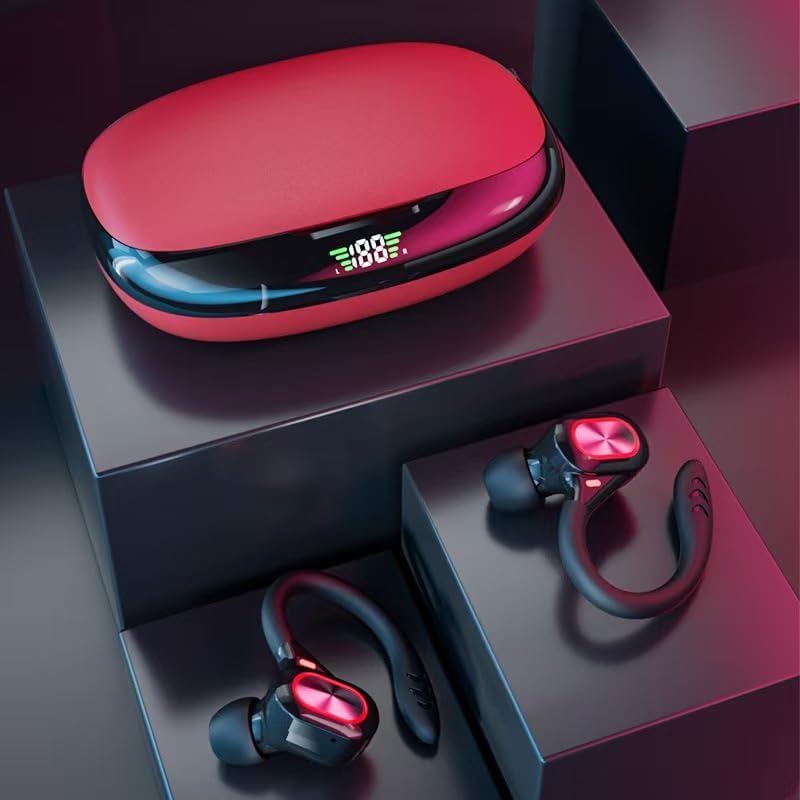
Image: The S730 Sports Bluetooth Headphones, featuring the red charging case with an LED display and the two earbuds with ear hooks.
Package Contents
Verify that all items are present in the package:
- S730 Sports Bluetooth Headphones (Left and Right Earbuds)
- Charging Case
- USB Type-C Charging Cable
- Instruction Manual (this document)
- Ear Tips (various sizes)
Setup
1. Initial Charging
- Before first use, place both earbuds into the charging case.
- Connect the USB Type-C charging cable to the charging port on the case and to a power source.
- The LED display on the charging case will indicate the charging status. Ensure both earbuds and the case are fully charged.
2. Pairing with a Device
- Open the charging case. The earbuds will automatically power on and enter pairing mode.
- On your device (smartphone, tablet, laptop), enable Bluetooth.
- Search for available Bluetooth devices and select "S730" from the list.
- Once connected, a voice prompt will confirm successful pairing. The earbuds will automatically reconnect to the last paired device when removed from the case.
3. Wearing the Earbuds
Select the ear tips that provide the most comfortable and secure fit. Position the ear hooks over your ears to ensure stability during physical activity.

Image: A person wearing the S730 Sports Bluetooth Headphones, demonstrating the secure fit provided by the flexible ear hooks.
Operating Instructions
Power On/Off
- Power On: Open the charging case, and the earbuds will automatically power on.
- Power Off: Place the earbuds back into the charging case and close the lid. They will automatically power off and begin charging.
Touch Controls
The S730 earbuds feature intuitive touch controls on the outer surface of each earbud:
- Play/Pause: Single tap on either earbud.
- Next Track: Double tap on the right earbud.
- Previous Track: Double tap on the left earbud.
- Volume Up: Triple tap on the right earbud.
- Volume Down: Triple tap on the left earbud.
- Answer/End Call: Single tap on either earbud during an incoming call or active call.
- Reject Call: Press and hold either earbud for 2 seconds during an incoming call.
- Activate Voice Assistant: Press and hold either earbud for 3 seconds.

Image: A close-up of the S730 earbud, highlighting the touch-sensitive control area for managing audio and calls.
Mono or Stereo Mode
You can use one earbud independently (mono mode) or both together (stereo mode).
- Mono Mode: Simply take one earbud out of the charging case. It will automatically connect to your device.
- Stereo Mode: Take both earbuds out of the charging case. They will automatically pair with each other and then with your device.

Image: An illustration demonstrating how to use the S730 headphones in either mono (single earbud) or stereo (both earbuds) mode, along with a phone showing Bluetooth connection settings.
Maintenance
Cleaning
Regular cleaning helps maintain sound quality and hygiene.
- Gently wipe the earbuds and charging case with a soft, dry, lint-free cloth.
- For ear tips, remove them from the earbuds and clean with a mild soap solution if necessary, then rinse and dry thoroughly before reattaching.
- Do not use abrasive cleaners or solvents.
Water Resistance
The S730 earbuds are IPX5 waterproof, meaning they are resistant to water splashes and sweat. They are suitable for sports and workouts but should not be submerged in water.

Image: The S730 Sports Bluetooth Headphones shown with water splashes, illustrating their IPX5 waterproof rating for daily life and sports activities.
Storage
When not in use, store the earbuds in their charging case to protect them and keep them charged.
Troubleshooting
- Earbuds not pairing with device:
- Ensure earbuds are charged and out of the case.
- Turn off and on Bluetooth on your device.
- Delete "S730" from your device's Bluetooth list and attempt to re-pair.
- Try pairing with another device to rule out device-specific issues.
- Only one earbud working:
- Place both earbuds back into the charging case, close the lid, then open it again.
- Ensure both earbuds are charged.
- If the issue persists, try resetting the earbuds (refer to manufacturer's specific reset instructions if available, otherwise re-pair).
- Earbuds not charging:
- Ensure the charging cable is securely connected to both the case and the power source.
- Check if the charging case itself has power (LED display).
- Clean the charging contacts on both the earbuds and inside the case with a dry cotton swab.
- Low volume or poor sound quality:
- Adjust the volume on both your device and the earbuds.
- Ensure ear tips are properly sealed in your ear canal.
- Clean any debris from the earbud speaker mesh.
- Ensure there are no obstructions between your device and the earbuds.
Specifications
| Feature | Detail |
|---|---|
| Model Name | S730 Sports Bluetooth Headphones |
| Bluetooth Version | 5.3 |
| Wireless Communication Technology | Bluetooth |
| Transmission Distance | 10 meters (barrier-free) |
| Water Resistance Level | IPX5 Waterproof |
| Audio Driver Size | 8 mm |
| Speaker Impedance | 16 Ohms |
| Frequency Response | 20 Hz - 20 KHz |
| Control Type | Touch |
| Noise Control | Sound Isolation |
| Materials | Acrylonitrile Butadiene Styrene (ABS), Polycarbonate (PC) |
| Estimated Playtime (per charge) | Up to 15 hours |
| Total Playtime (with charging case) | Up to 80 hours |
| Charging Port | USB Type-C |

Image: An exploded diagram illustrating the internal components of the S730 earbud, highlighting the driver unit for clear stereo sound.
Warranty and Support
For warranty information or technical support, please refer to the contact details provided by your retailer or the manufacturer. Keep your proof of purchase for any warranty claims.


