
WLU WLU Noise Cancellation Bluetooth Hearing Aids (Model B0DPZWHCPL)
WLU Noise Cancellation Bluetooth Hearing Aids
User Manual
Introduction
Thank you for choosing WLU Noise Cancellation Bluetooth Hearing Aids. These advanced devices are designed to provide enhanced hearing clarity, reduce background noise, and offer the convenience of Bluetooth connectivity for a seamless audio experience. This manual will guide you through the setup, operation, and maintenance of your new hearing aids to ensure optimal performance and comfort.

Image: A pair of WLU Noise Cancellation Bluetooth Hearing Aids, showcasing their sleek, black design.
What's in the Box
Your WLU Hearing Aids package includes the following items:
- WLU Noise Cancellation Bluetooth Hearing Aids (1 pair)
- Multiple ear tip sizes for customized fit
- Charging cable
- Instruction Manual
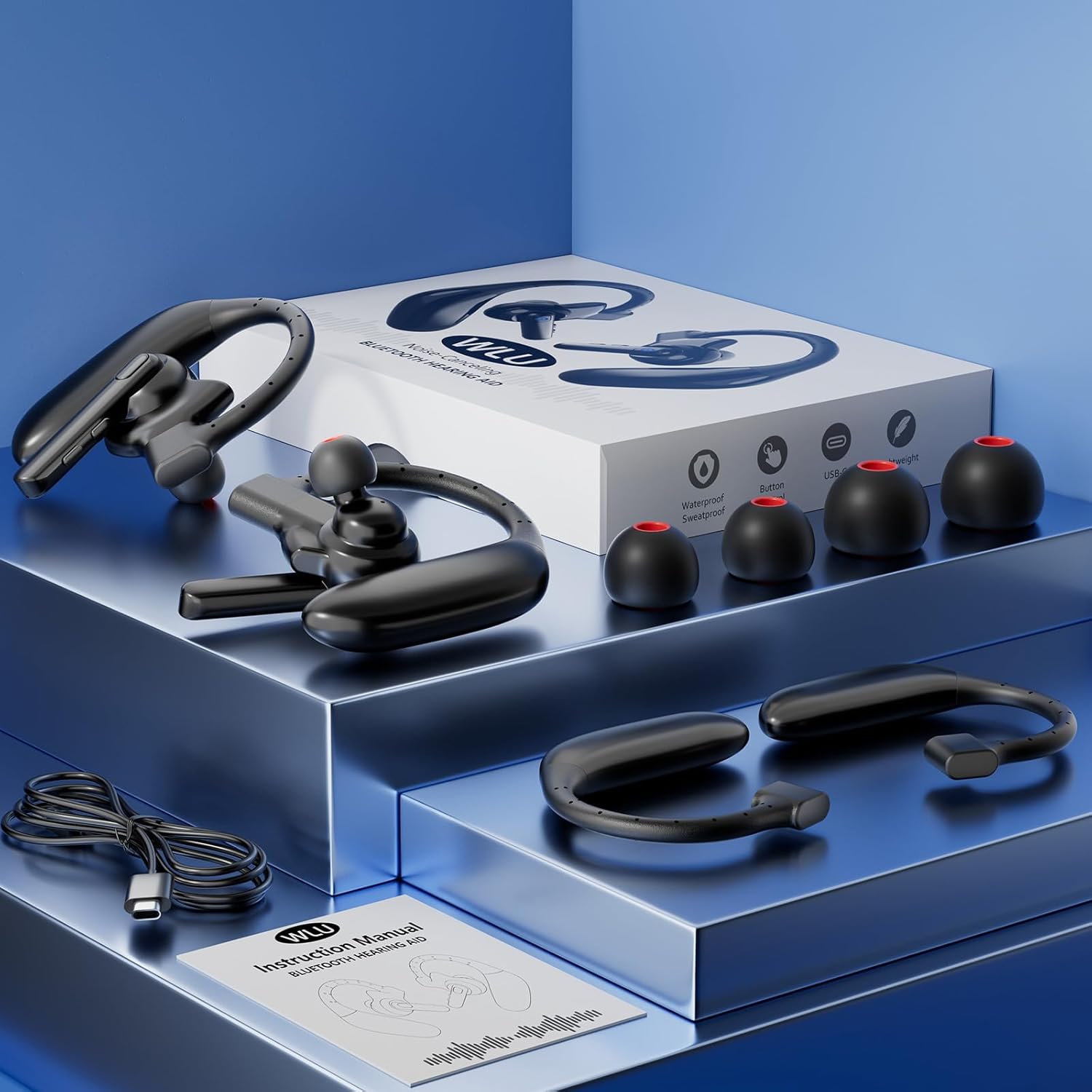
Image: The WLU Hearing Aids, charging cable, and various ear tips neatly arranged next to their product box.

Image: A close-up view of the WLU Hearing Aids and included accessories, such as different sized ear tips, presented within their packaging.

Image: The WLU Instruction Manual and charging cable, highlighting the included documentation and power accessory.
Key Features
- Rechargeable and Long-lasting Battery: Equipped with rechargeable batteries, offering extended battery life. Can also function as wireless Bluetooth headphones.
- Enhanced Hearing Clarity: Provides clear sound quality and advanced noise-canceling features for improved understanding of conversations, TV, and music.
- Ergonomically Designed: Compact and lightweight (0.02 lbs each) for comfortable, long-term wear. Includes 3 different ear tip sizes for a customized fit.
- Fashionable and Discreet Design: Resembles regular earplugs, making them virtually unnoticeable as hearing aids.

Image: Visual representation of key features: Clear Sound, Easy to Use, Ergonomic Design, and Noise Reduction.

Image: Icons illustrating various benefits and features, including multiple modes, Bluetooth connectivity, removable battery, noise reduction, stylish appearance, and clear sound.
Setup Guide
1. Charging the Devices
Before first use, fully charge your WLU Hearing Aids. Connect the provided charging cable to the charging port on each hearing aid and plug the other end into a compatible USB power source. A full charge takes approximately 1.5 hours.
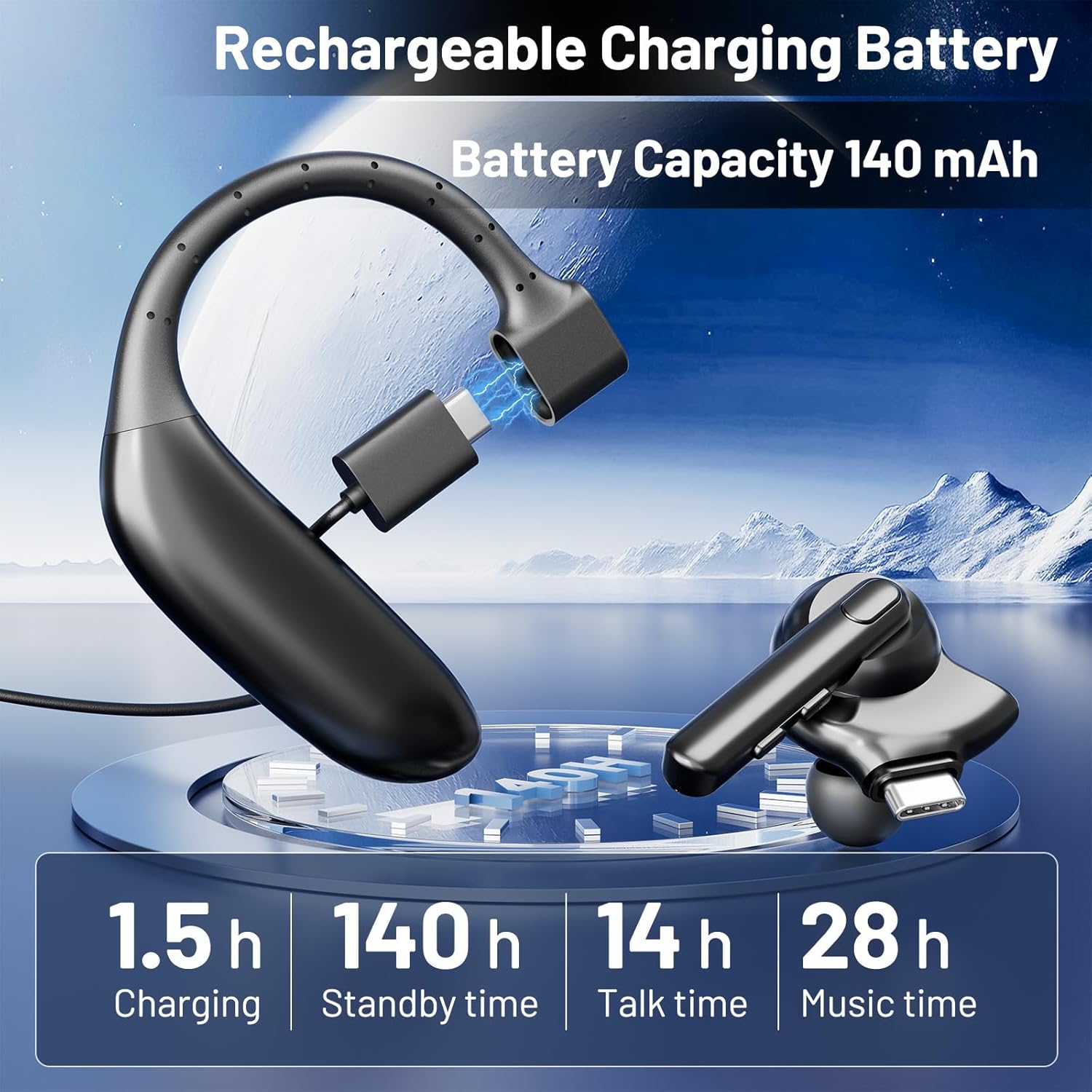
Image: A WLU Hearing Aid connected to a charging cable, with an overlay indicating charging time (1.5h), standby time (140h), talk time (14h), and music time (28h).

Image: The WLU Hearing Aids displayed with icons and text indicating their long-lasting, removable battery and duration metrics.
2. Selecting Ear Tips and Fitting
Choose the ear tip size that provides the most comfortable and secure fit in your ear canal. The package includes three different sizes to ensure a perfect seal for optimal sound quality and comfort. Gently insert the hearing aid into your ear, ensuring the ear hook rests comfortably over your ear.
3. Bluetooth Pairing
To pair your hearing aids with a Bluetooth-enabled device (e.g., smartphone, tablet):
- Wear Your Devices: Place both hearing aids comfortably in your ears.
- Turn on Bluetooth: On your smartphone or device, navigate to the Bluetooth settings and ensure Bluetooth is enabled.
- Connect 'UF05': In the list of available Bluetooth devices, select 'UF05' to establish the connection. Once connected, you will hear an audible confirmation.
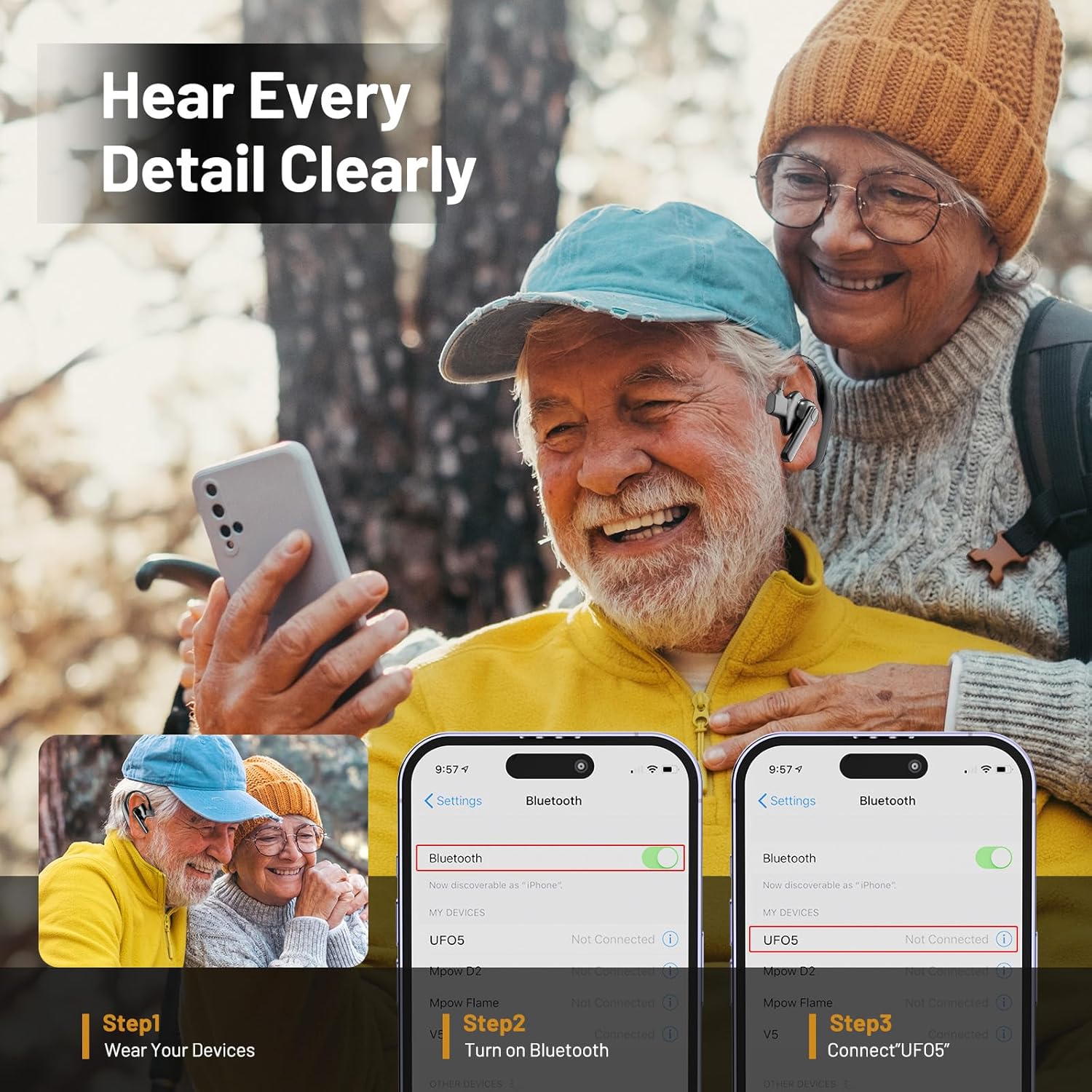
Image: A visual guide demonstrating the three steps for connecting the hearing aids via Bluetooth to a smartphone.
Operating Instructions
Sound Clarity and Noise Cancellation
Your WLU Hearing Aids feature advanced noise-canceling technology to filter out unwanted background noise, allowing you to focus on important sounds like conversations and music. The devices automatically adapt to your environment to provide optimal sound clarity.

Image: An exploded view of the hearing aid's internal components, illustrating its high-definition audio quality with sound wave graphics.

Image: A transparent rendering of the hearing aid, demonstrating adaptive noise cancellation technology with sound wave patterns.
Bluetooth Functionality
Once paired, your hearing aids can be used as wireless Bluetooth headphones. This allows you to:
- Answer calls directly through the hearing aids.
- Listen to music or audio from your connected device.
- Enjoy private entertainment without disturbing others.
Usage Scenarios
The WLU Hearing Aids are versatile and suitable for various daily activities:
- Daily conversations and social gatherings.
- Watching television or movies.
- Listening to music or podcasts.
- Participating in meetings or lectures.
- Engaging in sports or outdoor activities.

Image: A collage showing individuals of different ages using the WLU Hearing Aids in various everyday situations, such as conversing, watching TV, and enjoying music.

Image: Icons depicting diverse usage scenarios for the hearing aids, including sports, daily conversations, meetings, watching TV, and commuting on a bus.
Maintenance and Care
To ensure the longevity and optimal performance of your WLU Hearing Aids, follow these care guidelines:
- Cleaning: Regularly wipe the hearing aids with a soft, dry cloth. Do not use harsh chemicals or abrasive materials.
- Ear Tips: Clean or replace ear tips as needed to prevent wax buildup and maintain hygiene.
- Storage: Store the hearing aids in a cool, dry place away from direct sunlight and extreme temperatures when not in use.
- Water Exposure: Avoid exposing the devices to water or excessive moisture. While designed for daily use, they are not fully waterproof.
Troubleshooting
| Problem | Possible Cause | Solution |
|---|---|---|
| No Sound / Low Volume | Low battery; Incorrect volume setting; Ear tip clogged; Device not properly seated. | Charge the devices; Adjust volume; Clean or replace ear tip; Re-seat the hearing aid in your ear. |
| Bluetooth Disconnection | Out of range; Interference; Device pairing issue. | Move closer to the connected device; Turn off other Bluetooth devices; Re-pair the hearing aids with your device. |
| Discomfort / Poor Fit | Incorrect ear tip size. | Try a different size ear tip from the included set. |
| Excessive Background Noise | Environmental conditions; Device setting. | Ensure the noise cancellation feature is active (if adjustable); Move to a quieter environment if possible. |
Specifications
- Brand: WLU
- Model: B0DPZWHCPL
- Color: Black
- Battery Type: Lithium Ion (4 included)
- Battery Weight: 1 Grams
- Charging Time: Approximately 1.5 hours
- Standby Time: Up to 140 hours
- Talk Time: Up to 14 hours
- Music Time: Up to 28 hours
- Package Dimensions: 6.73 x 4.49 x 1.46 inches
- Item Weight: 6.38 ounces (total package)
Warranty and Support
For warranty information or technical support, please refer to the contact details provided on the product packaging or visit the official WLU website. We are committed to providing high-quality products and excellent customer service.
Ask a question about this manual
Ask about setup, troubleshooting, compatibility, parts, safety, or missing instructions. Manuals+ will review the question and use this page’s manual context to help answer it.