
CNBRO YJ33
CNBRO YJ33 Ultra Open Ear Bluetooth Earbuds User Manual
Model: YJ33 | Brand: CNBRO
1. Important Safety Information
Please read all safety instructions carefully before using this product. Failure to follow these instructions may result in electric shock, fire, or other hazards.
- Do not expose the earbuds or charging case to extreme temperatures, direct sunlight, or high humidity.
- Avoid dropping, impacting, or disassembling the device.
- Keep out of reach of children and pets.
- Use only the provided charging cable or a certified equivalent.
- Do not use the earbuds at excessively high volumes for extended periods to prevent hearing damage.
- Be aware of your surroundings when using open-ear earbuds, especially in traffic or hazardous environments.
2. Package Contents
Verify that all items are present in the package:
- 1 Pair of CNBRO YJ33 Wireless Touch Screen Earbuds with Ear Hooks
- 1 TYPE-C Charging Cable
- 1 User Manual (this document)
- 1 Exquisite Packaging Box
3. Product Overview
The CNBRO YJ33 earbuds feature an ultra open-ear design with ear hooks for secure and comfortable wear, along with a smart touchscreen charging case for intuitive control.
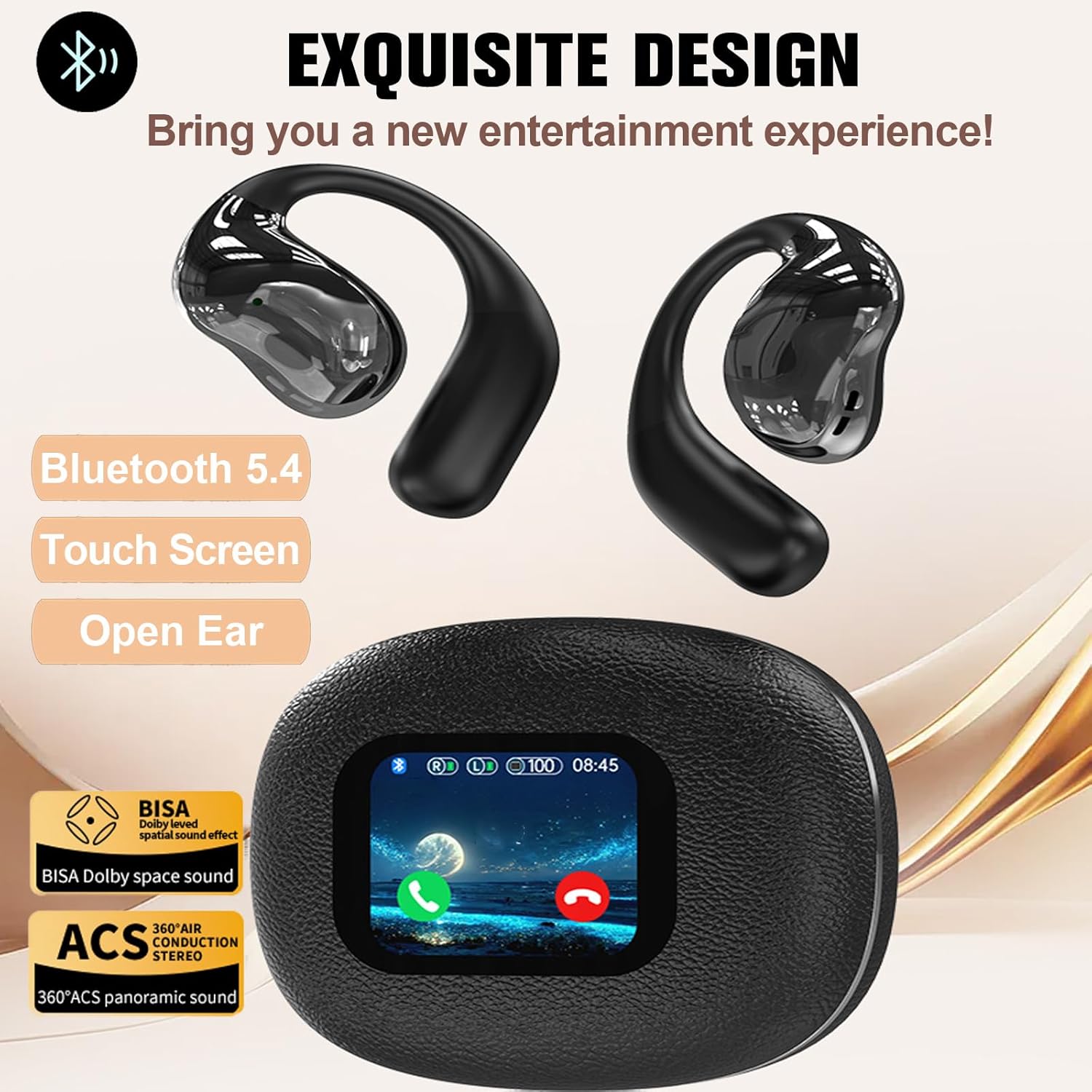
Image: The CNBRO YJ33 earbuds and their smart charging case, highlighting the sleek design and touchscreen interface.
3.1 Open-Ear Design
The open-ear design allows you to remain aware of your surroundings while enjoying audio, making them suitable for activities like running, cycling, or working in environments where situational awareness is important.

Image: A person wearing the CNBRO YJ33 earbuds, demonstrating the comfortable and secure open-ear fit.
4. Setup
4.1 Charging the Earbuds and Case
Before first use, fully charge the earbuds and the charging case.
- Place the earbuds into the charging case.
- Connect the TYPE-C charging cable to the charging port on the case and a USB power source.
- The touchscreen on the case will display the charging status.
- A full charge takes approximately 2 hours. The charging case has a 600mAh battery capacity.
4.2 Bluetooth Pairing
To connect your earbuds to a device:
- Ensure the earbuds are charged and inside the charging case.
- Open the charging case. The earbuds will automatically enter pairing mode.
- On your device (smartphone, tablet, etc.), enable Bluetooth.
- Search for available Bluetooth devices and select "YJ33" from the list.
- Once connected, the earbuds will indicate successful pairing, and the case screen may show a connection icon.
- The earbuds support Bluetooth version 5.4 for stable and efficient connection.
5. Operating Instructions
The CNBRO YJ33 earbuds and charging case offer multiple functions controlled via touch gestures and the touchscreen interface.

Image: The touchscreen on the charging case displaying various functions such as music playback, call management, equalizer settings, brightness adjustment, remote photography, and voice assistant.
5.1 Smart Touch Control (Earbuds)
Control audio playback and calls directly from the earbuds:
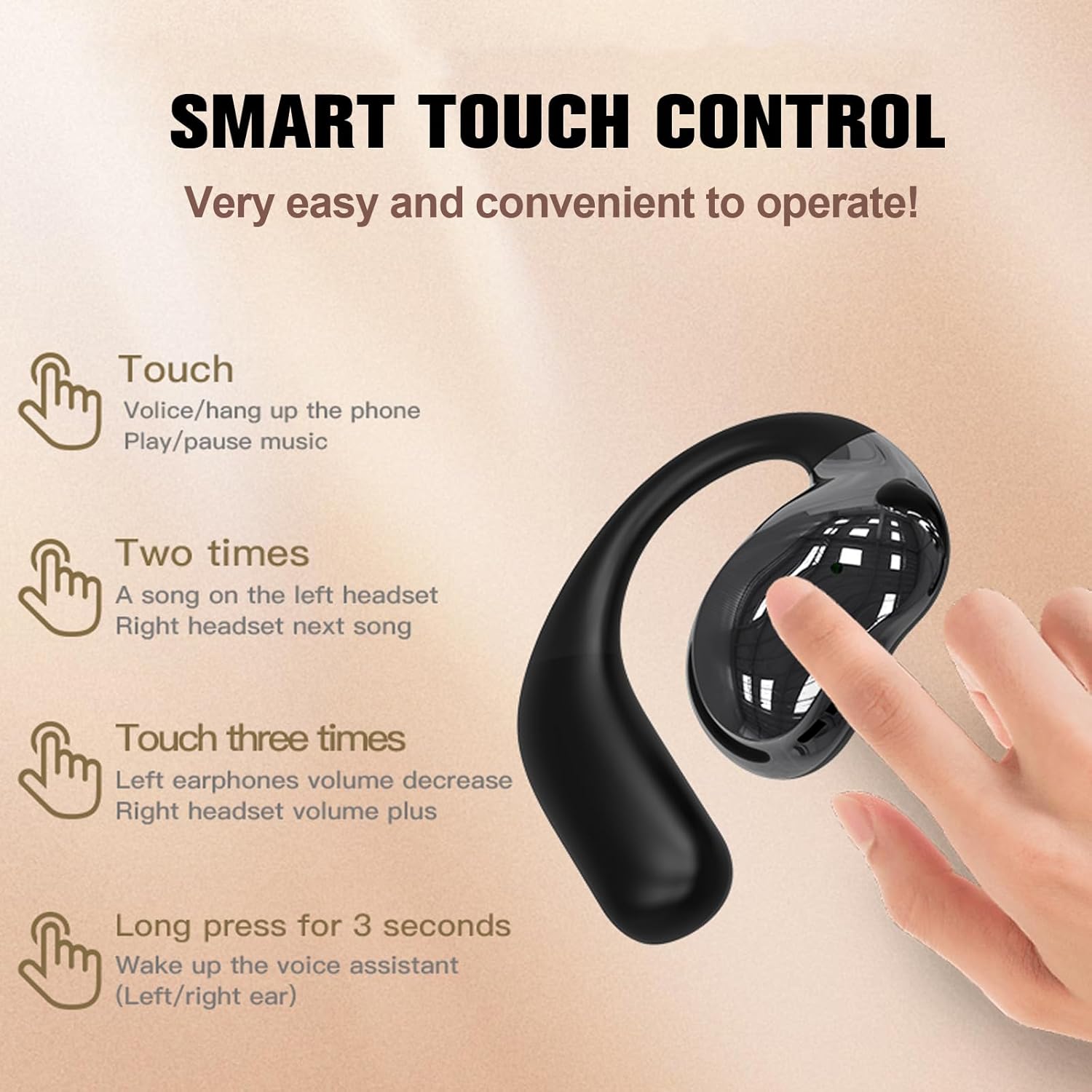
Image: A visual guide to the touch controls on the CNBRO YJ33 earbuds, illustrating single touch, double touch, triple touch, and long press actions.
- Single Touch: Answer/hang up phone calls, Play/pause music.
- Double Touch: Left earbud for previous song, Right earbud for next song.
- Triple Touch: Left earbud for volume decrease, Right earbud for volume increase.
- Long Press (3 seconds): Wake up the voice assistant (Left/Right ear).
5.2 Touch Screen Case Functions
The charging case's touchscreen provides access to additional features:
- Main Interface: Displays battery levels, connection status, and time.
- Music Control: Play, pause, skip tracks, and adjust volume.
- Call Management: Answer or reject calls directly from the case.
- EQ Modes: Select from various equalizer presets (e.g., Pop, Rock, Classic, Jazz, Vocal, Electro, Dance) to customize your audio experience.
- Brightness Adjustment: Control the screen brightness of the charging case.
- Remote Photography: Use the case as a remote shutter for your phone's camera.
- Voice Assistant: Activate your device's voice assistant.
- Language Switching: Change the language of the case interface.
6. Maintenance
6.1 Cleaning
Regular cleaning helps maintain optimal performance and hygiene:
- Wipe the earbuds and charging case with a soft, dry, lint-free cloth.
- Do not use abrasive cleaners, alcohol, or chemical solvents.
- Ensure charging contacts are clean and free of debris.
6.2 Waterproofing (IPX5)
The earbuds are rated IPX5 waterproof, meaning they are resistant to splashes and sweat. They are not designed for submersion in water.

Image: The CNBRO YJ33 earbuds shown with water droplets, illustrating their IPX5 waterproof capability, suitable for resisting rain and sweat.
6.3 Storage
When not in use, store the earbuds in their charging case to protect them and keep them charged.
7. Troubleshooting
If you encounter issues, refer to the following common solutions:
| Problem | Possible Solution |
|---|---|
| Earbuds not pairing |
|
| No sound from earbuds |
|
| Charging case not charging |
|
| Poor call quality / ENC Noise Cancellation |
 Image: A diagram showing how Environmental Noise Cancellation (ENC) technology reduces ambient noise for improved call clarity. |
8. Specifications
| Feature | Specification |
|---|---|
| Bluetooth Version | 5.4 |
| Headphone Charging Case Battery Capacity | 600mAh |
| Transmission Distance | Approximately 10 meters (33 feet) |
| Single Playing Time | 6-8 hours |
| Total Playing Time (with charging case) | Up to 48 hours |
| Charging Time | 2 hours |
| Waterproof Level | IPX5 |
| Support System | All devices and mobile phones that support Bluetooth |
| Ear Placement | Open Ear |
| Form Factor | Over Ear (with ear hooks) |
| Control Method | Touch (earbuds) / Touch Screen (case) |
| Audio Driver Type | Dynamic Driver |
| Frequency Range | 20 Hz - 20,000 Hz |
| Item Weight | 0.64 Ounces |
9. Warranty and Support
Your CNBRO YJ33 earbuds come with a standard manufacturer's warranty. For specific warranty details, please refer to the documentation provided with your purchase or contact the retailer.
If you receive a defective product or have any questions during use, please feel free to contact our customer support team for assistance. Contact information can typically be found on the product packaging or the retailer's website.
Ask a question about this manual
Ask about setup, troubleshooting, compatibility, parts, safety, or missing instructions. Manuals+ will review the question and use this page’s manual context to help answer it.